🪟 Window Management: Control Desktop Applications Like a Pro
📚 What You'll Learn
By the end of this lesson, you will be able to:
- Discover windows by title, class, or process and enumerate everything that's open
- Control a window's position, size, and state — move, resize, minimize, maximize, show, and hide
- Activate a window to raise it and give it focus before sending input
- Understand that keyboard and mouse input always go to the currently focused window, and guard against focus theft
- Build and save grid or custom layouts and handle multi-monitor, high-DPI setups
- Wait for an application's window to appear before acting, and verify a window still exists before operating on it
⏱️ Estimated Time: 45–60 minutes
🎯 Project: Build a layout tool that finds two named windows, activates and positions them side by side on the screen, and re-checks the foreground window before typing into either.
Window management automation gives you complete control over desktop applications - you can find, focus, resize, position, and manipulate windows programmatically, creating sophisticated multi-application workflows and desktop layouts. Like being a conductor orchestrating an entire desktop environment, mastering window management allows you to automate complex application interactions, create custom window arrangements, monitor application states, and build powerful productivity tools. Whether you're automating multi-monitor setups, creating testing environments, or building desktop utilities, window management is essential for professional GUI automation. Let's explore the comprehensive world of window control! 🖥️
The Window Management Architecture
Think of window management as controlling a complex theater stage - each window is an actor that needs to be positioned, shown, hidden, and directed at the right time. Using libraries like pygetwindow, win32gui on Windows, and platform-specific APIs, you can enumerate windows, control their properties, monitor their states, and orchestrate complex multi-window interactions. Understanding window hierarchies, process management, and desktop composition is crucial for reliable window automation!
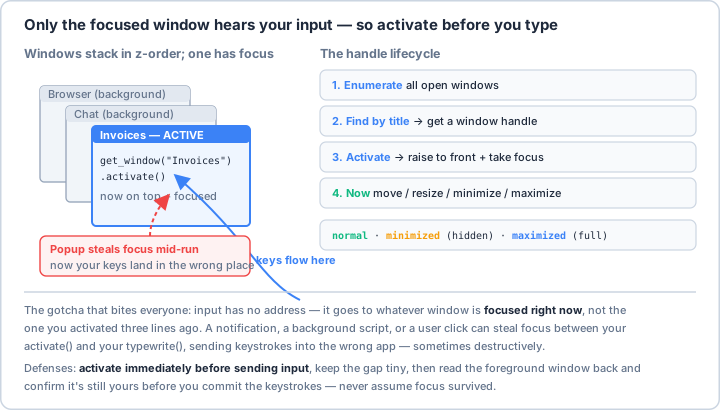
activate() to raise and focus it, and only then send input. A notification or stray click can steal focus between your activate() and your typewrite(), sending keystrokes into the wrong app — sometimes destructively. Keep the gap tiny and read the foreground window back to confirm it's still yours.Real-World Scenario: The Desktop Automation Platform 🎯
You're building a comprehensive desktop automation platform that manages complex multi-window workflows, creates custom desktop layouts for different tasks, monitors application states and responds to changes, handles multi-monitor configurations seamlessly, automates window arrangements for presentations, tests GUI applications across different resolutions, creates virtual workspaces for productivity, and provides accessibility features for users. Your system must work across different operating systems, handle high-DPI displays, manage minimized and hidden windows, and maintain layouts across application restarts. Let's build a professional window management framework!
# First, install required packages:
# pip install pygetwindow pyautogui psutil screeninfo
# For Windows: pip install pywin32
# For Linux: pip install python-xlib ewmh
# For Mac: pip install pyobjc-framework-Quartz
import os
import sys
import time
import json
import subprocess
from typing import List, Dict, Optional, Tuple, Any, Callable, Union
from dataclasses import dataclass, field
from enum import Enum, auto
from pathlib import Path
import logging
import threading
from datetime import datetime
# Cross-platform imports
import pyautogui
import psutil
# Platform-specific imports
if sys.platform == 'win32':
import win32gui
import win32con
import win32process
import win32api
import ctypes
from ctypes import wintypes
PLATFORM = 'windows'
elif sys.platform == 'darwin':
try:
from Quartz import (
CGWindowListCopyWindowInfo,
kCGWindowListOptionOnScreenOnly,
kCGNullWindowID
)
from AppKit import NSWorkspace
PLATFORM = 'macos'
except ImportError:
PLATFORM = 'macos_no_quartz'
elif sys.platform.startswith('linux'):
try:
from ewmh import EWMH
from Xlib import display, X
PLATFORM = 'linux'
except ImportError:
PLATFORM = 'linux_no_x11'
else:
PLATFORM = 'unknown'
try:
import pygetwindow as gw
PYGETWINDOW_AVAILABLE = True
except ImportError:
PYGETWINDOW_AVAILABLE = False
# Screen info
try:
from screeninfo import get_monitors
SCREENINFO_AVAILABLE = True
except ImportError:
SCREENINFO_AVAILABLE = False
# ==================== Configuration ====================
@dataclass
class WindowConfig:
"""Configuration for window management."""
# Platform
platform: str = PLATFORM
# Window finding
case_sensitive_search: bool = False
partial_title_match: bool = True
# Window control
animation_duration: float = 0.3 # Seconds for smooth transitions
focus_delay: float = 0.1 # Delay after focusing
# Layout
default_gap: int = 10 # Pixels between windows
snap_threshold: int = 20 # Pixels for snap detection
# Multi-monitor
primary_monitor_only: bool = False
dpi_aware: bool = True
# Monitoring
poll_interval: float = 0.5 # Seconds between state checks
# Safety
protect_system_windows: bool = True
confirm_close: bool = True
class WindowState(Enum):
"""Window states."""
NORMAL = auto()
MINIMIZED = auto()
MAXIMIZED = auto()
HIDDEN = auto()
FULLSCREEN = auto()
RESTORED = auto()
# ==================== Window Information ====================
@dataclass
class WindowInfo:
"""Information about a window."""
handle: Any # Window handle/ID
title: str
class_name: Optional[str] = None
process_name: Optional[str] = None
process_id: Optional[int] = None
# Position and size
x: int = 0
y: int = 0
width: int = 0
height: int = 0
# State
state: WindowState = WindowState.NORMAL
is_visible: bool = True
is_active: bool = False
# Monitor
monitor_index: int = 0
# Metadata
executable_path: Optional[str] = None
creation_time: Optional[datetime] = None
# ==================== Cross-Platform Window Manager ====================
class WindowManager:
"""Cross-platform window manager."""
def __init__(self, config: Optional[WindowConfig] = None):
self.config = config or WindowConfig()
self.logger = logging.getLogger(__name__)
# Platform-specific initialization
self._init_platform()
def _init_platform(self):
"""Initialize platform-specific components."""
if self.config.platform == 'windows':
self._init_windows()
elif self.config.platform == 'linux':
self._init_linux()
elif self.config.platform == 'macos':
self._init_macos()
def _init_windows(self):
"""Initialize Windows-specific components."""
if self.config.dpi_aware:
try:
ctypes.windll.shcore.SetProcessDpiAwareness(2)
except:
pass
def _init_linux(self):
"""Initialize Linux-specific components."""
try:
self.ewmh = EWMH()
self.display = display.Display()
except:
self.logger.warning("X11 not available")
def _init_macos(self):
"""Initialize macOS-specific components."""
pass
def get_all_windows(self) -> List[WindowInfo]:
"""Get all windows."""
if PYGETWINDOW_AVAILABLE:
return self._get_windows_pygetwindow()
elif self.config.platform == 'windows':
return self._get_windows_win32()
elif self.config.platform == 'linux':
return self._get_windows_linux()
elif self.config.platform == 'macos':
return self._get_windows_macos()
else:
return []
def _get_windows_pygetwindow(self) -> List[WindowInfo]:
"""Get windows using pygetwindow."""
windows = []
for win in gw.getAllWindows():
if not win.title:
continue
windows.append(WindowInfo(
handle=win,
title=win.title,
x=win.left,
y=win.top,
width=win.width,
height=win.height,
is_visible=win.visible,
is_active=win.isActive,
state=self._get_window_state(win)
))
return windows
def _get_windows_win32(self) -> List[WindowInfo]:
"""Get windows using Win32 API."""
windows = []
def enum_callback(hwnd, _):
if win32gui.IsWindowVisible(hwnd):
title = win32gui.GetWindowText(hwnd)
if title:
rect = win32gui.GetWindowRect(hwnd)
class_name = win32gui.GetClassName(hwnd)
# Get process info
_, pid = win32process.GetWindowThreadProcessId(hwnd)
try:
process = psutil.Process(pid)
process_name = process.name()
exe_path = process.exe()
except:
process_name = None
exe_path = None
windows.append(WindowInfo(
handle=hwnd,
title=title,
class_name=class_name,
process_name=process_name,
process_id=pid,
x=rect[0],
y=rect[1],
width=rect[2] - rect[0],
height=rect[3] - rect[1],
is_visible=True,
executable_path=exe_path
))
win32gui.EnumWindows(enum_callback, None)
return windows
def _get_windows_linux(self) -> List[WindowInfo]:
"""Get windows using X11."""
windows = []
try:
for window in self.ewmh.getClientList():
title = self.ewmh.getWmName(window)
if title:
geometry = window.get_geometry()
windows.append(WindowInfo(
handle=window,
title=title.decode('utf-8') if isinstance(title, bytes) else title,
x=geometry.x,
y=geometry.y,
width=geometry.width,
height=geometry.height
))
except:
pass
return windows
def _get_windows_macos(self) -> List[WindowInfo]:
"""Get windows using Quartz."""
windows = []
try:
window_list = CGWindowListCopyWindowInfo(
kCGWindowListOptionOnScreenOnly,
kCGNullWindowID
)
for window in window_list:
title = window.get('kCGWindowName', '')
if title:
bounds = window.get('kCGWindowBounds', {})
windows.append(WindowInfo(
handle=window.get('kCGWindowNumber'),
title=title,
x=bounds.get('X', 0),
y=bounds.get('Y', 0),
width=bounds.get('Width', 0),
height=bounds.get('Height', 0),
process_name=window.get('kCGWindowOwnerName'),
process_id=window.get('kCGWindowOwnerPID')
))
except:
pass
return windows
def find_window(
self,
title: Optional[str] = None,
class_name: Optional[str] = None,
process_name: Optional[str] = None
) -> Optional[WindowInfo]:
"""Find a window by criteria."""
windows = self.get_all_windows()
for window in windows:
# Check title
if title:
if self.config.partial_title_match:
if self.config.case_sensitive_search:
if title not in window.title:
continue
else:
if title.lower() not in window.title.lower():
continue
else:
if self.config.case_sensitive_search:
if title != window.title:
continue
else:
if title.lower() != window.title.lower():
continue
# Check class name
if class_name and window.class_name:
if class_name.lower() != window.class_name.lower():
continue
# Check process name
if process_name and window.process_name:
if process_name.lower() != window.process_name.lower():
continue
return window
return None
def focus_window(self, window: WindowInfo) -> bool:
"""Focus/activate a window."""
try:
if PYGETWINDOW_AVAILABLE and hasattr(window.handle, 'activate'):
window.handle.activate()
elif self.config.platform == 'windows':
win32gui.SetForegroundWindow(window.handle)
else:
# Fallback to clicking on window
self.click_window(window)
time.sleep(self.config.focus_delay)
return True
except Exception as e:
self.logger.error(f"Failed to focus window: {e}")
return False
def move_window(
self,
window: WindowInfo,
x: int,
y: int,
animate: bool = False
) -> bool:
"""Move window to position."""
try:
if animate:
self._animate_move(window, x, y)
else:
if PYGETWINDOW_AVAILABLE and hasattr(window.handle, 'moveTo'):
window.handle.moveTo(x, y)
elif self.config.platform == 'windows':
win32gui.SetWindowPos(
window.handle, 0, x, y, 0, 0,
win32con.SWP_NOSIZE | win32con.SWP_NOZORDER
)
window.x = x
window.y = y
return True
except Exception as e:
self.logger.error(f"Failed to move window: {e}")
return False
def resize_window(
self,
window: WindowInfo,
width: int,
height: int,
animate: bool = False
) -> bool:
"""Resize window."""
try:
if animate:
self._animate_resize(window, width, height)
else:
if PYGETWINDOW_AVAILABLE and hasattr(window.handle, 'resizeTo'):
window.handle.resizeTo(width, height)
elif self.config.platform == 'windows':
win32gui.SetWindowPos(
window.handle, 0, 0, 0, width, height,
win32con.SWP_NOMOVE | win32con.SWP_NOZORDER
)
window.width = width
window.height = height
return True
except Exception as e:
self.logger.error(f"Failed to resize window: {e}")
return False
def set_window_state(self, window: WindowInfo, state: WindowState) -> bool:
"""Set window state (minimize, maximize, etc)."""
try:
if PYGETWINDOW_AVAILABLE and hasattr(window.handle, 'minimize'):
if state == WindowState.MINIMIZED:
window.handle.minimize()
elif state == WindowState.MAXIMIZED:
window.handle.maximize()
elif state == WindowState.NORMAL:
window.handle.restore()
elif self.config.platform == 'windows':
if state == WindowState.MINIMIZED:
win32gui.ShowWindow(window.handle, win32con.SW_MINIMIZE)
elif state == WindowState.MAXIMIZED:
win32gui.ShowWindow(window.handle, win32con.SW_MAXIMIZE)
elif state == WindowState.NORMAL:
win32gui.ShowWindow(window.handle, win32con.SW_RESTORE)
elif state == WindowState.HIDDEN:
win32gui.ShowWindow(window.handle, win32con.SW_HIDE)
window.state = state
return True
except Exception as e:
self.logger.error(f"Failed to set window state: {e}")
return False
def close_window(self, window: WindowInfo, force: bool = False) -> bool:
"""Close a window."""
if self.config.protect_system_windows:
if self._is_system_window(window):
self.logger.warning(f"Refusing to close system window: {window.title}")
return False
if self.config.confirm_close and not force:
# Confirm before closing
response = pyautogui.confirm(f"Close window: {window.title}?")
if response != 'OK':
return False
try:
if PYGETWINDOW_AVAILABLE and hasattr(window.handle, 'close'):
window.handle.close()
elif self.config.platform == 'windows':
win32gui.PostMessage(window.handle, win32con.WM_CLOSE, 0, 0)
return True
except Exception as e:
self.logger.error(f"Failed to close window: {e}")
return False
def click_window(self, window: WindowInfo, offset_x: int = 10, offset_y: int = 10):
"""Click on a window to activate it."""
click_x = window.x + offset_x
click_y = window.y + offset_y
pyautogui.click(click_x, click_y)
def _get_window_state(self, window) -> WindowState:
"""Get window state from pygetwindow window."""
if hasattr(window, 'isMinimized') and window.isMinimized:
return WindowState.MINIMIZED
elif hasattr(window, 'isMaximized') and window.isMaximized:
return WindowState.MAXIMIZED
else:
return WindowState.NORMAL
def _is_system_window(self, window: WindowInfo) -> bool:
"""Check if window is a system window."""
system_titles = ['Start', 'Taskbar', 'Program Manager']
system_classes = ['Shell_TrayWnd', 'Progman']
if window.title in system_titles:
return True
if window.class_name in system_classes:
return True
return False
def _animate_move(self, window: WindowInfo, target_x: int, target_y: int):
"""Animate window movement."""
steps = int(self.config.animation_duration * 30) # 30 FPS
start_x, start_y = window.x, window.y
for i in range(steps + 1):
progress = i / steps
current_x = int(start_x + (target_x - start_x) * progress)
current_y = int(start_y + (target_y - start_y) * progress)
self.move_window(window, current_x, current_y, animate=False)
time.sleep(self.config.animation_duration / steps)
def _animate_resize(self, window: WindowInfo, target_width: int, target_height: int):
"""Animate window resize."""
steps = int(self.config.animation_duration * 30)
start_width, start_height = window.width, window.height
for i in range(steps + 1):
progress = i / steps
current_width = int(start_width + (target_width - start_width) * progress)
current_height = int(start_height + (target_height - start_height) * progress)
self.resize_window(window, current_width, current_height, animate=False)
time.sleep(self.config.animation_duration / steps)
# ==================== Layout Manager ====================
class LayoutManager:
"""Manage window layouts."""
def __init__(self, window_manager: WindowManager):
self.window_manager = window_manager
self.config = window_manager.config
self.logger = logging.getLogger(__name__)
self.layouts = {}
def save_layout(self, name: str) -> Dict[str, Any]:
"""Save current window layout."""
windows = self.window_manager.get_all_windows()
layout = {
'name': name,
'timestamp': datetime.now().isoformat(),
'windows': []
}
for window in windows:
if not window.is_visible:
continue
layout['windows'].append({
'title': window.title,
'process_name': window.process_name,
'x': window.x,
'y': window.y,
'width': window.width,
'height': window.height,
'state': window.state.name
})
self.layouts[name] = layout
self.logger.info(f"Saved layout: {name}")
return layout
def load_layout(self, name: str) -> bool:
"""Load a saved layout."""
if name not in self.layouts:
self.logger.error(f"Layout not found: {name}")
return False
layout = self.layouts[name]
for window_data in layout['windows']:
# Find window
window = self.window_manager.find_window(
title=window_data['title'],
process_name=window_data.get('process_name')
)
if window:
# Restore position and size
self.window_manager.move_window(
window,
window_data['x'],
window_data['y']
)
self.window_manager.resize_window(
window,
window_data['width'],
window_data['height']
)
# Restore state
state = WindowState[window_data['state']]
self.window_manager.set_window_state(window, state)
self.logger.info(f"Loaded layout: {name}")
return True
def arrange_grid(
self,
windows: List[WindowInfo],
rows: int,
cols: int,
monitor_index: int = 0
):
"""Arrange windows in a grid."""
monitor = self._get_monitor_bounds(monitor_index)
# Calculate cell dimensions
cell_width = (monitor['width'] - self.config.default_gap * (cols + 1)) // cols
cell_height = (monitor['height'] - self.config.default_gap * (rows + 1)) // rows
window_index = 0
for row in range(rows):
for col in range(cols):
if window_index >= len(windows):
return
window = windows[window_index]
x = monitor['x'] + self.config.default_gap + col * (cell_width + self.config.default_gap)
y = monitor['y'] + self.config.default_gap + row * (cell_height + self.config.default_gap)
self.window_manager.move_window(window, x, y)
self.window_manager.resize_window(window, cell_width, cell_height)
window_index += 1
def tile_windows(
self,
windows: List[WindowInfo],
direction: str = 'horizontal',
monitor_index: int = 0
):
"""Tile windows horizontally or vertically."""
if not windows:
return
monitor = self._get_monitor_bounds(monitor_index)
count = len(windows)
if direction == 'horizontal':
width = (monitor['width'] - self.config.default_gap * (count + 1)) // count
height = monitor['height'] - 2 * self.config.default_gap
for i, window in enumerate(windows):
x = monitor['x'] + self.config.default_gap + i * (width + self.config.default_gap)
y = monitor['y'] + self.config.default_gap
self.window_manager.move_window(window, x, y)
self.window_manager.resize_window(window, width, height)
else: # vertical
width = monitor['width'] - 2 * self.config.default_gap
height = (monitor['height'] - self.config.default_gap * (count + 1)) // count
for i, window in enumerate(windows):
x = monitor['x'] + self.config.default_gap
y = monitor['y'] + self.config.default_gap + i * (height + self.config.default_gap)
self.window_manager.move_window(window, x, y)
self.window_manager.resize_window(window, width, height)
def cascade_windows(
self,
windows: List[WindowInfo],
offset: int = 30,
monitor_index: int = 0
):
"""Cascade windows."""
monitor = self._get_monitor_bounds(monitor_index)
base_x = monitor['x'] + self.config.default_gap
base_y = monitor['y'] + self.config.default_gap
# Standard cascade size
width = min(800, monitor['width'] - 200)
height = min(600, monitor['height'] - 200)
for i, window in enumerate(windows):
x = base_x + i * offset
y = base_y + i * offset
# Wrap around if going off screen
if x + width > monitor['x'] + monitor['width']:
x = base_x
if y + height > monitor['y'] + monitor['height']:
y = base_y
self.window_manager.move_window(window, x, y)
self.window_manager.resize_window(window, width, height)
def snap_window(
self,
window: WindowInfo,
position: str,
monitor_index: int = 0
):
"""Snap window to screen edge or corner."""
monitor = self._get_monitor_bounds(monitor_index)
positions = {
'left': (
monitor['x'],
monitor['y'],
monitor['width'] // 2,
monitor['height']
),
'right': (
monitor['x'] + monitor['width'] // 2,
monitor['y'],
monitor['width'] // 2,
monitor['height']
),
'top': (
monitor['x'],
monitor['y'],
monitor['width'],
monitor['height'] // 2
),
'bottom': (
monitor['x'],
monitor['y'] + monitor['height'] // 2,
monitor['width'],
monitor['height'] // 2
),
'top-left': (
monitor['x'],
monitor['y'],
monitor['width'] // 2,
monitor['height'] // 2
),
'top-right': (
monitor['x'] + monitor['width'] // 2,
monitor['y'],
monitor['width'] // 2,
monitor['height'] // 2
),
'bottom-left': (
monitor['x'],
monitor['y'] + monitor['height'] // 2,
monitor['width'] // 2,
monitor['height'] // 2
),
'bottom-right': (
monitor['x'] + monitor['width'] // 2,
monitor['y'] + monitor['height'] // 2,
monitor['width'] // 2,
monitor['height'] // 2
),
'center': (
monitor['x'] + monitor['width'] // 4,
monitor['y'] + monitor['height'] // 4,
monitor['width'] // 2,
monitor['height'] // 2
)
}
if position in positions:
x, y, width, height = positions[position]
self.window_manager.move_window(window, x, y)
self.window_manager.resize_window(window, width, height)
def _get_monitor_bounds(self, monitor_index: int = 0) -> Dict[str, int]:
"""Get monitor boundaries."""
if SCREENINFO_AVAILABLE:
monitors = get_monitors()
if monitor_index < len(monitors):
monitor = monitors[monitor_index]
return {
'x': monitor.x,
'y': monitor.y,
'width': monitor.width,
'height': monitor.height
}
# Fallback to primary screen
width, height = pyautogui.size()
return {
'x': 0,
'y': 0,
'width': width,
'height': height
}
# ==================== Window Monitor ====================
class WindowMonitor:
"""Monitor windows for changes."""
def __init__(self, window_manager: WindowManager):
self.window_manager = window_manager
self.config = window_manager.config
self.logger = logging.getLogger(__name__)
self.monitoring = False
self.callbacks = {
'created': [],
'closed': [],
'moved': [],
'resized': [],
'state_changed': [],
'title_changed': []
}
self.window_cache = {}
self.monitor_thread = None
def add_callback(self, event: str, callback: Callable):
"""Add callback for window event."""
if event in self.callbacks:
self.callbacks[event].append(callback)
def start_monitoring(self):
"""Start monitoring windows."""
if self.monitoring:
return
self.monitoring = True
self.window_cache = self._get_window_dict()
self.monitor_thread = threading.Thread(target=self._monitor_loop)
self.monitor_thread.daemon = True
self.monitor_thread.start()
self.logger.info("Started window monitoring")
def stop_monitoring(self):
"""Stop monitoring windows."""
self.monitoring = False
if self.monitor_thread:
self.monitor_thread.join(timeout=5)
self.logger.info("Stopped window monitoring")
def _monitor_loop(self):
"""Main monitoring loop."""
while self.monitoring:
current_windows = self._get_window_dict()
# Check for new windows
for handle, window in current_windows.items():
if handle not in self.window_cache:
self._trigger_callbacks('created', window)
# Check for closed windows
for handle, window in self.window_cache.items():
if handle not in current_windows:
self._trigger_callbacks('closed', window)
# Check for changes in existing windows
for handle in set(current_windows.keys()) & set(self.window_cache.keys()):
old = self.window_cache[handle]
new = current_windows[handle]
# Check position
if (old.x, old.y) != (new.x, new.y):
self._trigger_callbacks('moved', new, old)
# Check size
if (old.width, old.height) != (new.width, new.height):
self._trigger_callbacks('resized', new, old)
# Check state
if old.state != new.state:
self._trigger_callbacks('state_changed', new, old)
# Check title
if old.title != new.title:
self._trigger_callbacks('title_changed', new, old)
self.window_cache = current_windows
time.sleep(self.config.poll_interval)
def _get_window_dict(self) -> Dict[Any, WindowInfo]:
"""Get dictionary of windows by handle."""
windows = {}
for window in self.window_manager.get_all_windows():
windows[window.handle] = window
return windows
def _trigger_callbacks(self, event: str, *args):
"""Trigger callbacks for an event."""
for callback in self.callbacks.get(event, []):
try:
callback(*args)
except Exception as e:
self.logger.error(f"Callback error for {event}: {e}")
# ==================== Application Launcher ====================
class ApplicationLauncher:
"""Launch and manage applications."""
def __init__(self, window_manager: WindowManager):
self.window_manager = window_manager
self.logger = logging.getLogger(__name__)
self.launched_apps = {}
def launch_application(
self,
path: str,
args: Optional[List[str]] = None,
wait_for_window: bool = True,
timeout: float = 10
) -> Optional[WindowInfo]:
"""Launch an application."""
self.logger.info(f"Launching application: {path}")
# Build command
cmd = [path]
if args:
cmd.extend(args)
# Launch process
try:
process = subprocess.Popen(cmd)
self.launched_apps[process.pid] = {
'process': process,
'path': path,
'launched_at': datetime.now()
}
if wait_for_window:
# Wait for window to appear
start_time = time.time()
while time.time() - start_time < timeout:
# Try to find window by process
windows = self.window_manager.get_all_windows()
for window in windows:
if window.process_id == process.pid:
self.logger.info(f"Found window for PID {process.pid}")
return window
time.sleep(0.5)
self.logger.warning(f"Timeout waiting for window (PID: {process.pid})")
return None
except Exception as e:
self.logger.error(f"Failed to launch application: {e}")
return None
def close_application(self, pid: int, force: bool = False) -> bool:
"""Close an application."""
if pid not in self.launched_apps:
self.logger.warning(f"PID {pid} not in launched apps")
return False
try:
process = self.launched_apps[pid]['process']
if force:
process.kill()
else:
process.terminate()
# Wait for process to end
process.wait(timeout=5)
del self.launched_apps[pid]
return True
except Exception as e:
self.logger.error(f"Failed to close application: {e}")
return False
def is_running(self, pid: int) -> bool:
"""Check if application is still running."""
if pid not in self.launched_apps:
return False
process = self.launched_apps[pid]['process']
return process.poll() is None
# ==================== Virtual Desktop Manager ====================
class VirtualDesktopManager:
"""Manage virtual desktops/workspaces."""
def __init__(self, window_manager: WindowManager):
self.window_manager = window_manager
self.logger = logging.getLogger(__name__)
self.workspaces = {}
def create_workspace(self, name: str) -> Dict[str, Any]:
"""Create a virtual workspace."""
workspace = {
'name': name,
'windows': [],
'layout': None,
'created_at': datetime.now()
}
self.workspaces[name] = workspace
self.logger.info(f"Created workspace: {name}")
return workspace
def switch_workspace(self, name: str):
"""Switch to a workspace."""
if name not in self.workspaces:
self.logger.error(f"Workspace not found: {name}")
return
workspace = self.workspaces[name]
# Hide all windows not in workspace
all_windows = self.window_manager.get_all_windows()
for window in all_windows:
if window.handle not in workspace['windows']:
self.window_manager.set_window_state(window, WindowState.MINIMIZED)
# Show workspace windows
for window_handle in workspace['windows']:
window = self._find_window_by_handle(window_handle)
if window:
self.window_manager.set_window_state(window, WindowState.NORMAL)
self.logger.info(f"Switched to workspace: {name}")
def add_window_to_workspace(self, workspace_name: str, window: WindowInfo):
"""Add window to workspace."""
if workspace_name not in self.workspaces:
return
self.workspaces[workspace_name]['windows'].append(window.handle)
def _find_window_by_handle(self, handle) -> Optional[WindowInfo]:
"""Find window by handle."""
for window in self.window_manager.get_all_windows():
if window.handle == handle:
return window
return None
# Example usage
if __name__ == "__main__":
print("🪟 Window Management Examples\n")
# Example 1: Initialize window manager
print("1️⃣ Initializing Window Manager:")
config = WindowConfig(
animation_duration=0.3,
default_gap=10,
dpi_aware=True
)
window_manager = WindowManager(config)
layout_manager = LayoutManager(window_manager)
print(f" Platform: {config.platform}")
print(" ✓ Window manager initialized")
print(" ✓ Layout manager initialized")
# Example 2: Find and control windows
print("\n2️⃣ Window Control:")
print(" # Find window by title")
print(" window = window_manager.find_window(title='Notepad')")
print("\n # Focus window")
print(" window_manager.focus_window(window)")
print("\n # Move and resize")
print(" window_manager.move_window(window, 100, 100)")
print(" window_manager.resize_window(window, 800, 600)")
# Example 3: Window layouts
print("\n3️⃣ Window Layouts:")
print(" # Save current layout")
print(" layout_manager.save_layout('work')")
print("\n # Arrange windows in grid")
print(" layout_manager.arrange_grid(windows, rows=2, cols=2)")
print("\n # Tile windows")
print(" layout_manager.tile_windows(windows, 'horizontal')")
# Example 4: Window snapping
print("\n4️⃣ Window Snapping:")
snap_positions = [
"left", "right", "top", "bottom",
"top-left", "top-right", "bottom-left", "bottom-right", "center"
]
for position in snap_positions:
print(f" layout_manager.snap_window(window, '{position}')")
# Example 5: Window monitoring
print("\n5️⃣ Window Monitoring:")
print(" monitor = WindowMonitor(window_manager)")
print(" ")
print(" def on_window_created(window):")
print(" print(f'New window: {window.title}')")
print(" ")
print(" monitor.add_callback('created', on_window_created)")
print(" monitor.start_monitoring()")
# Example 6: Application launching
print("\n6️⃣ Application Management:")
print(" launcher = ApplicationLauncher(window_manager)")
print(" window = launcher.launch_application(")
print(" r'C:\\Windows\\notepad.exe',")
print(" wait_for_window=True")
print(" )")
# Example 7: Virtual desktops
print("\n7️⃣ Virtual Workspaces:")
print(" desktop = VirtualDesktopManager(window_manager)")
print(" desktop.create_workspace('coding')")
print(" desktop.add_window_to_workspace('coding', window)")
print(" desktop.switch_workspace('coding')")
# Example 8: Multi-monitor support
print("\n8️⃣ Multi-Monitor Support:")
if SCREENINFO_AVAILABLE:
monitors = get_monitors()
print(f" Detected {len(monitors)} monitor(s):")
for i, monitor in enumerate(monitors):
print(f" Monitor {i}: {monitor.width}x{monitor.height} at ({monitor.x}, {monitor.y})")
# Example 9: Common window operations
print("\n9️⃣ Common Operations:")
operations = [
("List all windows", "window_manager.get_all_windows()"),
("Minimize window", "window_manager.set_window_state(window, WindowState.MINIMIZED)"),
("Maximize window", "window_manager.set_window_state(window, WindowState.MAXIMIZED)"),
("Close window", "window_manager.close_window(window)"),
("Cascade windows", "layout_manager.cascade_windows(windows)"),
("Save layout", "layout_manager.save_layout('my_layout')"),
("Load layout", "layout_manager.load_layout('my_layout')")
]
for operation, code in operations:
print(f" {operation}:")
print(f" {code}")
# Example 10: Best practices
print("\n🔟 Window Management Best Practices:")
practices = [
"🔍 Always verify window exists before operations",
"⏱️ Add delays after focus changes",
"💾 Save layouts for quick workspace switching",
"🖥️ Test on multi-monitor setups",
"🛡️ Protect system windows from changes",
"📏 Respect DPI settings for high-res displays",
"🔄 Handle window state changes gracefully",
"📝 Log all window operations",
"⚡ Use animations for smooth transitions",
"🎯 Implement smart window finding"
]
for practice in practices:
print(f" {practice}")
print("\n✅ Window management demonstration complete!")
# List current windows
print("\n📋 Current Windows:")
windows = window_manager.get_all_windows()
for i, window in enumerate(windows[:5]): # Show first 5
print(f" {i+1}. {window.title} ({window.width}x{window.height}) at ({window.x}, {window.y})")
Key Takeaways and Best Practices 🎯
- Cross-Platform Support: Handle platform differences gracefully.
- Window Verification: Always verify window exists before operations.
- Layout Management: Save and restore window arrangements.
- Multi-Monitor: Support multiple displays properly.
- DPI Awareness: Handle high-DPI displays correctly.
- State Management: Track and respond to window state changes.
- Animation: Use smooth transitions for better UX.
- System Protection: Avoid modifying critical system windows.
Window Management Best Practices 📋
Mastering window management enables you to orchestrate entire desktop environments programmatically. You can now find and control any window, create custom layouts for different workflows, monitor window changes in real-time, handle multi-monitor setups professionally, and build powerful productivity tools. Whether you're automating complex multi-application workflows, testing GUI applications, or creating desktop utilities, these window management skills provide complete control over the desktop environment! 🚀
📓 Learning Journal
Keep a learning journal — digital or physical. After this lesson, take a few minutes to write down:
- Key concepts you learned
- Techniques that clicked for you
- Questions or confusion points to revisit
- Ideas you want to try
- Your progress and feelings about learning this
✍️ This lesson's prompt: Input has no address — it lands in whatever window is focused at that instant, not the one you activated a few lines earlier. How does that reframe the way you'd sequence "activate, then type" in a multi-window workflow, and what would you check to be sure the keystrokes go where you intend?
📝 Lesson Summary
🎓 Key Takeaways
- The core workflow is find the window by title to get its handle,
activate()it to raise and focus it, then send input. - Input follows focus in real time — a notification or stray click can steal focus between activate and type, sending keystrokes to the wrong app.
- Keep the gap between activating and acting tiny, and read back the foreground window to confirm it's still your target.
- Always verify a window exists before operating on it, and account for multi-monitor boundaries and DPI scaling when positioning.
🎉 What You've Accomplished
You can now orchestrate the whole desktop — finding windows, focusing them, arranging them into layouts, and driving multi-application workflows safely. Combined with input control and screen reading, this completes your desktop automation toolkit.
❓ Common Questions at This Stage
Why do my keystrokes sometimes land in the wrong window?
Because input goes to whatever window has focus at that moment. If something stole focus after your activate() — a popup, notification, or an activation that hadn't finished — your typing goes elsewhere. Activate immediately before sending input, add a brief wait, and re-check the foreground window before proceeding.
Should I match window titles exactly or partially?
Use partial matching for flexibility (titles often include document names or counts that change), and exact matching when precision matters and several windows could match loosely. Either way, confirm you got exactly one window before acting, and handle the "not found" and "multiple matches" cases explicitly.
My window positions are wrong on a second monitor or high-DPI screen. Why?
Multi-monitor desktops use a combined coordinate space where secondary monitors can have negative or large offsets, and DPI scaling changes how logical coordinates map to pixels. Detect monitor bounds (e.g. with screeninfo) and be DPI-aware rather than assuming a single 1:1 display.
🔭 Looking Ahead
You've mastered controlling windows on one machine. Next you'll confront what changes when your automation has to run everywhere — the platform differences that make "write once, automate anywhere" harder than it sounds.
✅ Before the Next Lesson
- Write a script that lists every open window title, then finds one by name and prints its position and size.
- Activate a target window, immediately read the foreground window back, and log whether it matches before you would send any input.
- Write your Learning Journal entry for this lesson.
🌟 Encouragement for the Journey
Conducting a whole desktop of applications from a single script is a genuinely impressive skill. Respect the focus gotcha, verify before you act, and you can build workflows that feel like magic. Keep going!
Pro Tip: Think of window management as conducting a desktop orchestra - every window needs to be in the right place at the right time. Always verify windows exist before operating on them - windows can close unexpectedly. Use partial title matching for flexibility but exact matching when precision is needed. Implement smooth animations for window movements to create professional-looking automation. Save window layouts for different tasks (coding, writing, research) and switch between them instantly. Handle multi-monitor setups properly - detect monitor boundaries and don't assume single display. Be DPI-aware for high-resolution displays or your coordinates will be off. Protect system windows (taskbar, start menu) from accidental modification. Use window monitoring to respond to changes in real-time. When launching applications, wait for their windows to appear before attempting control. Implement virtual workspaces for better organization. Test your automation on different screen resolutions and multi-monitor configurations. Remember that window behavior varies across operating systems - test cross-platform code thoroughly. Most importantly: always provide fallback methods when platform-specific APIs aren't available!