📸 Screen Capture and OCR: Extract Text from Any Application
📚 What You'll Learn
By the end of this lesson, you will be able to:
- Capture the full screen, a region, a specific window, or a monitor using
mssand PyAutoGUI - Preprocess images for OCR — scaling, contrast, denoising, deskewing, and binarization
- Extract text with Tesseract (and EasyOCR), including confidence scores and bounding boxes
- Follow the find-then-read pipeline: locate a region, crop and clean it, then run OCR
- Detect visual changes between frames and monitor a region for updates
- Recognize why capture-and-read is brittle and reach for it only when no API or accessibility label exposes the data
⏱️ Estimated Time: 45–60 minutes
🎯 Project: Build a screen-reader tool that captures a chosen region, preprocesses the image, runs OCR, and prints the extracted text with its confidence so you can judge how much to trust it.
Screen capture and Optical Character Recognition (OCR) transform your computer's visual output into actionable data - they enable you to read text from any application, extract data from legacy systems, automate visual testing, and process information that's only available on screen. Like giving your automation scripts the ability to "see" and "read", these technologies bridge the gap between visual interfaces and programmatic control. Whether you're extracting data from PDFs, reading game stats, or automating legacy applications, screen capture and OCR are essential tools for comprehensive automation. Let's explore the powerful world of visual data extraction! 👁️
The Screen Capture and OCR Architecture
Think of screen capture and OCR as your automation's visual cortex - they capture pixel data from your screen, process images to enhance text visibility, and convert visual text into machine-readable strings. Using libraries like Pillow for image processing, Tesseract for OCR, and OpenCV for computer vision, you can extract text from screenshots, identify UI elements, track visual changes, and even perform real-time screen analysis. Understanding image preprocessing, OCR engines, and text extraction patterns is crucial for reliable visual automation!
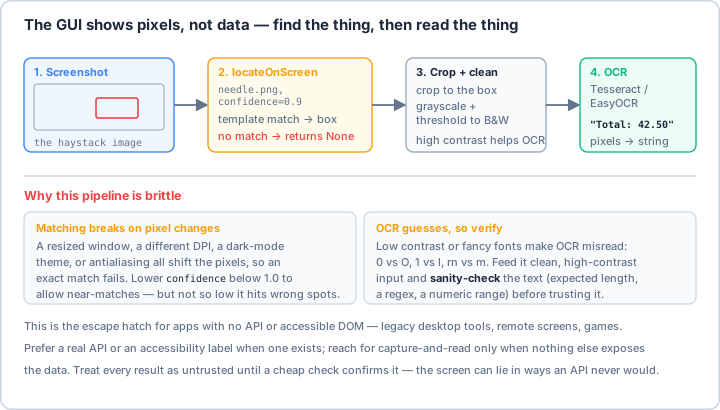
locateOnScreen (a template match — set confidence below 1.0 so a resize, theme, or DPI change doesn't break the match), then read it with OCR. Both stages guess, so feed clean high-contrast input and sanity-check the result before you trust it. Reach for capture-and-read only when no API or accessibility label exposes the data.Real-World Scenario: The Visual Data Extraction Platform 🔍
You're building a comprehensive visual data extraction system that captures screens from multiple applications, extracts text from images and PDFs, monitors visual changes in real-time, reads data from legacy terminal applications, processes invoices and receipts, extracts tables from screenshots, performs visual regression testing, and creates searchable archives from visual data. Your system must handle different fonts and languages, work with varying image qualities, process both static and dynamic content, and provide accurate text extraction with confidence scoring. Let's build a robust screen capture and OCR framework!
# First, install required packages:
# pip install pillow pytesseract opencv-python numpy easyocr
# pip install mss pygetwindow pandas matplotlib pdf2image
# Also install Tesseract OCR: https://github.com/tesseract-ocr/tesseract
import os
import time
import json
import re
from typing import List, Dict, Optional, Tuple, Any, Union
from dataclasses import dataclass, field
from enum import Enum
from pathlib import Path
import logging
from datetime import datetime
# Image processing
from PIL import Image, ImageEnhance, ImageFilter, ImageOps, ImageDraw, ImageFont
import cv2
import numpy as np
# OCR engines
import pytesseract
try:
import easyocr
EASYOCR_AVAILABLE = True
except ImportError:
EASYOCR_AVAILABLE = False
# Screen capture
import mss
import pyautogui
try:
import pygetwindow as gw
PYGETWINDOW_AVAILABLE = True
except ImportError:
PYGETWINDOW_AVAILABLE = False
# Data processing
import pandas as pd
# ==================== Configuration ====================
@dataclass
class OCRConfig:
"""Configuration for OCR and screen capture."""
# OCR settings
ocr_engine: str = "tesseract" # tesseract, easyocr, cloud
tesseract_path: Optional[str] = None # Path to tesseract executable
language: str = "eng" # OCR language(s)
confidence_threshold: float = 60.0 # Minimum confidence for text
# Image processing
enhance_contrast: bool = True
enhance_sharpness: bool = True
denoise: bool = True
deskew: bool = True
scale_factor: float = 2.0 # Image scaling for better OCR
# Screen capture
capture_method: str = "mss" # mss, pyautogui, opencv
default_monitor: int = 1
video_fps: int = 30
# Output settings
output_format: str = "text" # text, json, csv
preserve_layout: bool = False
detect_tables: bool = True
# Performance
enable_gpu: bool = False
batch_size: int = 1
num_threads: int = 4
class CaptureMode(Enum):
"""Screen capture modes."""
FULLSCREEN = "fullscreen"
REGION = "region"
WINDOW = "window"
MONITOR = "monitor"
VIDEO = "video"
# ==================== Screen Capture ====================
class ScreenCapture:
"""Advanced screen capture functionality."""
def __init__(self, config: OCRConfig):
self.config = config
self.logger = logging.getLogger(__name__)
self.sct = mss.mss()
def capture_screen(
self,
mode: CaptureMode = CaptureMode.FULLSCREEN,
region: Optional[Tuple[int, int, int, int]] = None,
window_title: Optional[str] = None,
monitor: Optional[int] = None
) -> Image.Image:
"""
Capture screen based on mode.
Args:
mode: Capture mode
region: (x, y, width, height) for region capture
window_title: Window title for window capture
monitor: Monitor number for monitor capture
Returns:
PIL Image object
"""
if mode == CaptureMode.FULLSCREEN:
return self._capture_fullscreen()
elif mode == CaptureMode.REGION:
return self._capture_region(region)
elif mode == CaptureMode.WINDOW:
return self._capture_window(window_title)
elif mode == CaptureMode.MONITOR:
return self._capture_monitor(monitor or self.config.default_monitor)
else:
raise ValueError(f"Unknown capture mode: {mode}")
def _capture_fullscreen(self) -> Image.Image:
"""Capture entire screen."""
self.logger.info("Capturing fullscreen")
if self.config.capture_method == "mss":
# Use mss for faster capture
screenshot = self.sct.grab(self.sct.monitors[0])
img = Image.frombytes('RGB', screenshot.size, screenshot.bgra, 'raw', 'BGRX')
else:
# Use pyautogui
img = pyautogui.screenshot()
return img
def _capture_region(self, region: Tuple[int, int, int, int]) -> Image.Image:
"""Capture specific region."""
if not region:
raise ValueError("Region must be specified for region capture")
x, y, width, height = region
self.logger.info(f"Capturing region: ({x}, {y}, {width}, {height})")
if self.config.capture_method == "mss":
monitor = {"left": x, "top": y, "width": width, "height": height}
screenshot = self.sct.grab(monitor)
img = Image.frombytes('RGB', screenshot.size, screenshot.bgra, 'raw', 'BGRX')
else:
img = pyautogui.screenshot(region=(x, y, width, height))
return img
def _capture_window(self, window_title: str) -> Image.Image:
"""Capture specific window."""
if not PYGETWINDOW_AVAILABLE:
raise ImportError("pygetwindow required for window capture")
if not window_title:
raise ValueError("Window title must be specified")
self.logger.info(f"Capturing window: {window_title}")
# Find window
windows = gw.getWindowsWithTitle(window_title)
if not windows:
raise ValueError(f"Window not found: {window_title}")
window = windows[0]
# Get window bounds
left, top, width, height = window.left, window.top, window.width, window.height
# Capture window region
return self._capture_region((left, top, width, height))
def _capture_monitor(self, monitor: int) -> Image.Image:
"""Capture specific monitor."""
self.logger.info(f"Capturing monitor {monitor}")
if monitor >= len(self.sct.monitors):
raise ValueError(f"Monitor {monitor} not found")
screenshot = self.sct.grab(self.sct.monitors[monitor])
img = Image.frombytes('RGB', screenshot.size, screenshot.bgra, 'raw', 'BGRX')
return img
def capture_video(
self,
duration: float,
output_path: str,
region: Optional[Tuple[int, int, int, int]] = None
):
"""Capture video of screen."""
self.logger.info(f"Recording video for {duration} seconds")
# Determine capture region
if region:
x, y, width, height = region
else:
# Full screen
monitor = self.sct.monitors[0]
x, y, width, height = monitor["left"], monitor["top"], monitor["width"], monitor["height"]
# Setup video writer
fourcc = cv2.VideoWriter_fourcc(*'mp4v')
out = cv2.VideoWriter(output_path, fourcc, self.config.video_fps, (width, height))
start_time = time.time()
frame_count = 0
while time.time() - start_time < duration:
# Capture frame
screenshot = self.sct.grab({"left": x, "top": y, "width": width, "height": height})
# Convert to numpy array
frame = np.array(screenshot)
frame = cv2.cvtColor(frame, cv2.COLOR_BGRA2BGR)
# Write frame
out.write(frame)
frame_count += 1
# Control frame rate
time.sleep(1 / self.config.video_fps)
out.release()
self.logger.info(f"Video saved: {output_path} ({frame_count} frames)")
def find_and_capture_text_regions(self, image: Image.Image) -> List[Dict[str, Any]]:
"""Find regions containing text in image."""
self.logger.info("Detecting text regions")
# Convert to OpenCV format
cv_image = cv2.cvtColor(np.array(image), cv2.COLOR_RGB2BGR)
gray = cv2.cvtColor(cv_image, cv2.COLOR_BGR2GRAY)
# Use MSER to detect text regions
mser = cv2.MSER_create()
regions, _ = mser.detectRegions(gray)
text_regions = []
for region in regions:
# Get bounding box
x, y, w, h = cv2.boundingRect(region)
# Filter small regions
if w < 20 or h < 10:
continue
text_regions.append({
'x': x,
'y': y,
'width': w,
'height': h,
'image': image.crop((x, y, x + w, y + h))
})
self.logger.info(f"Found {len(text_regions)} text regions")
return text_regions
# ==================== Image Processing ====================
class ImageProcessor:
"""Image preprocessing for better OCR."""
def __init__(self, config: OCRConfig):
self.config = config
self.logger = logging.getLogger(__name__)
def preprocess(self, image: Image.Image) -> Image.Image:
"""Apply preprocessing pipeline to image."""
self.logger.info("Preprocessing image")
# Convert to RGB if necessary
if image.mode != 'RGB':
image = image.convert('RGB')
# Scale image
if self.config.scale_factor != 1.0:
image = self._scale_image(image)
# Enhance contrast
if self.config.enhance_contrast:
image = self._enhance_contrast(image)
# Enhance sharpness
if self.config.enhance_sharpness:
image = self._enhance_sharpness(image)
# Denoise
if self.config.denoise:
image = self._denoise(image)
# Deskew
if self.config.deskew:
image = self._deskew(image)
# Convert to grayscale
image = image.convert('L')
# Binarize
image = self._binarize(image)
return image
def _scale_image(self, image: Image.Image) -> Image.Image:
"""Scale image for better OCR."""
width, height = image.size
new_width = int(width * self.config.scale_factor)
new_height = int(height * self.config.scale_factor)
self.logger.debug(f"Scaling image from {width}x{height} to {new_width}x{new_height}")
return image.resize((new_width, new_height), Image.Resampling.LANCZOS)
def _enhance_contrast(self, image: Image.Image) -> Image.Image:
"""Enhance image contrast."""
self.logger.debug("Enhancing contrast")
enhancer = ImageEnhance.Contrast(image)
return enhancer.enhance(1.5)
def _enhance_sharpness(self, image: Image.Image) -> Image.Image:
"""Enhance image sharpness."""
self.logger.debug("Enhancing sharpness")
enhancer = ImageEnhance.Sharpness(image)
return enhancer.enhance(2.0)
def _denoise(self, image: Image.Image) -> Image.Image:
"""Remove noise from image."""
self.logger.debug("Denoising image")
# Convert to OpenCV format
cv_image = cv2.cvtColor(np.array(image), cv2.COLOR_RGB2BGR)
# Apply denoising
denoised = cv2.fastNlMeansDenoising(cv_image, None, 10, 7, 21)
# Convert back to PIL
return Image.fromarray(cv2.cvtColor(denoised, cv2.COLOR_BGR2RGB))
def _deskew(self, image: Image.Image) -> Image.Image:
"""Correct image skew."""
self.logger.debug("Deskewing image")
# Convert to OpenCV format
cv_image = cv2.cvtColor(np.array(image), cv2.COLOR_RGB2GRAY)
# Find edges
edges = cv2.Canny(cv_image, 50, 150, apertureSize=3)
# Find lines using Hough transform
lines = cv2.HoughLines(edges, 1, np.pi/180, 200)
if lines is not None:
# Calculate average angle
angles = []
for rho, theta in lines[:, 0]:
angle = np.degrees(theta) - 90
if -45 < angle < 45:
angles.append(angle)
if angles:
median_angle = np.median(angles)
# Rotate image
if abs(median_angle) > 0.5:
self.logger.debug(f"Rotating image by {median_angle:.2f} degrees")
return image.rotate(median_angle, fillcolor='white', expand=True)
return image
def _binarize(self, image: Image.Image) -> Image.Image:
"""Convert image to binary (black and white)."""
self.logger.debug("Binarizing image")
# Convert to numpy array
img_array = np.array(image)
# Apply Otsu's thresholding
_, binary = cv2.threshold(img_array, 0, 255, cv2.THRESH_BINARY + cv2.THRESH_OTSU)
return Image.fromarray(binary)
def enhance_for_text_type(self, image: Image.Image, text_type: str) -> Image.Image:
"""Enhance image based on expected text type."""
if text_type == "handwritten":
# Enhance for handwritten text
image = self._enhance_sharpness(image)
image = image.filter(ImageFilter.MedianFilter(size=3))
elif text_type == "screenshot":
# Enhance for digital text
image = self._enhance_contrast(image)
elif text_type == "document":
# Enhance for scanned documents
image = self._denoise(image)
image = self._deskew(image)
elif text_type == "terminal":
# Enhance for terminal/console text
image = image.convert('L')
image = ImageOps.invert(image) # White text on black background
return image
# ==================== OCR Engines ====================
class TesseractOCR:
"""Tesseract OCR engine wrapper."""
def __init__(self, config: OCRConfig):
self.config = config
self.logger = logging.getLogger(__name__)
# Set Tesseract path if specified
if config.tesseract_path:
pytesseract.pytesseract.tesseract_cmd = config.tesseract_path
def extract_text(self, image: Image.Image) -> str:
"""Extract text from image."""
self.logger.info("Extracting text with Tesseract")
try:
text = pytesseract.image_to_string(
image,
lang=self.config.language
)
return text.strip()
except Exception as e:
self.logger.error(f"Tesseract OCR failed: {e}")
return ""
def extract_data(self, image: Image.Image) -> pd.DataFrame:
"""Extract detailed data including confidence scores."""
self.logger.info("Extracting detailed data with Tesseract")
try:
data = pytesseract.image_to_data(
image,
lang=self.config.language,
output_type=pytesseract.Output.DATAFRAME
)
# Filter by confidence
data = data[data.conf > self.config.confidence_threshold]
return data
except Exception as e:
self.logger.error(f"Tesseract data extraction failed: {e}")
return pd.DataFrame()
def extract_boxes(self, image: Image.Image) -> List[Dict[str, Any]]:
"""Extract text with bounding boxes."""
self.logger.info("Extracting text boxes with Tesseract")
try:
boxes = pytesseract.image_to_boxes(
image,
lang=self.config.language
)
result = []
for box in boxes.splitlines():
parts = box.split()
# image_to_boxes columns: char left bottom right top page
# (coords are bottom-origin, and there is NO confidence
# value here -- use image_to_data() if you need confidence)
if len(parts) >= 5:
result.append({
'char': parts[0],
'x': int(parts[1]),
'y': int(parts[2]),
'width': int(parts[3]) - int(parts[1]),
'height': int(parts[4]) - int(parts[2]),
})
return result
except Exception as e:
self.logger.error(f"Box extraction failed: {e}")
return []
class EasyOCREngine:
"""EasyOCR engine wrapper."""
def __init__(self, config: OCRConfig):
self.config = config
self.logger = logging.getLogger(__name__)
if not EASYOCR_AVAILABLE:
raise ImportError("EasyOCR not installed")
# Initialize reader
self.reader = easyocr.Reader(
[config.language],
gpu=config.enable_gpu
)
def extract_text(self, image: Image.Image) -> str:
"""Extract text from image."""
self.logger.info("Extracting text with EasyOCR")
# Convert PIL to numpy array
img_array = np.array(image)
try:
results = self.reader.readtext(img_array)
# Extract text
text_parts = []
for (bbox, text, confidence) in results:
if confidence > self.config.confidence_threshold / 100:
text_parts.append(text)
return ' '.join(text_parts)
except Exception as e:
self.logger.error(f"EasyOCR failed: {e}")
return ""
def extract_with_positions(self, image: Image.Image) -> List[Dict[str, Any]]:
"""Extract text with positions and confidence."""
self.logger.info("Extracting positioned text with EasyOCR")
img_array = np.array(image)
try:
results = self.reader.readtext(img_array)
extracted = []
for (bbox, text, confidence) in results:
if confidence > self.config.confidence_threshold / 100:
# Calculate bounding box
x_coords = [point[0] for point in bbox]
y_coords = [point[1] for point in bbox]
extracted.append({
'text': text,
'x': min(x_coords),
'y': min(y_coords),
'width': max(x_coords) - min(x_coords),
'height': max(y_coords) - min(y_coords),
'confidence': confidence * 100
})
return extracted
except Exception as e:
self.logger.error(f"EasyOCR position extraction failed: {e}")
return []
# ==================== Table Extraction ====================
class TableExtractor:
"""Extract tables from screenshots."""
def __init__(self, config: OCRConfig):
self.config = config
self.logger = logging.getLogger(__name__)
def extract_table(self, image: Image.Image) -> pd.DataFrame:
"""Extract table structure from image."""
self.logger.info("Extracting table from image")
# Convert to OpenCV format
cv_image = cv2.cvtColor(np.array(image), cv2.COLOR_RGB2BGR)
gray = cv2.cvtColor(cv_image, cv2.COLOR_BGR2GRAY)
# Find table lines
horizontal_lines = self._find_lines(gray, horizontal=True)
vertical_lines = self._find_lines(gray, horizontal=False)
# Find intersections (table cells)
cells = self._find_cells(horizontal_lines, vertical_lines, gray.shape)
if not cells:
self.logger.warning("No table structure found")
return pd.DataFrame()
# Sort cells by position
cells = sorted(cells, key=lambda x: (x['row'], x['col']))
# Extract text from each cell
table_data = {}
ocr = TesseractOCR(self.config)
for cell in cells:
# Crop cell region
cell_img = image.crop((cell['x'], cell['y'],
cell['x'] + cell['width'],
cell['y'] + cell['height']))
# Extract text
text = ocr.extract_text(cell_img)
# Add to table data
if cell['row'] not in table_data:
table_data[cell['row']] = {}
table_data[cell['row']][cell['col']] = text
# Convert to DataFrame
df = pd.DataFrame.from_dict(table_data, orient='index')
df = df.sort_index()
self.logger.info(f"Extracted table with shape {df.shape}")
return df
def _find_lines(self, gray_image: np.ndarray, horizontal: bool = True) -> List[np.ndarray]:
"""Find horizontal or vertical lines in image."""
# Create structure element
if horizontal:
kernel = cv2.getStructuringElement(cv2.MORPH_RECT, (40, 1))
else:
kernel = cv2.getStructuringElement(cv2.MORPH_RECT, (1, 40))
# Apply morphology
lines = cv2.morphologyEx(gray_image, cv2.MORPH_CLOSE, kernel)
# Find contours
contours, _ = cv2.findContours(lines, cv2.RETR_EXTERNAL, cv2.CHAIN_APPROX_SIMPLE)
return contours
def _find_cells(
self,
horizontal_lines: List,
vertical_lines: List,
image_shape: Tuple
) -> List[Dict[str, Any]]:
"""Find table cells from lines."""
cells = []
# Simplified cell detection
# In production, use more sophisticated algorithms
# Create grid based on line intersections
h_positions = sorted(set([cv2.boundingRect(line)[1] for line in horizontal_lines]))
v_positions = sorted(set([cv2.boundingRect(line)[0] for line in vertical_lines]))
# Create cells from grid
for row_idx in range(len(h_positions) - 1):
for col_idx in range(len(v_positions) - 1):
cells.append({
'row': row_idx,
'col': col_idx,
'x': v_positions[col_idx],
'y': h_positions[row_idx],
'width': v_positions[col_idx + 1] - v_positions[col_idx],
'height': h_positions[row_idx + 1] - h_positions[row_idx]
})
return cells
# ==================== Visual Change Detection ====================
class VisualChangeDetector:
"""Detect changes between screenshots."""
def __init__(self, config: OCRConfig):
self.config = config
self.logger = logging.getLogger(__name__)
self.previous_image = None
def detect_changes(
self,
current_image: Image.Image,
previous_image: Optional[Image.Image] = None
) -> Dict[str, Any]:
"""Detect changes between images."""
if previous_image is None:
previous_image = self.previous_image
if previous_image is None:
self.previous_image = current_image
return {'changed': False, 'regions': []}
self.logger.info("Detecting visual changes")
# Convert to numpy arrays
curr_array = np.array(current_image)
prev_array = np.array(previous_image)
# Ensure same size
if curr_array.shape != prev_array.shape:
self.logger.warning("Images have different sizes")
return {'changed': False, 'regions': []}
# Calculate difference
diff = cv2.absdiff(curr_array, prev_array)
# Convert to grayscale
if len(diff.shape) == 3:
gray_diff = cv2.cvtColor(diff, cv2.COLOR_RGB2GRAY)
else:
gray_diff = diff
# Threshold difference
_, thresh = cv2.threshold(gray_diff, 30, 255, cv2.THRESH_BINARY)
# Find contours of changed regions
contours, _ = cv2.findContours(thresh, cv2.RETR_EXTERNAL, cv2.CHAIN_APPROX_SIMPLE)
changed_regions = []
for contour in contours:
area = cv2.contourArea(contour)
if area > 100: # Filter small changes
x, y, w, h = cv2.boundingRect(contour)
changed_regions.append({
'x': x,
'y': y,
'width': w,
'height': h,
'area': area
})
# Store current image for next comparison
self.previous_image = current_image
return {
'changed': len(changed_regions) > 0,
'regions': changed_regions,
'change_percentage': np.sum(thresh > 0) / thresh.size * 100
}
def monitor_region(
self,
region: Tuple[int, int, int, int],
callback: callable,
interval: float = 1.0,
duration: Optional[float] = None
):
"""Monitor a screen region for changes."""
self.logger.info(f"Monitoring region {region}")
capture = ScreenCapture(self.config)
start_time = time.time()
while True:
# Check duration
if duration and (time.time() - start_time) > duration:
break
# Capture region
current = capture.capture_screen(CaptureMode.REGION, region=region)
# Detect changes
changes = self.detect_changes(current)
if changes['changed']:
# Call callback with changes
callback(changes, current)
time.sleep(interval)
# ==================== Main OCR System ====================
class OCRSystem:
"""Complete OCR system with multiple engines."""
def __init__(self, config: Optional[OCRConfig] = None):
self.config = config or OCRConfig()
# Initialize components
self.capture = ScreenCapture(self.config)
self.processor = ImageProcessor(self.config)
self.table_extractor = TableExtractor(self.config)
self.change_detector = VisualChangeDetector(self.config)
# Initialize OCR engines
self.engines = {}
self._init_ocr_engines()
self.logger = logging.getLogger(__name__)
def _init_ocr_engines(self):
"""Initialize available OCR engines."""
# Tesseract
try:
self.engines['tesseract'] = TesseractOCR(self.config)
self.logger.info("Tesseract OCR initialized")
except Exception as e:
self.logger.warning(f"Tesseract not available: {e}")
# EasyOCR
if EASYOCR_AVAILABLE and self.config.ocr_engine == "easyocr":
try:
self.engines['easyocr'] = EasyOCREngine(self.config)
self.logger.info("EasyOCR initialized")
except Exception as e:
self.logger.warning(f"EasyOCR not available: {e}")
def extract_text_from_screen(
self,
mode: CaptureMode = CaptureMode.FULLSCREEN,
region: Optional[Tuple[int, int, int, int]] = None,
preprocess: bool = True
) -> str:
"""Extract text from screen."""
# Capture screen
image = self.capture.capture_screen(mode, region=region)
# Preprocess if requested
if preprocess:
image = self.processor.preprocess(image)
# Extract text
return self.extract_text_from_image(image)
def extract_text_from_image(self, image: Image.Image) -> str:
"""Extract text from image using configured engine."""
engine_name = self.config.ocr_engine
if engine_name not in self.engines:
self.logger.error(f"OCR engine not available: {engine_name}")
return ""
engine = self.engines[engine_name]
return engine.extract_text(image)
def extract_structured_data(
self,
image: Image.Image,
format: str = "json"
) -> Union[str, Dict, pd.DataFrame]:
"""Extract structured data from image."""
self.logger.info(f"Extracting structured data as {format}")
# Preprocess image
processed = self.processor.preprocess(image)
# Extract with Tesseract (has best structured output)
if 'tesseract' in self.engines:
data = self.engines['tesseract'].extract_data(processed)
if format == "dataframe":
return data
elif format == "json":
return data.to_dict('records')
elif format == "csv":
return data.to_csv(index=False)
else:
return data.to_string()
else:
return "" if format == "string" else {}
def extract_table_from_screen(
self,
region: Optional[Tuple[int, int, int, int]] = None
) -> pd.DataFrame:
"""Extract table from screen region."""
# Capture screen
image = self.capture.capture_screen(
CaptureMode.REGION if region else CaptureMode.FULLSCREEN,
region=region
)
# Extract table
return self.table_extractor.extract_table(image)
def monitor_text_changes(
self,
region: Tuple[int, int, int, int],
callback: callable,
interval: float = 1.0
):
"""Monitor region for text changes."""
self.logger.info("Starting text monitoring")
previous_text = ""
def on_visual_change(changes, image):
# Extract text from changed image
text = self.extract_text_from_image(image)
# Check if text changed
nonlocal previous_text
if text != previous_text:
callback(text, previous_text)
previous_text = text
# Start monitoring
self.change_detector.monitor_region(
region,
on_visual_change,
interval
)
def batch_process_images(
self,
image_paths: List[str],
output_dir: str
) -> Dict[str, Any]:
"""Process multiple images in batch."""
output_dir = Path(output_dir)
output_dir.mkdir(exist_ok=True)
results = {
'processed': 0,
'failed': 0,
'files': []
}
for image_path in image_paths:
try:
# Load image
image = Image.open(image_path)
# Extract text
text = self.extract_text_from_image(image)
# Save result
output_file = output_dir / f"{Path(image_path).stem}.txt"
output_file.write_text(text)
results['processed'] += 1
results['files'].append(str(output_file))
except Exception as e:
self.logger.error(f"Failed to process {image_path}: {e}")
results['failed'] += 1
return results
# ==================== Utility Functions ====================
def draw_ocr_results(image: Image.Image, ocr_results: List[Dict]) -> Image.Image:
"""Draw OCR results on image."""
draw = ImageDraw.Draw(image)
# Try to load font
try:
font = ImageFont.truetype("arial.ttf", 16)
except:
font = ImageFont.load_default()
for result in ocr_results:
x, y = result['x'], result['y']
w, h = result['width'], result['height']
text = result.get('text', '')
confidence = result.get('confidence', 0)
# Draw bounding box
color = 'green' if confidence > 80 else 'yellow' if confidence > 60 else 'red'
draw.rectangle([x, y, x + w, y + h], outline=color, width=2)
# Draw text and confidence
draw.text((x, y - 20), f"{text} ({confidence:.1f}%)", fill=color, font=font)
return image
# Example usage
if __name__ == "__main__":
print("📸 Screen Capture and OCR Examples\n")
# Example 1: Initialize OCR system
print("1️⃣ Initializing OCR System:")
config = OCRConfig(
ocr_engine="tesseract",
language="eng",
confidence_threshold=60.0,
enhance_contrast=True
)
ocr_system = OCRSystem(config)
print(f" OCR Engine: {config.ocr_engine}")
print(f" Language: {config.language}")
print(f" Confidence Threshold: {config.confidence_threshold}%")
# Example 2: Screen capture methods
print("\n2️⃣ Screen Capture Methods:")
print(" # Full screen")
print(" image = ocr_system.capture.capture_screen(CaptureMode.FULLSCREEN)")
print("\n # Specific region")
print(" image = ocr_system.capture.capture_screen(CaptureMode.REGION, region=(100, 100, 500, 300))")
print("\n # Window capture")
print(" image = ocr_system.capture.capture_screen(CaptureMode.WINDOW, window_title='Notepad')")
# Example 3: Text extraction
print("\n3️⃣ Text Extraction:")
print(" # Extract from screen")
print(" text = ocr_system.extract_text_from_screen()")
print("\n # Extract from region")
print(" text = ocr_system.extract_text_from_screen(")
print(" mode=CaptureMode.REGION,")
print(" region=(100, 100, 500, 300)")
print(" )")
# Example 4: Image preprocessing
print("\n4️⃣ Image Preprocessing Pipeline:")
steps = [
"Scale image (2x for better OCR)",
"Enhance contrast",
"Enhance sharpness",
"Denoise",
"Deskew",
"Convert to grayscale",
"Binarize (black and white)"
]
for i, step in enumerate(steps, 1):
print(f" {i}. {step}")
# Example 5: Table extraction
print("\n5️⃣ Table Extraction:")
print(" # Extract table from screenshot")
print(" df = ocr_system.extract_table_from_screen()")
print(" print(df)")
# Example 6: Change detection
print("\n6️⃣ Visual Change Detection:")
print(" # Monitor region for changes")
print(" def on_text_change(new_text, old_text):")
print(" print(f'Text changed: {old_text} → {new_text}')")
print("")
print(" ocr_system.monitor_text_changes(")
print(" region=(100, 100, 500, 300),")
print(" callback=on_text_change")
print(" )")
# Example 7: OCR confidence
print("\n7️⃣ Working with Confidence Scores:")
print(" # Get detailed OCR data")
print(" if 'tesseract' in ocr_system.engines:")
print(" data = ocr_system.engines['tesseract'].extract_data(image)")
print(" # Filter by confidence")
print(" high_confidence = data[data.conf > 80]")
# Example 8: Multiple languages
print("\n8️⃣ Multi-Language Support:")
languages = [
("eng", "English"),
("fra", "French"),
("deu", "German"),
("spa", "Spanish"),
("chi_sim", "Chinese Simplified"),
("jpn", "Japanese")
]
for code, name in languages:
print(f" {code}: {name}")
# Example 9: Use cases
print("\n9️⃣ Common Use Cases:")
use_cases = [
"📊 Extract data from legacy applications",
"📝 Read text from scanned documents",
"🖼️ Extract text from images and screenshots",
"📈 Monitor dashboards for changes",
"🎮 Read game stats and scores",
"💼 Process invoices and receipts",
"📋 Extract tables from reports",
"🔍 Visual regression testing"
]
for use_case in use_cases:
print(f" {use_case}")
# Example 10: Best practices
print("\n🔟 OCR Best Practices:")
practices = [
"✨ Always preprocess images for better accuracy",
"📏 Use appropriate scale factor (2x-4x)",
"🎯 Set confidence thresholds based on use case",
"🔤 Use correct language models",
"📐 Deskew tilted images",
"🖤 Convert to grayscale/binary for text",
"🔍 Use region capture for specific areas",
"💾 Cache results to avoid re-processing",
"🔄 Implement retry logic for failed extractions",
"📊 Validate extracted data"
]
for practice in practices:
print(f" {practice}")
print("\n✅ Screen capture and OCR demonstration complete!")
Key Takeaways and Best Practices 🎯
- Preprocess Images: Always enhance images before OCR for better accuracy.
- Use Appropriate OCR Engine: Tesseract for general text, EasyOCR for scene text.
- Set Confidence Thresholds: Filter results based on confidence scores.
- Scale Images: Upscale small text for better recognition.
- Handle Multiple Languages: Use appropriate language models.
- Monitor Changes: Track visual changes for dynamic content.
- Extract Structure: Preserve layout and table information.
- Validate Results: Always verify extracted text accuracy.
Screen Capture and OCR Best Practices 📋
Mastering screen capture and OCR enables you to extract data from any visual source on your screen. You can now read text from legacy applications, monitor visual changes, extract tables from screenshots, process documents automatically, and bridge the gap between visual interfaces and programmatic access. Whether you're automating data entry, testing UIs, or extracting information from games, these visual extraction skills unlock powerful automation possibilities! 🚀
📓 Learning Journal
Keep a learning journal — digital or physical. After this lesson, take a few minutes to write down:
- Key concepts you learned
- Techniques that clicked for you
- Questions or confusion points to revisit
- Ideas you want to try
- Your progress and feelings about learning this
✍️ This lesson's prompt: Both stages of reading the screen — locating and OCR — only guess, so the output can be wrong in ways a human would never be. Where would you be comfortable trusting extracted text automatically, and where would you insist on a verification step before acting on it?
📝 Lesson Summary
🎓 Key Takeaways
- A GUI shows pixels, not data, so reading it is two approximate steps: find the region (template match) then read it (OCR).
- Image quality drives OCR accuracy — preprocessing (scale up, boost contrast, denoise, deskew, binarize) matters more than the engine choice.
- Set matching confidence below 1.0 so a resize, theme, or DPI change doesn't silently break your locate step.
- Capture-and-read is a last resort: prefer an API or accessibility label, and always sanity-check OCR output before trusting it.
🎉 What You've Accomplished
You've given your automation eyes — it can now capture any part of the screen, clean up the image, and turn pixels into text it can act on. That unlocks legacy apps, dashboards, and anything else that only exposes information visually.
❓ Common Questions at This Stage
Why is my OCR misreading characters like 0/O and 1/l?
Those confusions come from low-contrast or stylized fonts and too-small text. Scale the image up (2x–4x), increase contrast, convert to clean black-and-white, and pick the right language model. Better input beats post-processing almost every time.
Should I use screen capture and OCR or find a proper data source?
Prefer a real data source. An API, database, or accessibility label gives you exact data; OCR only estimates it and breaks when the UI shifts. Reach for capture-and-read only when the information genuinely isn't available any other way — legacy terminals, closed apps, images.
When monitoring for changes, why do I get false positives?
Comparing raw pixels flags harmless differences like anti-aliasing or a blinking cursor. Compare the extracted text instead of the pixels, or threshold the pixel difference and ignore changes below a minimum area, as the change detector does.
🔭 Looking Ahead
You can now see and read the screen. Next you'll learn to manage the windows themselves — finding, focusing, moving, and resizing application windows so your automation acts on the right target.
✅ Before the Next Lesson
- Capture a small region of text at 1x and again at 3x scale, run OCR on both, and compare the accuracy and confidence.
- Take one OCR result and write a simple validation check (for example, a regex for a date or amount) before you'd act on it.
- Write your Learning Journal entry for this lesson.
🌟 Encouragement for the Journey
Teaching a computer to read what's on its own screen feels genuinely powerful — and now you can. Respect the guesswork, clean your inputs, verify the output, and you'll extract data no plain script could reach. Keep going!
Pro Tip: Think of OCR as teaching your computer to read - the clearer the image, the better the results. Always preprocess images before OCR: enhance contrast, remove noise, correct skew, and convert to binary (black and white) for best results. Use a scale factor of 2x-4x for small text - OCR engines work better with larger images. Choose the right OCR engine: Tesseract is excellent for printed text and documents, EasyOCR handles scene text and handwriting better, and cloud APIs offer the best accuracy but require internet. Set appropriate confidence thresholds - 80%+ for critical data, 60%+ for general text. For tables, detect structure first, then extract text from individual cells. When monitoring for changes, compare text rather than pixels to avoid false positives from anti-aliasing. Use region capture to focus on specific areas and improve performance. Cache OCR results to avoid reprocessing identical images. Implement validation rules for extracted data (regex patterns, expected formats). Remember that OCR is probabilistic - always have a human verification step for critical data. Most importantly: the quality of your input image determines the quality of your OCR output!