🎮 Mouse and Keyboard Control: Master Precise Input Automation
📚 What You'll Learn
By the end of this lesson, you will be able to:
- Drive precise mouse movement, clicks, drags, scrolling, and gestures with PyAutoGUI and pynput
- Understand that every high-level call is a burst of low-level events (
click()= mouseDown + mouseUp) that returns no success value - Generate human-like input: bezier-curve movement, variable typing speed, and realistic delays
- Record and replay input sequences, translating pynput key names to PyAutoGUI names
- Build reusable macros with a fluent builder and coordinate multi-key combos with timing
- Add safety failsafes and benchmark input latency and throughput
⏱️ Estimated Time: 45–60 minutes
🎯 Project: Build an input recorder-and-macro tool that captures a sequence of clicks and keystrokes, saves it to JSON, and replays it at adjustable speed with an Esc-key failsafe.
Precise mouse and keyboard control forms the foundation of sophisticated GUI automation - it enables you to simulate complex user interactions, create realistic input patterns, automate gaming actions, perform stress testing, and control applications that resist traditional automation. Like having invisible hands that can type and click with superhuman speed and precision, mastering input control allows you to automate any desktop interaction. Whether you're creating macros, testing UIs, or building game bots, advanced input control is essential for professional automation. Let's explore the advanced world of mouse and keyboard automation! 🖱️⌨️
The Input Control Architecture
Think of mouse and keyboard control as choreographing a digital ballet - every movement, click, and keystroke must be precisely timed and executed. Using libraries like PyAutoGUI, pynput, and platform-specific APIs, you can create natural input patterns, handle multi-button combinations, simulate human-like movements, and even bypass basic anti-automation measures. Understanding event simulation, input queuing, and timing patterns is crucial for reliable input automation!
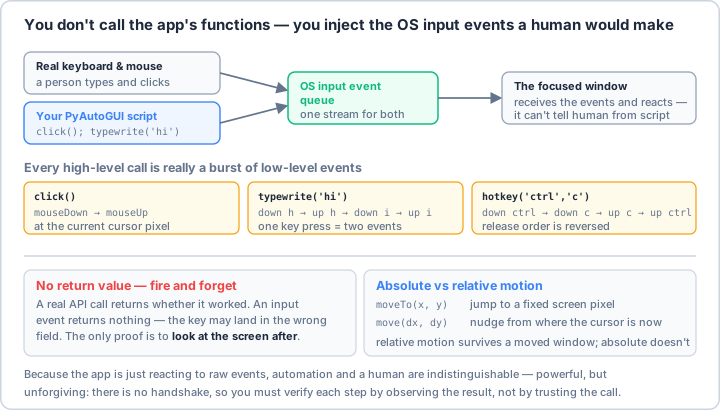
click() = mouseDown+mouseUp, hotkey() releases in reverse order) and it returns no value: there's no handshake, so verify each step by observing the screen, not by trusting the call. Prefer relative move(dx, dy) when a window might have shifted.Real-World Scenario: The Advanced Input Automation System 🎯
You're building an advanced input automation system that performs complex gaming combos with frame-perfect timing, simulates realistic human typing with errors and corrections, creates stress tests with thousands of inputs per second, automates CAD software with precise mouse movements, handles multi-monitor setups with seamless transitions, records and replays user input patterns, creates accessibility tools for disabled users, and bypasses basic automation detection. Your system must support all input devices, work across different applications, maintain precise timing, and provide both low-level and high-level control. Let's build a professional input control framework!
# First, install required packages:
# pip install pyautogui pynput keyboard mouse pyperclip numpy scipy
import time
import random
import threading
import queue
import json
from typing import List, Tuple, Optional, Dict, Any, Callable, Union
from dataclasses import dataclass, field
from enum import Enum, auto
from pathlib import Path
import logging
import math
import numpy as np
from datetime import datetime, timedelta
# Input libraries
import pyautogui
from pynput import mouse as pynput_mouse
from pynput import keyboard as pynput_keyboard
from pynput.mouse import Button as MouseButton, Listener as MouseListener
from pynput.keyboard import Key, Listener as KeyboardListener, Controller as KeyboardController
import pyperclip
# For advanced features
try:
import win32api
import win32con
WINDOWS_AVAILABLE = True
except ImportError:
WINDOWS_AVAILABLE = False
# ==================== Configuration ====================
@dataclass
class InputConfig:
"""Configuration for input control."""
# Safety
enable_failsafe: bool = True
failsafe_key: str = "esc"
# Mouse settings
mouse_speed: float = 0.5 # Default movement duration
mouse_acceleration: float = 1.0
click_duration: float = 0.05
double_click_interval: float = 0.25
# Keyboard settings
typing_speed: float = 0.05 # Seconds between keystrokes
typing_variance: float = 0.02 # Random variance in typing speed
typo_probability: float = 0.01 # Chance of making a typo
# Human simulation
enable_human_simulation: bool = False
human_mouse_noise: float = 2.0 # Pixels of random noise
human_reaction_time: Tuple[float, float] = (0.15, 0.25) # Min/max reaction time
# Recording
record_mouse_movement: bool = True
record_timestamps: bool = True
compression_threshold: int = 5 # Pixels to compress mouse movements
# Performance
event_queue_size: int = 1000
max_events_per_second: int = 1000
class InputEventType(Enum):
"""Types of input events."""
MOUSE_MOVE = auto()
MOUSE_CLICK = auto()
MOUSE_SCROLL = auto()
MOUSE_DRAG = auto()
KEY_PRESS = auto()
KEY_RELEASE = auto()
KEY_TYPE = auto()
DELAY = auto()
# ==================== Advanced Mouse Control ====================
class AdvancedMouseController:
"""Advanced mouse control with human-like movements."""
def __init__(self, config: InputConfig):
self.config = config
self.logger = logging.getLogger(__name__)
self.mouse = pynput_mouse.Controller()
def move_to(
self,
x: int,
y: int,
duration: Optional[float] = None,
human_like: bool = None
):
"""Move mouse with optional human-like behavior."""
human_like = human_like if human_like is not None else self.config.enable_human_simulation
duration = duration or self.config.mouse_speed
if human_like:
self._human_move(x, y, duration)
else:
self._linear_move(x, y, duration)
def _linear_move(self, x: int, y: int, duration: float):
"""Linear mouse movement."""
start_x, start_y = pyautogui.position()
# Calculate steps based on duration and distance
distance = math.sqrt((x - start_x)**2 + (y - start_y)**2)
steps = max(int(distance / 5), 10)
for i in range(steps + 1):
progress = i / steps
current_x = start_x + (x - start_x) * progress
current_y = start_y + (y - start_y) * progress
pyautogui.moveTo(current_x, current_y)
time.sleep(duration / steps)
def _human_move(self, x: int, y: int, duration: float):
"""Human-like mouse movement with curves and acceleration."""
start_x, start_y = pyautogui.position()
# Generate bezier curve points
points = self._generate_bezier_points(
(start_x, start_y),
(x, y),
duration
)
# Move through points with acceleration
for i, (px, py) in enumerate(points):
# Add small random noise
if self.config.human_mouse_noise > 0:
px += random.gauss(0, self.config.human_mouse_noise)
py += random.gauss(0, self.config.human_mouse_noise)
pyautogui.moveTo(px, py)
# Variable speed (slower at start/end)
progress = i / len(points)
speed_multiplier = self._ease_in_out_quad(progress)
time.sleep((duration / len(points)) * speed_multiplier)
def _generate_bezier_points(
self,
start: Tuple[int, int],
end: Tuple[int, int],
duration: float
) -> List[Tuple[float, float]]:
"""Generate points along a bezier curve."""
# Control points for curve
control1 = (
start[0] + (end[0] - start[0]) * 0.25 + random.randint(-50, 50),
start[1] + (end[1] - start[1]) * 0.25 + random.randint(-50, 50)
)
control2 = (
start[0] + (end[0] - start[0]) * 0.75 + random.randint(-50, 50),
start[1] + (end[1] - start[1]) * 0.75 + random.randint(-50, 50)
)
# Generate points
points = []
steps = int(duration * 60) # 60 FPS
for i in range(steps + 1):
t = i / steps
# Cubic bezier formula
x = (1-t)**3 * start[0] + \
3*(1-t)**2*t * control1[0] + \
3*(1-t)*t**2 * control2[0] + \
t**3 * end[0]
y = (1-t)**3 * start[1] + \
3*(1-t)**2*t * control1[1] + \
3*(1-t)*t**2 * control2[1] + \
t**3 * end[1]
points.append((x, y))
return points
def _ease_in_out_quad(self, t: float) -> float:
"""Quadratic easing function."""
if t < 0.5:
return 2 * t * t
return -1 + (4 - 2 * t) * t
def click(
self,
x: Optional[int] = None,
y: Optional[int] = None,
button: str = 'left',
clicks: int = 1,
human_like: bool = None
):
"""Click with optional human-like behavior."""
human_like = human_like if human_like is not None else self.config.enable_human_simulation
# Move to position if specified
if x is not None and y is not None:
self.move_to(x, y, human_like=human_like)
# Add human reaction time
if human_like:
time.sleep(random.uniform(*self.config.human_reaction_time))
# Perform clicks
for _ in range(clicks):
if human_like:
# Variable click duration
duration = random.gauss(self.config.click_duration, 0.01)
pyautogui.mouseDown(button=button)
time.sleep(max(0.01, duration))
pyautogui.mouseUp(button=button)
if clicks > 1:
time.sleep(random.gauss(self.config.double_click_interval, 0.05))
else:
pyautogui.click(button=button)
def drag(
self,
start_x: int,
start_y: int,
end_x: int,
end_y: int,
duration: float = 1.0,
button: str = 'left',
human_like: bool = None
):
"""Perform drag operation."""
human_like = human_like if human_like is not None else self.config.enable_human_simulation
# Move to start
self.move_to(start_x, start_y, human_like=human_like)
# Press button
pyautogui.mouseDown(button=button)
# Drag to end
if human_like:
self._human_move(end_x, end_y, duration)
else:
pyautogui.dragTo(end_x, end_y, duration, button=button)
# Release button
pyautogui.mouseUp(button=button)
def scroll(
self,
clicks: int,
x: Optional[int] = None,
y: Optional[int] = None,
smooth: bool = False
):
"""Scroll mouse wheel."""
if x is not None and y is not None:
self.move_to(x, y)
if smooth and abs(clicks) > 1:
# Smooth scrolling
direction = 1 if clicks > 0 else -1
for _ in range(abs(clicks)):
pyautogui.scroll(direction)
time.sleep(0.05)
else:
pyautogui.scroll(clicks)
def gesture(self, gesture_type: str, **kwargs):
"""Perform mouse gestures."""
if gesture_type == "circle":
self._draw_circle(**kwargs)
elif gesture_type == "swipe":
self._swipe(**kwargs)
elif gesture_type == "pinch":
self._pinch(**kwargs)
else:
raise ValueError(f"Unknown gesture: {gesture_type}")
def _draw_circle(self, center_x: int, center_y: int, radius: int, duration: float = 1.0):
"""Draw a circle with the mouse."""
steps = 36
angle_step = 2 * math.pi / steps
for i in range(steps + 1):
angle = i * angle_step
x = center_x + radius * math.cos(angle)
y = center_y + radius * math.sin(angle)
if i == 0:
self.move_to(x, y, duration=0.2)
pyautogui.mouseDown()
else:
pyautogui.moveTo(x, y)
time.sleep(duration / steps)
pyautogui.mouseUp()
# ==================== Advanced Keyboard Control ====================
class AdvancedKeyboardController:
"""Advanced keyboard control with human-like typing."""
def __init__(self, config: InputConfig):
self.config = config
self.logger = logging.getLogger(__name__)
self.keyboard = KeyboardController()
# Common typos for human simulation
self.typo_map = {
'a': ['s', 'q', 'w'],
'b': ['v', 'n', 'g'],
'c': ['x', 'v', 'd'],
'd': ['s', 'f', 'e'],
'e': ['w', 'r', 'd'],
'f': ['d', 'g', 'r'],
'g': ['f', 'h', 't'],
'h': ['g', 'j', 'y'],
'i': ['u', 'o', 'k'],
'j': ['h', 'k', 'u'],
'k': ['j', 'l', 'i'],
'l': ['k', 'p', 'o'],
'm': ['n', 'j', 'k'],
'n': ['b', 'm', 'h'],
'o': ['i', 'p', 'l'],
'p': ['o', 'l', '['],
'q': ['w', 'a', '1'],
'r': ['e', 't', 'f'],
's': ['a', 'd', 'w'],
't': ['r', 'y', 'g'],
'u': ['y', 'i', 'j'],
'v': ['c', 'b', 'f'],
'w': ['q', 'e', 's'],
'x': ['z', 'c', 's'],
'y': ['t', 'u', 'h'],
'z': ['x', 'a', 's']
}
def type_text(
self,
text: str,
human_like: bool = None,
wpm: Optional[int] = None
):
"""Type text with optional human-like behavior."""
human_like = human_like if human_like is not None else self.config.enable_human_simulation
if human_like:
self._human_type(text, wpm)
else:
self._normal_type(text)
def _normal_type(self, text: str):
"""Normal typing without human simulation."""
pyautogui.typewrite(text, interval=self.config.typing_speed)
def _human_type(self, text: str, wpm: Optional[int] = None):
"""Human-like typing with variable speed and occasional typos."""
if wpm:
# Calculate base interval from WPM
base_interval = 60 / (wpm * 5) # Average 5 characters per word
else:
base_interval = self.config.typing_speed
for i, char in enumerate(text):
# Variable typing speed
interval = random.gauss(base_interval, self.config.typing_variance)
interval = max(0.01, interval) # Minimum interval
# Occasional typos
if (random.random() < self.config.typo_probability and
char.lower() in self.typo_map and i < len(text) - 1):
# Make a typo
typo_char = random.choice(self.typo_map[char.lower()])
pyautogui.typewrite(typo_char)
time.sleep(interval)
# Realize mistake and correct it
time.sleep(random.uniform(0.1, 0.3)) # Reaction time
pyautogui.press('backspace')
time.sleep(interval)
pyautogui.typewrite(char)
else:
pyautogui.typewrite(char)
time.sleep(interval)
# Occasional pauses (thinking)
if char in '.!?' and random.random() < 0.3:
time.sleep(random.uniform(0.5, 1.5))
def press_key(self, key: Union[str, Key], duration: float = 0):
"""Press and release a key."""
if isinstance(key, str):
if duration > 0:
pyautogui.keyDown(key)
time.sleep(duration)
pyautogui.keyUp(key)
else:
pyautogui.press(key)
else:
# pynput Key
self.keyboard.press(key)
if duration > 0:
time.sleep(duration)
self.keyboard.release(key)
def hotkey(self, *keys, human_like: bool = None):
"""Press hotkey combination."""
human_like = human_like if human_like is not None else self.config.enable_human_simulation
if human_like:
# Press keys with slight delays
for key in keys[:-1]:
pyautogui.keyDown(key)
time.sleep(random.uniform(0.01, 0.03))
# Press last key
pyautogui.press(keys[-1])
# Release in reverse order
for key in reversed(keys[:-1]):
pyautogui.keyUp(key)
time.sleep(random.uniform(0.01, 0.03))
else:
pyautogui.hotkey(*keys)
def type_with_formatting(self, text: str, formatting: Dict[str, Any]):
"""Type text with formatting (bold, italic, etc)."""
for segment in formatting.get('segments', []):
segment_text = segment['text']
# Apply formatting
if segment.get('bold'):
self.hotkey('ctrl', 'b')
if segment.get('italic'):
self.hotkey('ctrl', 'i')
if segment.get('underline'):
self.hotkey('ctrl', 'u')
# Type text
self.type_text(segment_text)
# Remove formatting
if segment.get('bold'):
self.hotkey('ctrl', 'b')
if segment.get('italic'):
self.hotkey('ctrl', 'i')
if segment.get('underline'):
self.hotkey('ctrl', 'u')
# ==================== Input Recording and Playback ====================
@dataclass
class InputEvent:
"""Recorded input event."""
event_type: InputEventType
timestamp: float
data: Dict[str, Any]
class InputRecorder:
"""Record and playback input sequences."""
def __init__(self, config: InputConfig):
self.config = config
self.logger = logging.getLogger(__name__)
self.events: List[InputEvent] = []
self.recording = False
self.start_time = 0
# Listeners
self.mouse_listener = None
self.keyboard_listener = None
def start_recording(self):
"""Start recording input events."""
self.logger.info("Starting input recording")
self.events = []
self.recording = True
self.start_time = time.time()
# Start mouse listener
self.mouse_listener = MouseListener(
on_move=self._on_mouse_move if self.config.record_mouse_movement else None,
on_click=self._on_mouse_click,
on_scroll=self._on_mouse_scroll
)
self.mouse_listener.start()
# Start keyboard listener
self.keyboard_listener = KeyboardListener(
on_press=self._on_key_press,
on_release=self._on_key_release
)
self.keyboard_listener.start()
def stop_recording(self):
"""Stop recording input events."""
self.recording = False
if self.mouse_listener:
self.mouse_listener.stop()
if self.keyboard_listener:
self.keyboard_listener.stop()
self.logger.info(f"Stopped recording. {len(self.events)} events recorded")
def _on_mouse_move(self, x: int, y: int):
"""Record mouse movement."""
if not self.recording:
return
# Compress movements
if self.events and self.events[-1].event_type == InputEventType.MOUSE_MOVE:
last_pos = self.events[-1].data
distance = math.sqrt((x - last_pos['x'])**2 + (y - last_pos['y'])**2)
if distance < self.config.compression_threshold:
# Update last position instead of adding new event
self.events[-1].data = {'x': x, 'y': y}
return
self._add_event(InputEventType.MOUSE_MOVE, {'x': x, 'y': y})
def _on_mouse_click(self, x: int, y: int, button: MouseButton, pressed: bool):
"""Record mouse click."""
if not self.recording:
return
event_type = InputEventType.MOUSE_CLICK
self._add_event(event_type, {
'x': x,
'y': y,
'button': button.name,
'pressed': pressed
})
def _on_mouse_scroll(self, x: int, y: int, dx: int, dy: int):
"""Record mouse scroll."""
if not self.recording:
return
self._add_event(InputEventType.MOUSE_SCROLL, {
'x': x,
'y': y,
'dx': dx,
'dy': dy
})
def _on_key_press(self, key: Union[Key, pynput_keyboard.KeyCode]):
"""Record key press."""
if not self.recording:
return
# Stop recording on ESC
if key == Key.esc and self.config.enable_failsafe:
self.stop_recording()
return
key_name = key.char if hasattr(key, 'char') else str(key)
self._add_event(InputEventType.KEY_PRESS, {'key': key_name})
def _on_key_release(self, key: Union[Key, pynput_keyboard.KeyCode]):
"""Record key release."""
if not self.recording:
return
key_name = key.char if hasattr(key, 'char') else str(key)
self._add_event(InputEventType.KEY_RELEASE, {'key': key_name})
def _add_event(self, event_type: InputEventType, data: Dict[str, Any]):
"""Add event to recording."""
timestamp = time.time() - self.start_time if self.config.record_timestamps else 0
self.events.append(InputEvent(
event_type=event_type,
timestamp=timestamp,
data=data
))
def save_recording(self, filename: str):
"""Save recording to file."""
data = {
'events': [
{
'type': event.event_type.name,
'timestamp': event.timestamp,
'data': event.data
}
for event in self.events
],
'metadata': {
'duration': self.events[-1].timestamp if self.events else 0,
'event_count': len(self.events),
'recorded_at': datetime.now().isoformat()
}
}
with open(filename, 'w') as f:
json.dump(data, f, indent=2)
self.logger.info(f"Recording saved to {filename}")
def load_recording(self, filename: str):
"""Load recording from file."""
with open(filename, 'r') as f:
data = json.load(f)
self.events = []
for event_data in data['events']:
self.events.append(InputEvent(
event_type=InputEventType[event_data['type']],
timestamp=event_data['timestamp'],
data=event_data['data']
))
self.logger.info(f"Loaded {len(self.events)} events from {filename}")
def playback(
self,
speed: float = 1.0,
loop: bool = False,
callback: Optional[Callable] = None
):
"""Playback recorded events."""
self.logger.info(f"Starting playback at {speed}x speed")
while True:
last_timestamp = 0
for event in self.events:
# Calculate delay
if self.config.record_timestamps:
delay = (event.timestamp - last_timestamp) / speed
if delay > 0:
time.sleep(delay)
last_timestamp = event.timestamp
# Execute event
self._execute_event(event)
# Callback
if callback:
callback(event)
# Check for failsafe
if self.config.enable_failsafe:
if pyautogui.position() == (0, 0):
self.logger.info("Failsafe triggered, stopping playback")
return
if not loop:
break
self.logger.info("Looping playback")
def _execute_event(self, event: InputEvent):
"""Execute a recorded event."""
data = event.data
if event.event_type == InputEventType.MOUSE_MOVE:
pyautogui.moveTo(data['x'], data['y'])
elif event.event_type == InputEventType.MOUSE_CLICK:
if data['pressed']:
pyautogui.mouseDown(x=data['x'], y=data['y'], button=data['button'])
else:
pyautogui.mouseUp(x=data['x'], y=data['y'], button=data['button'])
elif event.event_type == InputEventType.MOUSE_SCROLL:
pyautogui.scroll(data['dy'], x=data['x'], y=data['y'])
elif event.event_type == InputEventType.KEY_PRESS:
pyautogui.keyDown(self._normalize_key(data['key']))
elif event.event_type == InputEventType.KEY_RELEASE:
pyautogui.keyUp(self._normalize_key(data['key']))
@staticmethod
def _normalize_key(key: str) -> str:
"""Convert a recorded pynput key name to a pyautogui key name.
Special keys are stored as pynput reprs like "Key.enter" or
"Key.shift"; pyautogui expects the bare name ("enter", "shift"),
so strip the "Key." prefix. A few names differ between the two
libraries and are remapped explicitly.
"""
if key.startswith('Key.'):
key = key[len('Key.'):]
# pynput name -> pyautogui name for the cases that don't match
remap = {
'cmd': 'command', 'cmd_r': 'command',
'alt_l': 'altleft', 'alt_r': 'altright', 'alt_gr': 'altright',
'ctrl_l': 'ctrlleft', 'ctrl_r': 'ctrlright',
'shift_l': 'shiftleft', 'shift_r': 'shiftright',
}
return remap.get(key, key)
# ==================== Macro System ====================
class MacroSystem:
"""Create and execute complex input macros."""
def __init__(self, config: InputConfig):
self.config = config
self.logger = logging.getLogger(__name__)
self.macros: Dict[str, List[Callable]] = {}
self.mouse = AdvancedMouseController(config)
self.keyboard = AdvancedKeyboardController(config)
def create_macro(self, name: str) -> 'MacroBuilder':
"""Create a new macro."""
return MacroBuilder(name, self)
def register_macro(self, name: str, actions: List[Callable]):
"""Register a macro."""
self.macros[name] = actions
self.logger.info(f"Registered macro: {name}")
def execute_macro(
self,
name: str,
repeat: int = 1,
delay_between: float = 0
):
"""Execute a registered macro."""
if name not in self.macros:
raise ValueError(f"Macro not found: {name}")
self.logger.info(f"Executing macro: {name} (repeat={repeat})")
for i in range(repeat):
for action in self.macros[name]:
action()
if i < repeat - 1 and delay_between > 0:
time.sleep(delay_between)
def list_macros(self) -> List[str]:
"""List all registered macros."""
return list(self.macros.keys())
class MacroBuilder:
"""Builder for creating macros."""
def __init__(self, name: str, system: MacroSystem):
self.name = name
self.system = system
self.actions = []
def move_to(self, x: int, y: int, duration: float = 0.5) -> 'MacroBuilder':
"""Add mouse move action."""
self.actions.append(lambda: self.system.mouse.move_to(x, y, duration))
return self
def click(self, x: Optional[int] = None, y: Optional[int] = None,
button: str = 'left') -> 'MacroBuilder':
"""Add click action."""
self.actions.append(lambda: self.system.mouse.click(x, y, button))
return self
def type_text(self, text: str) -> 'MacroBuilder':
"""Add typing action."""
self.actions.append(lambda: self.system.keyboard.type_text(text))
return self
def hotkey(self, *keys) -> 'MacroBuilder':
"""Add hotkey action."""
self.actions.append(lambda: self.system.keyboard.hotkey(*keys))
return self
def wait(self, duration: float) -> 'MacroBuilder':
"""Add wait action."""
self.actions.append(lambda: time.sleep(duration))
return self
def build(self):
"""Build and register the macro."""
self.system.register_macro(self.name, self.actions)
return self.name
# ==================== Gaming Input Controller ====================
class GamingInputController:
"""Specialized controller for gaming automation."""
def __init__(self, config: InputConfig):
self.config = config
self.logger = logging.getLogger(__name__)
self.mouse = AdvancedMouseController(config)
self.keyboard = AdvancedKeyboardController(config)
def execute_combo(
self,
combo: List[Union[str, Tuple[str, float]]],
timing_precision: float = 0.001
):
"""Execute a gaming combo with precise timing."""
self.logger.info(f"Executing combo: {combo}")
for action in combo:
if isinstance(action, tuple):
key, duration = action
self.keyboard.press_key(key, duration)
else:
self.keyboard.press_key(action)
time.sleep(timing_precision)
def aim_at(
self,
target_x: int,
target_y: int,
smoothing: float = 0.1,
prediction: bool = False
):
"""Aim at target position (for FPS games)."""
current_x, current_y = pyautogui.position()
if prediction:
# Simple prediction based on target movement
# In real implementation, track target history
pass
# Smooth aiming
self.mouse.move_to(
target_x,
target_y,
duration=smoothing,
human_like=True
)
def strafe_pattern(self, pattern: str, duration: float = 1.0):
"""Execute movement pattern (for FPS games)."""
patterns = {
'circle': ['a', 'w', 'd', 's'],
'zigzag': ['a', 'd', 'a', 'd'],
'random': ['w', 'a', 's', 'd', 'w', 'd']
}
if pattern not in patterns:
raise ValueError(f"Unknown pattern: {pattern}")
movement = patterns[pattern]
time_per_key = duration / len(movement)
for key in movement:
self.keyboard.press_key(key, time_per_key)
def quick_scope(self, target_x: int, target_y: int):
"""Perform quick scope action (for FPS games)."""
# Aim at target
self.aim_at(target_x, target_y, smoothing=0.05)
# Quick scope sequence
self.mouse.click(button='right') # Aim down sights
time.sleep(0.15) # Wait for scope
self.mouse.click(button='left') # Fire
time.sleep(0.05)
self.mouse.click(button='right') # Release scope
# ==================== Input Testing Framework ====================
class InputTester:
"""Test and benchmark input performance."""
def __init__(self, config: InputConfig):
self.config = config
self.logger = logging.getLogger(__name__)
def stress_test(
self,
duration: float,
clicks_per_second: int = 10,
keys_per_second: int = 20
) -> Dict[str, Any]:
"""Perform input stress test."""
self.logger.info(f"Starting stress test for {duration} seconds")
start_time = time.time()
click_count = 0
key_count = 0
errors = 0
# Calculate intervals
click_interval = 1 / clicks_per_second
key_interval = 1 / keys_per_second
last_click = 0
last_key = 0
while time.time() - start_time < duration:
current_time = time.time()
# Click test
if current_time - last_click >= click_interval:
try:
pyautogui.click()
click_count += 1
last_click = current_time
except Exception as e:
errors += 1
# Key test
if current_time - last_key >= key_interval:
try:
pyautogui.press('a')
key_count += 1
last_key = current_time
except Exception as e:
errors += 1
elapsed = time.time() - start_time
return {
'duration': elapsed,
'clicks': click_count,
'clicks_per_second': click_count / elapsed,
'keys': key_count,
'keys_per_second': key_count / elapsed,
'errors': errors
}
def latency_test(self, samples: int = 100) -> Dict[str, float]:
"""Test input latency."""
self.logger.info(f"Testing latency with {samples} samples")
click_latencies = []
key_latencies = []
for _ in range(samples):
# Test click latency
start = time.perf_counter()
pyautogui.click()
click_latencies.append(time.perf_counter() - start)
# Test key latency
start = time.perf_counter()
pyautogui.press('a')
key_latencies.append(time.perf_counter() - start)
time.sleep(0.01) # Small delay between samples
return {
'click_avg': np.mean(click_latencies) * 1000, # Convert to ms
'click_min': np.min(click_latencies) * 1000,
'click_max': np.max(click_latencies) * 1000,
'key_avg': np.mean(key_latencies) * 1000,
'key_min': np.min(key_latencies) * 1000,
'key_max': np.max(key_latencies) * 1000
}
# Example usage
if __name__ == "__main__":
print("🎮 Mouse and Keyboard Control Examples\n")
# Example 1: Initialize controllers
print("1️⃣ Initializing Input Controllers:")
config = InputConfig(
enable_human_simulation=True,
typing_speed=0.05,
mouse_speed=0.5
)
mouse = AdvancedMouseController(config)
keyboard = AdvancedKeyboardController(config)
print(" ✓ Mouse controller initialized")
print(" ✓ Keyboard controller initialized")
print(" ✓ Human simulation enabled")
# Example 2: Mouse movements
print("\n2️⃣ Advanced Mouse Movements:")
print(" # Linear movement")
print(" mouse.move_to(500, 300, duration=1.0)")
print("\n # Human-like movement (bezier curve)")
print(" mouse.move_to(800, 400, human_like=True)")
print("\n # Precise clicking")
print(" mouse.click(600, 350, human_like=True)")
# Example 3: Human-like typing
print("\n3️⃣ Human-Like Typing:")
print(" # Type with variable speed and typos")
print(" keyboard.type_text('Hello World!', human_like=True)")
print("\n # Type at specific WPM")
print(" keyboard.type_text('Fast typing', wpm=80)")
# Example 4: Input recording
print("\n4️⃣ Recording and Playback:")
print(" recorder = InputRecorder(config)")
print(" recorder.start_recording()")
print(" # ... perform actions ...")
print(" recorder.stop_recording()")
print(" recorder.save_recording('macro.json')")
print(" recorder.playback(speed=2.0)")
# Example 5: Macro system
print("\n5️⃣ Macro Creation:")
print(" macro_system = MacroSystem(config)")
print(" macro_system.create_macro('login')")
print(" .click(100, 200)")
print(" .type_text('username')")
print(" .hotkey('tab')")
print(" .type_text('password')")
print(" .hotkey('enter')")
print(" .build()")
# Example 6: Gaming combos
print("\n6️⃣ Gaming Combos:")
print(" gaming = GamingInputController(config)")
print(" # Fighting game combo")
print(" gaming.execute_combo([")
print(" 'down', 'right', 'a',")
print(" ('b', 0.1), # Hold for 0.1s")
print(" 'up', 'a'")
print(" ])")
# Example 7: Mouse gestures
print("\n7️⃣ Mouse Gestures:")
gestures = [
("Circle", "mouse.gesture('circle', center_x=500, center_y=500, radius=100)"),
("Swipe", "mouse.gesture('swipe', start=(100, 100), end=(500, 100))"),
("Drag", "mouse.drag(100, 100, 500, 500, human_like=True)")
]
for gesture, code in gestures:
print(f" {gesture}:")
print(f" {code}")
# Example 8: Performance testing
print("\n8️⃣ Performance Testing:")
print(" tester = InputTester(config)")
print(" # Stress test")
print(" results = tester.stress_test(duration=10)")
print(" # Latency test")
print(" latency = tester.latency_test(samples=100)")
# Example 9: Anti-detection techniques
print("\n9️⃣ Anti-Detection Techniques:")
techniques = [
"Random delays between actions",
"Human-like mouse curves",
"Variable typing speed",
"Occasional typos and corrections",
"Natural reaction times",
"Random mouse noise",
"Realistic click durations",
"Gradual acceleration/deceleration"
]
for technique in techniques:
print(f" • {technique}")
# Example 10: Best practices
print("\n🔟 Input Control Best Practices:")
practices = [
"⚠️ Always implement failsafe mechanisms",
"⏱️ Add realistic delays between actions",
"🎯 Use precise timing for games",
"🖱️ Simulate human mouse movements",
"⌨️ Vary typing speed naturally",
"📝 Record and test macros thoroughly",
"🔄 Handle errors gracefully",
"📊 Monitor performance impact",
"🛡️ Respect rate limits",
"🎮 Test on different systems"
]
for practice in practices:
print(f" {practice}")
print("\n✅ Mouse and keyboard control demonstration complete!")
Key Takeaways and Best Practices 🎯
- Use Human Simulation: Natural movements avoid detection and feel realistic.
- Implement Failsafes: Always have emergency stop mechanisms.
- Add Timing Variance: Random delays make automation more natural.
- Record and Replay: Save complex sequences for reuse.
- Test Performance: Monitor latency and stress test your automation.
- Handle Errors: Gracefully recover from input failures.
- Use Appropriate Speed: Balance speed with reliability.
- Consider Anti-Detection: Implement human-like patterns when needed.
Input Control Best Practices 📋
Mastering mouse and keyboard control enables you to create sophisticated automation that can interact with any application naturally and efficiently. You can now simulate complex user interactions, create gaming macros with frame-perfect timing, implement human-like typing and movement patterns, and build comprehensive input testing frameworks. Whether you're automating games, testing UIs, or creating accessibility tools, these advanced input control skills provide professional-grade automation capabilities! 🚀
📓 Learning Journal
Keep a learning journal — digital or physical. After this lesson, take a few minutes to write down:
- Key concepts you learned
- Techniques that clicked for you
- Questions or confusion points to revisit
- Ideas you want to try
- Your progress and feelings about learning this
✍️ This lesson's prompt: Input automation is "fire and forget" — the call returns nothing about whether it worked, so you have to verify by observing the screen. How does that change the way you'd design a reliable multi-step macro compared to code that returns values you can check?
📝 Lesson Summary
🎓 Key Takeaways
- You automate a GUI by injecting the same low-level events a real keyboard and mouse produce — the app can't tell the difference, and it works only on the focused window.
- High-level helpers decompose into event bursts (mouseDown/mouseUp, key down/up, hotkeys released in reverse) and return no success value, so verify by watching the screen.
- Human-like patterns — bezier curves, variable timing, small noise — make automation more natural and robust to timing quirks.
- A failsafe (like PyAutoGUI's corner failsafe or an Esc listener) is non-negotiable when your code is driving the real mouse and keyboard.
🎉 What You've Accomplished
You can now simulate any desktop interaction with precision — moving and clicking naturally, typing with realistic rhythm, recording and replaying sequences, and packaging it all into reusable macros with safety built in. These are the hands your automation uses to touch any application.
❓ Common Questions at This Stage
Why does my click do nothing even though the code ran without error?
Injected events go to whichever window has focus, and the call returns nothing about success. If the wrong window was focused, the target moved, or the app wasn't ready, the click is simply lost. Confirm focus first, add a short pause, and verify the result by observing the screen rather than trusting the call.
When should I use absolute moveTo(x, y) versus relative move(dx, dy)?
Use absolute coordinates when you know the exact screen position of a target. Use relative movement when you're navigating from a known current position or when a window may have shifted — relative moves survive a repositioned window that would break hardcoded coordinates.
Is a failsafe really necessary?
Yes. Once a script controls the mouse and keyboard at speed, a bug can lock you out of your own machine. PyAutoGUI's failsafe (slam the cursor into a corner) or an Esc-key listener gives you a guaranteed way to abort — always wire one in before running at full speed.
🔭 Looking Ahead
So far your automation acts blindly on coordinates. Next you'll give it eyes — capturing the screen so your scripts can see what's actually there before they click.
✅ Before the Next Lesson
- Write a tiny script that moves the mouse in a square using relative
move(dx, dy)calls, with the failsafe enabled. - Record a short click-and-type sequence, save it to JSON, and replay it at half speed to watch the event timing.
- Write your Learning Journal entry for this lesson.
🌟 Encouragement for the Journey
There's a real thrill the first time you watch your script type and click on its own. You've now got precise, safe control over every input a computer accepts — use it to automate the tedious and free yourself for the interesting. Keep going!
Pro Tip: Think of input automation as conducting an orchestra - every action must be precisely timed and coordinated. For mouse control, use bezier curves instead of straight lines for natural movement. Add small random noise (1-3 pixels) to make movements less robotic. Implement variable click durations (30-70ms) like real humans. For keyboard control, vary typing speed based on word difficulty and add occasional pauses for "thinking". Include realistic typos with backspace corrections. Use WPM (words per minute) settings for consistent typing speed. For gaming automation, frame-perfect timing is crucial - use high-precision timers and account for input lag. Record complex sequences once and replay them with adjustments rather than hardcoding. Implement stress testing to ensure your automation can handle high-speed inputs. Monitor system performance - excessive automation can lag the system. Use platform-specific APIs when PyAutoGUI isn't fast enough. Remember that some applications detect automated input - implement anti-detection measures like human-like patterns, random delays, and gradual movements. Most importantly: always test your automation thoroughly before deploying to production!