🌍 Cross-Platform Considerations: Write Once, Automate Everywhere
📚 What You'll Learn
By the end of this lesson, you will be able to:
- Detect the operating system, display server, DPI, and environment (SSH, Docker, WSL, Wayland) at runtime
- Isolate OS-specific code behind an abstraction layer using an adapter per platform
- Normalize keyboard shortcuts across platforms (Ctrl on Windows/Linux ↔ Cmd on macOS)
- Handle DPI/Retina scaling so screen coordinates land in the right place
- Request the right permissions — macOS Accessibility, Windows admin, Linux X11 access — and fail gracefully without them
- Provide fallbacks for missing features and test capabilities on every target OS
⏱️ Estimated Time: 45–60 minutes
🎯 Project: Build a small platform layer that reports the current OS, screen, DPI, and features, then exposes one automation API whose hotkeys and coordinates adapt automatically to Windows, macOS, and Linux.
Cross-platform GUI automation presents unique challenges and opportunities - different operating systems have distinct window managers, input systems, accessibility APIs, and security models that affect how automation works. Like building a universal translator for desktop environments, mastering cross-platform considerations allows you to create automation that works seamlessly across Windows, macOS, and Linux. Whether you're building enterprise tools, testing applications, or creating productivity utilities, understanding platform differences is crucial for robust automation. Let's explore the comprehensive world of cross-platform GUI automation! 🖥️
The Cross-Platform Architecture
Think of cross-platform automation as building bridges between different worlds - each operating system has its own language, customs, and rules that must be respected. Using abstraction layers, platform detection, and conditional logic, you can create automation that adapts to its environment while maintaining consistent behavior. Understanding platform-specific APIs, security models, and UI paradigms is essential for creating truly portable automation solutions!
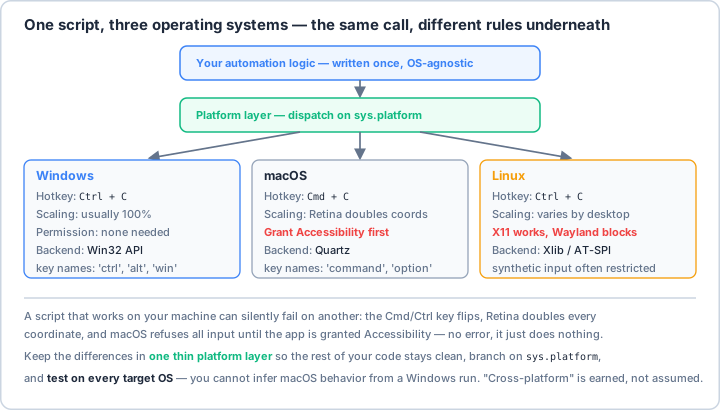
sys.platform, and test on every target OS — you can't infer macOS behavior from a Windows run.Real-World Scenario: The Universal Automation Framework 🚀
You're building a universal GUI automation framework that works identically across Windows, macOS, and Linux, handles different screen resolutions and DPI settings, adapts to various keyboard layouts and input methods, respects platform-specific security requirements, provides consistent API despite platform differences, supports both desktop and web applications, handles accessibility features properly, and maintains performance across different hardware. Your framework must detect capabilities dynamically, provide fallbacks for missing features, handle platform-specific edge cases, and deliver consistent results everywhere. Let's build a robust cross-platform automation framework!
# First, install required packages:
# pip install pyautogui pynput psutil pygetwindow pillow mss
# Platform-specific:
# Windows: pip install pywin32 pywinauto
# macOS: pip install pyobjc-framework-Quartz pyobjc-framework-ApplicationServices
# Linux: pip install python-xlib python-evdev ewmh
import os
import sys
import platform
import subprocess
import json
import logging
from typing import Dict, List, Optional, Tuple, Any, Callable, Union
from dataclasses import dataclass, field
from enum import Enum, auto
from pathlib import Path
from abc import ABC, abstractmethod
import importlib
import warnings
# Core libraries
import pyautogui
# Platform detection
SYSTEM = platform.system() # 'Windows', 'Linux', 'Darwin'
VERSION = platform.version()
ARCHITECTURE = platform.machine()
PYTHON_VERSION = sys.version_info
# ==================== Platform Detection ====================
class PlatformInfo:
"""Comprehensive platform detection."""
def __init__(self):
self.system = SYSTEM
self.version = VERSION
self.architecture = ARCHITECTURE
self.python_version = PYTHON_VERSION
# Detailed OS info
self.os_info = self._get_os_info()
# Display info
self.display_info = self._get_display_info()
# Available features
self.features = self._detect_features()
# Environment
self.environment = self._detect_environment()
def _get_os_info(self) -> Dict[str, Any]:
"""Get detailed OS information."""
info = {
'system': self.system,
'release': platform.release(),
'version': platform.version(),
'machine': platform.machine(),
'processor': platform.processor(),
'python_implementation': platform.python_implementation(),
}
if self.system == 'Windows':
info['edition'] = platform.win32_edition() if hasattr(platform, 'win32_edition') else None
info['version_tuple'] = sys.getwindowsversion() if hasattr(sys, 'getwindowsversion') else None
elif self.system == 'Linux':
try:
with open('/etc/os-release') as f:
os_release = {}
for line in f:
if '=' in line:
key, value = line.strip().split('=', 1)
os_release[key] = value.strip('"')
info['distribution'] = os_release.get('NAME', 'Unknown')
info['version_id'] = os_release.get('VERSION_ID', 'Unknown')
except:
info['distribution'] = 'Unknown'
elif self.system == 'Darwin':
info['darwin_version'] = platform.mac_ver()[0]
return info
def _get_display_info(self) -> Dict[str, Any]:
"""Get display information."""
info = {}
# Basic screen info
try:
width, height = pyautogui.size()
info['primary_screen'] = {'width': width, 'height': height}
except:
info['primary_screen'] = None
# Multi-monitor info
try:
from screeninfo import get_monitors
monitors = get_monitors()
info['monitor_count'] = len(monitors)
info['monitors'] = [
{
'width': m.width,
'height': m.height,
'x': m.x,
'y': m.y,
'is_primary': m.is_primary if hasattr(m, 'is_primary') else False
}
for m in monitors
]
except:
info['monitor_count'] = 1
# DPI info
info['dpi'] = self._get_dpi()
return info
def _get_dpi(self) -> Optional[float]:
"""Get screen DPI."""
if self.system == 'Windows':
try:
import ctypes
hdc = ctypes.windll.user32.GetDC(0)
dpi = ctypes.windll.gdi32.GetDeviceCaps(hdc, 88) # LOGPIXELSX
ctypes.windll.user32.ReleaseDC(0, hdc)
return dpi
except:
return None
elif self.system == 'Darwin':
# macOS typically uses 72 or 144 DPI (Retina)
return 72.0
elif self.system == 'Linux':
# Try to get from X11
try:
from Xlib import display
d = display.Display()
screen = d.screen()
# Calculate DPI from screen dimensions
width_mm = screen.width_in_mms
width_px = screen.width_in_pixels
if width_mm > 0:
return (width_px * 25.4) / width_mm
except:
pass
return None
def _detect_features(self) -> Dict[str, bool]:
"""Detect available features."""
features = {}
# Check for various libraries
libraries = {
'pyautogui': 'pyautogui',
'pynput': 'pynput',
'pygetwindow': 'pygetwindow',
'win32': 'win32api' if self.system == 'Windows' else None,
'quartz': 'Quartz' if self.system == 'Darwin' else None,
'x11': 'Xlib' if self.system == 'Linux' else None,
'opencv': 'cv2',
'tesseract': 'pytesseract',
'numpy': 'numpy'
}
for name, module in libraries.items():
if module:
try:
importlib.import_module(module)
features[name] = True
except ImportError:
features[name] = False
else:
features[name] = False
# Check for specific capabilities
features['admin_rights'] = self._check_admin_rights()
features['accessibility_api'] = self._check_accessibility_api()
return features
def _detect_environment(self) -> Dict[str, Any]:
"""Detect runtime environment."""
env = {
'display': os.environ.get('DISPLAY'), # X11
'wayland': 'WAYLAND_DISPLAY' in os.environ, # Wayland
'ssh': 'SSH_CONNECTION' in os.environ,
'docker': Path('/.dockerenv').exists(),
'wsl': 'WSL_DISTRO_NAME' in os.environ,
'virtual_env': hasattr(sys, 'real_prefix') or (
hasattr(sys, 'base_prefix') and sys.base_prefix != sys.prefix
),
'conda': 'CONDA_DEFAULT_ENV' in os.environ
}
return env
def _check_admin_rights(self) -> bool:
"""Check if running with admin/root privileges."""
if self.system == 'Windows':
try:
import ctypes
return ctypes.windll.shell32.IsUserAnAdmin() != 0
except:
return False
else: # Unix-like
return os.getuid() == 0
def _check_accessibility_api(self) -> bool:
"""Check if accessibility API is available."""
if self.system == 'Darwin':
# Check for accessibility permissions on macOS
try:
from ApplicationServices import AXIsProcessTrusted
return AXIsProcessTrusted()
except:
return False
elif self.system == 'Windows':
# Windows accessibility is generally available
return True
elif self.system == 'Linux':
# Check for AT-SPI on Linux
try:
subprocess.run(['dbus-send', '--version'],
capture_output=True, check=True)
return True
except:
return False
return False
def is_supported(self) -> bool:
"""Check if platform is supported for automation."""
return self.system in ['Windows', 'Linux', 'Darwin']
def get_report(self) -> str:
"""Generate platform report."""
report = []
report.append(f"Platform: {self.system} {self.version}")
report.append(f"Architecture: {self.architecture}")
report.append(f"Python: {'.'.join(map(str, self.python_version[:3]))}")
if self.display_info.get('primary_screen'):
screen = self.display_info['primary_screen']
report.append(f"Screen: {screen['width']}x{screen['height']}")
if self.display_info.get('dpi'):
report.append(f"DPI: {self.display_info['dpi']}")
report.append("\nFeatures:")
for feature, available in self.features.items():
status = "✓" if available else "✗"
report.append(f" {status} {feature}")
report.append("\nEnvironment:")
for key, value in self.environment.items():
if value:
report.append(f" • {key}: {value}")
return '\n'.join(report)
# ==================== Platform Abstraction Layer ====================
class PlatformAdapter(ABC):
"""Abstract base class for platform-specific implementations."""
@abstractmethod
def get_windows(self) -> List[Dict[str, Any]]:
"""Get list of windows."""
pass
@abstractmethod
def focus_window(self, window_id: Any) -> bool:
"""Focus a window."""
pass
@abstractmethod
def get_mouse_position(self) -> Tuple[int, int]:
"""Get mouse position."""
pass
@abstractmethod
def click(self, x: int, y: int, button: str = 'left'):
"""Perform mouse click."""
pass
@abstractmethod
def type_text(self, text: str):
"""Type text."""
pass
@abstractmethod
def press_key(self, key: str):
"""Press a key."""
pass
@abstractmethod
def take_screenshot(self, region: Optional[Tuple[int, int, int, int]] = None):
"""Take a screenshot."""
pass
class WindowsAdapter(PlatformAdapter):
"""Windows-specific implementation."""
def __init__(self):
self.logger = logging.getLogger(__name__)
try:
import win32gui
import win32api
import win32con
self.win32gui = win32gui
self.win32api = win32api
self.win32con = win32con
self.available = True
except ImportError:
self.available = False
self.logger.warning("Win32 API not available")
def get_windows(self) -> List[Dict[str, Any]]:
"""Get list of windows using Win32 API."""
if not self.available:
return []
windows = []
def enum_callback(hwnd, _):
if self.win32gui.IsWindowVisible(hwnd):
title = self.win32gui.GetWindowText(hwnd)
if title:
rect = self.win32gui.GetWindowRect(hwnd)
windows.append({
'id': hwnd,
'title': title,
'x': rect[0],
'y': rect[1],
'width': rect[2] - rect[0],
'height': rect[3] - rect[1]
})
self.win32gui.EnumWindows(enum_callback, None)
return windows
def focus_window(self, window_id: Any) -> bool:
"""Focus window using Win32 API."""
if not self.available:
return False
try:
self.win32gui.SetForegroundWindow(window_id)
return True
except:
return False
def get_mouse_position(self) -> Tuple[int, int]:
"""Get mouse position."""
if self.available:
pos = self.win32api.GetCursorPos()
return pos
else:
return pyautogui.position()
def click(self, x: int, y: int, button: str = 'left'):
"""Perform mouse click."""
pyautogui.click(x, y, button=button)
def type_text(self, text: str):
"""Type text."""
pyautogui.typewrite(text)
def press_key(self, key: str):
"""Press a key."""
pyautogui.press(key)
def take_screenshot(self, region: Optional[Tuple[int, int, int, int]] = None):
"""Take a screenshot."""
return pyautogui.screenshot(region=region)
class MacOSAdapter(PlatformAdapter):
"""macOS-specific implementation."""
def __init__(self):
self.logger = logging.getLogger(__name__)
try:
from Quartz import CGWindowListCopyWindowInfo, kCGWindowListOptionOnScreenOnly, kCGNullWindowID
from ApplicationServices import AXIsProcessTrusted
self.quartz = True
self.trusted = AXIsProcessTrusted()
if not self.trusted:
self.logger.warning("Accessibility permissions not granted")
except ImportError:
self.quartz = False
self.trusted = False
self.logger.warning("Quartz not available")
def get_windows(self) -> List[Dict[str, Any]]:
"""Get list of windows using Quartz."""
if not self.quartz:
return []
from Quartz import CGWindowListCopyWindowInfo, kCGWindowListOptionOnScreenOnly, kCGNullWindowID
windows = []
window_list = CGWindowListCopyWindowInfo(kCGWindowListOptionOnScreenOnly, kCGNullWindowID)
for window in window_list:
title = window.get('kCGWindowName', '')
if title:
bounds = window.get('kCGWindowBounds', {})
windows.append({
'id': window.get('kCGWindowNumber'),
'title': title,
'x': bounds.get('X', 0),
'y': bounds.get('Y', 0),
'width': bounds.get('Width', 0),
'height': bounds.get('Height', 0)
})
return windows
def focus_window(self, window_id: Any) -> bool:
"""Focus window on macOS."""
# macOS window focusing requires AppleScript or specific app APIs
try:
script = f'''
tell application "System Events"
set frontmost of (first process whose id is {window_id}) to true
end tell
'''
subprocess.run(['osascript', '-e', script], check=True)
return True
except:
return False
def get_mouse_position(self) -> Tuple[int, int]:
"""Get mouse position."""
return pyautogui.position()
def click(self, x: int, y: int, button: str = 'left'):
"""Perform mouse click."""
pyautogui.click(x, y, button=button)
def type_text(self, text: str):
"""Type text."""
pyautogui.typewrite(text)
def press_key(self, key: str):
"""Press a key."""
pyautogui.press(key)
def take_screenshot(self, region: Optional[Tuple[int, int, int, int]] = None):
"""Take a screenshot."""
return pyautogui.screenshot(region=region)
class LinuxAdapter(PlatformAdapter):
"""Linux-specific implementation."""
def __init__(self):
self.logger = logging.getLogger(__name__)
# Detect display server
self.display_server = self._detect_display_server()
# Initialize X11 if available
try:
from ewmh import EWMH
from Xlib import display
self.ewmh = EWMH()
self.display = display.Display()
self.x11_available = True
except ImportError:
self.x11_available = False
self.logger.warning("X11 libraries not available")
def _detect_display_server(self) -> str:
"""Detect display server (X11 or Wayland)."""
if 'WAYLAND_DISPLAY' in os.environ:
return 'wayland'
elif 'DISPLAY' in os.environ:
return 'x11'
else:
return 'unknown'
def get_windows(self) -> List[Dict[str, Any]]:
"""Get list of windows using X11/EWMH."""
if not self.x11_available:
return []
windows = []
try:
for window in self.ewmh.getClientList():
title = self.ewmh.getWmName(window)
if title:
geometry = window.get_geometry()
windows.append({
'id': window.id,
'title': title.decode('utf-8') if isinstance(title, bytes) else title,
'x': geometry.x,
'y': geometry.y,
'width': geometry.width,
'height': geometry.height
})
except:
pass
return windows
def focus_window(self, window_id: Any) -> bool:
"""Focus window using X11."""
if not self.x11_available:
return False
try:
window = self.display.create_resource_object('window', window_id)
self.ewmh.setActiveWindow(window)
self.ewmh.display.flush()
return True
except:
return False
def get_mouse_position(self) -> Tuple[int, int]:
"""Get mouse position."""
return pyautogui.position()
def click(self, x: int, y: int, button: str = 'left'):
"""Perform mouse click."""
pyautogui.click(x, y, button=button)
def type_text(self, text: str):
"""Type text."""
pyautogui.typewrite(text)
def press_key(self, key: str):
"""Press a key."""
pyautogui.press(key)
def take_screenshot(self, region: Optional[Tuple[int, int, int, int]] = None):
"""Take a screenshot."""
return pyautogui.screenshot(region=region)
# ==================== Cross-Platform Manager ====================
class CrossPlatformAutomation:
"""Main cross-platform automation interface."""
def __init__(self):
self.logger = logging.getLogger(__name__)
# Detect platform
self.platform_info = PlatformInfo()
# Initialize appropriate adapter
self.adapter = self._init_adapter()
# Initialize safety features
self._init_safety()
# Log platform info
self.logger.info(f"Platform: {self.platform_info.system}")
self.logger.info(f"Features: {self.platform_info.features}")
def _init_adapter(self) -> PlatformAdapter:
"""Initialize platform-specific adapter."""
if self.platform_info.system == 'Windows':
return WindowsAdapter()
elif self.platform_info.system == 'Darwin':
return MacOSAdapter()
elif self.platform_info.system == 'Linux':
return LinuxAdapter()
else:
raise NotImplementedError(f"Platform not supported: {self.platform_info.system}")
def _init_safety(self):
"""Initialize safety features."""
# Set PyAutoGUI failsafe
pyautogui.FAILSAFE = True
# Set pause between actions
pyautogui.PAUSE = 0.1
def get_windows(self) -> List[Dict[str, Any]]:
"""Get windows (cross-platform)."""
return self.adapter.get_windows()
def focus_window(self, window_id: Any) -> bool:
"""Focus window (cross-platform)."""
return self.adapter.focus_window(window_id)
def click(self, x: int, y: int, button: str = 'left'):
"""Click (cross-platform)."""
self.adapter.click(x, y, button)
def type_text(self, text: str):
"""Type text (cross-platform)."""
self.adapter.type_text(text)
def press_key(self, key: str):
"""Press key (cross-platform)."""
# Normalize key names across platforms
key = self._normalize_key(key)
self.adapter.press_key(key)
def hotkey(self, *keys):
"""Press hotkey combination (cross-platform)."""
# Use platform-specific modifier keys
keys = self._normalize_hotkey(keys)
pyautogui.hotkey(*keys)
def _normalize_key(self, key: str) -> str:
"""Normalize key name across platforms."""
key_map = {
'return': 'enter',
'escape': 'esc',
'command': 'cmd' if self.platform_info.system == 'Darwin' else 'ctrl',
'option': 'alt',
'control': 'ctrl'
}
return key_map.get(key.lower(), key)
def _normalize_hotkey(self, keys: Tuple[str, ...]) -> Tuple[str, ...]:
"""Normalize hotkey for platform."""
normalized = []
for key in keys:
# Convert Command to Ctrl on non-Mac
if key.lower() in ['command', 'cmd'] and self.platform_info.system != 'Darwin':
normalized.append('ctrl')
# Convert Ctrl to Command on Mac
elif key.lower() == 'ctrl' and self.platform_info.system == 'Darwin':
normalized.append('cmd')
else:
normalized.append(self._normalize_key(key))
return tuple(normalized)
def take_screenshot(self, region: Optional[Tuple[int, int, int, int]] = None):
"""Take screenshot (cross-platform)."""
return self.adapter.take_screenshot(region)
# ==================== Platform-Specific Features ====================
class PlatformFeatures:
"""Handle platform-specific features and capabilities."""
def __init__(self, platform_info: PlatformInfo):
self.platform_info = platform_info
self.logger = logging.getLogger(__name__)
def request_accessibility_permissions(self) -> bool:
"""Request accessibility permissions."""
if self.platform_info.system == 'Darwin':
# macOS - check and request accessibility
try:
from ApplicationServices import AXIsProcessTrusted
if not AXIsProcessTrusted():
print("Accessibility permissions required.")
print("Please grant accessibility permissions in:")
print("System Preferences > Security & Privacy > Privacy > Accessibility")
# Open accessibility preferences
subprocess.run([
'osascript', '-e',
'tell application "System Preferences" to reveal anchor "Privacy_Accessibility" of pane id "com.apple.preference.security"'
])
subprocess.run(['osascript', '-e', 'tell application "System Preferences" to activate'])
return False
return True
except ImportError:
self.logger.warning("Cannot check accessibility permissions")
return False
elif self.platform_info.system == 'Windows':
# Windows - check for admin rights
if not self.platform_info.features.get('admin_rights'):
print("Consider running with administrator privileges for full functionality")
return True
elif self.platform_info.system == 'Linux':
# Linux - check for X11 access
if not os.environ.get('DISPLAY'):
print("No DISPLAY variable set. GUI automation may not work.")
return False
return True
return False
def get_keyboard_layout(self) -> Optional[str]:
"""Get current keyboard layout."""
if self.platform_info.system == 'Windows':
try:
import ctypes
# Get keyboard layout
user32 = ctypes.windll.user32
layout_id = user32.GetKeyboardLayout(0)
# Convert to language code
language_id = layout_id & 0xFFFF
return f"0x{language_id:04X}"
except:
return None
elif self.platform_info.system == 'Darwin':
try:
# Use Carbon framework
from Carbon import Keyboard
return Keyboard.GetKeyboardLayout()
except:
return None
elif self.platform_info.system == 'Linux':
try:
# Use setxkbmap
result = subprocess.run(
['setxkbmap', '-query'],
capture_output=True,
text=True
)
for line in result.stdout.split('\n'):
if 'layout:' in line:
return line.split(':')[1].strip()
except:
pass
return None
def handle_dpi_scaling(self, coordinates: Tuple[int, int]) -> Tuple[int, int]:
"""Handle DPI scaling for coordinates."""
if not self.platform_info.display_info.get('dpi'):
return coordinates
dpi = self.platform_info.display_info['dpi']
# Standard DPI is 96 on Windows, 72 on macOS
standard_dpi = 96 if self.platform_info.system == 'Windows' else 72
if dpi and dpi != standard_dpi:
scale_factor = dpi / standard_dpi
x, y = coordinates
return (int(x * scale_factor), int(y * scale_factor))
return coordinates
# ==================== Compatibility Layer ====================
class CompatibilityLayer:
"""Ensure compatibility across different environments."""
def __init__(self, platform_info: PlatformInfo):
self.platform_info = platform_info
self.logger = logging.getLogger(__name__)
def check_environment(self) -> Dict[str, Any]:
"""Check environment compatibility."""
issues = []
warnings = []
# Check for headless environment
if self.platform_info.environment.get('ssh'):
issues.append("Running over SSH - GUI automation may not work")
# Check for container environment
if self.platform_info.environment.get('docker'):
warnings.append("Running in Docker - ensure display is properly configured")
# Check for WSL
if self.platform_info.environment.get('wsl'):
warnings.append("Running in WSL - ensure X server is configured")
# Check for Wayland
if self.platform_info.environment.get('wayland'):
warnings.append("Wayland detected - some features may be limited")
# Check for virtual environment
if self.platform_info.environment.get('virtual_env'):
self.logger.info("Running in virtual environment")
return {
'compatible': len(issues) == 0,
'issues': issues,
'warnings': warnings
}
def provide_fallback(self, feature: str) -> Optional[Callable]:
"""Provide fallback for missing features."""
fallbacks = {
'window_management': self._fallback_window_management,
'ocr': self._fallback_ocr,
'advanced_mouse': self._fallback_mouse
}
return fallbacks.get(feature)
def _fallback_window_management(self):
"""Fallback for window management."""
self.logger.warning("Window management not available, using click-based activation")
def activate_window_by_click(title: str):
# Try to find window by taking screenshot and OCR
# This is a simplified example
import pyautogui
# Click on taskbar or dock area
if self.platform_info.system == 'Windows':
# Click on taskbar
pyautogui.click(100, pyautogui.size()[1] - 30)
elif self.platform_info.system == 'Darwin':
# Click on dock
pyautogui.click(pyautogui.size()[0] // 2, pyautogui.size()[1] - 30)
return activate_window_by_click
def _fallback_ocr(self):
"""Fallback for OCR."""
self.logger.warning("OCR not available, using image matching")
def find_text_by_image(text_image_path: str):
import pyautogui
try:
location = pyautogui.locateOnScreen(text_image_path)
if location:
return pyautogui.center(location)
except:
pass
return None
return find_text_by_image
def _fallback_mouse(self):
"""Fallback for advanced mouse control."""
self.logger.warning("Advanced mouse control not available, using basic movements")
def simple_move(x: int, y: int):
pyautogui.moveTo(x, y)
return simple_move
# ==================== Testing Framework ====================
class CrossPlatformTester:
"""Test automation across platforms."""
def __init__(self):
self.platform_info = PlatformInfo()
self.automation = CrossPlatformAutomation()
self.compatibility = CompatibilityLayer(self.platform_info)
self.results = []
def run_tests(self) -> Dict[str, Any]:
"""Run cross-platform tests."""
print("Running cross-platform tests...\n")
# Test platform detection
self._test_platform_detection()
# Test basic operations
self._test_basic_operations()
# Test compatibility
self._test_compatibility()
# Generate report
return self._generate_report()
def _test_platform_detection(self):
"""Test platform detection."""
test = {
'name': 'Platform Detection',
'passed': self.platform_info.is_supported(),
'details': {
'system': self.platform_info.system,
'version': self.platform_info.version,
'features': self.platform_info.features
}
}
self.results.append(test)
def _test_basic_operations(self):
"""Test basic operations."""
operations = [
('Mouse Position', lambda: self.automation.adapter.get_mouse_position()),
('Screenshot', lambda: self.automation.take_screenshot() is not None),
('Window List', lambda: len(self.automation.get_windows()) > 0)
]
for name, operation in operations:
try:
result = operation()
test = {
'name': name,
'passed': bool(result),
'details': str(result)[:100]
}
except Exception as e:
test = {
'name': name,
'passed': False,
'error': str(e)
}
self.results.append(test)
def _test_compatibility(self):
"""Test compatibility."""
compat_check = self.compatibility.check_environment()
test = {
'name': 'Environment Compatibility',
'passed': compat_check['compatible'],
'issues': compat_check['issues'],
'warnings': compat_check['warnings']
}
self.results.append(test)
def _generate_report(self) -> Dict[str, Any]:
"""Generate test report."""
passed = sum(1 for t in self.results if t.get('passed'))
total = len(self.results)
report = {
'platform': self.platform_info.system,
'tests_run': total,
'tests_passed': passed,
'success_rate': f"{(passed/total)*100:.1f}%",
'results': self.results
}
return report
# Example usage
if __name__ == "__main__":
print("🌍 Cross-Platform GUI Automation Examples\n")
# Example 1: Platform detection
print("1️⃣ Platform Detection:")
platform_info = PlatformInfo()
print(platform_info.get_report())
# Example 2: Cross-platform automation
print("\n2️⃣ Cross-Platform Automation:")
try:
automation = CrossPlatformAutomation()
print(" ✓ Automation initialized")
# Get mouse position (works everywhere)
x, y = automation.adapter.get_mouse_position()
print(f" Mouse position: ({x}, {y})")
except Exception as e:
print(f" ✗ Error: {e}")
# Example 3: Platform-specific features
print("\n3️⃣ Platform Features:")
features = PlatformFeatures(platform_info)
# Check accessibility
if features.request_accessibility_permissions():
print(" ✓ Accessibility permissions granted")
else:
print(" ⚠️ Accessibility permissions needed")
# Get keyboard layout
layout = features.get_keyboard_layout()
print(f" Keyboard layout: {layout or 'Unknown'}")
# Example 4: Compatibility checking
print("\n4️⃣ Environment Compatibility:")
compatibility = CompatibilityLayer(platform_info)
env_check = compatibility.check_environment()
if env_check['compatible']:
print(" ✓ Environment compatible")
else:
print(" ✗ Issues found:")
for issue in env_check['issues']:
print(f" - {issue}")
if env_check['warnings']:
print(" ⚠️ Warnings:")
for warning in env_check['warnings']:
print(f" - {warning}")
# Example 5: Cross-platform hotkeys
print("\n5️⃣ Cross-Platform Hotkeys:")
hotkeys = [
("Copy", ["ctrl", "c"] if platform_info.system != "Darwin" else ["cmd", "c"]),
("Paste", ["ctrl", "v"] if platform_info.system != "Darwin" else ["cmd", "v"]),
("Undo", ["ctrl", "z"] if platform_info.system != "Darwin" else ["cmd", "z"]),
("Select All", ["ctrl", "a"] if platform_info.system != "Darwin" else ["cmd", "a"]),
]
for name, keys in hotkeys:
print(f" {name}: {' + '.join(keys)}")
# Example 6: Platform differences
print("\n6️⃣ Key Platform Differences:")
differences = {
"Windows": [
"Win32 API for window management",
"Registry for settings",
"UAC for elevation",
".exe executables"
],
"macOS": [
"Quartz/CoreGraphics for display",
"Accessibility API requires permission",
"Command key instead of Ctrl",
".app bundles"
],
"Linux": [
"X11 or Wayland display servers",
"Window managers vary widely",
"Package managers differ",
"Different desktop environments"
]
}
for platform, items in differences.items():
print(f"\n {platform}:")
for item in items:
print(f" • {item}")
# Example 7: Fallback strategies
print("\n7️⃣ Fallback Strategies:")
strategies = [
"Use PyAutoGUI as universal fallback",
"Implement platform-specific adapters",
"Provide alternative methods for missing features",
"Use image recognition when APIs unavailable",
"Gracefully degrade functionality",
"Warn users about limitations"
]
for strategy in strategies:
print(f" • {strategy}")
# Example 8: Testing across platforms
print("\n8️⃣ Cross-Platform Testing:")
tester = CrossPlatformTester()
test_report = tester.run_tests()
print(f" Tests run: {test_report['tests_run']}")
print(f" Tests passed: {test_report['tests_passed']}")
print(f" Success rate: {test_report['success_rate']}")
# Example 9: Best practices
print("\n9️⃣ Cross-Platform Best Practices:")
practices = [
"🔍 Always detect platform at runtime",
"🎯 Use abstraction layers for platform-specific code",
"📦 Handle missing dependencies gracefully",
"🔑 Normalize keyboard shortcuts across platforms",
"🖥️ Account for different screen configurations",
"🔒 Respect platform security models",
"📝 Provide clear platform requirements",
"🧪 Test on all target platforms",
"⚡ Optimize for platform-specific features",
"📚 Document platform limitations"
]
for practice in practices:
print(f" {practice}")
# Example 10: Common pitfalls
print("\n🔟 Common Cross-Platform Pitfalls:")
pitfalls = [
("Path separators", "Use os.path or pathlib"),
("Line endings", "Handle \\n, \\r\\n, \\r"),
("File permissions", "Check platform-specific permissions"),
("Process management", "Use subprocess properly"),
("GUI differences", "Test UI on each platform"),
("Keyboard layouts", "Don't assume QWERTY"),
("Screen coordinates", "Handle DPI scaling"),
("Package availability", "Check dependencies per platform")
]
for pitfall, solution in pitfalls:
print(f" ❌ {pitfall}")
print(f" → {solution}")
print("\n✅ Cross-platform automation demonstration complete!")
Key Takeaways and Best Practices 🎯
- Platform Detection: Always detect the platform at runtime.
- Abstraction Layers: Use adapters to isolate platform-specific code.
- Graceful Degradation: Provide fallbacks for missing features.
- Permission Handling: Request necessary permissions properly.
- Keyboard Normalization: Handle different keyboard shortcuts.
- DPI Awareness: Account for screen scaling differences.
- Environment Detection: Check for containers, SSH, WSL, etc.
- Comprehensive Testing: Test on all target platforms.
Cross-Platform Best Practices 📋
Mastering cross-platform considerations enables you to create truly universal automation solutions. You can now detect and adapt to different operating systems, handle platform-specific features properly, provide graceful fallbacks for missing capabilities, and build automation that works consistently everywhere. Whether you're creating enterprise tools, testing applications, or building productivity utilities, these cross-platform skills ensure your automation works for everyone, regardless of their operating system! 🚀
📓 Learning Journal
Keep a learning journal — digital or physical. After this lesson, take a few minutes to write down:
- Key concepts you learned
- Techniques that clicked for you
- Questions or confusion points to revisit
- Ideas you want to try
- Your progress and feelings about learning this
✍️ This lesson's prompt: The hardest cross-platform bugs are the silent ones — like macOS ignoring every input until Accessibility is granted, with no error at all. Which platform assumption did you not realize you were making, and how would you now surface a failure like that instead of letting it fail quietly?
📝 Lesson Summary
🎓 Key Takeaways
- "Cross-platform" is earned, not assumed — detect the OS and environment at runtime instead of hardcoding assumptions.
- Keep every OS difference in one thin platform layer (an adapter per OS) so the rest of your code stays clean.
- The common gotchas are concrete: Cmd vs Ctrl, Retina/DPI scaling doubling coordinates, and macOS silently blocking input without Accessibility permission.
- Design to degrade gracefully — provide fallbacks and clear messages when a feature or permission is missing rather than crashing.
🎉 What You've Accomplished
You can now write automation that adapts to whatever machine it runs on — detecting platform capabilities, normalizing input, handling scaling, requesting permissions, and falling back gracefully. That's the difference between a script that works on your laptop and a tool your whole team can run.
❓ Common Questions at This Stage
Why does my script do nothing on macOS but throw no error?
macOS blocks synthetic input from apps that haven't been granted Accessibility permission (System Settings → Privacy & Security → Accessibility), and it does so silently. Check AXIsProcessTrusted() at startup and prompt the user to grant permission, rather than letting every action quietly no-op.
My clicks land in the wrong spot on a high-resolution display. What's going on?
That's DPI/Retina scaling. A logical coordinate maps to more physical pixels, so a point you measured at 100% scaling is off at 150% or on a Retina screen. Detect the scale factor and convert coordinates, or capture your target positions on the same display the script will run on.
Can I just test on one OS and trust it works everywhere?
No. Window management, permission models, and even "cross-platform" libraries like PyAutoGUI behave differently per OS — and Wayland blocks much of the synthetic input that X11 allows. You cannot infer macOS or Linux behavior from a Windows run; test on each real target.
🔭 Looking Ahead
You've completed the desktop GUI automation toolkit. Next you'll take automation into conversation — building bots that respond to messages and commands, starting with chat platforms.
✅ Before the Next Lesson
- Write a small startup check that prints the OS, display server, DPI, and whether required permissions are granted, then run it on any second machine you can access.
- Take one hardcoded hotkey in a script and route it through a normalize step so it uses Cmd on macOS and Ctrl elsewhere.
- Write your Learning Journal entry for this lesson.
🌟 Encouragement for the Journey
Writing software that behaves well everywhere is a mark of real craftsmanship. You now think like a diplomat of operating systems — anticipating differences instead of being surprised by them. That mindset will serve you far beyond automation. Keep going!
Pro Tip: Think of cross-platform automation as being a polyglot diplomat - you need to speak multiple languages and understand different cultures. Always detect the platform at runtime rather than hardcoding assumptions. Use abstraction layers to isolate platform-specific code - this makes maintenance much easier. Handle missing dependencies gracefully with try/except blocks and provide helpful error messages. Normalize keyboard shortcuts - remember that Ctrl on Windows/Linux is Cmd on macOS. Be aware of path separators (use pathlib for cross-platform paths). Handle different line endings properly (\\n vs \\r\\n). Request permissions appropriately - macOS needs accessibility permissions, Windows might need admin rights, Linux needs X11 access. Test for environment issues like running over SSH, in Docker, or in WSL. Account for DPI scaling differences, especially between standard and Retina displays. Provide fallbacks when platform-specific features aren't available. Use image recognition as a universal fallback for window finding. Document platform-specific limitations clearly. Test on actual hardware, not just VMs - behavior can differ. Remember that even "cross-platform" libraries like PyAutoGUI have platform-specific quirks. Most importantly: design your automation to degrade gracefully when features aren't available rather than failing completely!