✈️ Telegram Bots: Create Versatile Messaging Bots
📚 What You'll Learn
By the end of this lesson, you will be able to:
- Register a bot with BotFather and obtain its API token
- Understand that a bot receives a stream of typed Update objects (commands, text, callbacks, media), not plain "messages"
- Register handlers with
python-telegram-botand order them specific → general, always including a fallback - Build inline and reply keyboards, and answer a button tap's
callback_queryso the user doesn't see a spinner - Choose between long polling (
getUpdateswith an offset) and webhooks, and explain the trade-offs - Handle media and maintain conversation context across a multi-step flow
⏱️ Estimated Time: 45–60 minutes
🎯 Project: Build a Telegram bot that responds to /start, shows an inline keyboard, and correctly answers the button tap's callback query — with a fallback handler for anything unmatched.
Telegram bots are the Swiss Army knives of messaging automation - they can handle payments, manage groups, share files, play games, provide customer support, and even run entire businesses. With Telegram's powerful Bot API and extensive features like inline keyboards, custom keyboards, inline queries, and webhook support, you can build bots that serve millions of users worldwide. Let's explore the comprehensive world of Telegram bot development! 🤖
The Telegram Bot Architecture
Think of Telegram bots as virtual assistants that live in the cloud - they can chat privately, manage groups with thousands of members, send rich media, process payments, and integrate with web services. Using libraries like python-telegram-bot or aiogram, you can create bots that handle everything from simple commands to complex conversational AI. Understanding Telegram's update system, message types, and inline features is crucial for building powerful bots!
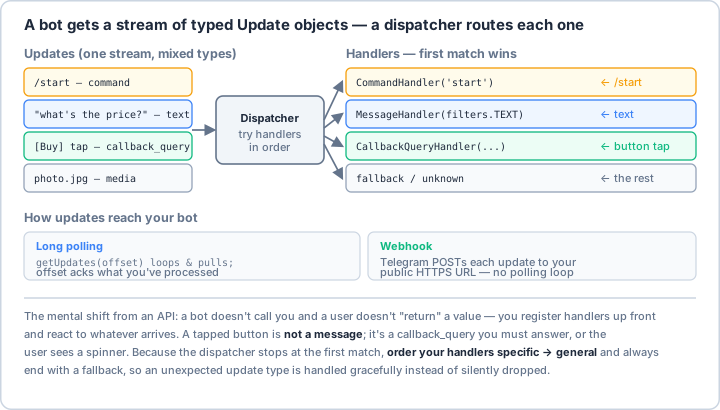
callback_query, media), and a dispatcher routes each to the first matching handler. So the mental shift from an API is that you register handlers up front and react to whatever arrives. Order handlers specific → general and always add a fallback, and remember a tapped button is not a message — it's a callback_query you must answer or the user just sees a spinner.Real-World Scenario: The Multi-Purpose Service Bot 🌐
You're building a comprehensive Telegram bot for a digital services company that handles customer support inquiries, processes orders and payments, manages subscription services, sends notifications and alerts, moderates community groups, provides interactive tutorials, tracks deliveries, and integrates with CRM systems. Your bot must handle thousands of concurrent users, support multiple languages, process media files, and maintain conversation context. Let's build a production-ready Telegram bot framework!
# First, install required packages:
# pip install python-telegram-bot aiogram redis asyncpg pillow qrcode stripe
import os
import logging
import json
import asyncio
from typing import Optional, List, Dict, Any, Union, Callable
from datetime import datetime, timedelta
from dataclasses import dataclass, field
from enum import Enum
import re
import hashlib
import io
# Telegram Bot API
from telegram import (
Update, Bot, InlineKeyboardButton, InlineKeyboardMarkup,
ReplyKeyboardMarkup, KeyboardButton, ReplyKeyboardRemove,
InputMediaPhoto, LabeledPrice,
InlineQueryResultArticle, InputTextMessageContent
)
from telegram.constants import ParseMode, ChatAction
from telegram.ext import (
Application, CommandHandler, MessageHandler, CallbackQueryHandler,
ConversationHandler, ContextTypes, filters, InlineQueryHandler,
PreCheckoutQueryHandler, ShippingQueryHandler
)
# For async operations with aiogram (alternative)
import aiogram
from aiogram import Bot as AiogramBot, Dispatcher, types
from aiogram.filters import Command
from aiogram.fsm.context import FSMContext
from aiogram.fsm.state import State, StatesGroup
from aiogram.fsm.storage.memory import MemoryStorage
# Load environment variables
from dotenv import load_dotenv
load_dotenv()
# ==================== Bot Configuration ====================
@dataclass
class TelegramBotConfig:
"""Telegram bot configuration."""
token: str
webhook_url: Optional[str] = None
use_webhooks: bool = False
# Features
enable_payments: bool = False
payment_token: Optional[str] = None
enable_inline_mode: bool = True
# Admin settings
admin_ids: List[int] = field(default_factory=list)
support_chat_id: Optional[int] = None
# Database
database_url: str = "sqlite:///telegram_bot.db"
redis_url: Optional[str] = None
# Limits
max_message_length: int = 4096
max_buttons_per_row: int = 3
# Localization
default_language: str = "en"
available_languages: List[str] = field(default_factory=lambda: ["en", "es", "ru"])
# ==================== User States for Conversations ====================
class ConversationStates(Enum):
"""Conversation states for stateful interactions."""
MAIN_MENU = 1
WAITING_NAME = 2
WAITING_EMAIL = 3
WAITING_FEEDBACK = 4
ORDER_PRODUCT = 5
ORDER_QUANTITY = 6
ORDER_CONFIRM = 7
SUPPORT_CATEGORY = 8
SUPPORT_DESCRIPTION = 9
# ==================== Main Bot Class ====================
class TelegramBot:
"""
Comprehensive Telegram bot with advanced features.
"""
def __init__(self, config: TelegramBotConfig):
self.config = config
self.logger = self._setup_logging()
# Initialize application
self.application = Application.builder().token(config.token).build()
# User data storage
self.user_data = {}
self.conversation_data = {}
# Register handlers
self._register_handlers()
def _setup_logging(self) -> logging.Logger:
"""Setup logging configuration."""
logging.basicConfig(
format='%(asctime)s - %(name)s - %(levelname)s - %(message)s',
level=logging.INFO
)
return logging.getLogger(__name__)
def _register_handlers(self):
"""Register all command and message handlers."""
# Command handlers
self.application.add_handler(CommandHandler("start", self.cmd_start))
self.application.add_handler(CommandHandler("help", self.cmd_help))
self.application.add_handler(CommandHandler("settings", self.cmd_settings))
self.application.add_handler(CommandHandler("subscribe", self.cmd_subscribe))
self.application.add_handler(CommandHandler("cancel", self.cmd_cancel))
# Conversation handler for registration
registration_conv = ConversationHandler(
entry_points=[CommandHandler("register", self.start_registration)],
states={
ConversationStates.WAITING_NAME: [
MessageHandler(filters.TEXT & ~filters.COMMAND, self.receive_name)
],
ConversationStates.WAITING_EMAIL: [
MessageHandler(filters.TEXT & ~filters.COMMAND, self.receive_email)
],
},
fallbacks=[CommandHandler("cancel", self.cancel_registration)]
)
self.application.add_handler(registration_conv)
# Order conversation handler
order_conv = ConversationHandler(
entry_points=[CommandHandler("order", self.start_order)],
states={
ConversationStates.ORDER_PRODUCT: [
CallbackQueryHandler(self.select_product, pattern="^product_")
],
ConversationStates.ORDER_QUANTITY: [
MessageHandler(filters.TEXT & ~filters.COMMAND, self.set_quantity)
],
ConversationStates.ORDER_CONFIRM: [
CallbackQueryHandler(self.confirm_order, pattern="^confirm_")
],
},
fallbacks=[CommandHandler("cancel", self.cancel_order)]
)
self.application.add_handler(order_conv)
# Callback query handler for inline keyboards
self.application.add_handler(CallbackQueryHandler(self.button_callback))
# Message handlers
self.application.add_handler(MessageHandler(filters.TEXT & ~filters.COMMAND, self.handle_message))
self.application.add_handler(MessageHandler(filters.PHOTO, self.handle_photo))
self.application.add_handler(MessageHandler(filters.Document.ALL, self.handle_document))
# Inline query handler
if self.config.enable_inline_mode:
self.application.add_handler(InlineQueryHandler(self.handle_inline_query))
# Payment handlers
if self.config.enable_payments:
self.application.add_handler(PreCheckoutQueryHandler(self.pre_checkout_callback))
self.application.add_handler(MessageHandler(filters.SUCCESSFUL_PAYMENT, self.successful_payment))
# Error handler
self.application.add_error_handler(self.error_handler)
# ==================== Command Handlers ====================
async def cmd_start(self, update: Update, context: ContextTypes.DEFAULT_TYPE):
"""Handle /start command."""
user = update.effective_user
# Create welcome message with inline keyboard
welcome_text = (
f"👋 Welcome, {user.first_name}!\n\n"
"I'm your personal assistant bot. I can help you with:\n"
"• 📝 Registration and account management\n"
"• 🛍️ Product orders and payments\n"
"• 💬 Customer support\n"
"• 📊 Analytics and reports\n"
"• 🔔 Notifications and reminders\n\n"
"How can I help you today?"
)
# Create inline keyboard
keyboard = [
[
InlineKeyboardButton("📝 Register", callback_data="action_register"),
InlineKeyboardButton("🛍️ Shop", callback_data="action_shop")
],
[
InlineKeyboardButton("💬 Support", callback_data="action_support"),
InlineKeyboardButton("⚙️ Settings", callback_data="action_settings")
],
[
InlineKeyboardButton("📊 Dashboard", callback_data="action_dashboard")
]
]
reply_markup = InlineKeyboardMarkup(keyboard)
await update.message.reply_text(
welcome_text,
reply_markup=reply_markup,
parse_mode=ParseMode.MARKDOWN
)
# Store user data
self.user_data[user.id] = {
"username": user.username,
"first_name": user.first_name,
"last_name": user.last_name,
"language_code": user.language_code,
"joined": datetime.now().isoformat()
}
async def cmd_help(self, update: Update, context: ContextTypes.DEFAULT_TYPE):
"""Handle /help command."""
help_text = """
📚 *Available Commands:*
*Basic Commands:*
/start - Start the bot
/help - Show this help message
/settings - Configure your preferences
/cancel - Cancel current operation
*Services:*
/register - Create new account
/order - Place an order
/subscribe - Manage subscriptions
/support - Get customer support
*Information:*
/status - Check service status
/about - About this bot
/contact - Contact information
*Tips:*
• You can use inline mode by typing @botname in any chat
• Send me photos or documents for processing
• Use the menu buttons for quick access to features
"""
await update.message.reply_text(
help_text,
parse_mode=ParseMode.MARKDOWN
)
async def cmd_settings(self, update: Update, context: ContextTypes.DEFAULT_TYPE):
"""Handle /settings command."""
user_id = update.effective_user.id
# Create settings keyboard
keyboard = [
[
InlineKeyboardButton("🌍 Language", callback_data="settings_language"),
InlineKeyboardButton("🔔 Notifications", callback_data="settings_notifications")
],
[
InlineKeyboardButton("👤 Profile", callback_data="settings_profile"),
InlineKeyboardButton("🔐 Privacy", callback_data="settings_privacy")
],
[
InlineKeyboardButton("🎨 Theme", callback_data="settings_theme"),
InlineKeyboardButton("❌ Delete Account", callback_data="settings_delete")
]
]
reply_markup = InlineKeyboardMarkup(keyboard)
await update.message.reply_text(
"⚙️ *Settings Menu*\n\nChoose what you want to configure:",
reply_markup=reply_markup,
parse_mode=ParseMode.MARKDOWN
)
async def cmd_subscribe(self, update: Update, context: ContextTypes.DEFAULT_TYPE):
"""Handle subscription command."""
# Create subscription options
keyboard = [
[InlineKeyboardButton("🆓 Free Plan", callback_data="sub_free")],
[InlineKeyboardButton("⭐ Basic ($9.99/mo)", callback_data="sub_basic")],
[InlineKeyboardButton("💎 Premium ($19.99/mo)", callback_data="sub_premium")],
[InlineKeyboardButton("👑 Enterprise (Custom)", callback_data="sub_enterprise")]
]
reply_markup = InlineKeyboardMarkup(keyboard)
subscription_text = """
📋 *Subscription Plans*
🆓 *Free Plan*
• Basic features
• 10 requests/day
• Community support
⭐ *Basic Plan* - $9.99/month
• All free features
• 100 requests/day
• Email support
• Priority processing
💎 *Premium Plan* - $19.99/month
• All basic features
• Unlimited requests
• 24/7 support
• API access
• Advanced analytics
👑 *Enterprise Plan* - Custom pricing
• Custom features
• Dedicated support
• SLA guarantee
• Custom integrations
"""
await update.message.reply_text(
subscription_text,
reply_markup=reply_markup,
parse_mode=ParseMode.MARKDOWN
)
async def cmd_cancel(self, update: Update, context: ContextTypes.DEFAULT_TYPE):
"""Handle /cancel command."""
await update.message.reply_text(
"❌ Operation cancelled.",
reply_markup=ReplyKeyboardRemove()
)
return ConversationHandler.END
# ==================== Registration Conversation ====================
async def start_registration(self, update: Update, context: ContextTypes.DEFAULT_TYPE):
"""Start registration process."""
await update.message.reply_text(
"Let's get you registered! 📝\n\n"
"Please tell me your full name:"
)
return ConversationStates.WAITING_NAME
async def receive_name(self, update: Update, context: ContextTypes.DEFAULT_TYPE):
"""Receive user's name."""
name = update.message.text
context.user_data['name'] = name
await update.message.reply_text(
f"Nice to meet you, {name}! 👋\n\n"
"Now, please provide your email address:"
)
return ConversationStates.WAITING_EMAIL
async def receive_email(self, update: Update, context: ContextTypes.DEFAULT_TYPE):
"""Receive user's email."""
email = update.message.text
# Validate email
if not re.match(r'^[a-zA-Z0-9._%+-]+@[a-zA-Z0-9.-]+\.[a-zA-Z]{2,}$', email):
await update.message.reply_text(
"❌ Invalid email format. Please try again:"
)
return ConversationStates.WAITING_EMAIL
context.user_data['email'] = email
# Complete registration
await update.message.reply_text(
f"✅ Registration complete!\n\n"
f"*Name:* {context.user_data['name']}\n"
f"*Email:* {email}\n\n"
"You can now access all features! 🎉",
parse_mode=ParseMode.MARKDOWN
)
return ConversationHandler.END
async def cancel_registration(self, update: Update, context: ContextTypes.DEFAULT_TYPE):
"""Cancel registration."""
await update.message.reply_text(
"Registration cancelled. You can start again with /register"
)
return ConversationHandler.END
# ==================== Order Conversation ====================
async def start_order(self, update: Update, context: ContextTypes.DEFAULT_TYPE):
"""Start order process."""
# Product catalog
products = [
{"id": "1", "name": "📱 Smartphone", "price": 599},
{"id": "2", "name": "💻 Laptop", "price": 1299},
{"id": "3", "name": "🎧 Headphones", "price": 199},
{"id": "4", "name": "⌚ Smartwatch", "price": 399}
]
keyboard = []
for product in products:
keyboard.append([
InlineKeyboardButton(
f"{product['name']} - ${product['price']}",
callback_data=f"product_{product['id']}"
)
])
reply_markup = InlineKeyboardMarkup(keyboard)
await update.message.reply_text(
"🛍️ *Product Catalog*\n\nSelect a product to order:",
reply_markup=reply_markup,
parse_mode=ParseMode.MARKDOWN
)
return ConversationStates.ORDER_PRODUCT
async def select_product(self, update: Update, context: ContextTypes.DEFAULT_TYPE):
"""Handle product selection."""
query = update.callback_query
await query.answer()
product_id = query.data.split('_')[1]
context.user_data['product_id'] = product_id
await query.edit_message_text(
"How many would you like to order? (Enter a number)"
)
return ConversationStates.ORDER_QUANTITY
async def set_quantity(self, update: Update, context: ContextTypes.DEFAULT_TYPE):
"""Set order quantity."""
try:
quantity = int(update.message.text)
if quantity < 1:
raise ValueError
except ValueError:
await update.message.reply_text(
"❌ Please enter a valid number greater than 0:"
)
return ConversationStates.ORDER_QUANTITY
context.user_data['quantity'] = quantity
# Show order summary
keyboard = [
[
InlineKeyboardButton("✅ Confirm", callback_data="confirm_yes"),
InlineKeyboardButton("❌ Cancel", callback_data="confirm_no")
]
]
reply_markup = InlineKeyboardMarkup(keyboard)
await update.message.reply_text(
f"📋 *Order Summary*\n\n"
f"Product: {context.user_data.get('product_id')}\n"
f"Quantity: {quantity}\n\n"
"Confirm your order?",
reply_markup=reply_markup,
parse_mode=ParseMode.MARKDOWN
)
return ConversationStates.ORDER_CONFIRM
async def confirm_order(self, update: Update, context: ContextTypes.DEFAULT_TYPE):
"""Confirm or cancel order."""
query = update.callback_query
await query.answer()
if query.data == "confirm_yes":
# Process order (in production, this would create actual order)
await query.edit_message_text(
"✅ Order placed successfully!\n\n"
"You will receive a confirmation shortly."
)
# Send invoice if payments enabled
if self.config.enable_payments:
await self.send_invoice(query.message.chat_id, context)
else:
await query.edit_message_text("Order cancelled.")
return ConversationHandler.END
async def cancel_order(self, update: Update, context: ContextTypes.DEFAULT_TYPE):
"""Cancel order process."""
await update.message.reply_text("Order cancelled.")
return ConversationHandler.END
# ==================== Inline Keyboard Callbacks ====================
async def button_callback(self, update: Update, context: ContextTypes.DEFAULT_TYPE):
"""Handle inline keyboard button presses."""
query = update.callback_query
await query.answer()
data = query.data
if data.startswith("action_"):
action = data.split("_")[1]
if action == "register":
await query.message.reply_text("Start registration with /register")
elif action == "shop":
await query.message.reply_text("Browse products with /order")
elif action == "support":
await self.show_support_menu(query.message)
elif action == "settings":
await query.message.reply_text("Configure settings with /settings")
elif action == "dashboard":
await self.show_dashboard(query.message, context)
elif data.startswith("settings_"):
setting = data.split("_")[1]
await self.handle_settings(query, setting)
elif data.startswith("sub_"):
plan = data.split("_")[1]
await self.handle_subscription(query, plan)
async def show_support_menu(self, message):
"""Show support menu."""
keyboard = [
[InlineKeyboardButton("🔧 Technical Support", callback_data="support_technical")],
[InlineKeyboardButton("💰 Billing Support", callback_data="support_billing")],
[InlineKeyboardButton("📚 Documentation", callback_data="support_docs")],
[InlineKeyboardButton("💬 Live Chat", callback_data="support_chat")]
]
reply_markup = InlineKeyboardMarkup(keyboard)
await message.reply_text(
"💬 *Support Center*\n\nHow can we help you?",
reply_markup=reply_markup,
parse_mode=ParseMode.MARKDOWN
)
async def show_dashboard(self, message, context: ContextTypes.DEFAULT_TYPE):
"""Show user dashboard."""
user_data = context.user_data
dashboard_text = f"""
📊 *User Dashboard*
👤 *Profile:*
Name: {user_data.get('name', 'Not set')}
Email: {user_data.get('email', 'Not set')}
📈 *Statistics:*
Orders: 0
Messages: 0
Support Tickets: 0
💳 *Subscription:*
Plan: Free
Expires: Never
🎯 *Quick Actions:*
Use the buttons below for quick access to features.
"""
await message.reply_text(
dashboard_text,
parse_mode=ParseMode.MARKDOWN
)
# ==================== Message Handlers ====================
async def handle_message(self, update: Update, context: ContextTypes.DEFAULT_TYPE):
"""Handle regular text messages."""
text = update.message.text
user_id = update.effective_user.id
# Simple echo for demonstration
# In production, this would use NLP for intent recognition
await update.message.reply_text(
f"You said: {text}\n\n"
"Use /help to see available commands."
)
async def handle_photo(self, update: Update, context: ContextTypes.DEFAULT_TYPE):
"""Handle photo messages."""
await update.message.reply_chat_action(ChatAction.TYPING)
# Get the largest photo
photo_file = await update.message.photo[-1].get_file()
await update.message.reply_text(
"📸 Photo received!\n\n"
f"File ID: {photo_file.file_id}\n"
f"Size: {photo_file.file_size} bytes\n\n"
"Processing image..."
)
# In production, you could download and process the image
# await photo_file.download_to_drive("photo.jpg")
async def handle_document(self, update: Update, context: ContextTypes.DEFAULT_TYPE):
"""Handle document uploads."""
document = update.message.document
await update.message.reply_text(
f"📄 Document received!\n\n"
f"Name: {document.file_name}\n"
f"Type: {document.mime_type}\n"
f"Size: {document.file_size} bytes"
)
# ==================== Inline Mode ====================
async def handle_inline_query(self, update: Update, context: ContextTypes.DEFAULT_TYPE):
"""Handle inline queries."""
query = update.inline_query.query
if not query:
return
# Create inline results
results = []
# Search products (example)
products = [
{"id": "1", "name": "Smartphone", "description": "Latest model"},
{"id": "2", "name": "Laptop", "description": "High performance"}
]
for product in products:
if query.lower() in product['name'].lower():
results.append(
InlineQueryResultArticle(
id=product['id'],
title=product['name'],
input_message_content=InputTextMessageContent(
f"Check out: {product['name']} - {product['description']}"
),
description=product['description']
)
)
await update.inline_query.answer(results)
# ==================== Payment Handling ====================
async def send_invoice(self, chat_id: int, context: ContextTypes.DEFAULT_TYPE):
"""Send payment invoice."""
if not self.config.payment_token:
return
# Create invoice
title = "Product Order"
description = "Your order from our shop"
payload = "order-payload"
provider_token = self.config.payment_token
currency = "USD"
prices = [LabeledPrice("Product", 10000)] # Price in cents
await context.bot.send_invoice(
chat_id=chat_id,
title=title,
description=description,
payload=payload,
provider_token=provider_token,
currency=currency,
prices=prices
)
async def pre_checkout_callback(self, update: Update, context: ContextTypes.DEFAULT_TYPE):
"""Handle pre-checkout query."""
query = update.pre_checkout_query
# Check the payload
if query.invoice_payload != 'order-payload':
await query.answer(ok=False, error_message="Something went wrong...")
else:
await query.answer(ok=True)
async def successful_payment(self, update: Update, context: ContextTypes.DEFAULT_TYPE):
"""Handle successful payment."""
await update.message.reply_text(
"✅ Payment received successfully!\n"
"Thank you for your order."
)
# ==================== Settings Handlers ====================
async def handle_settings(self, query, setting_type: str):
"""Handle settings changes."""
if setting_type == "language":
keyboard = [
[InlineKeyboardButton("🇬🇧 English", callback_data="lang_en")],
[InlineKeyboardButton("🇪🇸 Español", callback_data="lang_es")],
[InlineKeyboardButton("🇷🇺 Русский", callback_data="lang_ru")]
]
reply_markup = InlineKeyboardMarkup(keyboard)
await query.edit_message_text(
"🌍 Select your language:",
reply_markup=reply_markup
)
elif setting_type == "notifications":
keyboard = [
[
InlineKeyboardButton("✅ Enable All", callback_data="notif_all"),
InlineKeyboardButton("❌ Disable All", callback_data="notif_none")
],
[InlineKeyboardButton("⚙️ Custom", callback_data="notif_custom")]
]
reply_markup = InlineKeyboardMarkup(keyboard)
await query.edit_message_text(
"🔔 Notification Settings:",
reply_markup=reply_markup
)
async def handle_subscription(self, query, plan: str):
"""Handle subscription selection."""
if plan == "free":
await query.edit_message_text(
"You're already on the free plan!"
)
else:
# In production, this would initiate payment process
await query.edit_message_text(
f"Selected plan: {plan}\n"
"Payment integration would go here."
)
# ==================== Error Handler ====================
async def error_handler(self, update: Update, context: ContextTypes.DEFAULT_TYPE):
"""Handle errors."""
self.logger.error(f"Update {update} caused error {context.error}")
if update and update.effective_message:
await update.effective_message.reply_text(
"❌ An error occurred. Please try again later."
)
# ==================== Bot Control ====================
def run(self):
"""Run the bot."""
if self.config.use_webhooks:
# Webhook mode
self.application.run_webhook(
listen="0.0.0.0",
port=8443,
url_path=self.config.token,
webhook_url=f"{self.config.webhook_url}/{self.config.token}"
)
else:
# Polling mode
self.application.run_polling(allowed_updates=Update.ALL_TYPES)
# ==================== Utility Classes ====================
class KeyboardBuilder:
"""Helper class for building keyboards."""
@staticmethod
def create_reply_keyboard(buttons: List[List[str]],
resize: bool = True,
one_time: bool = False) -> ReplyKeyboardMarkup:
"""Create reply keyboard."""
keyboard = []
for row in buttons:
keyboard.append([KeyboardButton(text) for text in row])
return ReplyKeyboardMarkup(
keyboard,
resize_keyboard=resize,
one_time_keyboard=one_time
)
@staticmethod
def create_inline_keyboard(buttons: List[List[Dict[str, str]]]) -> InlineKeyboardMarkup:
"""Create inline keyboard."""
keyboard = []
for row in buttons:
keyboard_row = []
for button in row:
keyboard_row.append(
InlineKeyboardButton(
button['text'],
callback_data=button.get('callback_data'),
url=button.get('url')
)
)
keyboard.append(keyboard_row)
return InlineKeyboardMarkup(keyboard)
# ==================== Main Entry Point ====================
def main():
"""Main entry point."""
# Load configuration
config = TelegramBotConfig(
token=os.getenv("TELEGRAM_BOT_TOKEN"),
admin_ids=[int(id) for id in os.getenv("ADMIN_IDS", "").split(",") if id],
enable_payments=os.getenv("ENABLE_PAYMENTS", "false").lower() == "true",
payment_token=os.getenv("PAYMENT_TOKEN")
)
# Create and run bot
bot = TelegramBot(config)
print("🤖 Starting Telegram bot...")
print("Press Ctrl+C to stop")
bot.run()
# Example usage
if __name__ == "__main__":
print("✈️ Telegram Bot Examples\n")
# Example 1: Bot setup
print("1️⃣ Bot Setup with BotFather:")
steps = [
"Open Telegram and search @BotFather",
"Send /newbot command",
"Choose bot name and username",
"Receive bot token",
"Configure bot settings with /mybots",
"Enable inline mode if needed",
"Set up payments if required"
]
for i, step in enumerate(steps, 1):
print(f" {i}. {step}")
# Example 2: Message types
print("\n2️⃣ Telegram Message Types:")
msg_types = [
("Text", "Regular text messages"),
("Photo", "Images with captions"),
("Document", "Files and documents"),
("Video", "Video messages"),
("Voice", "Voice messages"),
("Location", "GPS coordinates"),
("Contact", "Contact cards"),
("Poll", "Interactive polls")
]
for msg_type, description in msg_types:
print(f" {msg_type}: {description}")
# Example 3: Keyboard types
print("\n3️⃣ Keyboard Types:")
keyboards = [
("Inline Keyboard", "Buttons attached to messages"),
("Reply Keyboard", "Custom keyboard replacing default"),
("Force Reply", "Force user to reply"),
("Remove Keyboard", "Hide custom keyboard")
]
for kb_type, description in keyboards:
print(f" {kb_type}: {description}")
# Example 4: Bot capabilities
print("\n4️⃣ Bot Capabilities:")
capabilities = [
"Send/receive messages",
"Manage groups and channels",
"Process payments",
"Share files up to 50MB",
"Create inline queries",
"Handle voice/video calls",
"Play games",
"Create web apps"
]
for capability in capabilities:
print(f" • {capability}")
# Example 5: Conversation states
print("\n5️⃣ Conversation Flow Example:")
flow = [
"User: /register",
"Bot: What's your name?",
"User: John Doe",
"Bot: What's your email?",
"User: john@example.com",
"Bot: Registration complete!"
]
for step in flow:
print(f" {step}")
# Example 6: Inline mode
print("\n6️⃣ Inline Mode Usage:")
print(" @your_bot search_query")
print(" → Bot shows inline results")
print(" → User selects result")
print(" → Result sent to chat")
# Example 7: Payment flow
print("\n7️⃣ Payment Processing Flow:")
payment_flow = [
"User selects product",
"Bot sends invoice",
"User enters payment details",
"Pre-checkout query validation",
"Payment processed",
"Success confirmation sent"
]
for step in payment_flow:
print(f" • {step}")
# Example 8: Group management
print("\n8️⃣ Group Management Features:")
features = [
"Welcome new members",
"Moderate content",
"Manage permissions",
"Create polls and votes",
"Schedule messages",
"Generate statistics"
]
for feature in features:
print(f" • {feature}")
# Example 9: Best practices
print("\n9️⃣ Telegram Bot Best Practices:")
practices = [
"🔐 Keep token secret",
"⚡ Respond quickly to updates",
"💾 Store user data securely",
"🎨 Use rich media and keyboards",
"🌍 Support multiple languages",
"📊 Track usage analytics",
"🛡️ Validate user input",
"💬 Provide helpful error messages",
"🔄 Handle rate limits",
"📱 Optimize for mobile"
]
for practice in practices:
print(f" {practice}")
print("\n✅ Telegram bot demonstration complete!")
print("\n📝 Note: To run the bot, you need:")
print(" 1. Bot token from @BotFather")
print(" 2. Install python-telegram-bot: pip install python-telegram-bot")
print(" 3. Set TELEGRAM_BOT_TOKEN environment variable")
print(" 4. Run with: python telegram_bot.py")
Key Takeaways and Best Practices 🎯
- Secure Your Token: Never expose your bot token publicly.
- Use Conversations: Implement ConversationHandler for multi-step interactions.
- Rich Keyboards: Use inline and reply keyboards for better UX.
- Handle Media: Process photos, documents, and other media types.
- Implement Inline Mode: Allow bot usage in any chat.
- Add Payment Support: Monetize with Telegram Payments API.
- Error Handling: Always handle exceptions gracefully.
- Use Webhooks in Production: More efficient than polling.
Telegram Bot Development Best Practices 📋
Mastering Telegram bot development enables you to create powerful, versatile bots that serve millions of users worldwide. You can now build bots for customer support, e-commerce, notifications, group management, and countless other use cases. Whether you're building for a small community or a global audience, these Telegram bot skills empower you to create engaging, interactive experiences! 🚀
Pro Tip: Think of Telegram bots as Swiss Army knives - they should be versatile, reliable, and user-friendly. Start by creating your bot with @BotFather and securing your token immediately. Use the python-telegram-bot library for comprehensive features and clean async handling. Implement ConversationHandler for complex interactions - it maintains state across multiple messages. Always use keyboards (inline or reply) instead of making users type commands. Handle all media types - users love sending photos and files. Implement inline mode to make your bot accessible from any chat. Use webhooks in production for better performance than polling. Add payment support if you're monetizing - Telegram handles the payment processing. Store user data securely and implement proper authentication for sensitive features. Support multiple languages if you have international users. Track analytics to understand usage patterns. Most importantly: make your bot conversational and helpful - users should feel like they're chatting with a smart assistant, not typing commands to a machine!