👁️ Directory Watching: Real-Time File System Monitoring
📚 What You'll Learn
By the end of this lesson, you will be able to:
- Use the
watchdoglibrary to observe a directory and respond to created, modified, deleted, and moved events - Write an event handler by subclassing
FileSystemEventHandlerand overriding itson_*methods - Debounce event storms so a single save doesn't trigger your action multiple times on a half-written file
- Filter out temp and hidden files, and confirm real changes with a content hash
- Offload heavy work to a background queue so the watcher thread stays responsive
- Choose the right OS-level backend (inotify, FSEvents, ReadDirectoryChangesW) and know when to fall back to watchdog
⏱️ Estimated Time: 45–60 minutes
🎯 Project: Build an auto-processor that watches a folder and reacts to each new or changed file — for example compiling, converting, or backing it up — with debouncing so it fires exactly once per real change.
Imagine having a security guard that never sleeps, constantly watching your files and folders, instantly reacting to any changes. That's what directory watching gives you – the power to respond to file system events in real-time! It's like having super-hearing for your hard drive. 🎯
Understanding File System Events
Every time you save a document, delete a file, or rename a folder, your operating system fires events. Directory watching lets us listen to these events and take action immediately. Think of it as setting up tripwires throughout your file system!
Real-World Scenario: The Auto-Compiler 🔧
You're working on a web project. Every time you save a TypeScript file, you want it compiled to JavaScript. Every time you modify a SASS file, you want CSS generated. Every time you update a Markdown file, you want HTML created. Let's automate all of this!
import time
from pathlib import Path
from watchdog.observers import Observer
from watchdog.events import FileSystemEventHandler
import subprocess
import hashlib
from datetime import datetime

class DevelopmentWatcher(FileSystemEventHandler):
    """
    A smart development watcher that automatically compiles,
    processes, and optimizes your files as you work.
    """

    def __init__(self, project_root):
        self.project_root = Path(project_root)
        self.file_handlers = {
            '.ts': self.compile_typescript,
            '.tsx': self.compile_typescript,
            '.scss': self.compile_sass,
            '.sass': self.compile_sass,
            '.md': self.convert_markdown,
            '.py': self.check_python_syntax,
            '.js': self.minify_javascript
        }
        # Track file hashes to avoid unnecessary recompilation
        self.file_hashes = {}
        self.compile_queue = []
        self.last_compile_time = {}

    def on_modified(self, event):
        """Called when a file is modified"""
        if event.is_directory:
            return

        file_path = Path(event.src_path)

        # Skip temporary files and hidden files
        if file_path.name.startswith('.') or file_path.name.endswith('~'):
            return

        # Check if file actually changed (some editors trigger multiple events)
        if not self._file_changed(file_path):
            return

        print(f"📝 Modified: {file_path.relative_to(self.project_root)}")
        self.process_file(file_path)

    def on_created(self, event):
        """Called when a new file is created"""
        if event.is_directory:
            print(f"📁 New directory: {Path(event.src_path).name}")
            return

        file_path = Path(event.src_path)
        print(f"✨ Created: {file_path.relative_to(self.project_root)}")
        self.process_file(file_path)

    def on_deleted(self, event):
        """Called when a file is deleted"""
        file_path = Path(event.src_path)
        print(f"🗑️ Deleted: {file_path.name}")

        # Clean up compiled versions if they exist
        self.cleanup_compiled_files(file_path)

    def on_moved(self, event):
        """Called when a file is moved or renamed"""
        src = Path(event.src_path)
        dest = Path(event.dest_path)
        print(f"📦 Moved: {src.name} → {dest.name}")

        # Update compiled file locations
        self.cleanup_compiled_files(src)
        self.process_file(dest)

    def _file_changed(self, file_path):
        """Check if file content actually changed using hash"""
        try:
            with open(file_path, 'rb') as f:
                current_hash = hashlib.md5(f.read()).hexdigest()

            prev_hash = self.file_hashes.get(str(file_path))
            self.file_hashes[str(file_path)] = current_hash

            return prev_hash != current_hash
        except:
            return True

    def process_file(self, file_path):
        """Process file based on its extension"""
        suffix = file_path.suffix.lower()

        # Debounce - avoid processing the same file too quickly
        last_time = self.last_compile_time.get(str(file_path), 0)
        if time.time() - last_time < 0.5:  # Wait at least 0.5 seconds
            return
        self.last_compile_time[str(file_path)] = time.time()

        # Find and execute the appropriate handler
        handler = self.file_handlers.get(suffix)
        if handler:
            try:
                handler(file_path)
            except Exception as e:
                print(f"❌ Error processing {file_path.name}: {e}")

    def compile_typescript(self, file_path):
        """Compile TypeScript to JavaScript"""
        output_path = file_path.with_suffix('.js')

        try:
            result = subprocess.run(
                ['tsc', str(file_path), '--outFile', str(output_path)],
                capture_output=True,
                text=True,
                timeout=10
            )

            if result.returncode == 0:
                print(f"  ✅ Compiled TypeScript → {output_path.name}")
            else:
                print(f"  ❌ TypeScript compilation failed:")
                print(f"     {result.stderr}")
        except subprocess.TimeoutExpired:
            print(f"  ⏱️ TypeScript compilation timed out")
        except FileNotFoundError:
            print(f"  ⚠️ TypeScript compiler (tsc) not found")

    def compile_sass(self, file_path):
        """Compile SASS/SCSS to CSS"""
        output_path = file_path.with_suffix('.css')

        try:
            result = subprocess.run(
                ['sass', str(file_path), str(output_path)],
                capture_output=True,
                text=True,
                timeout=10
            )

            if result.returncode == 0:
                print(f"  ✅ Compiled SASS → {output_path.name}")
                # Also create minified version
                self.minify_css(output_path)
            else:
                print(f"  ❌ SASS compilation failed:")
                print(f"     {result.stderr}")
        except FileNotFoundError:
            print(f"  ⚠️ SASS compiler not found")

    def convert_markdown(self, file_path):
        """Convert Markdown to HTML"""
        import markdown

        output_path = file_path.with_suffix('.html')

        try:
            with open(file_path, 'r', encoding='utf-8') as f:
                md_content = f.read()

            # Convert with extensions
            html_content = markdown.markdown(
                md_content,
                extensions=['extra', 'codehilite', 'toc']
            )

            # Wrap in basic HTML template
            full_html = f"""<!DOCTYPE html>
<html>
<head>
    <meta charset="UTF-8">
    <title>{file_path.stem}</title>
    <link rel="stylesheet" href="styles/main.css">
</head>
<body>
    {html_content}
</body>
</html>"""

            with open(output_path, 'w', encoding='utf-8') as f:
                f.write(full_html)

            print(f"  ✅ Converted Markdown → {output_path.name}")
        except Exception as e:
            print(f"  ❌ Markdown conversion failed: {e}")

    def check_python_syntax(self, file_path):
        """Check Python file for syntax errors and style issues"""
        try:
            # Syntax check
            result = subprocess.run(
                ['python', '-m', 'py_compile', str(file_path)],
                capture_output=True,
                text=True
            )

            if result.returncode != 0:
                print(f"  ❌ Python syntax error in {file_path.name}")
                return

            # Style check with flake8 (if available)
            result = subprocess.run(
                ['flake8', str(file_path), '--max-line-length=100'],
                capture_output=True,
                text=True
            )

            if result.stdout:
                print(f"  ⚠️ Style issues in {file_path.name}:")
                for line in result.stdout.strip().split('\n'):
                    print(f"     {line}")
            else:
                print(f"  ✅ Python file OK: {file_path.name}")
        except FileNotFoundError:
            # flake8 not installed, just do syntax check
            print(f"  ✅ Python syntax OK: {file_path.name}")

    def minify_javascript(self, file_path):
        """Minify JavaScript files"""
        # Skip already minified files
        if '.min.js' in file_path.name:
            return

        output_path = file_path.with_name(f"{file_path.stem}.min.js")

        try:
            # Using terser for minification
            result = subprocess.run(
                ['terser', str(file_path), '-o', str(output_path), '--compress', '--mangle'],
                capture_output=True,
                text=True
            )

            if result.returncode == 0:
                # Calculate size reduction
                original_size = file_path.stat().st_size
                minified_size = output_path.stat().st_size
                reduction = (1 - minified_size / original_size) * 100
                print(f"  ✅ Minified JS → {output_path.name} ({reduction:.1f}% smaller)")
        except FileNotFoundError:
            print(f"  ⚠️ Terser not found, skipping minification")

    def minify_css(self, file_path):
        """Minify CSS files"""
        if '.min.css' in file_path.name:
            return

        output_path = file_path.with_name(f"{file_path.stem}.min.css")

        try:
            with open(file_path, 'r') as f:
                css_content = f.read()

            # Simple CSS minification (remove comments, whitespace)
            import re
            # Remove comments
            minified = re.sub(r'/\*[\s\S]*?\*/', '', css_content)
            # Remove unnecessary whitespace
            minified = re.sub(r'\s+', ' ', minified)
            minified = re.sub(r':\s+', ':', minified)
            minified = re.sub(r';\s+', ';', minified)
            minified = re.sub(r'{\s+', '{', minified)
            minified = re.sub(r'}\s+', '}', minified)
            minified = re.sub(r'\s+{', '{', minified)

            with open(output_path, 'w') as f:
                f.write(minified)

            print(f"  ✅ Minified CSS → {output_path.name}")
        except Exception as e:
            print(f"  ❌ CSS minification failed: {e}")

    def cleanup_compiled_files(self, source_path):
        """Remove compiled versions when source is deleted"""
        # Map of source extensions to compiled extensions
        cleanup_map = {
            '.ts': ['.js', '.js.map'],
            '.tsx': ['.js', '.jsx', '.js.map'],
            '.scss': ['.css', '.min.css'],
            '.sass': ['.css', '.min.css'],
            '.md': ['.html'],
            '.js': ['.min.js']
        }

        extensions = cleanup_map.get(source_path.suffix.lower(), [])
        for ext in extensions:
            compiled_path = source_path.with_suffix(ext)
            if compiled_path.exists():
                compiled_path.unlink()
                print(f"  🧹 Cleaned up: {compiled_path.name}")

# Usage example
if __name__ == "__main__":
    project_path = "/home/user/my_web_project"

    event_handler = DevelopmentWatcher(project_path)
    observer = Observer()
    observer.schedule(event_handler, project_path, recursive=True)

    print(f"👀 Watching directory: {project_path}")
    print("Press Ctrl+C to stop...")

    observer.start()
    try:
        while True:
            time.sleep(1)
    except KeyboardInterrupt:
        observer.stop()
    observer.join()

    print("\n👋 File watcher stopped")
Advanced Pattern: The Smart Backup System 💾
Let's build a backup system that watches important directories and automatically creates versioned backups when files change. It's like having a time machine for your files!
import os
import shutil
import gzip
import json
from datetime import datetime, timedelta
from pathlib import Path
from watchdog.observers import Observer
from watchdog.events import FileSystemEventHandler
import threading
import queue

class IntelligentBackupSystem(FileSystemEventHandler):
    """
    An intelligent backup system that:
    - Watches for changes in important files
    - Creates versioned backups
    - Compresses old backups
    - Manages storage space intelligently
    """

    def __init__(self, watch_dir, backup_dir, config=None):
        self.watch_dir = Path(watch_dir)
        self.backup_dir = Path(backup_dir)
        self.backup_dir.mkdir(parents=True, exist_ok=True)

        # Configuration
        self.config = config or self.get_default_config()

        # Backup queue for async processing
        self.backup_queue = queue.Queue()
        self.backup_thread = threading.Thread(target=self._backup_worker, daemon=True)
        self.backup_thread.start()

        # Track backup history
        self.history_file = self.backup_dir / 'backup_history.json'
        self.history = self.load_history()

        # File importance patterns
        self.important_patterns = [
            '*.py', '*.js', '*.ts', '*.jsx', '*.tsx',  # Code
            '*.doc*', '*.pdf', '*.xlsx', '*.pptx',     # Documents
            '*.psd', '*.ai', '*.sketch',                # Design files
            '*.sql', '*.db', '*.sqlite',                # Databases
            'config.*', '*.conf', '*.ini', '*.yaml'     # Configs
        ]

    def get_default_config(self):
        """Default configuration for the backup system"""
        return {
            'max_versions': 10,              # Keep last 10 versions
            'compress_after_days': 1,        # Compress backups older than 1 day
            'delete_after_days': 30,         # Delete backups older than 30 days
            'min_change_size': 1,            # Min bytes changed to trigger backup
            'backup_delay_seconds': 5,       # Wait before backing up (debounce)
            'max_backup_size_gb': 10,        # Max total backup size
            'exclude_patterns': [            # Patterns to exclude
                '*.tmp', '*.temp', '~*', '.DS_Store', 'Thumbs.db',
                '__pycache__', 'node_modules', '.git'
            ]
        }

    def load_history(self):
        """Load backup history from file"""
        if self.history_file.exists():
            with open(self.history_file, 'r') as f:
                return json.load(f)
        return {}

    def save_history(self):
        """Save backup history to file"""
        with open(self.history_file, 'w') as f:
            json.dump(self.history, f, indent=2, default=str)

    def should_backup(self, file_path):
        """Determine if a file should be backed up"""
        file_path = Path(file_path)

        # Check exclude patterns
        for pattern in self.config['exclude_patterns']:
            if file_path.match(pattern):
                return False

        # Check if it's an important file
        for pattern in self.important_patterns:
            if file_path.match(pattern):
                return True

        # Check file size (don't backup huge files automatically)
        try:
            size_mb = file_path.stat().st_size / (1024 * 1024)
            if size_mb > 100:  # Files larger than 100MB need manual backup
                print(f"  ⚠️ File too large for auto-backup: {file_path.name} ({size_mb:.1f}MB)")
                return False
        except:
            pass

        return True

    def on_modified(self, event):
        """Handle file modification events"""
        if event.is_directory:
            return

        file_path = Path(event.src_path)

        if self.should_backup(file_path):
            # Add to backup queue with delay
            self.backup_queue.put((file_path, 'modified'))

    def on_created(self, event):
        """Handle file creation events"""
        if event.is_directory:
            return

        file_path = Path(event.src_path)

        if self.should_backup(file_path):
            self.backup_queue.put((file_path, 'created'))

    def _backup_worker(self):
        """Worker thread for processing backup queue"""
        pending_backups = {}

        while True:
            try:
                # Check for new items with timeout
                try:
                    file_path, event_type = self.backup_queue.get(timeout=1)
                    # Schedule backup with delay (debouncing)
                    pending_backups[str(file_path)] = (
                        file_path,
                        event_type,
                        datetime.now() + timedelta(seconds=self.config['backup_delay_seconds'])
                    )
                except queue.Empty:
                    pass

                # Process pending backups
                current_time = datetime.now()
                for path_str in list(pending_backups.keys()):
                    file_path, event_type, backup_time = pending_backups[path_str]

                    if current_time >= backup_time:
                        self.create_backup(file_path, event_type)
                        del pending_backups[path_str]

                # Periodic maintenance
                if datetime.now().second == 0:  # Once per minute
                    self.perform_maintenance()

            except Exception as e:
                print(f"❌ Backup worker error: {e}")

    def create_backup(self, file_path, event_type):
        """Create a versioned backup of the file"""
        try:
            if not file_path.exists():
                return

            # Generate backup path with version
            relative_path = file_path.relative_to(self.watch_dir)
            timestamp = datetime.now().strftime('%Y%m%d_%H%M%S')

            # Create directory structure in backup location
            backup_subdir = self.backup_dir / relative_path.parent / relative_path.stem
            backup_subdir.mkdir(parents=True, exist_ok=True)

            # Create versioned backup filename
            backup_name = f"{relative_path.stem}_{timestamp}{relative_path.suffix}"
            backup_path = backup_subdir / backup_name

            # Check if file has actually changed since last backup
            if self.is_duplicate_backup(file_path, backup_path):
                return

            # Perform the backup
            shutil.copy2(file_path, backup_path)

            # Update history
            file_key = str(relative_path)
            if file_key not in self.history:
                self.history[file_key] = []

            self.history[file_key].append({
                'timestamp': timestamp,
                'event': event_type,
                'backup_path': str(backup_path),
                'size': file_path.stat().st_size,
                'compressed': False
            })

            self.save_history()

            print(f"  💾 Backed up: {relative_path} → {backup_name}")

            # Compress if needed
            self.compress_old_backups(file_key)

            # Clean up old versions
            self.cleanup_old_versions(file_key)

        except Exception as e:
            print(f"  ❌ Backup failed for {file_path}: {e}")

    def is_duplicate_backup(self, source_path, potential_backup_path):
        """Check if this would be a duplicate backup"""
        try:
            # Find the most recent backup for this file
            relative_path = source_path.relative_to(self.watch_dir)
            file_key = str(relative_path)

            if file_key in self.history and self.history[file_key]:
                last_backup = self.history[file_key][-1]
                last_backup_path = Path(last_backup['backup_path'])

                if last_backup_path.exists():
                    # Compare file contents (using size as quick check)
                    if source_path.stat().st_size == last_backup_path.stat().st_size:
                        # Do actual content comparison
                        import filecmp
                        if filecmp.cmp(source_path, last_backup_path, shallow=False):
                            return True
        except:
            pass

        return False

    def compress_old_backups(self, file_key):
        """Compress backups older than configured days"""
        if file_key not in self.history:
            return

        cutoff_date = datetime.now() - timedelta(days=self.config['compress_after_days'])

        for backup_info in self.history[file_key]:
            if backup_info['compressed']:
                continue

            backup_time = datetime.strptime(backup_info['timestamp'], '%Y%m%d_%H%M%S')

            if backup_time < cutoff_date:
                backup_path = Path(backup_info['backup_path'])

                if backup_path.exists():
                    compressed_path = backup_path.with_suffix(backup_path.suffix + '.gz')

                    try:
                        # Compress the file
                        with open(backup_path, 'rb') as f_in:
                            with gzip.open(compressed_path, 'wb', compresslevel=9) as f_out:
                                shutil.copyfileobj(f_in, f_out)

                        # Remove original
                        backup_path.unlink()

                        # Update history
                        backup_info['backup_path'] = str(compressed_path)
                        backup_info['compressed'] = True
                        backup_info['compressed_date'] = datetime.now().isoformat()

                        original_size = backup_info['size']
                        compressed_size = compressed_path.stat().st_size
                        compression_ratio = (1 - compressed_size / original_size) * 100

                        print(f"  🗜️ Compressed: {backup_path.name} ({compression_ratio:.1f}% smaller)")
                    except Exception as e:
                        print(f"  ❌ Compression failed: {e}")

    def cleanup_old_versions(self, file_key):
        """Remove old backup versions beyond retention limit"""
        if file_key not in self.history:
            return

        backups = self.history[file_key]

        # Keep only the configured number of versions
        if len(backups) > self.config['max_versions']:
            # Sort by timestamp (newest first)
            backups.sort(key=lambda x: x['timestamp'], reverse=True)

            # Remove old versions
            for backup_info in backups[self.config['max_versions']:]:
                backup_path = Path(backup_info['backup_path'])

                if backup_path.exists():
                    backup_path.unlink()
                    print(f"  🗑️ Removed old version: {backup_path.name}")

            # Update history
            self.history[file_key] = backups[:self.config['max_versions']]

    def perform_maintenance(self):
        """Perform periodic maintenance tasks"""
        try:
            # Check total backup size
            total_size = sum(
                Path(backup['backup_path']).stat().st_size
                for file_backups in self.history.values()
                for backup in file_backups
                if Path(backup['backup_path']).exists()
            )

            total_gb = total_size / (1024**3)

            if total_gb > self.config['max_backup_size_gb']:
                print(f"  ⚠️ Backup size limit reached: {total_gb:.2f}GB")
                self.cleanup_oldest_backups()

            # Delete backups older than retention period
            cutoff_date = datetime.now() - timedelta(days=self.config['delete_after_days'])

            for file_key in list(self.history.keys()):
                self.history[file_key] = [
                    backup for backup in self.history[file_key]
                    if datetime.strptime(backup['timestamp'], '%Y%m%d_%H%M%S') > cutoff_date
                ]

                if not self.history[file_key]:
                    del self.history[file_key]

            self.save_history()

        except Exception as e:
            print(f"  ❌ Maintenance error: {e}")

    def cleanup_oldest_backups(self):
        """Remove oldest backups to free space"""
        all_backups = [
            (file_key, backup)
            for file_key, backups in self.history.items()
            for backup in backups
        ]

        # Sort by timestamp (oldest first)
        all_backups.sort(key=lambda x: x[1]['timestamp'])

        # Remove oldest 10%
        to_remove = len(all_backups) // 10

        for file_key, backup in all_backups[:to_remove]:
            backup_path = Path(backup['backup_path'])
            if backup_path.exists():
                backup_path.unlink()
                print(f"  🧹 Freed space: {backup_path.name}")

            # Remove from history
            if file_key in self.history:
                self.history[file_key] = [
                    b for b in self.history[file_key]
                    if b['timestamp'] != backup['timestamp']
                ]

    def get_backup_statistics(self):
        """Get statistics about the backup system"""
        stats = {
            'total_files': len(self.history),
            'total_versions': sum(len(backups) for backups in self.history.values()),
            'total_size': 0,
            'compressed_count': 0,
            'recent_backups': []
        }

        for file_key, backups in self.history.items():
            for backup in backups:
                backup_path = Path(backup['backup_path'])
                if backup_path.exists():
                    stats['total_size'] += backup_path.stat().st_size

                if backup['compressed']:
                    stats['compressed_count'] += 1

        # Get recent backups
        all_backups = [
            (file_key, backup)
            for file_key, backups in self.history.items()
            for backup in backups
        ]
        all_backups.sort(key=lambda x: x[1]['timestamp'], reverse=True)
        stats['recent_backups'] = all_backups[:10]

        return stats

# Usage example
if __name__ == "__main__":
    # Configure the backup system
    config = {
        'max_versions': 5,
        'compress_after_days': 2,
        'delete_after_days': 30,
        'backup_delay_seconds': 3,
        'max_backup_size_gb': 5
    }

    # Set up directories
    watch_directory = "/home/user/important_projects"
    backup_directory = "/backup/auto_backups"

    # Create and start the backup system
    backup_system = IntelligentBackupSystem(watch_directory, backup_directory, config)

    observer = Observer()
    observer.schedule(backup_system, watch_directory, recursive=True)
    observer.start()

    print(f"🛡️ Intelligent Backup System Started")
    print(f"📁 Watching: {watch_directory}")
    print(f"💾 Backing up to: {backup_directory}")
    print(f"⚙️ Configuration:")
    for key, value in config.items():
        print(f"   {key}: {value}")
    print("\nPress Ctrl+C to stop...")

    try:
        while True:
            time.sleep(60)
            # Print statistics every minute
            stats = backup_system.get_backup_statistics()
            print(f"\n📊 Backup Statistics:")
            print(f"   Files tracked: {stats['total_files']}")
            print(f"   Total versions: {stats['total_versions']}")
            print(f"   Total size: {stats['total_size'] / (1024**2):.2f} MB")
            print(f"   Compressed: {stats['compressed_count']}")
    except KeyboardInterrupt:
        observer.stop()

    observer.join()
    print("\n✅ Backup system stopped gracefully")
Platform-Specific Watching Techniques 🖥️
Different operating systems provide different mechanisms for file system monitoring. Understanding these can help you build more efficient watchers!
import platform
import os
import time
from pathlib import Path

class PlatformOptimizedWatcher:
    """
    Platform-optimized file watcher that uses the best
    available method for each operating system.
    """

    def __init__(self, watch_path):
        self.watch_path = Path(watch_path)
        self.platform = platform.system()
        self.watcher = self._create_platform_watcher()

    def _create_platform_watcher(self):
        """Create the appropriate watcher for the current platform"""
        if self.platform == 'Linux':
            return self._create_linux_watcher()
        elif self.platform == 'Darwin':  # macOS
            return self._create_macos_watcher()
        elif self.platform == 'Windows':
            return self._create_windows_watcher()
        else:
            return self._create_generic_watcher()

    def _create_linux_watcher(self):
        """Linux-specific watcher using inotify"""
        try:
            import inotify.adapters

            class LinuxWatcher:
                def __init__(self, path):
                    self.path = path
                    self.notifier = inotify.adapters.InotifyTree(str(path))

                def watch(self, callback):
                    for event in self.notifier.event_gen(yield_nones=False):
                        (_, type_names, path, filename) = event
                        full_path = Path(path) / filename

                        for type_name in type_names:
                            if type_name == 'IN_CREATE':
                                callback('created', full_path)
                            elif type_name == 'IN_DELETE':
                                callback('deleted', full_path)
                            elif type_name == 'IN_MODIFY':
                                callback('modified', full_path)
                            elif type_name == 'IN_MOVED_TO':
                                callback('moved', full_path)

            print("✅ Using Linux inotify for optimal performance")
            return LinuxWatcher(self.watch_path)

        except ImportError:
            print("⚠️ inotify not available, falling back to watchdog")
            return self._create_generic_watcher()

    def _create_macos_watcher(self):
        """macOS-specific watcher using FSEvents"""
        try:
            from fsevents import Observer, Stream

            class MacOSWatcher:
                def __init__(self, path):
                    self.path = path
                    self.observer = Observer()

                def watch(self, callback):
                    def file_event_callback(event):
                        if event.mask & 0x100:  # Created
                            callback('created', Path(event.name))
                        elif event.mask & 0x200:  # Removed
                            callback('deleted', Path(event.name))
                        elif event.mask & 0x1000:  # Modified
                            callback('modified', Path(event.name))

                    stream = Stream(file_event_callback, str(self.path), file_events=True)
                    self.observer.schedule(stream)
                    self.observer.start()

            print("✅ Using macOS FSEvents for optimal performance")
            return MacOSWatcher(self.watch_path)

        except ImportError:
            print("⚠️ FSEvents not available, falling back to watchdog")
            return self._create_generic_watcher()

    def _create_windows_watcher(self):
        """Windows-specific watcher using ReadDirectoryChangesW"""
        try:
            import win32file
            import win32con

            class WindowsWatcher:
                def __init__(self, path):
                    self.path = path
                    self.handle = win32file.CreateFile(
                        str(path),
                        0x0001,  # FILE_LIST_DIRECTORY
                        win32con.FILE_SHARE_READ | win32con.FILE_SHARE_WRITE,
                        None,
                        win32con.OPEN_EXISTING,
                        win32con.FILE_FLAG_BACKUP_SEMANTICS,
                        None
                    )

                def watch(self, callback):
                    while True:
                        results = win32file.ReadDirectoryChangesW(
                            self.handle,
                            1024,
                            True,  # Watch subdirectories
                            win32con.FILE_NOTIFY_CHANGE_FILE_NAME |
                            win32con.FILE_NOTIFY_CHANGE_DIR_NAME |
                            win32con.FILE_NOTIFY_CHANGE_SIZE |
                            win32con.FILE_NOTIFY_CHANGE_LAST_WRITE,
                            None,
                            None
                        )

                        for action, filename in results:
                            full_path = Path(self.path) / filename

                            if action == 1:  # Created
                                callback('created', full_path)
                            elif action == 2:  # Deleted
                                callback('deleted', full_path)
                            elif action == 3:  # Modified
                                callback('modified', full_path)
                            elif action == 4:  # Renamed from
                                callback('renamed_from', full_path)
                            elif action == 5:  # Renamed to
                                callback('renamed_to', full_path)

            print("✅ Using Windows ReadDirectoryChangesW for optimal performance")
            return WindowsWatcher(self.watch_path)

        except ImportError:
            print("⚠️ pywin32 not available, falling back to watchdog")
            return self._create_generic_watcher()

    def _create_generic_watcher(self):
        """Generic watcher using watchdog (cross-platform)"""
        from watchdog.observers import Observer
        from watchdog.events import FileSystemEventHandler

        class GenericWatcher(FileSystemEventHandler):
            def __init__(self, path):
                self.path = path
                self.callback = None
                self.observer = Observer()

            def on_created(self, event):
                if self.callback and not event.is_directory:
                    self.callback('created', Path(event.src_path))

            def on_deleted(self, event):
                if self.callback and not event.is_directory:
                    self.callback('deleted', Path(event.src_path))

            def on_modified(self, event):
                if self.callback and not event.is_directory:
                    self.callback('modified', Path(event.src_path))

            def on_moved(self, event):
                if self.callback and not event.is_directory:
                    self.callback('moved', Path(event.dest_path))

            def watch(self, callback):
                self.callback = callback
                self.observer.schedule(self, str(self.path), recursive=True)
                self.observer.start()
                try:
                    while True:
                        time.sleep(1)
                except KeyboardInterrupt:
                    self.observer.stop()
                self.observer.join()

        print("✅ Using cross-platform watchdog")
        return GenericWatcher(self.watch_path)

    def start_watching(self, callback):
        """Start watching with the platform-optimized watcher"""
        print(f"🎯 Platform: {self.platform}")
        print(f"📁 Watching: {self.watch_path}")
        self.watcher.watch(callback)

# Example usage
def handle_file_event(event_type, file_path):
    """Handle file system events"""
    emoji_map = {
        'created': '✨',
        'deleted': '🗑️',
        'modified': '📝',
        'moved': '📦',
        'renamed_from': '📤',
        'renamed_to': '📥'
    }

    emoji = emoji_map.get(event_type, '❓')
    print(f"{emoji} {event_type.capitalize()}: {file_path.name}")

# Create platform-optimized watcher
watcher = PlatformOptimizedWatcher("/home/user/watch_this")
watcher.start_watching(handle_file_event)
Key Takeaways and Best Practices 🎯
- Use Debouncing: Many editors save files multiple times. Wait a short period before processing to avoid duplicate work.
- Filter Intelligently: Not every file change needs attention. Filter out temp files, backups, and system files.
- Handle Errors Gracefully: Files can be locked, deleted, or moved while you're processing them. Always use try-except blocks.
- Use Queues for Heavy Processing: Don't block the watcher thread. Queue events and process them asynchronously.
- Consider Platform Differences: File system events behave differently on Windows, Linux, and macOS. Test on your target platforms.
- Monitor Performance: Watching large directory trees can be resource-intensive. Profile your watchers and optimize as needed.
- Implement Proper Cleanup: Always stop observers properly and clean up resources when your program exits.
Real-World Applications 🌟
Directory watching transforms your Python scripts from passive tools into active guardians of your file system. Whether you're building development tools, backup systems, or data pipelines, the ability to react to file system changes in real-time opens up endless automation possibilities! 🚀
📓 Learning Journal
Keep a learning journal — digital or physical. After this lesson, take a few minutes to write down:
- Key concepts you learned
- Techniques that clicked for you
- Questions or confusion points to revisit
- Ideas you want to try
- Your progress and feelings about learning this
✍️ This lesson's prompt: Directory watching turns a passive script into something that reacts on its own. What repetitive "I always do X right after I save Y" task in your own workflow would you hand off to a watcher — and what could go wrong if it fired before the file was fully written?
📝 Lesson Summary
🎓 Key Takeaways
- Watchdog's
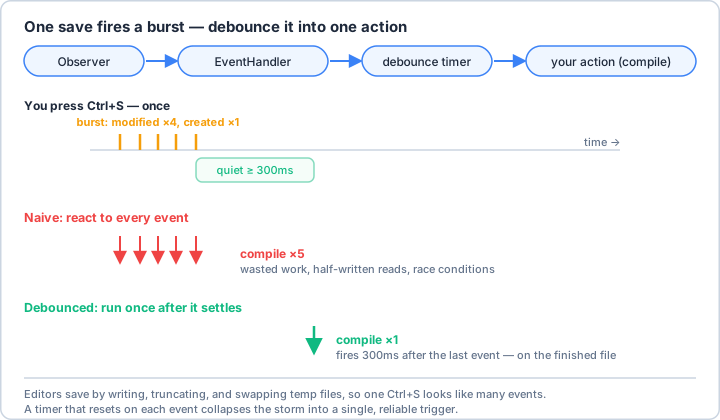
Observerplus aFileSystemEventHandlersubclass lets you react to file events in real time across platforms. - A single save fires a burst of events — debouncing with a short reset timer collapses that storm into one clean action.
- Filter noise (temp/hidden files) and verify real changes with a hash, because editors often trigger events without changing content.
- Keep the watcher thread light: queue heavy processing to a worker so you never block incoming events.
🎉 What You've Accomplished
You can now build scripts that guard a directory and act the instant files change — auto-compilers, live processors, real-time backups, and data pipelines. Your automation has gone from something you run to something that runs itself.
❓ Common Questions at This Stage
Why does saving one file trigger several events?
Many editors save by writing to a temp file, truncating or replacing the original, and updating metadata — each step is a separate filesystem event. Some also do atomic saves that show up as create + move. Debouncing (waiting a short quiet period before acting) is how you treat the whole burst as one change.
Should I use watchdog or the OS-native APIs like inotify directly?
Start with watchdog — it's cross-platform and already uses the best native backend for each OS under the hood. Reach for inotify, FSEvents, or ReadDirectoryChangesW directly only when you need finer control or performance that watchdog's abstraction can't give you.
My handler crashes when it opens a file that's still being written. What do I do?
That's the classic race between the event firing and the write finishing. Debounce so you act after activity settles, wrap file access in try/except, and if needed check that the file size has stopped changing before you process it.
🔭 Looking Ahead
A watcher tells you when a file arrives; next you'll build the logic that decides where it belongs — organization scripts that sort files automatically by type, date, and project.
✅ Before the Next Lesson
- Write a minimal watchdog handler that prints every event type for a test folder, then create, edit, and delete files to see the raw event stream.
- Add a debounce timer so editing one file rapidly triggers your action only once after you stop.
- Write your Learning Journal entry for this lesson.
🌟 Encouragement for the Journey
Reactive automation feels a little like magic the first time your script springs to life the moment you hit save. You've now got that power — go find a chore worth handing off to your tireless new watcher!
Pro Tip: Combine directory watching with other automation tools for powerful workflows. Watch for new CSV files and automatically import them to a database, monitor log files for errors and send alerts, or sync files across multiple machines in real-time!