🗄️ File Organization Scripts: Build Smart Systems That Organize Themselves
📚 What You'll Learn
By the end of this lesson, you will be able to:
- Classify files by extension, MIME type, and content into categories and subcategories
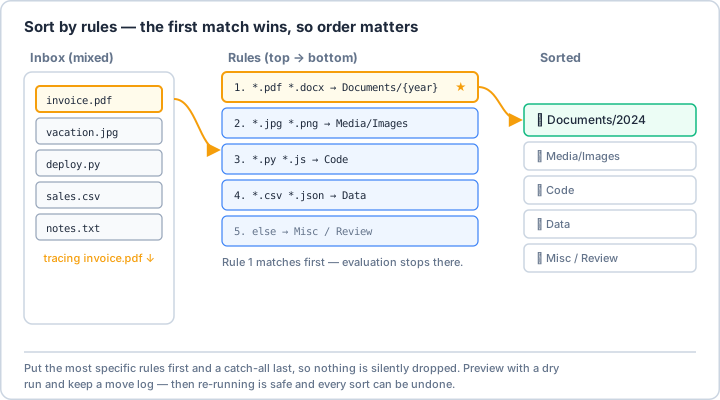
- Build an ordered, "first match wins" rule engine that routes each file to the right destination
- Organize files by date (year/month), by detected project, and by extracted metadata
- Detect duplicates with hashes and handle name collisions by renaming, skipping, or replacing
- Track moves in a SQLite index and learn patterns from how files get organized
- Speed up large jobs with async I/O and build smart folders using symlinks and dynamic criteria
⏱️ Estimated Time: 45–60 minutes
🎯 Project: Build an auto-organizer that sweeps a messy Downloads folder, sorts each file into a category/subcategory (or date/project) folder, handles duplicates safely, and logs every move.
Imagine having a personal assistant who knows exactly where every file belongs, sorts them automatically, and maintains perfect order in your digital life. That's what file organization scripts do – they're like having Marie Kondo for your hard drive, but they work 24/7 and never get tired! 🎯
The Philosophy of Automated Organization
Good file organization isn't just about tidiness – it's about creating a system where finding anything takes seconds, not minutes. Think of it as building highways for your data: clear paths, logical destinations, and no traffic jams!
Real-World Scenario: The Digital Life Organizer 🏠
You've been using the same computer for five years. Your Downloads folder has 10,000 files, Desktop looks like a digital landfill, and you have "New Folder", "New Folder (2)" through "New Folder (47)". Let's build a system that not only cleans this up but keeps it organized forever!
import os
import shutil
import hashlib
import mimetypes
from pathlib import Path
from datetime import datetime, timedelta
from typing import Dict, List, Tuple, Optional, Set
import json
import sqlite3
from collections import defaultdict
import re
class IntelligentFileOrganizer:
"""
An intelligent file organization system that learns from your habits
and automatically organizes files based on multiple criteria.
"""
def __init__(self, base_path: str, config_path: Optional[str] = None):
self.base_path = Path(base_path)
self.config_path = config_path or self.base_path / '.organizer_config.json'
self.db_path = self.base_path / '.file_index.db'
# Load or create configuration
self.config = self.load_config()
# Initialize database for file tracking
self.init_database()
# File type categories with extensive mappings
self.categories = {
'Documents': {
'extensions': ['.pdf', '.doc', '.docx', '.txt', '.odt', '.rtf',
'.tex', '.wpd', '.md'],
'subcategories': {
'PDFs': ['.pdf'],
'Word': ['.doc', '.docx'],
'Text': ['.txt', '.md', '.rtf'],
'Other': ['.odt', '.tex', '.wpd']
}
},
'Spreadsheets': {
'extensions': ['.xlsx', '.xls', '.csv', '.ods'],
'subcategories': {
'Excel': ['.xlsx', '.xls'],
'CSV': ['.csv'],
'Other': ['.ods']
}
},
'Presentations': {
'extensions': ['.pptx', '.ppt', '.odp'],
'subcategories': {
'PowerPoint': ['.pptx', '.ppt'],
'Other': ['.odp']
}
},
'Images': {
'extensions': ['.jpg', '.jpeg', '.png', '.gif', '.bmp', '.svg',
'.webp', '.ico', '.tiff', '.psd', '.ai', '.raw'],
'subcategories': {
'Photos': ['.jpg', '.jpeg', '.raw'],
'Graphics': ['.png', '.gif', '.svg', '.webp'],
'Design': ['.psd', '.ai'],
'Icons': ['.ico'],
'Other': ['.bmp', '.tiff']
}
},
'Videos': {
'extensions': ['.mp4', '.avi', '.mkv', '.mov', '.wmv', '.flv',
'.webm', '.m4v', '.mpg', '.mpeg', '.3gp'],
'subcategories': {
'Movies': ['.mp4', '.mkv', '.avi'],
'Clips': ['.mov', '.wmv', '.flv'],
'Web': ['.webm'],
'Other': ['.m4v', '.mpg', '.mpeg', '.3gp']
}
},
'Audio': {
'extensions': ['.mp3', '.wav', '.flac', '.aac', '.ogg', '.wma',
'.m4a', '.opus', '.aiff'],
'subcategories': {
'Music': ['.mp3', '.flac', '.m4a'],
'Podcasts': ['.mp3', '.m4a'],
'Recordings': ['.wav', '.aiff'],
'Other': ['.aac', '.ogg', '.wma', '.opus']
}
},
'Code': {
'extensions': ['.py', '.js', '.html', '.css', '.cpp', '.java',
'.c', '.h', '.cs', '.php', '.rb', '.go', '.rs',
'.swift', '.kt', '.ts', '.jsx', '.vue', '.sql'],
'subcategories': {
'Python': ['.py'],
'Web': ['.html', '.css', '.js', '.ts', '.jsx', '.vue'],
'Systems': ['.c', '.cpp', '.h', '.rs', '.go'],
'Mobile': ['.swift', '.kt', '.java'],
'Scripts': ['.sh', '.bat', '.ps1'],
'Database': ['.sql'],
'Other': ['.rb', '.php', '.cs']
}
},
'Archives': {
'extensions': ['.zip', '.rar', '.7z', '.tar', '.gz', '.bz2',
'.xz', '.tar.gz', '.tar.bz2'],
'subcategories': {
'ZIP': ['.zip', '.7z'],
'TAR': ['.tar', '.tar.gz', '.tar.bz2'],
'Other': ['.rar', '.gz', '.bz2', '.xz']
}
},
'Data': {
'extensions': ['.json', '.xml', '.yaml', '.yml', '.csv', '.db',
'.sqlite'],
'subcategories': {
'Structured': ['.json', '.xml', '.yaml', '.yml'],
'Databases': ['.db', '.sqlite'],
'Tables': ['.csv']
}
},
'Executables': {
'extensions': ['.exe', '.msi', '.app', '.deb', '.rpm', '.dmg',
'.pkg', '.appimage'],
'subcategories': {
'Windows': ['.exe', '.msi'],
'Mac': ['.app', '.dmg', '.pkg'],
'Linux': ['.deb', '.rpm', '.appimage']
}
}
}
# Smart organization rules
self.organization_rules = self.load_organization_rules()
def load_config(self) -> Dict:
"""Load or create default configuration."""
default_config = {
'auto_organize': True,
'use_date_folders': True,
'use_project_detection': True,
'duplicate_handling': 'rename', # 'rename', 'skip', 'replace'
'max_depth': 3,
'min_file_age_days': 0, # Don't move files newer than X days
'excluded_folders': ['node_modules', '.git', '__pycache__', '.venv'],
'special_folders': {
'Downloads': {'max_age_days': 30},
'Desktop': {'max_age_days': 7},
'Screenshots': {'pattern': r'Screenshot.*\.(png|jpg)'},
'Invoices': {'pattern': r'invoice[-_].*\.pdf', 'case_insensitive': True}
}
}
if self.config_path.exists():
with open(self.config_path, 'r') as f:
config = json.load(f)
# Merge with defaults
for key, value in default_config.items():
if key not in config:
config[key] = value
return config
else:
# Save default config
with open(self.config_path, 'w') as f:
json.dump(default_config, f, indent=2)
return default_config
def init_database(self):
"""Initialize SQLite database for file tracking and learning."""
conn = sqlite3.connect(self.db_path)
cursor = conn.cursor()
# File index table
cursor.execute('''
CREATE TABLE IF NOT EXISTS file_index (
id INTEGER PRIMARY KEY AUTOINCREMENT,
file_path TEXT UNIQUE,
file_hash TEXT,
original_location TEXT,
current_location TEXT,
file_type TEXT,
category TEXT,
subcategory TEXT,
file_size INTEGER,
created_date DATETIME,
modified_date DATETIME,
accessed_date DATETIME,
moved_date DATETIME DEFAULT CURRENT_TIMESTAMP,
tags TEXT,
project TEXT
)
''')
# Organization patterns learned from user
cursor.execute('''
CREATE TABLE IF NOT EXISTS learned_patterns (
id INTEGER PRIMARY KEY AUTOINCREMENT,
pattern TEXT,
destination TEXT,
confidence REAL,
usage_count INTEGER DEFAULT 1,
last_used DATETIME DEFAULT CURRENT_TIMESTAMP
)
''')
conn.commit()
conn.close()
def load_organization_rules(self) -> List[Dict]:
"""Load smart organization rules."""
return [
{
'name': 'Project Files',
'condition': lambda f: self.detect_project(f),
'action': lambda f: self.organize_by_project(f)
},
{
'name': 'Date-based Media',
'condition': lambda f: f.suffix.lower() in ['.jpg', '.jpeg', '.mp4', '.mov'],
'action': lambda f: self.organize_by_date(f, 'Media')
},
{
'name': 'Work Documents',
'condition': lambda f: self.is_work_document(f),
'action': lambda f: self.organize_work_document(f)
},
{
'name': 'Downloads Cleanup',
'condition': lambda f: 'download' in f.parent.name.lower(),
'action': lambda f: self.cleanup_downloads(f)
},
{
'name': 'Screenshot Organization',
'condition': lambda f: self.is_screenshot(f),
'action': lambda f: self.organize_screenshot(f)
},
{
'name': 'Course Materials',
'condition': lambda f: self.is_course_material(f),
'action': lambda f: self.organize_course_material(f)
}
]
def analyze_file(self, file_path: Path) -> Dict:
"""
Comprehensive file analysis including content inspection.
"""
analysis = {
'path': file_path,
'name': file_path.name,
'extension': file_path.suffix.lower(),
'size': file_path.stat().st_size,
'created': datetime.fromtimestamp(file_path.stat().st_ctime),
'modified': datetime.fromtimestamp(file_path.stat().st_mtime),
'accessed': datetime.fromtimestamp(file_path.stat().st_atime)
}
# Determine category and subcategory
for category, info in self.categories.items():
if analysis['extension'] in info['extensions']:
analysis['category'] = category
# Find subcategory
for subcat, exts in info.get('subcategories', {}).items():
if analysis['extension'] in exts:
analysis['subcategory'] = subcat
break
break
# Calculate file hash for duplicate detection
if analysis['size'] < 100 * 1024 * 1024: # Only hash files < 100MB
analysis['hash'] = self.calculate_file_hash(file_path)
# Extract additional metadata based on file type
analysis['metadata'] = self.extract_metadata(file_path)
# Detect if part of a project
analysis['project'] = self.detect_project(file_path)
# Generate tags based on filename and content
analysis['tags'] = self.generate_tags(file_path)
return analysis
def calculate_file_hash(self, file_path: Path) -> str:
"""Calculate SHA256 hash of file."""
sha256_hash = hashlib.sha256()
with open(file_path, "rb") as f:
for byte_block in iter(lambda: f.read(4096), b""):
sha256_hash.update(byte_block)
return sha256_hash.hexdigest()
def extract_metadata(self, file_path: Path) -> Dict:
"""Extract metadata based on file type."""
metadata = {}
# Extract date from filename if present
date_patterns = [
(r'(\d{4})-(\d{2})-(\d{2})', '%Y-%m-%d'),
(r'(\d{4})(\d{2})(\d{2})', '%Y%m%d'),
(r'(\d{2})-(\d{2})-(\d{4})', '%d-%m-%Y')
]
for pattern, date_format in date_patterns:
match = re.search(pattern, file_path.name)
if match:
try:
date_str = match.group(0)
metadata['extracted_date'] = datetime.strptime(
date_str.replace('-', ''),
date_format.replace('-', '')
)
break
except:
pass
# Extract version information
version_match = re.search(r'[vV](\d+(?:\.\d+)*)', file_path.name)
if version_match:
metadata['version'] = version_match.group(1)
# Extract project or client name
if '_' in file_path.stem:
parts = file_path.stem.split('_')
if len(parts) > 1:
metadata['possible_project'] = parts[0]
return metadata
def detect_project(self, file_path: Path) -> Optional[str]:
"""
Detect if file belongs to a project based on various heuristics.
"""
# Check for common project indicators
project_indicators = [
'.git', 'package.json', 'requirements.txt', 'pom.xml',
'Cargo.toml', 'CMakeLists.txt', 'Makefile', '.project'
]
# Search up the directory tree for project indicators
current = file_path.parent
for _ in range(3): # Look up to 3 levels
for indicator in project_indicators:
if (current / indicator).exists():
return current.name
current = current.parent
if current == current.parent: # Reached root
break
# Check filename for project patterns
# Format: ProjectName_DocumentType_Date
parts = file_path.stem.split('_')
if len(parts) >= 2:
potential_project = parts[0]
# Check if this looks like a project name
if len(potential_project) > 3 and potential_project[0].isupper():
return potential_project
return None
def generate_tags(self, file_path: Path) -> List[str]:
"""Generate tags based on filename and content analysis."""
tags = []
name_lower = file_path.name.lower()
# Common tag patterns
tag_patterns = {
'invoice': r'invoice|bill|receipt',
'contract': r'contract|agreement|terms',
'report': r'report|analysis|summary',
'presentation': r'presentation|slides|deck',
'meeting': r'meeting|minutes|notes',
'proposal': r'proposal|quote|estimate',
'budget': r'budget|financial|expense',
'personal': r'personal|private|confidential',
'work': r'work|office|business',
'important': r'important|urgent|critical',
'draft': r'draft|wip|work.?in.?progress',
'final': r'final|complete|approved',
'template': r'template|boilerplate|sample',
'backup': r'backup|bak|copy|old'
}
for tag, pattern in tag_patterns.items():
if re.search(pattern, name_lower):
tags.append(tag)
# Add year tag if present
year_match = re.search(r'20\d{2}', file_path.name)
if year_match:
tags.append(f"year_{year_match.group(0)}")
# Add tags based on file location
if 'downloads' in str(file_path).lower():
tags.append('downloaded')
if 'desktop' in str(file_path).lower():
tags.append('desktop')
return tags
def is_work_document(self, file_path: Path) -> bool:
"""Detect if file is a work-related document."""
work_keywords = [
'invoice', 'contract', 'proposal', 'report', 'meeting',
'client', 'project', 'budget', 'presentation', 'analysis'
]
name_lower = file_path.name.lower()
return any(keyword in name_lower for keyword in work_keywords)
def is_screenshot(self, file_path: Path) -> bool:
"""Detect if file is a screenshot."""
screenshot_patterns = [
r'^Screenshot',
r'^Screen Shot',
r'^Capture',
r'screenshot',
r'^Snip'
]
return any(re.match(pattern, file_path.name, re.IGNORECASE)
for pattern in screenshot_patterns)
def is_course_material(self, file_path: Path) -> bool:
"""Detect if file is course/educational material."""
edu_patterns = [
r'lecture\d*',
r'chapter\d*',
r'lesson\d*',
r'assignment\d*',
r'homework',
r'syllabus',
r'course',
r'tutorial',
r'exercise'
]
name_lower = file_path.name.lower()
return any(re.search(pattern, name_lower) for pattern in edu_patterns)
def organize_by_date(self, file_path: Path, base_category: str) -> Path:
"""Organize file by date in year/month structure."""
# Get the best date for the file
file_date = None
# Try to extract date from metadata first
metadata = self.extract_metadata(file_path)
if 'extracted_date' in metadata:
file_date = metadata['extracted_date']
else:
# Use file modification date
file_date = datetime.fromtimestamp(file_path.stat().st_mtime)
# Create date-based path
year = str(file_date.year)
month = f"{file_date.month:02d}-{file_date.strftime('%B')}"
target_dir = self.base_path / base_category / year / month
target_dir.mkdir(parents=True, exist_ok=True)
return target_dir / file_path.name
def organize_by_project(self, file_path: Path) -> Path:
"""Organize file into project structure."""
project = self.detect_project(file_path)
if project:
# Determine file type within project
category = None
for cat, info in self.categories.items():
if file_path.suffix.lower() in info['extensions']:
category = cat
break
if category:
target_dir = self.base_path / 'Projects' / project / category
else:
target_dir = self.base_path / 'Projects' / project / 'Other'
target_dir.mkdir(parents=True, exist_ok=True)
return target_dir / file_path.name
return file_path
def organize_work_document(self, file_path: Path) -> Path:
"""Organize work-related documents."""
# Detect document type
doc_types = {
'Invoices': r'invoice|bill|receipt',
'Contracts': r'contract|agreement',
'Reports': r'report|analysis',
'Presentations': r'presentation|slides',
'Proposals': r'proposal|quote'
}
doc_type = 'Other'
name_lower = file_path.name.lower()
for dtype, pattern in doc_types.items():
if re.search(pattern, name_lower):
doc_type = dtype
break
# Extract year if present
year_match = re.search(r'20\d{2}', file_path.name)
if year_match:
year = year_match.group(0)
target_dir = self.base_path / 'Work' / doc_type / year
else:
target_dir = self.base_path / 'Work' / doc_type / 'Unsorted'
target_dir.mkdir(parents=True, exist_ok=True)
return target_dir / file_path.name
def cleanup_downloads(self, file_path: Path) -> Path:
"""Clean up and organize downloads folder."""
# Determine category
category = None
subcategory = None
for cat, info in self.categories.items():
if file_path.suffix.lower() in info['extensions']:
category = cat
# Find subcategory
for subcat, exts in info.get('subcategories', {}).items():
if file_path.suffix.lower() in exts:
subcategory = subcat
break
break
if category:
if subcategory:
target_dir = self.base_path / 'Downloads_Organized' / category / subcategory
else:
target_dir = self.base_path / 'Downloads_Organized' / category
else:
target_dir = self.base_path / 'Downloads_Organized' / 'Other'
target_dir.mkdir(parents=True, exist_ok=True)
return target_dir / file_path.name
def organize_screenshot(self, file_path: Path) -> Path:
"""Organize screenshots by date."""
return self.organize_by_date(file_path, 'Screenshots')
def organize_course_material(self, file_path: Path) -> Path:
"""Organize educational/course materials."""
# Try to extract course name
course_match = re.search(r'([A-Z]{2,4}\d{3,4})', file_path.name)
if course_match:
course_code = course_match.group(1)
target_dir = self.base_path / 'Education' / course_code
else:
# Try to detect by common patterns
if 'math' in file_path.name.lower():
target_dir = self.base_path / 'Education' / 'Mathematics'
elif 'cs' in file_path.name.lower() or 'comp' in file_path.name.lower():
target_dir = self.base_path / 'Education' / 'Computer_Science'
else:
target_dir = self.base_path / 'Education' / 'General'
target_dir.mkdir(parents=True, exist_ok=True)
return target_dir / file_path.name
def handle_duplicate(self, source: Path, target: Path) -> Path:
"""Handle duplicate files based on configuration."""
if not target.exists():
return target
strategy = self.config.get('duplicate_handling', 'rename')
if strategy == 'skip':
print(f" ⏭️ Skipping duplicate: {source.name}")
return None
elif strategy == 'replace':
print(f" 🔄 Replacing: {target.name}")
return target
else: # rename
# Find a unique name
counter = 1
while target.exists():
stem = target.stem
# Remove existing counter if present
stem = re.sub(r'_\d+$', '', stem)
new_name = f"{stem}_{counter}{target.suffix}"
target = target.parent / new_name
counter += 1
print(f" 📝 Renaming to avoid duplicate: {target.name}")
return target
def move_file(self, source: Path, target: Path) -> bool:
"""Move file with safety checks and database update."""
try:
# Handle duplicates
target = self.handle_duplicate(source, target)
if target is None:
return False
# Create target directory if needed
target.parent.mkdir(parents=True, exist_ok=True)
# Move the file
shutil.move(str(source), str(target))
# Update database
conn = sqlite3.connect(self.db_path)
cursor = conn.cursor()
file_info = self.analyze_file(target)
cursor.execute('''
INSERT OR REPLACE INTO file_index
(file_path, file_hash, original_location, current_location,
file_type, category, subcategory, file_size,
created_date, modified_date, accessed_date,
tags, project)
VALUES (?, ?, ?, ?, ?, ?, ?, ?, ?, ?, ?, ?, ?)
''', (
str(target),
file_info.get('hash', ''),
str(source),
str(target),
file_info.get('extension', ''),
file_info.get('category', ''),
file_info.get('subcategory', ''),
file_info['size'],
file_info['created'],
file_info['modified'],
file_info['accessed'],
json.dumps(file_info.get('tags', [])),
file_info.get('project', '')
))
conn.commit()
conn.close()
print(f" ✅ Moved: {source.name} → {target.relative_to(self.base_path)}")
return True
except Exception as e:
print(f" ❌ Failed to move {source.name}: {e}")
return False
def organize_directory(self, directory: Path, recursive: bool = True):
"""
Organize all files in a directory.
"""
print(f"🚀 Organizing directory: {directory}")
print("=" * 60)
# Collect all files
if recursive:
files = [f for f in directory.rglob('*') if f.is_file()]
else:
files = [f for f in directory.glob('*') if f.is_file()]
# Filter out excluded folders
excluded = self.config.get('excluded_folders', [])
files = [f for f in files if not any(ex in str(f) for ex in excluded)]
# Filter by age if configured
min_age = self.config.get('min_file_age_days', 0)
if min_age > 0:
cutoff_date = datetime.now() - timedelta(days=min_age)
files = [f for f in files if datetime.fromtimestamp(f.stat().st_mtime) < cutoff_date]
print(f"📊 Found {len(files)} files to organize")
# Organize files by rules
organized_count = 0
skipped_count = 0
failed_count = 0
for file_path in files:
organized = False
# Apply organization rules
for rule in self.organization_rules:
if rule['condition'](file_path):
target = rule['action'](file_path)
if target and target != file_path:
if self.move_file(file_path, target):
organized_count += 1
else:
failed_count += 1
organized = True
break
if not organized:
# Apply default organization by category
analysis = self.analyze_file(file_path)
if 'category' in analysis:
target_dir = self.base_path / 'Organized' / analysis['category']
if 'subcategory' in analysis:
target_dir = target_dir / analysis['subcategory']
target_dir.mkdir(parents=True, exist_ok=True)
target = target_dir / file_path.name
if self.move_file(file_path, target):
organized_count += 1
else:
failed_count += 1
else:
skipped_count += 1
# Print summary
print("\n" + "=" * 60)
print("📊 Organization Summary:")
print(f" ✅ Successfully organized: {organized_count} files")
print(f" ⏭️ Skipped: {skipped_count} files")
print(f" ❌ Failed: {failed_count} files")
print("=" * 60)
def learn_pattern(self, source: Path, destination: Path):
"""
Learn from user's manual organization to improve future automation.
"""
conn = sqlite3.connect(self.db_path)
cursor = conn.cursor()
# Extract pattern from source
pattern = self._extract_pattern(source)
# Check if pattern exists
cursor.execute('''
SELECT id, usage_count, confidence
FROM learned_patterns
WHERE pattern = ? AND destination = ?
''', (pattern, str(destination)))
existing = cursor.fetchone()
if existing:
# Update existing pattern
new_count = existing[1] + 1
new_confidence = min(1.0, existing[2] + 0.1)
cursor.execute('''
UPDATE learned_patterns
SET usage_count = ?, confidence = ?, last_used = CURRENT_TIMESTAMP
WHERE id = ?
''', (new_count, new_confidence, existing[0]))
else:
# Add new pattern
cursor.execute('''
INSERT INTO learned_patterns (pattern, destination, confidence)
VALUES (?, ?, ?)
''', (pattern, str(destination), 0.5))
conn.commit()
conn.close()
def _extract_pattern(self, file_path: Path) -> str:
"""Extract a pattern from a file path for learning."""
# Simple pattern: extension + key words from filename
extension = file_path.suffix.lower()
# Extract meaningful words from filename
words = re.findall(r'\b[a-zA-Z]{3,}\b', file_path.stem.lower())
# Create pattern
if words:
pattern = f"{extension}:{':'.join(words[:3])}"
else:
pattern = extension
return pattern
def suggest_organization(self, file_path: Path) -> Optional[Path]:
"""
Suggest organization based on learned patterns.
"""
conn = sqlite3.connect(self.db_path)
cursor = conn.cursor()
pattern = self._extract_pattern(file_path)
# Find matching patterns
cursor.execute('''
SELECT destination, confidence
FROM learned_patterns
WHERE pattern LIKE ?
ORDER BY confidence DESC, usage_count DESC
LIMIT 1
''', (f"%{pattern}%",))
result = cursor.fetchone()
conn.close()
if result and result[1] > 0.7: # Only suggest if confidence > 70%
return Path(result[0]) / file_path.name
return None
class SmartFolderSystem:
"""
Create and maintain smart folders that automatically collect files
based on dynamic criteria.
"""
def __init__(self, base_path: str):
self.base_path = Path(base_path)
self.smart_folders_path = self.base_path / 'Smart_Folders'
self.smart_folders_path.mkdir(exist_ok=True)
# Define smart folder rules
self.smart_folders = [
{
'name': 'Recent_Documents',
'condition': lambda f: (
f.suffix.lower() in ['.pdf', '.doc', '.docx', '.txt'] and
(datetime.now() - datetime.fromtimestamp(f.stat().st_mtime)).days < 7
),
'type': 'symlink'
},
{
'name': 'Large_Files',
'condition': lambda f: f.stat().st_size > 100 * 1024 * 1024, # > 100MB
'type': 'list'
},
{
'name': 'Work_In_Progress',
'condition': lambda f: (
any(word in f.name.lower() for word in ['draft', 'wip', 'temp', 'todo']) and
(datetime.now() - datetime.fromtimestamp(f.stat().st_mtime)).days < 30
),
'type': 'symlink'
},
{
'name': 'Meeting_Materials',
'condition': lambda f: (
any(word in f.name.lower() for word in ['meeting', 'agenda', 'minutes', 'notes']) and
f.suffix.lower() in ['.pdf', '.doc', '.docx', '.pptx', '.txt']
),
'type': 'symlink'
},
{
'name': 'Archived',
'condition': lambda f: (
(datetime.now() - datetime.fromtimestamp(f.stat().st_atime)).days > 90 and
f.suffix.lower() not in ['.exe', '.app', '.msi']
),
'type': 'list'
},
{
'name': 'Media_This_Month',
'condition': lambda f: (
f.suffix.lower() in ['.jpg', '.jpeg', '.png', '.mp4', '.mov'] and
datetime.fromtimestamp(f.stat().st_mtime).month == datetime.now().month and
datetime.fromtimestamp(f.stat().st_mtime).year == datetime.now().year
),
'type': 'symlink'
}
]
def update_smart_folders(self, search_path: Path):
"""Update all smart folders based on current files."""
print("🔄 Updating smart folders...")
# Clear existing smart folders
for folder in self.smart_folders:
folder_path = self.smart_folders_path / folder['name']
if folder_path.exists():
# Remove old symlinks or lists
if folder['type'] == 'symlink':
for item in folder_path.glob('*'):
if item.is_symlink():
item.unlink()
else: # list type
list_file = folder_path / 'files.txt'
if list_file.exists():
list_file.unlink()
else:
folder_path.mkdir()
# Scan files and update smart folders
for file_path in search_path.rglob('*'):
if not file_path.is_file():
continue
for folder in self.smart_folders:
try:
if folder['condition'](file_path):
folder_path = self.smart_folders_path / folder['name']
if folder['type'] == 'symlink':
# Create symlink
link_path = folder_path / file_path.name
if not link_path.exists():
link_path.symlink_to(file_path)
else: # list type
# Add to list file
list_file = folder_path / 'files.txt'
with open(list_file, 'a') as f:
f.write(f"{file_path}\n")
except Exception as e:
print(f" ⚠️ Error processing {file_path.name}: {e}")
# Report results
for folder in self.smart_folders:
folder_path = self.smart_folders_path / folder['name']
if folder['type'] == 'symlink':
count = len(list(folder_path.glob('*')))
else:
list_file = folder_path / 'files.txt'
if list_file.exists():
with open(list_file, 'r') as f:
count = len(f.readlines())
else:
count = 0
print(f" 📁 {folder['name']}: {count} files")
# Example usage
if __name__ == "__main__":
# Initialize the organizer
organizer = IntelligentFileOrganizer("/home/user/Documents")
# Organize Downloads folder
downloads_path = Path("/home/user/Downloads")
organizer.organize_directory(downloads_path)
# Set up smart folders
smart_system = SmartFolderSystem("/home/user/Documents")
smart_system.update_smart_folders(Path("/home/user"))
print("\n✨ Organization complete! Your digital life is now in order!")
Advanced Organization Patterns 🎨
Let's explore sophisticated organization patterns that adapt to your specific needs. These are like having different organizational personalities for different situations!
import asyncio
import aiofiles
import re
import shutil
from datetime import datetime
from pathlib import Path
from concurrent.futures import ThreadPoolExecutor
from typing import AsyncGenerator
import magic  # python-magic for file type detection

class AsyncFileOrganizer:
    """
    High-performance async file organizer for handling thousands of files.
    Uses async I/O and parallel processing for maximum speed.
    """

    def __init__(self, base_path: str, workers: int = 4):
        self.base_path = Path(base_path)
        self.workers = workers
        self.executor = ThreadPoolExecutor(max_workers=workers)
        self.file_magic = magic.Magic(mime=True)

    async def organize_async(self, source_dir: Path):
        """Organize files asynchronously for better performance."""
        print(f"⚡ Starting async organization with {self.workers} workers...")

        # Gather all files asynchronously
        files = await self.gather_files_async(source_dir)
        print(f"📊 Found {len(files)} files to process")

        # Process files in parallel
        tasks = []
        for file_path in files:
            task = asyncio.create_task(self.process_file_async(file_path))
            tasks.append(task)

        # Process in batches to avoid overwhelming the system
        batch_size = 100
        for i in range(0, len(tasks), batch_size):
            batch = tasks[i:i+batch_size]
            results = await asyncio.gather(*batch, return_exceptions=True)

            # Report progress
            progress = min(i + batch_size, len(tasks))
            print(f"  Progress: {progress}/{len(tasks)} files processed")

        print("✅ Async organization complete!")

    async def gather_files_async(self, directory: Path) -> List[Path]:
        """Gather all files asynchronously."""
        files = []

        async def walk_directory(path: Path):
            try:
                for item in path.iterdir():
                    if item.is_file():
                        files.append(item)
                    elif item.is_dir():
                        await walk_directory(item)
            except PermissionError:
                pass

        await walk_directory(directory)
        return files

    async def process_file_async(self, file_path: Path):
        """Process a single file asynchronously."""
        try:
            # Analyze file in thread pool
            analysis = await asyncio.get_event_loop().run_in_executor(
                self.executor, self.analyze_file_advanced, file_path
            )

            # Determine destination
            destination = self.determine_destination(analysis)

            # Move file asynchronously
            await self.move_file_async(file_path, destination)

        except Exception as e:
            print(f"  ❌ Error processing {file_path.name}: {e}")

    def analyze_file_advanced(self, file_path: Path) -> Dict:
        """Advanced file analysis using multiple techniques."""
        analysis = {
            'path': file_path,
            'size': file_path.stat().st_size,
            'mime_type': self.file_magic.from_file(str(file_path))
        }

        # Content-based analysis for text files
        if 'text' in analysis['mime_type']:
            analysis['content_type'] = self.analyze_text_content(file_path)

        # Image analysis for photos
        if 'image' in analysis['mime_type']:
            analysis['image_info'] = self.analyze_image(file_path)

        return analysis

    def analyze_text_content(self, file_path: Path) -> str:
        """Analyze text content to determine document type."""
        try:
            with open(file_path, 'r', encoding='utf-8', errors='ignore') as f:
                content = f.read(1000)  # Read first 1000 chars

            # Detect code files
            if 'import' in content or 'function' in content or 'class' in content:
                return 'code'
            # Detect data files
            elif content.startswith('{') or content.startswith('['):
                return 'data'
            # Detect configuration
            elif '=' in content and '[' in content:
                return 'config'
            else:
                return 'document'
        except:
            return 'unknown'

    def analyze_image(self, file_path: Path) -> Dict:
        """Analyze image files for better organization."""
        try:
            from PIL import Image
            with Image.open(file_path) as img:
                return {
                    'width': img.width,
                    'height': img.height,
                    'format': img.format,
                    'mode': img.mode,
                    'is_screenshot': self.is_screenshot_image(img)
                }
        except:
            return {}

    def is_screenshot_image(self, img) -> bool:
        """Detect if an image is likely a screenshot."""
        # Screenshots often have specific resolutions
        common_resolutions = [
            (1920, 1080), (1366, 768), (1440, 900), (2560, 1440),
            (3840, 2160), (1280, 720), (1600, 900)
        ]

        return (img.width, img.height) in common_resolutions

    def determine_destination(self, analysis: Dict) -> Path:
        """Determine destination based on analysis."""
        mime_type = analysis.get('mime_type', '')

        # Map MIME types to categories
        mime_mapping = {
            'application/pdf': 'Documents/PDFs',
            'image/jpeg': 'Images/Photos',
            'image/png': 'Images/Graphics',
            'video/mp4': 'Videos',
            'audio/mpeg': 'Audio/Music',
            'application/zip': 'Archives',
            'text/plain': 'Documents/Text',
            'application/json': 'Data/JSON'
        }

        category = mime_mapping.get(mime_type, 'Other')

        # Special handling for screenshots
        if analysis.get('image_info', {}).get('is_screenshot'):
            category = 'Screenshots'

        # Special handling for code files
        if analysis.get('content_type') == 'code':
            category = 'Code'

        dest_dir = self.base_path / 'Organized_Async' / category
        dest_dir.mkdir(parents=True, exist_ok=True)

        return dest_dir / analysis['path'].name

    async def move_file_async(self, source: Path, destination: Path):
        """Move file asynchronously."""
        if destination.exists():
            return  # Skip duplicates

        # Read source file
        async with aiofiles.open(source, 'rb') as src:
            content = await src.read()

        # Write to destination
        async with aiofiles.open(destination, 'wb') as dst:
            await dst.write(content)

        # Remove source
        source.unlink()

class RuleBasedOrganizer:
    """
    Highly customizable rule-based file organizer.
    Allows users to define complex organization rules using a DSL.
    """

    def __init__(self):
        self.rules = []
        self.variables = {}

    def add_rule(self, name: str, condition: str, action: str):
        """
        Add a rule using a simple DSL.

        Example:
            condition: "extension in ['.jpg', '.png'] and size > 1MB"
            action: "move to 'Images/Large'"
        """
        self.rules.append({
            'name': name,
            'condition': self.compile_condition(condition),
            'action': self.compile_action(action)
        })

    def compile_condition(self, condition: str):
        """Compile condition string into executable function."""
        def check(file_path: Path) -> bool:
            # Create context for evaluation
            context = {
                'extension': file_path.suffix.lower(),
                'name': file_path.name,
                'size': file_path.stat().st_size,
                'age_days': (datetime.now() - datetime.fromtimestamp(
                    file_path.stat().st_mtime)).days,
                'MB': 1024 * 1024,
                'GB': 1024 * 1024 * 1024
            }

            # WARNING: eval() on untrusted input is NOT safe. Passing
            # {"__builtins__": {}} hides builtins but does NOT sandbox the
            # expression -- there are well-known escapes back to os/system, so
            # never feed user- or file-supplied rules through this. For real
            # safety use ast.literal_eval() or a small purpose-built parser.
            # Only use this with rule strings you fully control and trust.
            try:
                return eval(condition, {"__builtins__": {}}, context)
            except:
                return False

        return check

    def compile_action(self, action: str):
        """Compile action string into executable function."""
        def execute(file_path: Path, base_path: Path) -> Path:
            # Parse action
            if action.startswith("move to "):
                dest = action.replace("move to ", "").strip("'\"")
                dest_path = base_path / dest
                dest_path.mkdir(parents=True, exist_ok=True)
                return dest_path / file_path.name

            return file_path

        return execute

    def apply_rules(self, file_path: Path, base_path: Path) -> Optional[Path]:
        """Apply rules to determine file destination."""
        for rule in self.rules:
            if rule['condition'](file_path):
                print(f"  📏 Applying rule: {rule['name']}")
                return rule['action'](file_path, base_path)

        return None

# Example usage: Custom organization rules
def setup_custom_organization():
    """Set up a custom organization system with user-defined rules."""

    organizer = RuleBasedOrganizer()

    # Add custom rules
    organizer.add_rule(
        "Large Media Files",
        "extension in ['.mp4', '.mkv', '.avi'] and size > 1*GB",
        "move to 'Media/Movies'"
    )

    organizer.add_rule(
        "Old Downloads",
        "'downloads' in name.lower() and age_days > 30",
        "move to 'Archives/Old_Downloads'"
    )

    organizer.add_rule(
        "Work Documents",
        "('invoice' in name.lower() or 'contract' in name.lower()) and extension == '.pdf'",
        "move to 'Work/Important'"
    )

    organizer.add_rule(
        "Screenshots",
        "name.lower().startswith('screenshot')",
        "move to 'Screenshots'"
    )

    # Apply rules to a directory
    source_dir = Path("/home/user/Desktop")
    base_dir = Path("/home/user/Organized")

    for file_path in source_dir.glob("*"):
        if file_path.is_file():
            destination = organizer.apply_rules(file_path, base_dir)
            if destination:
                print(f"Moving {file_path.name} to {destination}")
                shutil.move(str(file_path), str(destination))

# Run async organization
async def main():
    organizer = AsyncFileOrganizer("/home/user/Documents", workers=4)
    await organizer.organize_async(Path("/home/user/Downloads"))

if __name__ == "__main__":
    # Run async organizer
    asyncio.run(main())

    # Set up custom rules
    setup_custom_organization()
Key Takeaways and Best Practices 🎯
- Start Simple, Evolve Gradually: Begin with basic categorization, then add more sophisticated rules as you understand your needs.
- Use Multiple Classification Methods: Combine extension-based, content-based, and metadata-based classification for accuracy.
- Implement Learning: Track how users manually organize files and learn from these patterns.
- Handle Edge Cases: Always have a fallback for files that don't match any rules.
- Preserve Original Structure When Needed: Some files (like project files) need to maintain their relative paths.
- Regular Maintenance: Schedule regular organization runs to keep everything tidy.
- User Control: Always provide dry-run options and undo capabilities.
The Organization Commandments 📜
File organization scripts transform chaos into order, making your digital life manageable and efficient. Whether you're organizing thousands of photos, managing project files, or keeping your downloads folder under control, these automation tools give you the power to maintain perfect organization with minimal effort! 🚀
📓 Learning Journal
Keep a learning journal — digital or physical. After this lesson, take a few minutes to write down:
- Key concepts you learned
- Techniques that clicked for you
- Questions or confusion points to revisit
- Ideas you want to try
- Your progress and feelings about learning this
✍️ This lesson's prompt: A good organization system matches how you think — by project, by date, or by type. Which mental model fits your own files best, and what would the top three routing rules of your personal organizer be?
📝 Lesson Summary
🎓 Key Takeaways
- An auto-organizer is an ordered list of rules where the first matching pattern decides the destination — so rule order (specific first, catch-all last) is everything.
- Combining extension, MIME type, and content inspection classifies files far more accurately than extension alone.
- Duplicate detection with hashes plus a clear collision policy (rename/skip/replace) keeps a bulk move from destroying data.
- A move log or SQLite index makes organization auditable, reversible, and even able to learn from your habits.
🎉 What You've Accomplished
You can now turn a digital landfill into a self-maintaining, logical structure — classifying files intelligently, routing them with rules, handling duplicates, and keeping a record of every move. That's a personal assistant for your file system that works around the clock.
❓ Common Questions at This Stage
Why does rule order matter so much?
Because the engine uses "first match wins." If a broad catch-all rule sits above a specific one, the specific rule never runs. Put your most specific patterns first and a general fallback last, so every file lands somewhere and nothing is silently misfiled or dropped.
Is classifying by file extension enough?
Often not. Extensions can be missing, wrong, or ambiguous (a .txt that's really code or config). Checking the MIME type and peeking at the content gives you a much more reliable category, which is why the advanced organizer combines all three.
Should I move files or copy them when organizing?
Start with a dry run that only prints the planned moves. When you commit, moving is usually what you want (you don't want two copies), but always handle duplicates explicitly and keep a log so any move can be undone. For irreplaceable data, back up first.
🔭 Looking Ahead
You now keep files in order automatically. The natural next step is protecting them: turning this organizational discipline toward reliable, automated backups.
✅ Before the Next Lesson
- Write three routing rules for your own Downloads folder and run them in dry-run mode to preview where each file would go.
- Add a duplicate check that hashes files and confirms two same-named files really differ before renaming.
- Write your Learning Journal entry for this lesson.
🌟 Encouragement for the Journey
There's a quiet satisfaction in watching a folder of chaos resolve into clean, logical order in seconds. You've built the system that does it — and it'll keep your digital life tidy long after this lesson. Keep going!
Pro Tip: The best organization system is one that matches your mental model. If you think in terms of projects, organize by projects. If you think in terms of dates, organize by dates. The key is consistency and automation – let Python do the heavy lifting while you focus on your actual work!