🏷️ Batch Renaming: Master the Art of File Naming at Scale
📚 What You'll Learn
By the end of this lesson, you will be able to:
- Analyze existing filename patterns (camera, screenshot, dated, numbered) to plan a rename strategy
- Build new names from templates using metadata like dates, indexes, and file hashes
- Use regular expressions to extract structure — episode codes, dates, version numbers — from messy names
- Detect and resolve naming collisions instead of silently overwriting files
- Sort files naturally so
file2comes beforefile10 - Apply safety layers: dry-run previews, validation, operation logging, and rollback/undo
⏱️ Estimated Time: 45–60 minutes
🎯 Project: Build a batch renamer that previews an old→new plan, flags collisions, renames a folder of files from a template, and can roll the whole operation back.
Ever downloaded 500 photos from your camera named DSC_0001 through DSC_0500? Or inherited a project with files named "final_v2_REALLY_FINAL_USE_THIS_ONE.doc"? Batch renaming is your superpower for bringing order to naming chaos. It's like being a librarian with superhuman speed! 📚
The Psychology of Good File Names
A good filename tells a story. It should answer three questions: What is it? When was it created? What version is it? Think of filenames as the DNA of your digital organization – they carry essential information that helps you (and your scripts) identify files instantly.
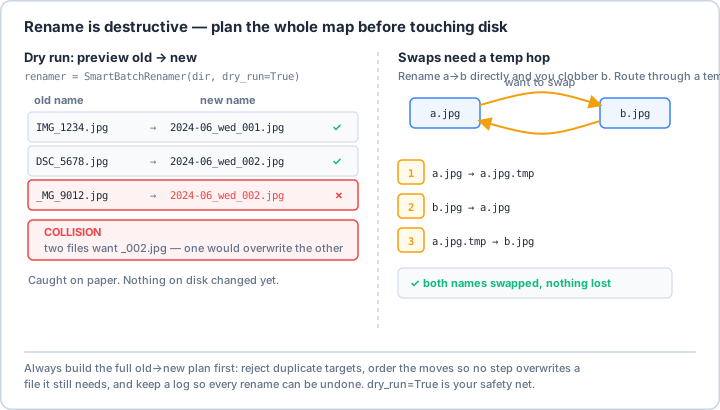
dry_run=True before a single file moves.Real-World Scenario: The Wedding Photographer's Nightmare 📸
Imagine you're a wedding photographer. You've just shot three weddings in one weekend, each with multiple photographers, different cameras, and various memory cards. You have 5,000 photos with names like IMG_1234.jpg, DSC_5678.NEF, and _MG_9012.CR2. Let's build a system that brings order to this chaos!
import os
import re
import shutil
from pathlib import Path
from datetime import datetime
from typing import List, Dict, Tuple, Optional
import hashlib
from collections import defaultdict

class SmartBatchRenamer:
    """
    A comprehensive batch renaming system that handles complex
    renaming scenarios with safety checks and rollback capabilities.
    """

    def __init__(self, target_dir: str, dry_run: bool = True):
        self.target_dir = Path(target_dir)
        self.dry_run = dry_run
        self.rename_history = []
        self.collision_counter = defaultdict(int)

    def analyze_naming_patterns(self) -> Dict[str, List[Path]]:
        """
        Analyze existing naming patterns to understand the chaos.
        Groups files by their naming pattern for targeted renaming.
        """
        patterns = defaultdict(list)

        # Common camera naming patterns
        pattern_rules = {
            'Canon': re.compile(r'^IMG_\d{4}', re.IGNORECASE),
            'Nikon': re.compile(r'^DSC_\d{4}', re.IGNORECASE),
            'Sony': re.compile(r'^DSC\d{5}', re.IGNORECASE),
            'iPhone': re.compile(r'^IMG_\d{4}', re.IGNORECASE),
            'Android': re.compile(r'^IMG_\d{8}_\d{6}', re.IGNORECASE),
            'GoPro': re.compile(r'^GOPR\d{4}', re.IGNORECASE),
            'Drone': re.compile(r'^DJI_\d{4}', re.IGNORECASE),
            'Screenshot': re.compile(r'^Screenshot', re.IGNORECASE),
            'Download': re.compile(r'^download', re.IGNORECASE),
            'Numbered': re.compile(r'^\d+\.'),
            'Dated': re.compile(r'^\d{4}-\d{2}-\d{2}'),
            'Unknown': re.compile(r'.*')  # Catch-all
        }

        for file_path in self.target_dir.glob('*'):
            if file_path.is_file():
                for pattern_name, pattern_regex in pattern_rules.items():
                    if pattern_regex.match(file_path.name):
                        patterns[pattern_name].append(file_path)
                        break

        # Print analysis results
        print("📊 File Naming Pattern Analysis:")
        print("=" * 50)
        for pattern_name, files in patterns.items():
            if files:
                print(f"  {pattern_name}: {len(files)} files")
                # Show examples
                examples = files[:3]
                for example in examples:
                    print(f"    → {example.name}")
                if len(files) > 3:
                    print(f"    ... and {len(files) - 3} more")
        print("=" * 50)

        return patterns

    def extract_metadata(self, file_path: Path) -> Dict:
        """
        Extract all available metadata from a file.
        This is like doing forensics on each file!
        """
        metadata = {
            'original_name': file_path.name,
            'size': file_path.stat().st_size,
            'extension': file_path.suffix.lower(),
            'stem': file_path.stem
        }

        # Get timestamps
        stat_info = file_path.stat()
        metadata['created'] = datetime.fromtimestamp(stat_info.st_ctime)
        metadata['modified'] = datetime.fromtimestamp(stat_info.st_mtime)

        # Try to extract date from filename
        date_patterns = [
            (r'(\d{4})[-_](\d{2})[-_](\d{2})', '%Y-%m-%d'),
            (r'(\d{4})(\d{2})(\d{2})', '%Y%m%d'),
            (r'(\d{2})[-_](\d{2})[-_](\d{4})', '%d-%m-%Y'),
            (r'(\d{8})_(\d{6})', '%Y%m%d_%H%M%S')
        ]

        for pattern, date_format in date_patterns:
            match = re.search(pattern, file_path.name)
            if match:
                try:
                    date_str = match.group(0)
                    metadata['extracted_date'] = datetime.strptime(
                        date_str.replace('_', '-'),
                        date_format.replace('_', '-')
                    )
                    break
                except:
                    pass

        # Extract number sequences (useful for maintaining order)
        numbers = re.findall(r'\d+', file_path.stem)
        if numbers:
            metadata['numbers'] = numbers
            metadata['primary_number'] = numbers[0]

        # Calculate file hash for duplicate detection
        metadata['hash'] = self._calculate_file_hash(file_path)

        return metadata

    def _calculate_file_hash(self, file_path: Path, chunk_size: int = 8192) -> str:
        """Calculate MD5 hash of file for duplicate detection."""
        md5_hash = hashlib.md5()
        try:
            with open(file_path, 'rb') as f:
                for chunk in iter(lambda: f.read(chunk_size), b''):
                    md5_hash.update(chunk)
            return md5_hash.hexdigest()[:8]  # Use first 8 chars for brevity
        except:
            return 'unknown'

    def create_new_name(self, file_path: Path, template: str,
                        metadata: Dict, index: int = 0) -> str:
        """
        Create a new filename based on a template and metadata.
        Templates can include placeholders like {date}, {index}, {original}, etc.
        """
        # Available template variables
        variables = {
            'original': metadata['stem'],
            'ext': metadata['extension'],
            'index': f"{index:04d}",
            'index3': f"{index:03d}",
            'index2': f"{index:02d}",
            'hash': metadata['hash'],
            'size': metadata['size'],
            'year': metadata.get('extracted_date', metadata['modified']).year,
            'month': metadata.get('extracted_date', metadata['modified']).month,
            'day': metadata.get('extracted_date', metadata['modified']).day,
            'date': metadata.get('extracted_date', metadata['modified']).strftime('%Y%m%d'),
            'time': metadata.get('extracted_date', metadata['modified']).strftime('%H%M%S'),
            'monthname': metadata.get('extracted_date', metadata['modified']).strftime('%B'),
            'weekday': metadata.get('extracted_date', metadata['modified']).strftime('%A'),
        }

        # Add custom counters for specific patterns
        if 'primary_number' in metadata:
            variables['number'] = metadata['primary_number']

        # Format the template
        new_name = template
        for key, value in variables.items():
            new_name = new_name.replace(f'{{{key}}}', str(value))

        # Ensure we keep the extension
        if not new_name.endswith(metadata['extension']):
            new_name += metadata['extension']

        return new_name

    def rename_by_pattern(self, pattern: str, files: List[Path],
                          new_template: str, sort_by: str = 'name'):
        """
        Rename files matching a specific pattern.

        Args:
            pattern: The pattern name (from analyze_naming_patterns)
            files: List of files to rename
            new_template: Template for new names
            sort_by: How to sort files before renaming ('name', 'date', 'size')
        """
        print(f"\n🔄 Renaming {pattern} files...")
        print(f"Template: {new_template}")

        # Sort files based on criteria
        if sort_by == 'date':
            files.sort(key=lambda x: x.stat().st_mtime)
        elif sort_by == 'size':
            files.sort(key=lambda x: x.stat().st_size)
        else:
            files.sort(key=lambda x: x.name)

        rename_operations = []

        for index, file_path in enumerate(files, 1):
            metadata = self.extract_metadata(file_path)
            new_name = self.create_new_name(file_path, new_template, metadata, index)
            new_path = file_path.parent / new_name

            # Handle collisions
            if new_path.exists() and new_path != file_path:
                collision_index = self.collision_counter[new_name]
                self.collision_counter[new_name] += 1

                # Add collision suffix
                name_parts = new_name.rsplit('.', 1)
                new_name = f"{name_parts[0]}_({collision_index}).{name_parts[1]}"
                new_path = file_path.parent / new_name

            rename_operations.append((file_path, new_path))

        # Preview changes
        self._preview_changes(rename_operations)

        # Apply changes if not dry run
        if not self.dry_run:
            self._apply_renames(rename_operations)

    def _preview_changes(self, operations: List[Tuple[Path, Path]]):
        """Show preview of rename operations."""
        print("\n📋 Preview of changes:")
        print("-" * 60)

        for old_path, new_path in operations[:10]:  # Show first 10
            old_name = old_path.name
            new_name = new_path.name

            # Highlight changes
            if len(old_name) > 30:
                old_name = old_name[:27] + "..."
            if len(new_name) > 30:
                new_name = new_name[:27] + "..."

            print(f"  {old_name:<30} → {new_name}")

        if len(operations) > 10:
            print(f"  ... and {len(operations) - 10} more files")

        print("-" * 60)

    def _apply_renames(self, operations: List[Tuple[Path, Path]]):
        """Apply the rename operations with rollback capability."""
        print(f"\n🚀 Applying {len(operations)} rename operations...")

        successful = []
        failed = []

        for old_path, new_path in operations:
            try:
                # Store in history for potential rollback
                self.rename_history.append((old_path, new_path))

                # Perform rename
                old_path.rename(new_path)
                successful.append((old_path, new_path))

            except Exception as e:
                failed.append((old_path, new_path, str(e)))
                print(f"  ❌ Failed: {old_path.name} - {e}")

        # Report results
        print(f"\n✅ Successfully renamed: {len(successful)} files")
        if failed:
            print(f"❌ Failed: {len(failed)} files")

    def rollback_last_operation(self):
        """Rollback the last rename operation."""
        if not self.rename_history:
            print("⚠️ No operations to rollback")
            return

        print(f"⏪ Rolling back {len(self.rename_history)} operations...")

        for old_path, new_path in reversed(self.rename_history):
            try:
                if new_path.exists():
                    new_path.rename(old_path)
                    print(f"  ↩️ Restored: {old_path.name}")
            except Exception as e:
                print(f"  ❌ Rollback failed: {new_path.name} - {e}")

        self.rename_history.clear()
        print("✅ Rollback complete")

class AdvancedRenamingStrategies:
    """
    Collection of advanced renaming strategies for specific use cases.
    """

    @staticmethod
    def sequential_numbering(files: List[Path], prefix: str = "",
                           suffix: str = "", start: int = 1,
                           padding: int = 3) -> List[Tuple[Path, str]]:
        """
        Simple sequential numbering with optional prefix/suffix.
        Example: photo_001.jpg, photo_002.jpg, ...
        """
        operations = []
        for i, file_path in enumerate(files, start):
            new_name = f"{prefix}{i:0{padding}d}{suffix}{file_path.suffix}"
            operations.append((file_path, new_name))
        return operations

    @staticmethod
    def date_based_naming(files: List[Path],
                         format: str = "%Y%m%d_%H%M%S") -> List[Tuple[Path, str]]:
        """
        Rename based on file modification date.
        Handles same-second conflicts by adding microseconds.
        """
        operations = []
        seen_names = defaultdict(int)

        for file_path in files:
            mtime = datetime.fromtimestamp(file_path.stat().st_mtime)
            base_name = mtime.strftime(format)

            # Handle conflicts
            if seen_names[base_name] > 0:
                new_name = f"{base_name}_{seen_names[base_name]:03d}{file_path.suffix}"
            else:
                new_name = f"{base_name}{file_path.suffix}"

            seen_names[base_name] += 1
            operations.append((file_path, new_name))

        return operations

    @staticmethod
    def clean_and_standardize(files: List[Path]) -> List[Tuple[Path, str]]:
        """
        Clean up messy filenames by removing special characters,
        fixing spacing, and standardizing format.
        """
        operations = []

        for file_path in files:
            clean_name = file_path.stem

            # Remove special characters except hyphens and underscores
            clean_name = re.sub(r'[^\w\s-]', '', clean_name)

            # Replace multiple spaces with single space
            clean_name = re.sub(r'\s+', ' ', clean_name)

            # Replace spaces with underscores
            clean_name = clean_name.replace(' ', '_')

            # Remove duplicate underscores
            clean_name = re.sub(r'_+', '_', clean_name)

            # Convert to lowercase
            clean_name = clean_name.lower()

            # Remove trailing/leading underscores
            clean_name = clean_name.strip('_')

            # Add extension
            new_name = f"{clean_name}{file_path.suffix.lower()}"

            operations.append((file_path, new_name))

        return operations

    @staticmethod
    def add_prefix_suffix(files: List[Path], prefix: str = "",
                         suffix: str = "") -> List[Tuple[Path, str]]:
        """Add prefix or suffix to existing filenames."""
        operations = []

        for file_path in files:
            stem = file_path.stem
            ext = file_path.suffix
            new_name = f"{prefix}{stem}{suffix}{ext}"
            operations.append((file_path, new_name))

        return operations

    @staticmethod
    def replace_text(files: List[Path], search: str,
                    replace: str, case_sensitive: bool = False) -> List[Tuple[Path, str]]:
        """Replace text in filenames."""
        operations = []

        for file_path in files:
            if case_sensitive:
                new_name = file_path.name.replace(search, replace)
            else:
                # Case-insensitive replace
                pattern = re.compile(re.escape(search), re.IGNORECASE)
                new_name = pattern.sub(replace, file_path.name)

            operations.append((file_path, new_name))

        return operations

    @staticmethod
    def smart_case_correction(files: List[Path]) -> List[Tuple[Path, str]]:
        """
        Intelligently correct the case of filenames.
        Capitalizes first letter of words, fixes extension case.
        """
        operations = []

        # Common acronyms that should stay uppercase
        acronyms = {'USA', 'UK', 'EU', 'PDF', 'HTML', 'CSS', 'JS',
                   'API', 'URL', 'ID', 'HD', '4K', 'FAQ', 'CEO'}

        for file_path in files:
            stem = file_path.stem
            ext = file_path.suffix.lower()

            # Split on common separators
            parts = re.split(r'[-_\s]+', stem)

            corrected_parts = []
            for part in parts:
                if part.upper() in acronyms:
                    corrected_parts.append(part.upper())
                elif part:
                    # Capitalize first letter
                    corrected_parts.append(part[0].upper() + part[1:].lower())

            new_stem = '_'.join(corrected_parts)
            new_name = f"{new_stem}{ext}"

            operations.append((file_path, new_name))

        return operations

# Example usage: Wedding Photography Workflow
def organize_wedding_photos(base_dir: str, event_name: str, event_date: str):
    """
    Complete workflow for organizing wedding photos from multiple photographers.
    """
    print(f"💒 Organizing Wedding Photos: {event_name}")
    print(f"📅 Event Date: {event_date}")
    print("=" * 60)

    # Create renamer instance
    renamer = SmartBatchRenamer(base_dir, dry_run=False)

    # Analyze current state
    patterns = renamer.analyze_naming_patterns()

    # Define naming templates for different sources
    templates = {
        'Canon': f"{event_name}_{event_date}_Main_{{index}}",
        'Nikon': f"{event_name}_{event_date}_Second_{{index}}",
        'iPhone': f"{event_name}_{event_date}_Mobile_{{index}}",
        'Drone': f"{event_name}_{event_date}_Aerial_{{index}}",
        'GoPro': f"{event_name}_{event_date}_Action_{{index}}"
    }

    # Process each pattern group
    for pattern_name, files in patterns.items():
        if pattern_name in templates and files:
            template = templates[pattern_name]
            renamer.rename_by_pattern(pattern_name, files, template, sort_by='date')

    print("\n✨ Wedding photos organized successfully!")

# Advanced example: Clean up a messy download folder
def cleanup_downloads_folder(downloads_dir: str):
    """
    Clean up a messy downloads folder with intelligent categorization.
    """
    print("🧹 Cleaning up Downloads folder...")

    path = Path(downloads_dir)

    # Categorize files by type
    categories = {
        'Documents': ['.pdf', '.doc', '.docx', '.txt', '.odt'],
        'Images': ['.jpg', '.jpeg', '.png', '.gif', '.bmp', '.svg'],
        'Videos': ['.mp4', '.avi', '.mkv', '.mov', '.wmv'],
        'Audio': ['.mp3', '.wav', '.flac', '.m4a', '.ogg'],
        'Archives': ['.zip', '.rar', '.7z', '.tar', '.gz'],
        'Code': ['.py', '.js', '.html', '.css', '.cpp', '.java'],
        'Data': ['.csv', '.json', '.xml', '.sql', '.xlsx']
    }

    # Create category folders and organize
    for category, extensions in categories.items():
        category_dir = path / category
        category_dir.mkdir(exist_ok=True)

        for ext in extensions:
            for file in path.glob(f'*{ext}'):
                if file.is_file():
                    # Clean the filename
                    clean_name = re.sub(r'[^\w\s.-]', '', file.stem)
                    clean_name = re.sub(r'\s+', '_', clean_name)
                    clean_name = clean_name.strip('_')

                    # Add date prefix
                    date_prefix = datetime.fromtimestamp(
                        file.stat().st_mtime
                    ).strftime('%Y%m%d')

                    new_name = f"{date_prefix}_{clean_name}{ext}"
                    new_path = category_dir / new_name

                    # Handle duplicates
                    counter = 1
                    while new_path.exists():
                        new_name = f"{date_prefix}_{clean_name}_{counter}{ext}"
                        new_path = category_dir / new_name
                        counter += 1

                    file.rename(new_path)
                    print(f"  📁 {category}: {file.name} → {new_name}")

    print("✅ Downloads folder organized!")

if __name__ == "__main__":
    # Example 1: Organize wedding photos
    organize_wedding_photos(
        base_dir="/photos/smith_wedding_raw",
        event_name="Smith_Wedding",
        event_date="20240315"
    )

    # Example 2: Clean downloads
    cleanup_downloads_folder("/home/user/Downloads")
Pattern-Based Renaming with Regular Expressions 🎭
Regular expressions are like surgical tools for filename manipulation. They let you extract, replace, and rearrange parts of filenames with precision. Think of them as the Swiss Army knife of text processing!
import re
import os
from pathlib import Path
from datetime import datetime
from collections import defaultdict
from typing import Dict, List, Pattern, Optional

class RegexRenamer:
    """
    Advanced regex-based renaming for complex patterns.
    Perfect for when simple string replacement isn't enough!
    """

    def __init__(self):
        self.common_patterns = self._load_common_patterns()

    def _load_common_patterns(self) -> Dict[str, Pattern]:
        """Load commonly used regex patterns for file renaming."""
        return {
            # Extract episode information: S01E05
            'episode': re.compile(
                r'[Ss](\d{1,2})[Ee](\d{1,2})',
                re.IGNORECASE
            ),

            # Extract date in various formats
            'date_yyyy_mm_dd': re.compile(r'(\d{4})[-_](\d{2})[-_](\d{2})'),
            'date_dd_mm_yyyy': re.compile(r'(\d{2})[-_](\d{2})[-_](\d{4})'),
            'date_compact': re.compile(r'(\d{8})'),

            # Extract version numbers
            'version': re.compile(
                r'[vV](\d+)\.?(\d*)\.?(\d*)',
                re.IGNORECASE
            ),

            # Clean up common junk
            'junk_parentheses': re.compile(r'\([^)]*\)'),
            'junk_brackets': re.compile(r'\[[^\]]*\]'),
            'multiple_spaces': re.compile(r'\s+'),
            'special_chars': re.compile(r'[^\w\s.-]'),

            # Resolution patterns
            'resolution': re.compile(
                r'(\d{3,4})[xX](\d{3,4})|(\d{3,4})[pP]',
                re.IGNORECASE
            ),

            # Common tags to extract
            'quality_tags': re.compile(
                r'(HD|FHD|4K|8K|720p|1080p|2160p)',
                re.IGNORECASE
            )
        }

    def extract_episode_info(self, filename: str) -> Optional[Dict]:
        """
        Extract TV show episode information from filename.
        Returns dict with season, episode, and show name.
        """
        match = self.common_patterns['episode'].search(filename)
        if match:
            season = int(match.group(1))
            episode = int(match.group(2))

            # Try to extract show name (everything before the episode pattern)
            show_name = filename[:match.start()].strip()
            show_name = re.sub(r'[._-]+', ' ', show_name).strip()

            return {
                'show': show_name,
                'season': season,
                'episode': episode,
                'episode_code': f"S{season:02d}E{episode:02d}"
            }
        return None

    def rename_tv_episodes(self, directory: Path, show_name: Optional[str] = None):
        """
        Rename TV show episodes to a standard format.
        Example: "Show Name - S01E05 - Episode Title.mp4"
        """
        video_extensions = {'.mp4', '.avi', '.mkv', '.mov', '.wmv'}
        episodes = []

        for file in directory.glob('*'):
            if file.suffix.lower() in video_extensions:
                info = self.extract_episode_info(file.stem)
                if info:
                    episodes.append((file, info))

        # Sort by season and episode
        episodes.sort(key=lambda x: (x[1]['season'], x[1]['episode']))

        print(f"📺 Found {len(episodes)} episodes to rename")

        for file, info in episodes:
            # Use provided show name or extracted one
            show = show_name or info['show'] or "Unknown Show"

            # Build new filename
            new_name = f"{show} - {info['episode_code']}"

            # Try to extract episode title (text after episode pattern)
            episode_match = self.common_patterns['episode'].search(file.stem)
            if episode_match:
                title_part = file.stem[episode_match.end():].strip()
                # Clean up the title
                title_part = re.sub(r'^[-._]+', '', title_part)
                title_part = re.sub(r'[._]+', ' ', title_part)
                title_part = title_part.strip()

                if title_part:
                    new_name += f" - {title_part}"

            new_name += file.suffix
            new_path = file.parent / new_name

            print(f"  📹 {file.name}")
            print(f"     → {new_name}")

            # Rename the file
            if not new_path.exists():
                file.rename(new_path)

    def extract_and_reorganize_dates(self, files: List[Path]) -> Dict[str, List[Path]]:
        """
        Extract dates from filenames and organize files by date.
        Handles multiple date formats intelligently.
        """
        dated_files = defaultdict(list)
        undated_files = []

        for file in files:
            date_found = False

            # Try different date patterns
            for pattern_name, pattern in self.common_patterns.items():
                if not pattern_name.startswith('date_'):
                    continue

                match = pattern.search(file.name)
                if match:
                    # Parse the date based on pattern type
                    if pattern_name == 'date_yyyy_mm_dd':
                        year, month, day = match.groups()
                    elif pattern_name == 'date_dd_mm_yyyy':
                        day, month, year = match.groups()
                    elif pattern_name == 'date_compact':
                        date_str = match.group(1)
                        year = date_str[:4]
                        month = date_str[4:6]
                        day = date_str[6:8]
                    else:
                        continue

                    # Validate date
                    try:
                        date_obj = datetime(int(year), int(month), int(day))
                        date_key = date_obj.strftime('%Y-%m-%d')
                        dated_files[date_key].append(file)
                        date_found = True
                        break
                    except:
                        pass

            if not date_found:
                undated_files.append(file)

        # Report findings
        print(f"📅 Date extraction results:")
        print(f"  Files with dates: {sum(len(f) for f in dated_files.values())}")
        print(f"  Files without dates: {len(undated_files)}")

        if dated_files:
            print("\n  Dates found:")
            for date in sorted(dated_files.keys()):
                print(f"    {date}: {len(dated_files[date])} files")

        return {'dated': dated_files, 'undated': undated_files}

    def clean_filename_aggressive(self, filename: str, preserve_info: bool = True) -> str:
        """
        Aggressively clean a filename while optionally preserving important info.
        """
        name, ext = os.path.splitext(filename)

        # Extract important information first if preserving
        preserved = {}
        if preserve_info:
            # Extract resolution
            res_match = self.common_patterns['resolution'].search(name)
            if res_match:
                preserved['resolution'] = res_match.group(0)

            # Extract quality tags
            quality_match = self.common_patterns['quality_tags'].search(name)
            if quality_match:
                preserved['quality'] = quality_match.group(1).upper()

            # Extract year (4 digits between 1900-2099)
            year_match = re.search(r'\b(19|20)\d{2}\b', name)
            if year_match:
                preserved['year'] = year_match.group(0)

        # Start cleaning
        clean = name

        # Remove everything in parentheses and brackets
        clean = self.common_patterns['junk_parentheses'].sub('', clean)
        clean = self.common_patterns['junk_brackets'].sub('', clean)

        # Remove common junk patterns
        junk_patterns = [
            r'\bWEB-?DL\b', r'\bBlu-?Ray\b', r'\bDVD-?Rip\b',
            r'\bHDTV\b', r'\bx264\b', r'\bx265\b', r'\bHEVC\b',
            r'\bAAC\b', r'\bDTS\b', r'\b5\.1\b', r'\bREPACK\b',
            r'\bPROPER\b', r'\b10bit\b', r'\bH264\b'
        ]

        for pattern in junk_patterns:
            clean = re.sub(pattern, '', clean, flags=re.IGNORECASE)

        # Replace separators with spaces
        clean = re.sub(r'[._-]+', ' ', clean)

        # Remove multiple spaces
        clean = self.common_patterns['multiple_spaces'].sub(' ', clean)

        # Trim
        clean = clean.strip()

        # Add back preserved info if requested
        if preserve_info and preserved:
            parts = [clean]
            if 'year' in preserved:
                parts.append(f"({preserved['year']})")
            if 'quality' in preserved:
                parts.append(f"[{preserved['quality']}]")
            clean = ' '.join(parts)

        return clean + ext

class SmartSeriesRenamer:
    """
    Intelligent renaming for series of related files.
    Maintains relationships and order while improving names.
    """

    def __init__(self):
        self.series_patterns = self._identify_series_patterns()

    def _identify_series_patterns(self) -> Dict:
        """Identify common series patterns."""
        return {
            'numbered': re.compile(r'(\d+)'),
            'lettered': re.compile(r'([A-Z])'),
            'part': re.compile(r'part[_\s]*(\d+)', re.IGNORECASE),
            'chapter': re.compile(r'ch(?:apter)?[_\s]*(\d+)', re.IGNORECASE),
            'volume': re.compile(r'vol(?:ume)?[_\s]*(\d+)', re.IGNORECASE)
        }

    def detect_series(self, files: List[Path]) -> Dict[str, List[Path]]:
        """
        Detect series of related files based on naming patterns.
        Groups files that appear to be part of the same series.
        """
        series_groups = defaultdict(list)

        for file in files:
            # Remove numbers to find base name
            base = re.sub(r'\d+', '#', file.stem)
            series_groups[base].append(file)

        # Filter out single files (not a series)
        series_groups = {
            k: v for k, v in series_groups.items()
            if len(v) > 1
        }

        return series_groups

    def rename_series(self, files: List[Path], series_name: str,
                     padding: int = 2, separator: str = " - "):
        """
        Rename a series of files with consistent naming.
        Preserves order and relationships.
        """
        # Sort files to maintain order
        sorted_files = self._smart_sort(files)

        operations = []
        for i, file in enumerate(sorted_files, 1):
            # Extract any subtitle or additional info
            subtitle = self._extract_subtitle(file.stem, series_name)

            # Build new name
            parts = [series_name, f"Part {i:0{padding}d}"]
            if subtitle:
                parts.append(subtitle)

            new_name = separator.join(parts) + file.suffix
            operations.append((file, file.parent / new_name))

        return operations

    def _smart_sort(self, files: List[Path]) -> List[Path]:
        """
        Smart sorting that handles mixed alphanumeric names.
        E.g., correctly sorts: file1, file2, file10 (not file1, file10, file2)
        """
        def natural_key(path: Path):
            """
            Convert a string into a list of mixed strings and integers.
            This allows for natural sorting.
            """
            parts = []
            for match in re.finditer(r'(\d+|\D+)', path.name):
                part = match.group(0)
                if part.isdigit():
                    parts.append(int(part))
                else:
                    parts.append(part.lower())
            return parts

        return sorted(files, key=natural_key)

    def _extract_subtitle(self, filename: str, series_name: str) -> Optional[str]:
        """Extract subtitle or additional info from filename."""
        # Remove series name if present
        remainder = filename.replace(series_name, '', 1).strip()

        # Remove common numbered patterns
        for pattern in self.series_patterns.values():
            remainder = pattern.sub('', remainder).strip()

        # Clean up separators
        remainder = re.sub(r'^[-_.\s]+|[-_.\s]+$', '', remainder)

        return remainder if remainder else None

# Example usage
if __name__ == "__main__":
    # Example: Clean up downloaded TV shows
    regex_renamer = RegexRenamer()
    tv_dir = Path("/downloads/tv_shows/breaking_bad")
    regex_renamer.rename_tv_episodes(tv_dir, "Breaking Bad")

    # Example: Organize files by extracted dates
    photo_dir = Path("/photos/unsorted")
    photos = list(photo_dir.glob("*.jpg"))
    date_groups = regex_renamer.extract_and_reorganize_dates(photos)

    # Create date-based folders
    for date, files in date_groups['dated'].items():
        date_folder = photo_dir / date
        date_folder.mkdir(exist_ok=True)
        for file in files:
            file.rename(date_folder / file.name)
Safety Measures and Undo Operations 🛡️
Renaming files is like surgery – measure twice, cut once! Always implement safety measures to prevent disasters. Think of this as your safety net when walking the tightrope of bulk file operations.
import json
import sqlite3
from datetime import datetime
from pathlib import Path
import shutil

class SafeRenamer:
    """
    Ultra-safe batch renaming with multiple safety layers.
    Because nobody wants to explain why 10,000 files disappeared!
    """

    def __init__(self, workspace: Path):
        self.workspace = Path(workspace)
        self.db_path = self.workspace / '.rename_history.db'
        self.backup_dir = self.workspace / '.rename_backups'
        self.backup_dir.mkdir(exist_ok=True)

        # Initialize database for operation history
        self.init_database()

    def init_database(self):
        """Initialize SQLite database for rename history."""
        conn = sqlite3.connect(self.db_path)
        cursor = conn.cursor()

        cursor.execute('''
            CREATE TABLE IF NOT EXISTS rename_operations (
                id INTEGER PRIMARY KEY AUTOINCREMENT,
                timestamp DATETIME DEFAULT CURRENT_TIMESTAMP,
                operation_id TEXT UNIQUE,
                original_path TEXT,
                new_path TEXT,
                file_hash TEXT,
                status TEXT,
                error_message TEXT
            )
        ''')

        conn.commit()
        conn.close()

    def create_operation_id(self) -> str:
        """Generate unique operation ID."""
        return datetime.now().strftime('%Y%m%d_%H%M%S_%f')

    def backup_files(self, files: List[Path], operation_id: str) -> Path:
        """
        Create backup of files before renaming.
        Returns path to backup archive.
        """
        backup_path = self.backup_dir / f"backup_{operation_id}.tar.gz"

        import tarfile
        with tarfile.open(backup_path, 'w:gz') as tar:
            for file in files:
                if file.exists():
                    tar.add(file, arcname=file.name)

        print(f"💾 Backup created: {backup_path.name}")
        return backup_path

    def validate_rename_operation(self, old_path: Path, new_path: Path) -> Tuple[bool, str]:
        """
        Validate a rename operation before applying.
        Returns (is_valid, error_message).
        """
        # Check source exists
        if not old_path.exists():
            return False, f"Source file does not exist: {old_path}"

        # Check destination doesn't exist (unless it's the same file)
        if new_path.exists() and new_path != old_path:
            return False, f"Destination already exists: {new_path}"

        # Check we're not moving across filesystems (would change inode)
        if old_path.stat().st_dev != new_path.parent.stat().st_dev:
            return False, "Cannot rename across different filesystems"

        # Check path length limits
        if len(str(new_path)) > 255:  # Most systems limit
            return False, f"Path too long: {len(str(new_path))} characters"

        # Check for invalid characters in new name
        invalid_chars = '<>:"|?*' if os.name == 'nt' else '\0'
        if any(char in new_path.name for char in invalid_chars):
            return False, f"Invalid characters in filename: {new_path.name}"

        # Check we're not creating circular references
        if new_path.parent.is_relative_to(old_path):
            return False, "Would create circular reference"

        return True, ""

    def safe_rename_with_rollback(self, operations: List[Tuple[Path, Path]],
                                  dry_run: bool = True) -> Dict:
        """
        Perform rename operations with automatic rollback on failure.
        """
        operation_id = self.create_operation_id()
        results = {
            'operation_id': operation_id,
            'total': len(operations),
            'successful': 0,
            'failed': 0,
            'errors': [],
            'rollback': False
        }

        if dry_run:
            print("🔍 DRY RUN MODE - No actual changes will be made")

        # Validate all operations first
        print("✅ Validating operations...")
        for old_path, new_path in operations:
            is_valid, error = self.validate_rename_operation(old_path, new_path)
            if not is_valid:
                results['errors'].append({
                    'file': str(old_path),
                    'error': error
                })
                results['failed'] += 1

        if results['failed'] > 0:
            print(f"❌ Validation failed for {results['failed']} files")
            return results

        if dry_run:
            print("✅ All operations validated successfully (dry run complete)")
            results['successful'] = results['total']
            return results

        # Create backup
        files_to_backup = [op[0] for op in operations]
        backup_path = self.backup_files(files_to_backup, operation_id)

        # Apply operations with rollback capability
        completed_operations = []
        conn = sqlite3.connect(self.db_path)
        cursor = conn.cursor()

        try:
            for old_path, new_path in operations:
                # Log operation attempt
                cursor.execute('''
                    INSERT INTO rename_operations
                    (operation_id, original_path, new_path, status)
                    VALUES (?, ?, ?, ?)
                ''', (operation_id, str(old_path), str(new_path), 'pending'))

                # Perform rename
                old_path.rename(new_path)
                completed_operations.append((old_path, new_path))

                # Update status
                cursor.execute('''
                    UPDATE rename_operations
                    SET status = 'completed'
                    WHERE operation_id = ? AND original_path = ?
                ''', (operation_id, str(old_path)))

                results['successful'] += 1

            conn.commit()
            print(f"✅ Successfully renamed {results['successful']} files")

        except Exception as e:
            # ROLLBACK!
            print(f"❌ Error occurred: {e}")
            print("🔄 Initiating rollback...")

            results['rollback'] = True

            # Reverse completed operations
            for old_path, new_path in reversed(completed_operations):
                try:
                    if new_path.exists():
                        new_path.rename(old_path)
                        print(f"  ↩️ Rolled back: {new_path.name} → {old_path.name}")
                except Exception as rollback_error:
                    print(f"  ❌ Rollback failed: {rollback_error}")

            # Update database
            cursor.execute('''
                UPDATE rename_operations
                SET status = 'rolled_back'
                WHERE operation_id = ?
            ''', (operation_id,))
            conn.commit()

            results['errors'].append({
                'error': str(e),
                'rollback': 'completed'
            })

        finally:
            conn.close()

        return results

    def undo_operation(self, operation_id: str):
        """
        Undo a specific rename operation using the history database.
        """
        conn = sqlite3.connect(self.db_path)
        cursor = conn.cursor()

        # Get all operations for this ID
        cursor.execute('''
            SELECT original_path, new_path, status
            FROM rename_operations
            WHERE operation_id = ?
            ORDER BY id DESC
        ''', (operation_id,))

        operations = cursor.fetchall()

        if not operations:
            print(f"❌ No operations found for ID: {operation_id}")
            return

        print(f"⏪ Undoing operation {operation_id}...")

        for original, new, status in operations:
            if status != 'completed':
                continue

            original_path = Path(original)
            new_path = Path(new)

            try:
                if new_path.exists():
                    new_path.rename(original_path)
                    print(f"  ↩️ Restored: {original_path.name}")

                    # Update database
                    cursor.execute('''
                        UPDATE rename_operations
                        SET status = 'undone'
                        WHERE operation_id = ? AND original_path = ?
                    ''', (operation_id, original))
            except Exception as e:
                print(f"  ❌ Failed to undo: {new_path.name} - {e}")

        conn.commit()
        conn.close()
        print("✅ Undo operation completed")

    def get_operation_history(self, limit: int = 10) -> List[Dict]:
        """Get recent rename operation history."""
        conn = sqlite3.connect(self.db_path)
        cursor = conn.cursor()

        cursor.execute('''
            SELECT operation_id, timestamp,
                   COUNT(*) as file_count,
                   SUM(CASE WHEN status = 'completed' THEN 1 ELSE 0 END) as completed
            FROM rename_operations
            GROUP BY operation_id
            ORDER BY timestamp DESC
            LIMIT ?
        ''', (limit,))

        history = []
        for row in cursor.fetchall():
            history.append({
                'operation_id': row[0],
                'timestamp': row[1],
                'file_count': row[2],
                'completed': row[3]
            })

        conn.close()
        return history

# Usage example with safety features
if __name__ == "__main__":
    # Create safe renamer
    renamer = SafeRenamer("/home/user/important_files")

    # Prepare operations
    files = list(Path("/home/user/important_files").glob("*.txt"))
    operations = [
        (file, file.with_name(f"document_{i:03d}.txt"))
        for i, file in enumerate(files, 1)
    ]

    # First, do a dry run
    print("🔍 Performing dry run...")
    dry_results = renamer.safe_rename_with_rollback(operations, dry_run=True)

    if dry_results['failed'] == 0:
        # Ask for confirmation
        response = input("\n✅ Dry run successful. Apply changes? (y/n): ")

        if response.lower() == 'y':
            # Apply for real
            results = renamer.safe_rename_with_rollback(operations, dry_run=False)

            if results['rollback']:
                print("\n⚠️ Operation was rolled back due to errors")
            else:
                print(f"\n✅ Operation {results['operation_id']} completed successfully")

    # Show history
    print("\n📜 Recent operations:")
    history = renamer.get_operation_history(5)
    for op in history:
        print(f"  {op['timestamp']}: {op['completed']}/{op['file_count']} files")
        print(f"    ID: {op['operation_id']}")
Key Takeaways and Best Practices 🎯
- Always Preview First: Use dry-run mode to see what will happen before committing changes.
- Maintain Order: When renaming series of files, preserve their logical order using natural sorting.
- Handle Collisions: Always check if the target filename exists and have a strategy for handling duplicates.
- Preserve Metadata: Don't lose important information like dates, version numbers, or quality indicators when renaming.
- Use Templates: Create reusable naming templates for consistency across similar projects.
- Log Everything: Keep detailed logs of rename operations for debugging and potential rollback.
- Think in Patterns: Use regex to identify and extract patterns rather than hardcoding specific cases.
The Golden Rules of Batch Renaming 📜
Batch renaming is more than just changing filenames – it's about creating order from chaos, making your digital life searchable and organized. Whether you're managing a photo library, organizing downloads, or maintaining a media collection, these tools give you the power to rename thousands of files with confidence and precision! 🚀
📓 Learning Journal
Keep a learning journal — digital or physical. After this lesson, take a few minutes to write down:
- Key concepts you learned
- Techniques that clicked for you
- Questions or confusion points to revisit
- Ideas you want to try
- Your progress and feelings about learning this
✍️ This lesson's prompt: Bulk renaming is destructive — one collision can silently erase a file. How did building a dry-run preview and a rollback path change how confident you felt about running a rename over hundreds of real files?
📝 Lesson Summary
🎓 Key Takeaways
- Compute the complete old→new plan first, then preview it with
dry_run=Truebefore a single file moves. - Naming collisions are the main danger of bulk renames — detect them and add a suffix or route swaps through a temp name rather than overwriting.
- Regular expressions turn chaotic names into structured data you can rebuild from templates.
- Natural (human) sorting keeps numbered series in the right order, and an operation log makes any rename reversible.
🎉 What You've Accomplished
You can now bring order to thousands of chaotically named files — analyzing patterns, extracting metadata with regex, applying consistent templates, and doing it all safely with previews and undo. This is the difference between renaming with confidence and renaming with crossed fingers.
❓ Common Questions at This Stage
What actually happens when two files get the same new name?
Whichever rename runs second overwrites the first, and the first file is gone. Nothing warns you by default. That's why you compute the full plan up front, check for duplicate targets, and either append a counter suffix or reject the batch before applying anything.
Why does file10 sort before file2 normally, and how do I fix it?
Default string sorting compares character by character, so "1" comes before "2" and file10 lands before file2. Natural sorting splits each name into text and integer chunks and compares the numbers as numbers — that's what the natural_key helper does.
Do I really need a rollback if I already preview changes?
Previews catch planning mistakes, but the apply step can still fail partway (a permission error, a full disk). Logging each completed rename lets you reverse exactly what happened and return to a known-good state, which a preview alone can't do.
🔭 Looking Ahead
Renaming responds to files that already exist. Next you'll make automation reactive — watching a directory and running your logic automatically the moment files appear or change.
✅ Before the Next Lesson
- Run a dry-run rename over a copy of a messy folder and inspect the previewed plan for any collisions.
- Write a small regex that extracts the date from three differently formatted filenames you have on hand.
- Write your Learning Journal entry for this lesson.
🌟 Encouragement for the Journey
Turning a folder of "IMG_4821 (final)(2)_REAL.jpg" into clean, sortable names is deeply satisfying — and now you can do it to thousands of files without fear. That's real power over your digital world. Keep going!
Pro Tip: The best file naming system is one that works for both humans and machines. Use dates in YYYYMMDD format for easy sorting, avoid special characters that might cause issues on different systems, and be consistent with your separators (underscores vs hyphens). Your future self will thank you!