🗂️ Advanced File Operations
📚 What You'll Learn
By the end of this lesson, you will be able to:
- Write files safely with the atomic write-to-temp-then-
os.replace()pattern so a crash never leaves a torn file - Process multi-gigabyte files efficiently using memory-mapped files (
mmap) - Coordinate concurrent access with file locking (
fcntl.flock) and understand its Windows caveats - Inspect and manipulate file metadata — timestamps, permission bits, and file type — with
os.statand thestatmodule - Preserve metadata during copies using
shutil.copy2()andos.utime() - Combine these techniques into a robust file sync system with change detection and conflict handling
⏱️ Estimated Time: 45–60 minutes
🎯 Project: Build a photo organizer that sorts images into year/month folders, skips duplicates by hash, and preserves each file's original metadata.
Welcome to the world of advanced file operations! Think of Python as your digital filing assistant that never gets tired, never makes mistakes, and can organize thousands of files faster than you can say "where did I save that document?" 📁
Understanding File Operations Beyond the Basics
If basic file operations are like using scissors and glue, advanced file operations are like having a Swiss Army knife combined with a robotic assistant. You're not just reading and writing files anymore – you're orchestrating entire file systems! 🤖
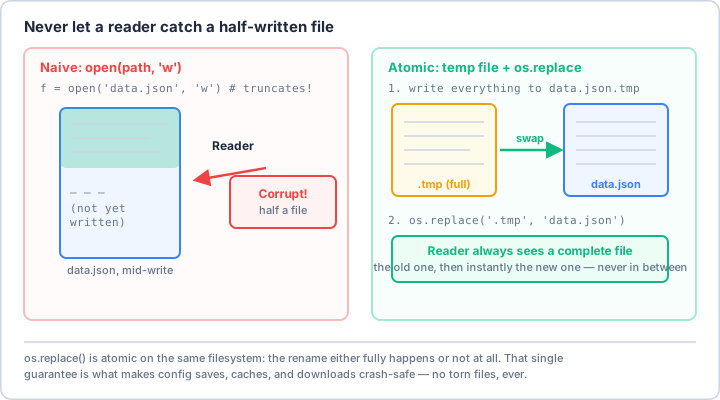
os.replace() it over the original in one atomic step. A reader sees the old file or the new file, never a torn one.Real-World Scenario: The Digital Photo Organizer 📸
Imagine you've just returned from a year-long trip with 10,000 photos scattered across different devices. Your camera names them DSC_0001.jpg, your phone uses IMG_20240315.jpg, and your friend's camera has completely different naming. Let's build a smart organizer!
import os
import shutil
from pathlib import Path
from datetime import datetime
import hashlib
from PIL import Image
from PIL.ExifTags import TAGS

class PhotoOrganizer:
    """
    A sophisticated photo organizer that sorts images by date,
    removes duplicates, and maintains metadata integrity.
    """

    def __init__(self, source_dir, dest_dir):
        self.source = Path(source_dir)
        self.destination = Path(dest_dir)
        self.processed_hashes = set()
        self.stats = {
            'processed': 0,
            'duplicates': 0,
            'organized': 0,
            'errors': 0
        }

    def get_photo_date(self, photo_path):
        """Extract the actual date taken from photo metadata"""
        try:
            image = Image.open(photo_path)
            exifdata = image.getexif()

            for tag_id, value in exifdata.items():
                tag = TAGS.get(tag_id, tag_id)
                if tag == 'DateTimeOriginal':
                    # Parse EXIF date format: 'YYYY:MM:DD HH:MM:SS'
                    return datetime.strptime(value, '%Y:%m:%d %H:%M:%S')

            # Fallback to file modification time
            return datetime.fromtimestamp(os.path.getmtime(photo_path))

        except Exception as e:
            print(f"Error reading metadata from {photo_path}: {e}")
            return datetime.fromtimestamp(os.path.getmtime(photo_path))

    def calculate_file_hash(self, filepath, chunk_size=8192):
        """Calculate SHA256 hash to detect duplicate photos"""
        sha256_hash = hashlib.sha256()
        with open(filepath, "rb") as f:
            for byte_block in iter(lambda: f.read(chunk_size), b""):
                sha256_hash.update(byte_block)
        return sha256_hash.hexdigest()

    def organize_photo(self, photo_path):
        """Organize a single photo into year/month structure"""
        try:
            # Check for duplicates
            file_hash = self.calculate_file_hash(photo_path)
            if file_hash in self.processed_hashes:
                self.stats['duplicates'] += 1
                print(f"🔄 Duplicate found: {photo_path.name}")
                return

            self.processed_hashes.add(file_hash)

            # Get photo date and create destination path
            photo_date = self.get_photo_date(photo_path)
            year_folder = self.destination / str(photo_date.year)
            month_folder = year_folder / f"{photo_date.month:02d}-{photo_date.strftime('%B')}"

            # Create directories if they don't exist
            month_folder.mkdir(parents=True, exist_ok=True)

            # Generate unique filename with date prefix
            date_prefix = photo_date.strftime('%Y%m%d_%H%M%S')
            new_filename = f"{date_prefix}_{photo_path.name}"
            dest_path = month_folder / new_filename

            # Handle filename conflicts
            counter = 1
            while dest_path.exists():
                name_parts = new_filename.rsplit('.', 1)
                new_filename = f"{name_parts[0]}_{counter}.{name_parts[1]}"
                dest_path = month_folder / new_filename
                counter += 1

            # Copy with metadata preservation
            shutil.copy2(photo_path, dest_path)
            self.stats['organized'] += 1
            print(f"✅ Organized: {photo_path.name} → {dest_path.relative_to(self.destination)}")

        except Exception as e:
            self.stats['errors'] += 1
            print(f"❌ Error processing {photo_path}: {e}")

    def process_all_photos(self):
        """Process all photos in the source directory"""
        photo_extensions = {'.jpg', '.jpeg', '.png', '.gif', '.bmp', '.raw', '.tiff'}

        print("🚀 Starting photo organization...")
        print(f"Source: {self.source}")
        print(f"Destination: {self.destination}\n")

        for photo_path in self.source.rglob('*'):
            if photo_path.is_file() and photo_path.suffix.lower() in photo_extensions:
                self.stats['processed'] += 1
                self.organize_photo(photo_path)

        self.print_summary()

    def print_summary(self):
        """Print organization summary"""
        print("\n" + "="*50)
        print("📊 Organization Summary:")
        print(f"  Total Processed: {self.stats['processed']}")
        print(f"  Successfully Organized: {self.stats['organized']}")
        print(f"  Duplicates Skipped: {self.stats['duplicates']}")
        print(f"  Errors: {self.stats['errors']}")
        print("="*50)

# Real-world usage
if __name__ == "__main__":
    organizer = PhotoOrganizer(
        source_dir="/home/user/messy_photos",
        dest_dir="/home/user/organized_photos"
    )
    organizer.process_all_photos()
Atomic File Operations: The All-or-Nothing Approach 🔒
Imagine you're updating your company's configuration file that controls critical services. What if your script crashes halfway through writing? You'd have a corrupted config file! Atomic operations are like having a safety net – either the entire operation succeeds, or nothing changes at all.
import tempfile
import os
from contextlib import contextmanager

@contextmanager
def atomic_write(filepath, mode='w', encoding='utf-8'):
    """
    Context manager for atomic file writes.
    Writes to a temporary file first, then atomically replaces the original.

    This is like writing a rough draft first, then only replacing
    the final document when you're completely satisfied!
    """
    # Create temp file in the same directory (for same filesystem)
    dir_name = os.path.dirname(filepath)
    with tempfile.NamedTemporaryFile(mode=mode,
                                     encoding=encoding,
                                     dir=dir_name,
                                     delete=False) as tf:
        temp_path = tf.name
        try:
            yield tf
            # If we get here, writing succeeded
            tf.flush()
            os.fsync(tf.fileno())  # Force write to disk
        except:
            # Something went wrong, clean up temp file
            try:
                os.unlink(temp_path)
            except:
                pass
            raise

    # Atomic rename (on POSIX systems)
    os.replace(temp_path, filepath)

# Example: Safely updating a critical configuration file
def update_config_safely(config_path, new_settings):
    """
    Update configuration file atomically.
    If anything fails, the original file remains untouched.
    """
    with atomic_write(config_path) as f:
        import json
        json.dump(new_settings, f, indent=2)
        # If JSON serialization fails, original file is safe!

# Real-world example: Updating a database connection config
config = {
    "database": {
        "host": "prod-db-server.company.com",
        "port": 5432,
        "name": "production_db",
        "pool_size": 20,
        "timeout": 30
    },
    "cache": {
        "redis_host": "cache-server.company.com",
        "ttl": 3600
    }
}

update_config_safely("/etc/myapp/config.json", config)
print("✅ Configuration updated safely!")
Memory-Mapped Files: The Speed Demon's Choice 🏎️
Memory-mapped files are like having a magic portal between your RAM and your hard drive. Instead of reading a huge file piece by piece, you can treat it like it's already in memory! This is incredibly powerful for processing large files.
import mmap
import os
import time

class LogAnalyzer:
    """
    High-performance log analyzer using memory-mapped files.
    Perfect for analyzing multi-gigabyte log files!
    """

    def __init__(self, log_path):
        self.log_path = log_path
        self.file_size = os.path.getsize(log_path)

    def count_errors_traditional(self):
        """Traditional approach - reads entire file into memory"""
        start = time.time()
        error_count = 0

        with open(self.log_path, 'r', encoding='utf-8') as f:
            for line in f:
                if 'ERROR' in line:
                    error_count += 1

        elapsed = time.time() - start
        print(f"Traditional method: {error_count} errors found in {elapsed:.2f} seconds")
        return error_count

    def count_errors_mmap(self):
        """Memory-mapped approach - much faster for large files"""
        start = time.time()
        error_count = 0

        with open(self.log_path, 'r+b') as f:
            with mmap.mmap(f.fileno(), 0, access=mmap.ACCESS_READ) as mmapped_file:
                for line in iter(mmapped_file.readline, b""):
                    if b'ERROR' in line:
                        error_count += 1

        elapsed = time.time() - start
        print(f"Memory-mapped method: {error_count} errors found in {elapsed:.2f} seconds")
        return error_count

    def find_pattern_in_huge_file(self, pattern):
        """
        Find all occurrences of a pattern in a huge file.
        Memory-mapped files make this lightning fast!
        """
        results = []
        pattern_bytes = pattern.encode('utf-8')

        with open(self.log_path, 'r+b') as f:
            with mmap.mmap(f.fileno(), 0, access=mmap.ACCESS_READ) as mmapped_file:
                # Find all occurrences
                position = 0
                while True:
                    position = mmapped_file.find(pattern_bytes, position)
                    if position == -1:
                        break

                    # Get the whole line containing the pattern
                    line_start = mmapped_file.rfind(b'\n', 0, position) + 1
                    line_end = mmapped_file.find(b'\n', position)
                    if line_end == -1:
                        line_end = len(mmapped_file)

                    line = mmapped_file[line_start:line_end].decode('utf-8', errors='ignore')
                    results.append({
                        'position': position,
                        'line': line,
                        'line_number': mmapped_file[:position].count(b'\n') + 1
                    })

                    position += len(pattern_bytes)

        return results

# Example usage with a large server log
analyzer = LogAnalyzer("/var/log/application.log")

# Find specific error patterns
critical_errors = analyzer.find_pattern_in_huge_file("CRITICAL")
for error in critical_errors[:5]:  # Show first 5
    print(f"Line {error['line_number']}: {error['line'].strip()}")
File Locking: Preventing Chaos in Concurrent Access 🔐
Think of file locking like a "Do Not Disturb" sign on a hotel room door. When multiple processes or scripts try to access the same file simultaneously, chaos can ensue. File locking ensures orderly access, preventing data corruption and race conditions.
import fcntl
import time
import os
from contextlib import contextmanager

@contextmanager
def file_lock(filepath, timeout=10):
    """
    POSIX/Unix-only file locking context manager.
    Like a traffic light for file access!

    Note: this relies on the ``fcntl`` module, which exists only on
    Unix-like systems. On Windows ``import fcntl`` fails; use ``msvcrt.locking``
    (or the ``portalocker`` package) there instead.
    """
    lock_file = f"{filepath}.lock"
    fp = open(lock_file, 'w')

    start_time = time.time()
    locked = False

    try:
        while not locked and (time.time() - start_time) < timeout:
            try:
                # Try to acquire an exclusive lock (non-blocking)
                fcntl.flock(fp.fileno(), fcntl.LOCK_EX | fcntl.LOCK_NB)
                locked = True
            except IOError:
                # Lock is held by another process, wait a bit
                time.sleep(0.1)

        if not locked:
            raise TimeoutError(f"Could not acquire lock for {filepath} within {timeout} seconds")

        yield

    finally:
        # Release the lock
        if locked:
            fcntl.flock(fp.fileno(), fcntl.LOCK_UN)
        fp.close()
        # Clean up lock file
        try:
            os.remove(lock_file)
        except:
            pass

# Real-world example: Multiple processes updating a shared counter file
def increment_counter(counter_file):
    """
    Safely increment a counter in a file, even with multiple processes.
    This could be tracking website visits, API calls, or any shared resource.
    """
    with file_lock(counter_file):
        # Read current value
        try:
            with open(counter_file, 'r') as f:
                count = int(f.read().strip())
        except (FileNotFoundError, ValueError):
            count = 0

        # Increment
        count += 1

        # Write back atomically
        with open(counter_file, 'w') as f:
            f.write(str(count))

        print(f"Process {os.getpid()}: Counter incremented to {count}")
        return count

# Simulate multiple processes (in reality, these would be separate scripts)
counter_file = "/tmp/visitor_counter.txt"
for _ in range(5):
    increment_counter(counter_file)
Advanced Metadata Manipulation 📊
Files aren't just about content – they carry rich metadata that tells a story. Creation time, modification time, permissions, extended attributes... it's like each file has its own passport with stamps from its journey through your system!
import os
import stat
import platform
from datetime import datetime
from pathlib import Path

class FileMetadataManager:
    """
    Comprehensive file metadata manipulation toolkit.
    Like being a detective and time traveler for files!
    """

    def __init__(self, filepath):
        self.path = Path(filepath)
        self.platform = platform.system()

    def get_all_timestamps(self):
        """Get all time-related metadata"""
        stat_info = os.stat(self.path)

        timestamps = {
            'changed': datetime.fromtimestamp(stat_info.st_ctime),  # st_ctime is metadata-change time on Unix, not creation time
            'modified': datetime.fromtimestamp(stat_info.st_mtime),
            'accessed': datetime.fromtimestamp(stat_info.st_atime),
            'size_bytes': stat_info.st_size,
            'size_human': self._human_readable_size(stat_info.st_size)
        }

        # On Unix systems, get more detailed info
        if self.platform != 'Windows':
            timestamps['inode'] = stat_info.st_ino
            timestamps['device'] = stat_info.st_dev
            timestamps['hard_links'] = stat_info.st_nlink

        return timestamps

    def _human_readable_size(self, size_bytes):
        """Convert bytes to human readable format"""
        for unit in ['B', 'KB', 'MB', 'GB', 'TB']:
            if size_bytes < 1024.0:
                return f"{size_bytes:.2f} {unit}"
            size_bytes /= 1024.0
        return f"{size_bytes:.2f} PB"

    def preserve_timestamps(self, operation):
        """
        Decorator to preserve file timestamps during operations.
        Like a time capsule for your files!
        """
        def wrapper(*args, **kwargs):
            # Capture original timestamps
            stat_info = os.stat(self.path)
            atime = stat_info.st_atime
            mtime = stat_info.st_mtime

            # Perform the operation
            result = operation(*args, **kwargs)

            # Restore timestamps
            os.utime(self.path, (atime, mtime))

            return result
        return wrapper

    def set_custom_timestamp(self, modified_time=None, accessed_time=None):
        """
        Set custom timestamps on a file.
        Useful for maintaining consistency when syncing files!
        """
        stat_info = os.stat(self.path)

        # Use current times if not specified
        atime = accessed_time or stat_info.st_atime
        mtime = modified_time or stat_info.st_mtime

        # Convert datetime objects to timestamps if necessary
        if isinstance(atime, datetime):
            atime = atime.timestamp()
        if isinstance(mtime, datetime):
            mtime = mtime.timestamp()

        os.utime(self.path, (atime, mtime))
        print(f"✅ Timestamps updated for {self.path.name}")

    def analyze_permissions(self):
        """
        Detailed permission analysis.
        Understanding who can do what with your files!
        """
        stat_info = os.stat(self.path)
        mode = stat_info.st_mode

        permissions = {
            'type': self._get_file_type(mode),
            'owner': {
                'read': bool(mode & stat.S_IRUSR),
                'write': bool(mode & stat.S_IWUSR),
                'execute': bool(mode & stat.S_IXUSR)
            },
            'group': {
                'read': bool(mode & stat.S_IRGRP),
                'write': bool(mode & stat.S_IWGRP),
                'execute': bool(mode & stat.S_IXGRP)
            },
            'others': {
                'read': bool(mode & stat.S_IROTH),
                'write': bool(mode & stat.S_IWOTH),
                'execute': bool(mode & stat.S_IXOTH)
            },
            'special': {
                'setuid': bool(mode & stat.S_ISUID),
                'setgid': bool(mode & stat.S_ISGID),
                'sticky': bool(mode & stat.S_ISVTX)
            },
            'octal': oct(stat.S_IMODE(mode))
        }

        return permissions

    def _get_file_type(self, mode):
        """Determine file type from mode"""
        if stat.S_ISREG(mode):
            return 'regular file'
        elif stat.S_ISDIR(mode):
            return 'directory'
        elif stat.S_ISLNK(mode):
            return 'symbolic link'
        elif stat.S_ISFIFO(mode):
            return 'FIFO/pipe'
        elif stat.S_ISSOCK(mode):
            return 'socket'
        elif stat.S_ISBLK(mode):
            return 'block device'
        elif stat.S_ISCHR(mode):
            return 'character device'
        else:
            return 'unknown'

    def create_backup_with_metadata(self, backup_dir):
        """
        Create a backup that preserves all metadata.
        It's like creating a perfect clone, not just a copy!
        """
        backup_path = Path(backup_dir) / f"{self.path.name}.backup"

        # Copy file with all metadata preserved
        import shutil
        shutil.copy2(self.path, backup_path)

        # Copy additional metadata if on Unix
        if self.platform != 'Windows':
            try:
                # Copy extended attributes (xattr)
                import xattr
                for attr_name in xattr.listxattr(self.path):
                    attr_value = xattr.getxattr(self.path, attr_name)
                    xattr.setxattr(backup_path, attr_name, attr_value)
            except ImportError:
                pass  # xattr not available

        print(f"📦 Backup created with full metadata: {backup_path}")
        return backup_path

# Example usage
metadata_mgr = FileMetadataManager("/path/to/important_document.pdf")

# Get comprehensive metadata
metadata = metadata_mgr.get_all_timestamps()
print("📋 File Metadata:")
for key, value in metadata.items():
    print(f"  {key}: {value}")

# Analyze permissions
perms = metadata_mgr.analyze_permissions()
print(f"\n🔐 Permissions ({perms['octal']}):")
for entity in ['owner', 'group', 'others']:
    rights = perms[entity]
    r = 'r' if rights['read'] else '-'
    w = 'w' if rights['write'] else '-'
    x = 'x' if rights['execute'] else '-'
    print(f"  {entity}: {r}{w}{x}")
Practical Exercise: Build Your Own File Sync System 🔄
Let's combine everything we've learned to build a simple but powerful file synchronization system. This is like having your own personal Dropbox that you control completely!
import hashlib
import json
import os
import shutil
from datetime import datetime
from pathlib import Path
import time

class SmartFileSync:
    """
    A smart file synchronization system that tracks changes,
    handles conflicts, and maintains history.
    """

    def __init__(self, source_dir, target_dir, config_file=None):
        self.source = Path(source_dir)
        self.target = Path(target_dir)
        self.config_file = config_file or self.target / '.sync_state.json'
        self.state = self.load_state()
        self.conflicts = []

    def load_state(self):
        """Load previous sync state"""
        if self.config_file.exists():
            with open(self.config_file, 'r') as f:
                return json.load(f)
        return {'files': {}, 'last_sync': None}

    def save_state(self):
        """Save current sync state"""
        self.state['last_sync'] = datetime.now().isoformat()
        with open(self.config_file, 'w') as f:
            json.dump(self.state, f, indent=2)

    def calculate_checksum(self, filepath):
        """Calculate file checksum for change detection"""
        sha256 = hashlib.sha256()
        with open(filepath, 'rb') as f:
            for chunk in iter(lambda: f.read(8192), b''):
                sha256.update(chunk)
        return sha256.hexdigest()

    def sync_file(self, source_file):
        """Sync a single file with conflict detection"""
        relative_path = source_file.relative_to(self.source)
        target_file = self.target / relative_path

        # Create target directory if needed
        target_file.parent.mkdir(parents=True, exist_ok=True)

        source_checksum = self.calculate_checksum(source_file)
        source_mtime = source_file.stat().st_mtime

        if not target_file.exists():
            # New file - simple copy
            shutil.copy2(source_file, target_file)
            print(f"✨ New file: {relative_path}")
            self.state['files'][str(relative_path)] = {
                'checksum': source_checksum,
                'mtime': source_mtime
            }
        else:
            # File exists - check for changes
            target_checksum = self.calculate_checksum(target_file)
            stored_state = self.state['files'].get(str(relative_path), {})

            if source_checksum != target_checksum:
                if stored_state.get('checksum') == target_checksum:
                    # Target unchanged, source changed - update
                    shutil.copy2(source_file, target_file)
                    print(f"📝 Updated: {relative_path}")
                    self.state['files'][str(relative_path)] = {
                        'checksum': source_checksum,
                        'mtime': source_mtime
                    }
                else:
                    # Conflict - both changed!
                    conflict_backup = target_file.with_suffix(
                        f'.conflict_{datetime.now().strftime("%Y%m%d_%H%M%S")}{target_file.suffix}'
                    )
                    shutil.copy2(target_file, conflict_backup)
                    shutil.copy2(source_file, target_file)
                    print(f"⚠️ Conflict resolved: {relative_path}")
                    print(f"   Backup saved as: {conflict_backup.name}")
                    self.conflicts.append(str(relative_path))
                    self.state['files'][str(relative_path)] = {
                        'checksum': source_checksum,
                        'mtime': source_mtime
                    }

    def sync_all(self):
        """Perform full synchronization"""
        print(f"\n🔄 Starting sync: {self.source} → {self.target}")
        print(f"Last sync: {self.state.get('last_sync', 'Never')}\n")

        # Track all source files
        source_files = set()

        # Sync all files from source
        for source_file in self.source.rglob('*'):
            if source_file.is_file() and not source_file.name.startswith('.'):
                relative_path = source_file.relative_to(self.source)
                source_files.add(str(relative_path))
                self.sync_file(source_file)

        # Check for deleted files
        for file_path in list(self.state['files'].keys()):
            if file_path not in source_files:
                target_file = self.target / file_path
                if target_file.exists():
                    # Move to trash instead of deleting
                    trash_dir = self.target / '.trash' / datetime.now().strftime('%Y%m%d')
                    trash_dir.mkdir(parents=True, exist_ok=True)
                    trash_file = trash_dir / target_file.name
                    shutil.move(str(target_file), str(trash_file))
                    print(f"🗑️ Moved to trash: {file_path}")
                del self.state['files'][file_path]

        # Save state
        self.save_state()

        # Print summary
        print(f"\n✅ Sync complete!")
        if self.conflicts:
            print(f"⚠️ {len(self.conflicts)} conflicts were resolved")
        print(f"📊 Tracking {len(self.state['files'])} files")

# Example usage
syncer = SmartFileSync(
    source_dir="/home/user/Documents",
    target_dir="/backup/Documents"
)
syncer.sync_all()
Key Takeaways and Best Practices 🎯
- Always Use Context Managers: They ensure files are properly closed, even if errors occur. It's like having an automatic cleanup crew!
- Think Atomically: For critical operations, use atomic writes. Better safe than sorry when dealing with important data.
- Memory-Map for Performance: When dealing with large files (logs, databases, media files), memory mapping can provide 10-100x performance improvements.
- Respect File Locking: In multi-process environments, proper locking prevents the digital equivalent of two people trying to go through a door at once.
- Preserve Metadata: When copying or moving files, remember that metadata tells a story. Use shutil.copy2() instead of shutil.copy() to preserve timestamps.
- Handle Errors Gracefully: Files can disappear, drives can fill up, permissions can change. Always expect the unexpected!
- Use Pathlib: It's more intuitive and cross-platform than os.path. Think of it as the Swiss Army knife of path manipulation.
Your Advanced File Operations Toolbox 🧰
You now have the power to manipulate files like a maestro conducts an orchestra. Whether you're organizing thousands of photos, synchronizing important documents, or analyzing massive log files, these advanced techniques will serve you well. Remember: with great power comes great responsibility – always backup before bulk operations! 🚀
📓 Learning Journal
Keep a learning journal — digital or physical. After this lesson, take a few minutes to write down:
- Key concepts you learned
- Techniques that clicked for you
- Questions or confusion points to revisit
- Ideas you want to try
- Your progress and feelings about learning this
✍️ This lesson's prompt: The atomic write pattern trades a little extra work (a temp file plus a rename) for a guarantee that readers never see a half-written file. Where in your own scripts or workflows would a "safe save" like this have prevented a headache?
📝 Lesson Summary
🎓 Key Takeaways
- Atomic writes (write to a temp file, then
os.replace()) make saves crash-safe — a reader always sees the old file or the new one, never a torn one. - Memory-mapped files let you treat a huge file as if it were in memory, giving big speedups when scanning logs or searching for patterns.
- File locking with
fcntl.flockkeeps concurrent processes from corrupting shared files; on Windows you needmsvcrtorportalockerinstead. - File metadata (timestamps, permissions, type) is rich and worth preserving — use
shutil.copy2()andos.utime()rather than plain copies.
🎉 What You've Accomplished
You can now go beyond basic read/write and orchestrate whole file systems — writing files safely under failure, scanning enormous files fast, coordinating concurrent access, and preserving the metadata that gives each file its history. These are the building blocks of every serious automation script.
❓ Common Questions at This Stage
Why does os.replace() count as "atomic" but a plain write doesn't?
On the same filesystem, os.replace() swaps the directory entry to point at the new file in a single operation the OS guarantees can't be half-done. A plain open(..., 'w') truncates the original immediately, so any crash mid-write leaves a partial file. That's why you write to a temp file first, then replace.
Is memory mapping always faster than reading a file normally?
No. Its advantage shows up on large files where you scan or seek repeatedly, because you avoid copying data into Python buffers. For small files or a single sequential pass, ordinary buffered reads are just as fast and simpler.
Does fcntl file locking work on Windows?
No — import fcntl fails on Windows. Use msvcrt.locking or the cross-platform portalocker package there. Also note that flock is advisory: it only stops other processes that also ask for the lock.
🔭 Looking Ahead
Next you'll turn these single-operation skills toward bulk work — renaming and reorganizing many files at once, where a preview-first, collision-aware mindset matters just as much as atomic safety.
✅ Before the Next Lesson
- Wrap one of your own file-writing scripts in the
atomic_writecontext manager and confirm the original survives a deliberately raised error mid-write. - Run
os.staton a few files and decode their permission bits with thestatmodule to read owner/group/other rights. - Write your Learning Journal entry for this lesson.
🌟 Encouragement for the Journey
Handling files safely under pressure is what separates a script you trust with real data from one you cross your fingers over. You now write the trustworthy kind. Keep building!
Pro Tip: Always test file operations on a small subset first. It's much easier to recover from mistakes with 10 files than 10,000!