🎯 Element Interaction: Master the Art of Web Element Control
📚 What You'll Learn
By the end of this lesson, you will be able to:
- Locate elements with the right strategy — ID, name, CSS selector, or XPath — and choose the most stable option available
- Perform core interactions:
click(),send_keys(),clear(), andsubmit() - Drive advanced gestures with
ActionChains: hover, double-click, right-click, and drag-and-drop - Check an element's state (
is_displayed,is_enabled,is_selected) before you act on it - Recover from common failures such as
StaleElementReferenceExceptionandElementClickInterceptedExceptionusing retries, JavaScript clicks, and scroll-into-view - Fill and submit dynamic forms — text fields, dropdowns, checkboxes, radio buttons, and file uploads — driven by field type
⏱️ Estimated Time: 45–60 minutes
🎯 Project: Build a resilient form filler that finds each field by multiple locator strategies, fills it based on its type, and submits the form reliably even when elements load late or shift.
Element interaction is the heart of browser automation - it's how your code clicks buttons, fills forms, reads text, and navigates websites just like a human would. Think of it as learning to play a complex instrument where each element type requires a different technique. From simple clicks to complex drag-and-drop operations, mastering element interaction transforms you from a browser observer to a browser conductor! 🎭
The Element Interaction Framework
Web elements are like actors on a stage - each has its role, properties, and ways to interact with them. Some need a gentle click, others require text input, and some demand complex gestures. Understanding how to find, wait for, and interact with these elements reliably is what separates amateur scripts from professional automation!
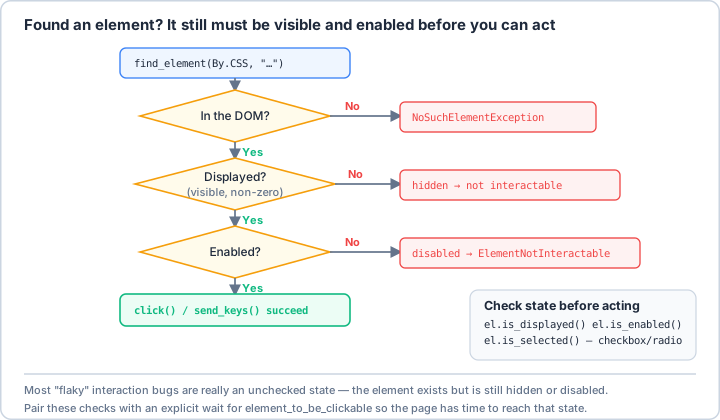
element_to_be_clickable) before you act.Real-World Scenario: The Universal Form Filler 📝
You're building an intelligent form automation system that can handle any web form - from simple contact forms to complex multi-step wizards with dynamic fields, file uploads, date pickers, dropdowns, and custom widgets. Your system must handle element timing, JavaScript-rendered elements, shadow DOM, iframes, and recover from stale element exceptions. Let's build a bulletproof element interaction system!
# First, install required packages:
# pip install selenium webdriver-manager pillow opencv-python
import time
import logging
from typing import List, Optional, Union, Tuple, Any, Dict, Callable
from dataclasses import dataclass
from enum import Enum
import re
from pathlib import Path
from selenium import webdriver
from selenium.webdriver.common.by import By
from selenium.webdriver.remote.webelement import WebElement
from selenium.webdriver.support.ui import WebDriverWait, Select
from selenium.webdriver.support import expected_conditions as EC
from selenium.webdriver.common.action_chains import ActionChains
from selenium.webdriver.common.keys import Keys
from selenium.common.exceptions import (
NoSuchElementException,
StaleElementReferenceException,
ElementNotInteractableException,
ElementNotVisibleException,
TimeoutException,
WebDriverException,
ElementClickInterceptedException,
NoSuchFrameException,
InvalidElementStateException
)
from selenium.webdriver.remote.file_detector import LocalFileDetector
# ==================== Element Locator Strategies ====================
class LocatorStrategy(Enum):
"""Element locator strategies."""
ID = By.ID
NAME = By.NAME
CLASS_NAME = By.CLASS_NAME
TAG_NAME = By.TAG_NAME
LINK_TEXT = By.LINK_TEXT
PARTIAL_LINK_TEXT = By.PARTIAL_LINK_TEXT
CSS_SELECTOR = By.CSS_SELECTOR
XPATH = By.XPATH
@dataclass
class Locator:
"""Element locator with strategy and value."""
strategy: LocatorStrategy
value: str
description: Optional[str] = None
def to_selenium(self) -> Tuple[str, str]:
"""Convert to Selenium locator tuple."""
return (self.strategy.value, self.value)
# ==================== Smart Element Finder ====================
class SmartElementFinder:
"""
Intelligent element finding with multiple strategies and fallbacks.
"""
def __init__(self, driver: webdriver.Remote, timeout: int = 10):
self.driver = driver
self.wait = WebDriverWait(driver, timeout)
self.logger = logging.getLogger(__name__)
def find_element(self, locator: Union[Locator, Tuple[str, str]],
timeout: Optional[int] = None) -> Optional[WebElement]:
"""
Find element with intelligent retry and fallback strategies.
"""
if isinstance(locator, Locator):
locator = locator.to_selenium()
wait = WebDriverWait(self.driver, timeout) if timeout else self.wait
try:
# Try standard wait
element = wait.until(EC.presence_of_element_located(locator))
return element
except TimeoutException:
# Try alternative strategies
return self._try_alternative_strategies(locator)
def find_elements(self, locator: Union[Locator, Tuple[str, str]],
timeout: Optional[int] = None) -> List[WebElement]:
"""Find multiple elements."""
if isinstance(locator, Locator):
locator = locator.to_selenium()
wait = WebDriverWait(self.driver, timeout) if timeout else self.wait
try:
wait.until(EC.presence_of_element_located(locator))
return self.driver.find_elements(*locator)
except TimeoutException:
return []
def find_clickable_element(self, locator: Union[Locator, Tuple[str, str]],
timeout: Optional[int] = None) -> Optional[WebElement]:
"""Find element that is clickable."""
if isinstance(locator, Locator):
locator = locator.to_selenium()
wait = WebDriverWait(self.driver, timeout) if timeout else self.wait
try:
return wait.until(EC.element_to_be_clickable(locator))
except TimeoutException:
return None
def find_visible_element(self, locator: Union[Locator, Tuple[str, str]],
timeout: Optional[int] = None) -> Optional[WebElement]:
"""Find element that is visible."""
if isinstance(locator, Locator):
locator = locator.to_selenium()
wait = WebDriverWait(self.driver, timeout) if timeout else self.wait
try:
return wait.until(EC.visibility_of_element_located(locator))
except TimeoutException:
return None
def _try_alternative_strategies(self, locator: Tuple[str, str]) -> Optional[WebElement]:
"""Try alternative finding strategies."""
strategy, value = locator
# Try JavaScript if element might be hidden
if strategy == By.ID:
try:
element = self.driver.execute_script(
f"return document.getElementById('{value}');"
)
if element:
return element
except:
pass
# Try to find in iframes
element = self._search_in_iframes(locator)
if element:
return element
# Try shadow DOM
if strategy == By.CSS_SELECTOR:
element = self._search_shadow_dom(value)
if element:
return element
return None
def _search_in_iframes(self, locator: Tuple[str, str]) -> Optional[WebElement]:
"""Search for element in all iframes."""
main_window = self.driver.current_window_handle
# Get all iframes
iframes = self.driver.find_elements(By.TAG_NAME, "iframe")
iframes.extend(self.driver.find_elements(By.TAG_NAME, "frame"))
for iframe in iframes:
try:
self.driver.switch_to.frame(iframe)
# Try to find element in this iframe
elements = self.driver.find_elements(*locator)
if elements:
return elements[0]
# Recursively search nested iframes
nested_element = self._search_in_iframes(locator)
if nested_element:
return nested_element
except:
pass
finally:
self.driver.switch_to.default_content()
return None
def _search_shadow_dom(self, css_selector: str) -> Optional[WebElement]:
"""Search for element in shadow DOM."""
script = """
function findInShadowDom(selector) {
const elements = [];
function traverse(node) {
// Check shadow root
if (node.shadowRoot) {
const shadowElements = node.shadowRoot.querySelectorAll(selector);
elements.push(...shadowElements);
// Traverse shadow DOM children
node.shadowRoot.querySelectorAll('*').forEach(traverse);
}
// Traverse regular children
node.querySelectorAll('*').forEach(child => {
if (child.shadowRoot) {
traverse(child);
}
});
}
traverse(document);
return elements[0] || null;
}
return findInShadowDom(arguments[0]);
"""
try:
return self.driver.execute_script(script, css_selector)
except:
return None
# ==================== Element Interactor ====================
class ElementInteractor:
"""
Comprehensive element interaction with error handling and retries.
"""
def __init__(self, driver: webdriver.Remote, finder: Optional[SmartElementFinder] = None):
self.driver = driver
self.finder = finder or SmartElementFinder(driver)
self.actions = ActionChains(driver)
self.logger = logging.getLogger(__name__)
def click(self, locator: Union[Locator, WebElement, Tuple[str, str]],
retry: int = 3, js_click: bool = False) -> bool:
"""
Click element with multiple strategies.
"""
element = self._get_element(locator)
if not element:
return False
for attempt in range(retry):
try:
if js_click:
# JavaScript click (bypasses overlays)
self.driver.execute_script("arguments[0].click();", element)
else:
# Standard click
element.click()
self.logger.info(f"Clicked element successfully")
return True
except ElementClickInterceptedException:
# Element is covered, try scrolling and clicking
self.scroll_to_element(element)
time.sleep(0.5)
if attempt == retry - 1:
# Last attempt - try JS click
try:
self.driver.execute_script("arguments[0].click();", element)
return True
except:
pass
except StaleElementReferenceException:
# Re-find element
element = self._get_element(locator)
if not element:
return False
except Exception as e:
self.logger.warning(f"Click attempt {attempt + 1} failed: {e}")
return False
def send_keys(self, locator: Union[Locator, WebElement, Tuple[str, str]],
text: str, clear_first: bool = True, human_like: bool = False) -> bool:
"""
Send keys to element.
"""
element = self._get_element(locator)
if not element:
return False
try:
# Clear field if requested
if clear_first:
element.clear()
# Sometimes clear doesn't work, use keyboard shortcut
element.send_keys(Keys.CONTROL + "a")
element.send_keys(Keys.DELETE)
if human_like:
# Type with human-like delays
import random
for char in text:
element.send_keys(char)
time.sleep(random.uniform(0.05, 0.2))
else:
element.send_keys(text)
self.logger.info(f"Sent keys to element")
return True
except Exception as e:
self.logger.error(f"Failed to send keys: {e}")
return False
def select_dropdown(self, locator: Union[Locator, WebElement, Tuple[str, str]],
value: Optional[str] = None, text: Optional[str] = None,
index: Optional[int] = None) -> bool:
"""
Select dropdown option.
"""
element = self._get_element(locator)
if not element:
return False
try:
select = Select(element)
if value is not None:
select.select_by_value(value)
elif text is not None:
select.select_by_visible_text(text)
elif index is not None:
select.select_by_index(index)
else:
return False
self.logger.info(f"Selected dropdown option")
return True
except Exception as e:
self.logger.error(f"Failed to select dropdown: {e}")
return False
def checkbox(self, locator: Union[Locator, WebElement, Tuple[str, str]],
check: bool = True) -> bool:
"""
Check or uncheck checkbox.
"""
element = self._get_element(locator)
if not element:
return False
try:
is_checked = element.is_selected()
if (check and not is_checked) or (not check and is_checked):
element.click()
self.logger.info(f"{'Checked' if check else 'Unchecked'} checkbox")
return True
except Exception as e:
self.logger.error(f"Failed to handle checkbox: {e}")
return False
def radio_button(self, locator: Union[Locator, WebElement, Tuple[str, str]]) -> bool:
"""
Select radio button.
"""
element = self._get_element(locator)
if not element:
return False
try:
if not element.is_selected():
element.click()
self.logger.info(f"Selected radio button")
return True
except Exception as e:
self.logger.error(f"Failed to select radio button: {e}")
return False
def upload_file(self, locator: Union[Locator, WebElement, Tuple[str, str]],
file_path: str) -> bool:
"""
Upload file to file input.
"""
element = self._get_element(locator)
if not element:
return False
# Ensure file exists
if not Path(file_path).exists():
self.logger.error(f"File not found: {file_path}")
return False
try:
# Make sure we use absolute path
absolute_path = str(Path(file_path).absolute())
# Set file detector for remote drivers
if hasattr(self.driver, 'file_detector'):
self.driver.file_detector = LocalFileDetector()
element.send_keys(absolute_path)
self.logger.info(f"Uploaded file: {file_path}")
return True
except Exception as e:
self.logger.error(f"Failed to upload file: {e}")
return False
def drag_and_drop(self, source: Union[Locator, WebElement, Tuple[str, str]],
target: Union[Locator, WebElement, Tuple[str, str]]) -> bool:
"""
Drag and drop element.
"""
source_element = self._get_element(source)
target_element = self._get_element(target)
if not source_element or not target_element:
return False
try:
# Method 1: Using ActionChains
ActionChains(self.driver).drag_and_drop(
source_element, target_element
).perform()
self.logger.info(f"Performed drag and drop")
return True
except:
# Method 2: JavaScript fallback
try:
self._js_drag_and_drop(source_element, target_element)
return True
except Exception as e:
self.logger.error(f"Failed to drag and drop: {e}")
return False
def _js_drag_and_drop(self, source: WebElement, target: WebElement):
"""JavaScript drag and drop fallback."""
script = """
function createEvent(typeOfEvent) {
var event = document.createEvent("CustomEvent");
event.initCustomEvent(typeOfEvent, true, true, null);
event.dataTransfer = {
data: {},
setData: function(key, value) { this.data[key] = value; },
getData: function(key) { return this.data[key]; }
};
return event;
}
function dispatchEvent(element, event, transferData) {
if (transferData !== undefined) {
event.dataTransfer = transferData;
}
if (element.dispatchEvent) {
element.dispatchEvent(event);
} else if (element.fireEvent) {
element.fireEvent("on" + event.type, event);
}
}
var source = arguments[0];
var target = arguments[1];
var dragStartEvent = createEvent('dragstart');
dispatchEvent(source, dragStartEvent);
var dropEvent = createEvent('drop');
dispatchEvent(target, dropEvent, dragStartEvent.dataTransfer);
var dragEndEvent = createEvent('dragend');
dispatchEvent(source, dragEndEvent, dropEvent.dataTransfer);
"""
self.driver.execute_script(script, source, target)
def hover(self, locator: Union[Locator, WebElement, Tuple[str, str]]) -> bool:
"""
Hover over element.
"""
element = self._get_element(locator)
if not element:
return False
try:
ActionChains(self.driver).move_to_element(element).perform()
self.logger.info(f"Hovered over element")
return True
except Exception as e:
self.logger.error(f"Failed to hover: {e}")
return False
def double_click(self, locator: Union[Locator, WebElement, Tuple[str, str]]) -> bool:
"""
Double click element.
"""
element = self._get_element(locator)
if not element:
return False
try:
ActionChains(self.driver).double_click(element).perform()
self.logger.info(f"Double clicked element")
return True
except Exception as e:
self.logger.error(f"Failed to double click: {e}")
return False
def right_click(self, locator: Union[Locator, WebElement, Tuple[str, str]]) -> bool:
"""
Right click (context menu) on element.
"""
element = self._get_element(locator)
if not element:
return False
try:
ActionChains(self.driver).context_click(element).perform()
self.logger.info(f"Right clicked element")
return True
except Exception as e:
self.logger.error(f"Failed to right click: {e}")
return False
def scroll_to_element(self, element: Union[Locator, WebElement, Tuple[str, str]],
align: str = "center") -> bool:
"""
Scroll element into view.
Args:
align: "center", "start", "end", "nearest"
"""
element = self._get_element(element) if not isinstance(element, WebElement) else element
if not element:
return False
try:
# JavaScript scroll with options
self.driver.execute_script(
"arguments[0].scrollIntoView({block: arguments[1], inline: 'center', behavior: 'smooth'});",
element, align
)
time.sleep(0.5) # Wait for smooth scroll
return True
except Exception as e:
self.logger.error(f"Failed to scroll to element: {e}")
return False
def get_text(self, locator: Union[Locator, WebElement, Tuple[str, str]]) -> Optional[str]:
"""
Get element text.
"""
element = self._get_element(locator)
if not element:
return None
try:
# Try visible text first
text = element.text
# If empty, try value attribute
if not text:
text = element.get_attribute("value")
# If still empty, try innerHTML
if not text:
text = element.get_attribute("innerHTML")
# Clean HTML if needed
import re
text = re.sub(r'<[^>]+>', '', text)
return text.strip() if text else ""
except Exception as e:
self.logger.error(f"Failed to get text: {e}")
return None
def get_attribute(self, locator: Union[Locator, WebElement, Tuple[str, str]],
attribute: str) -> Optional[str]:
"""
Get element attribute value.
"""
element = self._get_element(locator)
if not element:
return None
try:
return element.get_attribute(attribute)
except Exception as e:
self.logger.error(f"Failed to get attribute: {e}")
return None
def is_visible(self, locator: Union[Locator, WebElement, Tuple[str, str]]) -> bool:
"""
Check if element is visible.
"""
element = self._get_element(locator)
if not element:
return False
try:
return element.is_displayed()
except:
return False
def is_enabled(self, locator: Union[Locator, WebElement, Tuple[str, str]]) -> bool:
"""
Check if element is enabled.
"""
element = self._get_element(locator)
if not element:
return False
try:
return element.is_enabled()
except:
return False
def is_selected(self, locator: Union[Locator, WebElement, Tuple[str, str]]) -> bool:
"""
Check if element is selected.
"""
element = self._get_element(locator)
if not element:
return False
try:
return element.is_selected()
except:
return False
def wait_for_element(self, locator: Union[Locator, Tuple[str, str]],
timeout: int = 10, condition: str = "presence") -> Optional[WebElement]:
"""
Wait for element with specific condition.
Args:
condition: "presence", "visible", "clickable", "invisible", "selected"
"""
if isinstance(locator, Locator):
locator = locator.to_selenium()
wait = WebDriverWait(self.driver, timeout)
try:
if condition == "presence":
return wait.until(EC.presence_of_element_located(locator))
elif condition == "visible":
return wait.until(EC.visibility_of_element_located(locator))
elif condition == "clickable":
return wait.until(EC.element_to_be_clickable(locator))
elif condition == "invisible":
wait.until(EC.invisibility_of_element_located(locator))
return None
elif condition == "selected":
return wait.until(EC.element_located_to_be_selected(locator))
except TimeoutException:
self.logger.warning(f"Element not found with condition: {condition}")
return None
def _get_element(self, locator: Union[Locator, WebElement, Tuple[str, str]]) -> Optional[WebElement]:
"""Get element from various input types."""
if isinstance(locator, WebElement):
return locator
elif isinstance(locator, Locator):
return self.finder.find_element(locator)
else:
return self.finder.find_element(locator)
# ==================== Form Handler ====================
class FormHandler:
"""
Intelligent form filling and submission.
"""
def __init__(self, driver: webdriver.Remote):
self.driver = driver
self.interactor = ElementInteractor(driver)
self.finder = SmartElementFinder(driver)
self.logger = logging.getLogger(__name__)
def fill_form(self, form_data: Dict[str, Any],
submit: bool = True) -> bool:
"""
Fill form with data dictionary.
Args:
form_data: Dictionary mapping field names/ids to values
submit: Whether to submit the form after filling
"""
success = True
for field_name, value in form_data.items():
if not self._fill_field(field_name, value):
success = False
self.logger.warning(f"Failed to fill field: {field_name}")
if submit and success:
return self._submit_form()
return success
def _fill_field(self, field_name: str, value: Any) -> bool:
"""Fill a single form field."""
# Try multiple strategies to find the field
strategies = [
(By.ID, field_name),
(By.NAME, field_name),
(By.CSS_SELECTOR, f"[placeholder*='{field_name}' i]"),
(By.XPATH, f"//label[contains(text(), '{field_name}')]/following-sibling::input"),
(By.XPATH, f"//label[contains(text(), '{field_name}')]/..//input"),
]
for strategy in strategies:
element = self.finder.find_element(strategy, timeout=2)
if element:
return self._fill_element(element, value)
return False
def _fill_element(self, element: WebElement, value: Any) -> bool:
"""Fill element based on its type."""
try:
tag_name = element.tag_name.lower()
element_type = element.get_attribute("type")
if tag_name == "select":
# Dropdown
return self.interactor.select_dropdown(element, text=str(value))
elif element_type == "checkbox":
# Checkbox
return self.interactor.checkbox(element, bool(value))
elif element_type == "radio":
# Radio button
if value:
return self.interactor.radio_button(element)
elif element_type == "file":
# File upload
return self.interactor.upload_file(element, str(value))
elif tag_name == "textarea" or element_type in ["text", "email", "password", "tel", "number"]:
# Text input
return self.interactor.send_keys(element, str(value))
elif element_type == "date":
# Date input
# Format date if needed
if not isinstance(value, str):
value = value.strftime("%Y-%m-%d")
return self.interactor.send_keys(element, value)
else:
# Default to text input
return self.interactor.send_keys(element, str(value))
except Exception as e:
self.logger.error(f"Failed to fill element: {e}")
return False
def _submit_form(self) -> bool:
"""Submit the form."""
# Try multiple strategies to find submit button
submit_strategies = [
(By.CSS_SELECTOR, "button[type='submit']"),
(By.CSS_SELECTOR, "input[type='submit']"),
(By.XPATH, "//button[contains(text(), 'Submit')]"),
(By.XPATH, "//button[contains(text(), 'Send')]"),
(By.XPATH, "//button[contains(text(), 'Save')]"),
(By.CSS_SELECTOR, "button.submit"),
]
for strategy in submit_strategies:
element = self.finder.find_clickable_element(strategy, timeout=2)
if element:
return self.interactor.click(element)
# Try form.submit() as fallback
try:
form = self.driver.find_element(By.TAG_NAME, "form")
form.submit()
return True
except:
return False
# ==================== Table Handler ====================
class TableHandler:
"""
Handle HTML tables efficiently.
"""
def __init__(self, driver: webdriver.Remote):
self.driver = driver
self.finder = SmartElementFinder(driver)
self.logger = logging.getLogger(__name__)
def get_table_data(self, table_locator: Union[Locator, Tuple[str, str]]) -> List[Dict[str, str]]:
"""
Extract data from HTML table.
Returns:
List of dictionaries, each representing a row
"""
table = self.finder.find_element(table_locator)
if not table:
return []
data = []
# Get headers
headers = []
header_elements = table.find_elements(By.CSS_SELECTOR, "thead th, thead td")
if not header_elements:
# Try first row as headers
header_elements = table.find_elements(By.CSS_SELECTOR, "tr:first-child th, tr:first-child td")
headers = [h.text.strip() for h in header_elements]
# Get rows
rows = table.find_elements(By.CSS_SELECTOR, "tbody tr, tr")
for row in rows:
cells = row.find_elements(By.CSS_SELECTOR, "td, th")
if len(cells) == len(headers) and cells != header_elements:
row_data = {}
for i, cell in enumerate(cells):
if i < len(headers):
row_data[headers[i]] = cell.text.strip()
if row_data:
data.append(row_data)
return data
def click_row_by_text(self, table_locator: Union[Locator, Tuple[str, str]],
text: str, column: Optional[str] = None) -> bool:
"""
Click table row containing specific text.
"""
table = self.finder.find_element(table_locator)
if not table:
return False
rows = table.find_elements(By.CSS_SELECTOR, "tbody tr, tr")
for row in rows:
if column:
# Search in specific column
headers = self._get_headers(table)
if column in headers:
col_index = headers.index(column)
cells = row.find_elements(By.CSS_SELECTOR, "td")
if col_index < len(cells) and text in cells[col_index].text:
cells[col_index].click()
return True
else:
# Search in any cell
if text in row.text:
row.click()
return True
return False
def _get_headers(self, table: WebElement) -> List[str]:
"""Get table headers."""
headers = []
header_elements = table.find_elements(By.CSS_SELECTOR, "thead th, thead td")
if not header_elements:
header_elements = table.find_elements(By.CSS_SELECTOR, "tr:first-child th, tr:first-child td")
return [h.text.strip() for h in header_elements]
# Example usage
if __name__ == "__main__":
print("🎯 Element Interaction Examples\n")
# Setup driver (simplified for example)
from selenium import webdriver
from selenium.webdriver.chrome.options import Options
options = Options()
options.add_argument("--headless")
driver = webdriver.Chrome(options=options)
try:
# Example 1: Element location strategies
print("1️⃣ Element Location Strategies:")
strategies = [
("ID", "element_id"),
("Name", "element_name"),
("Class", ".class-name"),
("CSS Selector", "div.container > p:first-child"),
("XPath", "//div[@class='content']//button[text()='Submit']"),
("Link Text", "Click here"),
("Tag Name", "button")
]
for strategy, example in strategies:
print(f" {strategy}: {example}")
# Example 2: Basic interactions
print("\n2️⃣ Basic Element Interactions:")
interactor = ElementInteractor(driver)
interactions = [
"click() - Click element",
"send_keys() - Type text",
"clear() - Clear input field",
"submit() - Submit form",
"get_text() - Read element text",
"get_attribute() - Get attribute value"
]
for interaction in interactions:
print(f" • {interaction}")
# Example 3: Advanced interactions
print("\n3️⃣ Advanced Interactions:")
advanced = [
"drag_and_drop() - Drag element to target",
"hover() - Mouse over element",
"double_click() - Double click",
"right_click() - Context menu",
"scroll_to_element() - Scroll into view",
"upload_file() - File upload"
]
for action in advanced:
print(f" • {action}")
# Example 4: Form handling
print("\n4️⃣ Form Handling:")
form_handler = FormHandler(driver)
sample_form_data = {
"name": "John Doe",
"email": "john@example.com",
"age": 30,
"country": "United States",
"agree_terms": True,
"profile_pic": "/path/to/file.jpg"
}
print(" Sample form data:")
for field, value in sample_form_data.items():
print(f" {field}: {value}")
# Example 5: Element states
print("\n5️⃣ Element States:")
states = [
"is_visible() - Check if displayed",
"is_enabled() - Check if enabled",
"is_selected() - Check if selected",
"is_displayed() - Check visibility",
"is_clickable() - Check if can be clicked"
]
for state in states:
print(f" • {state}")
# Example 6: Wait conditions
print("\n6️⃣ Wait Conditions:")
conditions = [
("presence", "Element exists in DOM"),
("visible", "Element is visible"),
("clickable", "Element can be clicked"),
("invisible", "Element becomes invisible"),
("selected", "Element is selected"),
("text_present", "Text appears in element")
]
for condition, description in conditions:
print(f" {condition}: {description}")
# Example 7: Shadow DOM and iframes
print("\n7️⃣ Special Cases:")
special_cases = [
"Shadow DOM - Elements inside shadow roots",
"iFrames - Elements in frames",
"Dynamic Elements - JavaScript-generated",
"Lazy Loading - Elements load on scroll",
"Pop-ups/Modals - Overlay elements",
"SVG Elements - Scalable vector graphics"
]
for case in special_cases:
print(f" • {case}")
# Example 8: Error handling
print("\n8️⃣ Common Errors & Solutions:")
errors = [
("NoSuchElementException", "Element not found - Check locator"),
("StaleElementReferenceException", "Element no longer valid - Re-find element"),
("ElementNotInteractableException", "Element not interactable - Wait or scroll"),
("ElementClickInterceptedException", "Element covered - Use JS click"),
("TimeoutException", "Wait timeout - Increase timeout or check condition")
]
for error, solution in errors:
print(f" {error}:")
print(f" → {solution}")
# Example 9: Performance tips
print("\n9️⃣ Performance Optimization:")
tips = [
"Cache frequently used elements",
"Use CSS selectors over XPath when possible",
"Minimize implicit waits",
"Use explicit waits for specific conditions",
"Batch operations when possible",
"Avoid unnecessary element re-finding"
]
for tip in tips:
print(f" • {tip}")
# Example 10: Best practices
print("\n🔟 Element Interaction Best Practices:")
best_practices = [
"🎯 Use unique, stable locators",
"⏱️ Implement proper waits, not sleep()",
"🔄 Handle StaleElement exceptions",
"📍 Scroll elements into view before interaction",
"🛡️ Use try-except for error handling",
"📝 Log all interactions for debugging",
"🔍 Verify element state before interaction",
"⚡ Use JavaScript as fallback for tricky elements",
"🧪 Test locators in browser console first",
"📊 Monitor interaction success rates"
]
for practice in best_practices:
print(f" {practice}")
finally:
driver.quit()
print("\n✅ Element interaction demonstration complete!")
Key Takeaways and Best Practices 🎯
- Use Stable Locators: Prefer IDs and unique attributes over positions.
- Implement Smart Waiting: Use explicit waits for specific conditions.
- Handle Exceptions Gracefully: Expect and handle StaleElement and other errors.
- Scroll Before Interaction: Ensure elements are in viewport.
- Use JavaScript Fallbacks: When standard methods fail, try JS execution.
- Verify Element State: Check if element is enabled/visible before interaction.
- Log Everything: Track all interactions for debugging.
- Test Incrementally: Verify each step works before chaining actions.
Element Interaction Best Practices 📋
Mastering element interaction transforms you from someone who can find elements to someone who can orchestrate complex web interactions. You now have the tools to handle any form, navigate any interface, and interact with even the most challenging web elements. Whether you're automating tests, filling forms, or extracting data, these skills ensure reliable and maintainable browser automation! 🎪
Pro Tip: Element interaction is like learning to dance - timing, precision, and adaptability are key. Always verify element state before interaction - a present element isn't necessarily clickable. Use CSS selectors for speed, XPath for complex relationships. Handle StaleElementReferenceException by re-finding elements - the DOM changes constantly. When clicks fail due to overlays, try JavaScript clicks or scroll the element into view. For forms, map field types to appropriate interaction methods. Implement retry logic with exponential backoff for flaky elements. Use ActionChains for complex gestures like drag-and-drop. Always test your locators in the browser console first ($ for CSS, $x for XPath). Most importantly: what works today might break tomorrow as websites change, so build your interactions to be maintainable and debuggable!