⏰ Waiting Strategies: Master the Art of Timing
📚 What You'll Learn
By the end of this lesson, you will be able to:
- Explain why modern, asynchronous pages make fixed
time.sleep()both slow and unreliable - Distinguish implicit, explicit, and fluent waits and know when each is appropriate
- Use
WebDriverWait(...).until(...)with expected conditions likevisibility_of_element_locatedandelement_to_be_clickable - Write custom wait conditions for things such as AJAX completion, animation end, or a specific text appearing
- Avoid the classic mistake of mixing implicit and explicit waits in the same driver
- Turn flaky, timing-dependent scripts into reliable automation that neither acts too early nor wastes time
⏱️ Estimated Time: 45–60 minutes
🎯 Project: Automate a page whose content loads via AJAX, replacing every sleep() with a targeted explicit wait so the script proceeds the instant each element is truly ready.
Waiting strategies are the rhythm section of browser automation - they ensure everything happens at the right time. Like a conductor timing an orchestra, proper waits coordinate your automation with the dynamic nature of modern web applications. The difference between flaky tests and rock-solid automation often comes down to mastering the art of waiting. Let's explore every waiting technique to make your automation bulletproof! 🎼
The Waiting Strategy Framework
Modern web apps are asynchronous symphonies - elements load at different times, AJAX requests fly back and forth, and JavaScript constantly modifies the DOM. Your automation must dance with this complexity, waiting for the right moment to act. Too early and elements aren't ready; too late and you're wasting time. Master waiting strategies to achieve perfect timing!
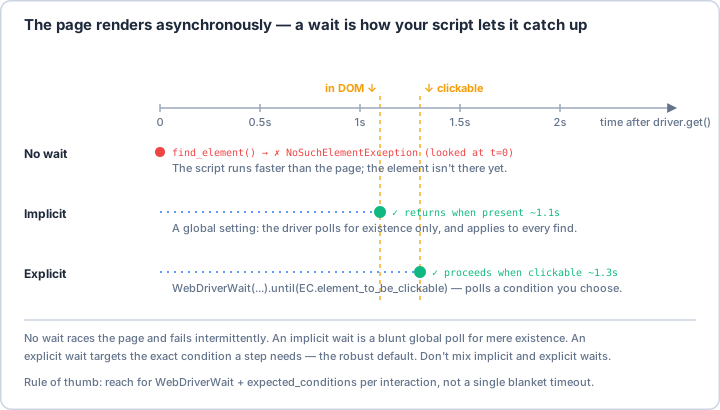
WebDriverWait(...).until(...)) polls for the exact condition a step needs, which is the robust default. Don't mix the two, and prefer targeting conditions over one blanket timeout.Real-World Scenario: The Dynamic Dashboard Automator 📊
You're automating a complex analytics dashboard that loads data progressively - first the layout, then charts via AJAX, followed by real-time updates, with animations between states. Some elements appear after user interaction, others after data loads, and some only when certain conditions are met. Your automation must handle all these timing challenges gracefully. Let's build a comprehensive waiting strategy system!
# First, install required packages:
# pip install selenium webdriver-manager
import time
import logging
from typing import Callable, Any, Optional, List, Union, Tuple
from functools import wraps
from datetime import datetime, timedelta
import re
from selenium import webdriver
from selenium.webdriver.common.by import By
from selenium.webdriver.remote.webelement import WebElement
from selenium.webdriver.support.ui import WebDriverWait
from selenium.webdriver.support import expected_conditions as EC
from selenium.common.exceptions import (
TimeoutException,
NoSuchElementException,
StaleElementReferenceException,
ElementNotVisibleException,
ElementNotSelectableException,
WebDriverException,
NoAlertPresentException,
InvalidElementStateException
)
# ==================== Built-in Expected Conditions ====================
class ExpectedConditionsGuide:
"""
Guide to all built-in expected conditions in Selenium.
"""
@staticmethod
def get_all_conditions():
"""Get description of all built-in expected conditions."""
return {
# Presence conditions
"presence_of_element_located": "Element is present in DOM (not necessarily visible)",
"presence_of_all_elements_located": "All matching elements are present",
# Visibility conditions
"visibility_of_element_located": "Element is present AND visible",
"visibility_of": "Existing element is visible",
"visibility_of_any_elements_located": "At least one element is visible",
"visibility_of_all_elements_located": "All elements are visible",
"invisibility_of_element_located": "Element is not visible or not present",
"invisibility_of_element": "Existing element becomes invisible",
# Clickable conditions
"element_to_be_clickable": "Element is visible and enabled",
# Selection conditions
"element_to_be_selected": "Element is selected",
"element_located_to_be_selected": "Located element is selected",
"element_selection_state_to_be": "Element has specific selection state",
"element_located_selection_state_to_be": "Located element has specific selection state",
# Text conditions
"text_to_be_present_in_element": "Specific text in element",
"text_to_be_present_in_element_value": "Specific text in element's value attribute",
"text_to_be_present_in_element_attribute": "Specific text in element's attribute",
# Frame conditions
"frame_to_be_available_and_switch_to_it": "Frame is available and switch to it",
# Window conditions
"number_of_windows_to_be": "Specific number of windows open",
"new_window_is_opened": "New window is opened",
# Alert conditions
"alert_is_present": "Alert is present",
# URL conditions
"url_to_be": "URL exactly matches",
"url_matches": "URL matches pattern",
"url_contains": "URL contains substring",
"url_changes": "URL changes from current",
# Title conditions
"title_is": "Page title exactly matches",
"title_contains": "Page title contains substring",
# Staleness conditions
"staleness_of": "Element is no longer attached to DOM",
# Attribute conditions
"element_attribute_to_include": "Element attribute contains value"
}
# ==================== Smart Wait Manager ====================
class SmartWait:
"""
Comprehensive waiting strategy manager.
"""
def __init__(self, driver: webdriver.Remote,
default_timeout: int = 10,
poll_frequency: float = 0.5):
self.driver = driver
self.default_timeout = default_timeout
self.poll_frequency = poll_frequency
self.logger = logging.getLogger(__name__)
# -------------------- Implicit Wait --------------------
def set_implicit_wait(self, timeout: int):
"""
Set implicit wait for the driver.
Note: Affects all element searches globally.
"""
self.driver.implicitly_wait(timeout)
self.logger.info(f"Set implicit wait to {timeout} seconds")
# -------------------- Explicit Waits --------------------
def wait_for_element(self, locator: Tuple[str, str],
timeout: Optional[int] = None) -> WebElement:
"""Wait for element to be present in DOM."""
timeout = timeout or self.default_timeout
wait = WebDriverWait(self.driver, timeout)
try:
element = wait.until(EC.presence_of_element_located(locator))
self.logger.debug(f"Element found: {locator}")
return element
except TimeoutException:
self.logger.error(f"Element not found after {timeout}s: {locator}")
raise
def wait_for_visible(self, locator: Tuple[str, str],
timeout: Optional[int] = None) -> WebElement:
"""Wait for element to be visible."""
timeout = timeout or self.default_timeout
wait = WebDriverWait(self.driver, timeout)
try:
element = wait.until(EC.visibility_of_element_located(locator))
self.logger.debug(f"Element visible: {locator}")
return element
except TimeoutException:
self.logger.error(f"Element not visible after {timeout}s: {locator}")
raise
def wait_for_clickable(self, locator: Tuple[str, str],
timeout: Optional[int] = None) -> WebElement:
"""Wait for element to be clickable."""
timeout = timeout or self.default_timeout
wait = WebDriverWait(self.driver, timeout)
try:
element = wait.until(EC.element_to_be_clickable(locator))
self.logger.debug(f"Element clickable: {locator}")
return element
except TimeoutException:
self.logger.error(f"Element not clickable after {timeout}s: {locator}")
raise
def wait_for_text(self, locator: Tuple[str, str], text: str,
timeout: Optional[int] = None) -> bool:
"""Wait for specific text in element."""
timeout = timeout or self.default_timeout
wait = WebDriverWait(self.driver, timeout)
try:
result = wait.until(EC.text_to_be_present_in_element(locator, text))
self.logger.debug(f"Text '{text}' found in element: {locator}")
return result
except TimeoutException:
self.logger.error(f"Text '{text}' not found after {timeout}s: {locator}")
raise
def wait_for_invisible(self, locator: Tuple[str, str],
timeout: Optional[int] = None) -> bool:
"""Wait for element to become invisible or not present."""
timeout = timeout or self.default_timeout
wait = WebDriverWait(self.driver, timeout)
try:
result = wait.until(EC.invisibility_of_element_located(locator))
self.logger.debug(f"Element invisible: {locator}")
return result
except TimeoutException:
self.logger.error(f"Element still visible after {timeout}s: {locator}")
raise
# -------------------- Fluent Waits --------------------
def fluent_wait(self, condition: Callable,
timeout: Optional[int] = None,
poll_frequency: Optional[float] = None,
ignored_exceptions: Optional[tuple] = None) -> Any:
"""
Fluent wait with custom polling and exception handling.
"""
timeout = timeout or self.default_timeout
poll_frequency = poll_frequency or self.poll_frequency
ignored_exceptions = ignored_exceptions or (NoSuchElementException,)
wait = WebDriverWait(
self.driver,
timeout,
poll_frequency=poll_frequency,
ignored_exceptions=ignored_exceptions
)
try:
result = wait.until(condition)
self.logger.debug(f"Fluent wait condition met")
return result
except TimeoutException:
self.logger.error(f"Fluent wait timeout after {timeout}s")
raise
# -------------------- Custom Conditions --------------------
def wait_for_element_count(self, locator: Tuple[str, str],
count: int,
timeout: Optional[int] = None) -> List[WebElement]:
"""Wait for specific number of elements."""
timeout = timeout or self.default_timeout
def element_count_condition(driver):
elements = driver.find_elements(*locator)
if len(elements) == count:
return elements
return False
wait = WebDriverWait(self.driver, timeout)
try:
elements = wait.until(element_count_condition)
self.logger.debug(f"Found {count} elements: {locator}")
return elements
except TimeoutException:
self.logger.error(f"Did not find {count} elements after {timeout}s")
raise
def wait_for_element_attribute(self, locator: Tuple[str, str],
attribute: str,
value: str,
timeout: Optional[int] = None) -> WebElement:
"""Wait for element to have specific attribute value."""
timeout = timeout or self.default_timeout
def attribute_condition(driver):
try:
element = driver.find_element(*locator)
if element.get_attribute(attribute) == value:
return element
except:
pass
return False
wait = WebDriverWait(self.driver, timeout)
try:
element = wait.until(attribute_condition)
self.logger.debug(f"Element has attribute {attribute}={value}")
return element
except TimeoutException:
self.logger.error(f"Attribute condition not met after {timeout}s")
raise
def wait_for_element_css_value(self, locator: Tuple[str, str],
property_name: str,
value: str,
timeout: Optional[int] = None) -> WebElement:
"""Wait for element to have specific CSS value."""
timeout = timeout or self.default_timeout
def css_value_condition(driver):
try:
element = driver.find_element(*locator)
if element.value_of_css_property(property_name) == value:
return element
except:
pass
return False
wait = WebDriverWait(self.driver, timeout)
try:
element = wait.until(css_value_condition)
self.logger.debug(f"Element has CSS {property_name}={value}")
return element
except TimeoutException:
self.logger.error(f"CSS condition not met after {timeout}s")
raise
# ==================== JavaScript-based Waits ====================
class JavaScriptWait:
"""
JavaScript-based waiting strategies for complex scenarios.
"""
def __init__(self, driver: webdriver.Remote):
self.driver = driver
self.logger = logging.getLogger(__name__)
def wait_for_page_load(self, timeout: int = 30) -> bool:
"""Wait for page to be completely loaded."""
end_time = time.time() + timeout
while time.time() < end_time:
try:
ready_state = self.driver.execute_script("return document.readyState")
if ready_state == "complete":
self.logger.debug("Page fully loaded")
return True
except:
pass
time.sleep(0.5)
self.logger.warning("Page did not complete loading")
return False
def wait_for_jquery(self, timeout: int = 30) -> bool:
"""Wait for jQuery to be ready and no active AJAX calls."""
end_time = time.time() + timeout
while time.time() < end_time:
try:
# Check if jQuery exists
jquery_defined = self.driver.execute_script("return typeof jQuery !== 'undefined'")
if jquery_defined:
# Check jQuery ready state and active AJAX calls
jquery_ready = self.driver.execute_script(
"return jQuery.active == 0 && jQuery(':animated').length == 0"
)
if jquery_ready:
self.logger.debug("jQuery ready, no active AJAX")
return True
else:
# No jQuery on page
return True
except:
pass
time.sleep(0.5)
self.logger.warning("jQuery/AJAX did not complete")
return False
def wait_for_angular(self, timeout: int = 30) -> bool:
"""Wait for Angular to be ready."""
end_time = time.time() + timeout
# Angular 1.x check
angular1_script = """
try {
if (window.angular && angular.element(document).injector()) {
var injector = angular.element(document).injector();
var $browser = injector.get('$browser');
return $browser.defer.queue.length === 0;
}
} catch(err) {}
return true;
"""
# Angular 2+ check
angular2_script = """
try {
if (window.getAllAngularTestabilities) {
return window.getAllAngularTestabilities().every(function(testability) {
return testability.isStable();
});
}
} catch(err) {}
return true;
"""
while time.time() < end_time:
try:
angular1_ready = self.driver.execute_script(angular1_script)
angular2_ready = self.driver.execute_script(angular2_script)
if angular1_ready and angular2_ready:
self.logger.debug("Angular ready")
return True
except:
pass
time.sleep(0.5)
self.logger.warning("Angular did not stabilize")
return False
def wait_for_react(self, timeout: int = 30) -> bool:
"""Wait for React to be ready."""
end_time = time.time() + timeout
react_script = """
try {
const reactRoot = document.querySelector('#root')._reactRootContainer;
if (reactRoot) {
return reactRoot._internalRoot.pendingTime === 0;
}
} catch(err) {}
// Alternative check
try {
return document.readyState === 'complete' &&
(!window.React || !window.React.isPending);
} catch(err) {}
return true;
"""
while time.time() < end_time:
try:
react_ready = self.driver.execute_script(react_script)
if react_ready:
self.logger.debug("React ready")
return True
except:
pass
time.sleep(0.5)
self.logger.warning("React did not stabilize")
return False
def wait_for_animation(self, element: WebElement, timeout: int = 10) -> bool:
"""Wait for CSS animations to complete on element."""
end_time = time.time() + timeout
animation_script = """
var element = arguments[0];
var style = window.getComputedStyle(element);
// Check animation
var animationDuration = style.animationDuration;
var animationDelay = style.animationDelay;
// Check transition
var transitionDuration = style.transitionDuration;
var transitionDelay = style.transitionDelay;
// Parse durations (convert to milliseconds)
function parseDuration(duration) {
if (duration === 'none' || duration === '0s') return 0;
var value = parseFloat(duration);
if (duration.indexOf('ms') > -1) return value;
return value * 1000;
}
var totalAnimation = parseDuration(animationDuration) + parseDuration(animationDelay);
var totalTransition = parseDuration(transitionDuration) + parseDuration(transitionDelay);
return Math.max(totalAnimation, totalTransition) === 0;
"""
while time.time() < end_time:
try:
animation_complete = self.driver.execute_script(animation_script, element)
if animation_complete:
self.logger.debug("Animation complete")
return True
except:
pass
time.sleep(0.1)
self.logger.warning("Animation did not complete")
return False
def wait_for_custom_js(self, script: str, timeout: int = 30) -> Any:
"""Wait for custom JavaScript condition."""
end_time = time.time() + timeout
while time.time() < end_time:
try:
result = self.driver.execute_script(script)
if result:
self.logger.debug("Custom JS condition met")
return result
except Exception as e:
self.logger.error(f"JS execution error: {e}")
time.sleep(0.5)
self.logger.warning("Custom JS condition not met")
return None
# ==================== Advanced Waiting Strategies ====================
class AdvancedWaitStrategies:
"""
Advanced waiting strategies for complex scenarios.
"""
def __init__(self, driver: webdriver.Remote):
self.driver = driver
self.logger = logging.getLogger(__name__)
def wait_for_any_condition(self, conditions: List[Callable],
timeout: int = 30) -> Any:
"""Wait for any of the conditions to be true."""
wait = WebDriverWait(self.driver, timeout)
def any_condition_true(driver):
for condition in conditions:
try:
result = condition(driver)
if result:
return result
except:
continue
return False
try:
result = wait.until(any_condition_true)
self.logger.debug("One of the conditions met")
return result
except TimeoutException:
self.logger.error("None of the conditions met")
raise
def wait_for_all_conditions(self, conditions: List[Callable],
timeout: int = 30) -> List[Any]:
"""Wait for all conditions to be true."""
wait = WebDriverWait(self.driver, timeout)
def all_conditions_true(driver):
results = []
for condition in conditions:
try:
result = condition(driver)
if not result:
return False
results.append(result)
except:
return False
return results
try:
results = wait.until(all_conditions_true)
self.logger.debug("All conditions met")
return results
except TimeoutException:
self.logger.error("Not all conditions met")
raise
def wait_with_retry(self, action: Callable,
validation: Callable,
max_retries: int = 3,
retry_delay: int = 2) -> Any:
"""Execute action and wait for validation, with retries."""
for attempt in range(max_retries):
try:
# Execute action
result = action()
# Wait for validation
wait = WebDriverWait(self.driver, retry_delay)
if wait.until(validation):
self.logger.debug(f"Action successful on attempt {attempt + 1}")
return result
except Exception as e:
self.logger.warning(f"Attempt {attempt + 1} failed: {e}")
if attempt < max_retries - 1:
time.sleep(retry_delay)
else:
raise
raise TimeoutException("Action failed after all retries")
def wait_for_stable_element(self, locator: Tuple[str, str],
stability_time: int = 2,
timeout: int = 30) -> WebElement:
"""Wait for element to be stable (not moving/changing)."""
end_time = time.time() + timeout
element = None
last_location = None
last_size = None
stable_start = None
while time.time() < end_time:
try:
element = self.driver.find_element(*locator)
current_location = element.location
current_size = element.size
if (last_location == current_location and
last_size == current_size):
if stable_start is None:
stable_start = time.time()
elif time.time() - stable_start >= stability_time:
self.logger.debug("Element is stable")
return element
else:
stable_start = None
last_location = current_location
last_size = current_size
except:
stable_start = None
time.sleep(0.5)
raise TimeoutException("Element did not stabilize")
def wait_for_network_idle(self, idle_time: int = 2, timeout: int = 30):
"""Wait for network to be idle (no pending requests)."""
script = """
if (!window.networkMonitor) {
window.networkMonitor = {
pendingRequests: 0,
lastActivity: Date.now()
};
// Monitor fetch
const originalFetch = window.fetch;
window.fetch = function(...args) {
window.networkMonitor.pendingRequests++;
window.networkMonitor.lastActivity = Date.now();
return originalFetch.apply(this, args).finally(() => {
window.networkMonitor.pendingRequests--;
window.networkMonitor.lastActivity = Date.now();
});
};
// Monitor XHR
const originalOpen = XMLHttpRequest.prototype.open;
const originalSend = XMLHttpRequest.prototype.send;
XMLHttpRequest.prototype.open = function(...args) {
this.addEventListener('loadstart', () => {
window.networkMonitor.pendingRequests++;
window.networkMonitor.lastActivity = Date.now();
});
this.addEventListener('loadend', () => {
window.networkMonitor.pendingRequests--;
window.networkMonitor.lastActivity = Date.now();
});
return originalOpen.apply(this, args);
};
}
return {
pending: window.networkMonitor.pendingRequests,
idleTime: (Date.now() - window.networkMonitor.lastActivity) / 1000
};
"""
end_time = time.time() + timeout
# Initialize monitor
self.driver.execute_script(script)
time.sleep(0.5)
while time.time() < end_time:
try:
status = self.driver.execute_script(script)
if status['pending'] == 0 and status['idleTime'] >= idle_time:
self.logger.debug("Network is idle")
return True
except:
pass
time.sleep(0.5)
self.logger.warning("Network did not become idle")
return False
# ==================== Wait Decorators ====================
def wait_for_condition(timeout: int = 10,
condition: Optional[Callable] = None,
message: str = ""):
"""
Decorator to add waiting logic to methods.
"""
def decorator(func):
@wraps(func)
def wrapper(self, *args, **kwargs):
driver = getattr(self, 'driver', None)
if not driver:
raise ValueError("No driver attribute found")
wait = WebDriverWait(driver, timeout)
# Execute function
result = func(self, *args, **kwargs)
# Wait for condition if provided
if condition:
try:
wait.until(condition)
except TimeoutException:
logging.error(f"Wait condition failed: {message}")
raise
return result
return wrapper
return decorator
def retry_on_stale_element(max_retries: int = 3, delay: float = 0.5):
"""
Decorator to retry on StaleElementReferenceException.
"""
def decorator(func):
@wraps(func)
def wrapper(*args, **kwargs):
for attempt in range(max_retries):
try:
return func(*args, **kwargs)
except StaleElementReferenceException:
if attempt < max_retries - 1:
time.sleep(delay)
logging.debug(f"Retrying due to stale element (attempt {attempt + 1})")
else:
raise
return None
return wrapper
return decorator
# Example usage
if __name__ == "__main__":
print("⏰ Waiting Strategies Examples\n")
# Setup driver (simplified for example)
from selenium import webdriver
from selenium.webdriver.chrome.options import Options
options = Options()
options.add_argument("--headless")
driver = webdriver.Chrome(options=options)
try:
# Example 1: Wait types comparison
print("1️⃣ Types of Waits:")
wait_types = [
("Implicit Wait", "Global, applies to all element searches", "driver.implicitly_wait(10)"),
("Explicit Wait", "Specific condition for specific element", "wait.until(EC.element_to_be_clickable(locator))"),
("Fluent Wait", "Custom polling and exception handling", "WebDriverWait with poll_frequency"),
("JavaScript Wait", "Wait for JS conditions", "Execute script until condition true"),
("Hard Wait", "Fixed delay (avoid!)", "time.sleep(5)")
]
for wait_type, description, example in wait_types:
print(f" {wait_type}:")
print(f" Description: {description}")
print(f" Example: {example}\n")
# Example 2: Expected conditions
print("2️⃣ Common Expected Conditions:")
conditions = [
"presence_of_element_located - Element in DOM",
"visibility_of_element_located - Element visible",
"element_to_be_clickable - Element clickable",
"text_to_be_present_in_element - Text present",
"invisibility_of_element - Element not visible",
"element_to_be_selected - Element selected",
"alert_is_present - Alert exists",
"frame_to_be_available_and_switch_to_it - Frame ready"
]
for condition in conditions:
print(f" • {condition}")
# Example 3: SmartWait usage
print("\n3️⃣ SmartWait Examples:")
smart_wait = SmartWait(driver)
examples = [
"wait_for_element() - Wait for presence",
"wait_for_visible() - Wait for visibility",
"wait_for_clickable() - Wait for clickable",
"wait_for_text() - Wait for text content",
"wait_for_invisible() - Wait for disappearance"
]
for example in examples:
print(f" • {example}")
# Example 4: JavaScript waits
print("\n4️⃣ JavaScript-based Waits:")
js_wait = JavaScriptWait(driver)
js_waits = [
"wait_for_page_load() - Document ready",
"wait_for_jquery() - jQuery and AJAX complete",
"wait_for_angular() - Angular stable",
"wait_for_react() - React rendered",
"wait_for_animation() - CSS animations done",
"wait_for_network_idle() - No pending requests"
]
for wait in js_waits:
print(f" • {wait}")
# Example 5: Custom conditions
print("\n5️⃣ Custom Wait Conditions:")
print(" Example: Wait for element count")
print(" ```python")
print(" def wait_for_count(driver):")
print(" elements = driver.find_elements(By.CLASS_NAME, 'item')")
print(" return len(elements) >= 10")
print(" ")
print(" wait.until(wait_for_count)")
print(" ```")
# Example 6: Fluent wait configuration
print("\n6️⃣ Fluent Wait Configuration:")
print(" WebDriverWait parameters:")
print(" • timeout: Maximum wait time")
print(" • poll_frequency: Check interval (default 0.5s)")
print(" • ignored_exceptions: Exceptions to ignore")
print(" ")
print(" Example:")
print(" wait = WebDriverWait(driver, 30,")
print(" poll_frequency=1,")
print(" ignored_exceptions=(NoSuchElementException,))")
# Example 7: Advanced strategies
print("\n7️⃣ Advanced Wait Strategies:")
advanced = AdvancedWaitStrategies(driver)
strategies = [
"wait_for_any_condition() - First condition wins",
"wait_for_all_conditions() - All must be true",
"wait_with_retry() - Action with validation",
"wait_for_stable_element() - Element not moving",
"wait_for_network_idle() - No active requests"
]
for strategy in strategies:
print(f" • {strategy}")
# Example 8: Common pitfalls
print("\n8️⃣ Common Waiting Pitfalls:")
pitfalls = [
("Using time.sleep()", "Use WebDriverWait instead"),
("Implicit wait conflicts", "Don't mix implicit with explicit waits"),
("Too short timeouts", "Be generous with timeouts in CI/CD"),
("Not handling StaleElement", "Elements can become stale"),
("Waiting for wrong condition", "Presence ≠ Visible ≠ Clickable"),
("Ignoring animations", "Wait for animations to complete")
]
for pitfall, solution in pitfalls:
print(f" ❌ {pitfall}")
print(f" ✅ {solution}\n")
# Example 9: Performance optimization
print("9️⃣ Performance Tips:")
tips = [
"Use specific waits instead of global implicit wait",
"Set appropriate poll frequency (0.5s usually good)",
"Combine multiple conditions when possible",
"Cache frequently used elements",
"Use CSS selectors for faster element location",
"Minimize timeout values where safe"
]
for tip in tips:
print(f" • {tip}")
# Example 10: Best practices
print("\n🔟 Waiting Best Practices:")
best_practices = [
"⏱️ Always use explicit waits for specific conditions",
"🎯 Be specific about what you're waiting for",
"🔄 Implement retry logic for flaky elements",
"📊 Monitor wait times in your tests",
"🏗️ Create reusable wait utilities",
"📝 Log wait timeouts for debugging",
"🧪 Test your waits with slow networks",
"⚡ Use presence for existence, visible for interaction",
"🎭 Wait for animations and transitions",
"🌐 Consider framework-specific waits (Angular, React)"
]
for practice in best_practices:
print(f" {practice}")
finally:
driver.quit()
print("\n✅ Waiting strategies demonstration complete!")
Key Takeaways and Best Practices 🎯
- Prefer Explicit Waits: More precise and efficient than implicit waits.
- Choose the Right Condition: Presence ≠ Visible ≠ Clickable.
- Avoid time.sleep(): Use proper waits for reliability and speed.
- Handle Framework-Specific Waits: Angular, React, jQuery have unique needs.
- Consider Animations: Wait for CSS animations and transitions.
- Monitor Network Activity: Wait for AJAX and fetch requests to complete.
- Implement Retry Logic: Handle transient failures gracefully.
- Log Timeout Failures: Essential for debugging flaky tests.
Waiting Strategy Best Practices 📋
Mastering waiting strategies transforms flaky automation into rock-solid reliability. You now have the tools to handle any timing challenge - from simple element appearance to complex asynchronous operations. Whether you're testing SPAs, handling AJAX, or dealing with animations, these waiting strategies ensure your automation runs smoothly every time! ⏳
Pro Tip: Waiting is the secret sauce that makes automation reliable. Think of it as teaching your code patience - knowing when to act is just as important as knowing what to do. Start with explicit waits for specific conditions rather than blanket implicit waits. Remember the hierarchy: element present (in DOM) → visible (displayed) → clickable (enabled and visible). For modern SPAs, standard Selenium waits aren't enough - implement JavaScript-based waits for framework readiness (Angular, React, Vue). Always wait for animations to complete before interacting. Monitor network activity for true page readiness. Create a library of custom wait conditions for your specific application. Use fluent waits with appropriate polling intervals to balance speed and CPU usage. Most importantly: what seems like a timing issue is often a synchronization issue - understand what you're really waiting for!