🎯 HTML/CSS Selectors: Master the Art of Web Element Targeting
📚 What You'll Learn
By the end of this lesson, you will be able to:
- Distinguish tag, class, id, attribute, and pseudo-class selectors and know when each applies
- Target elements precisely with both CSS selectors and XPath expressions
- Write selectors that are specific enough to be accurate yet flexible enough to survive page changes
- Order your selector choices by performance (id > class > tag > attribute > pseudo)
- Test and refine selectors using your browser's developer tools before coding
- Design fallback strategies for dynamic, AJAX-loaded content
⏱️ Estimated Time: 45–60 minutes
🎯 Project: Build a small selector toolkit that extracts product names, prices, and links from a sample e-commerce page using a mix of CSS selectors and XPath.
HTML/CSS selectors are the sniper scopes of web scraping - they let you precisely target any element on a webpage. Like a skilled surgeon who knows exactly where to make the incision, mastering selectors allows you to extract data with surgical precision. Let's become web element sharpshooters! 🎪
The Selector Ecosystem
Think of a webpage as a city, HTML as its architecture, and CSS selectors as your GPS coordinates. Every building (element) has an address (selector), and knowing how to navigate these addresses lets you reach any destination instantly. Python gives you the tools to become a master navigator of this digital cityscape!
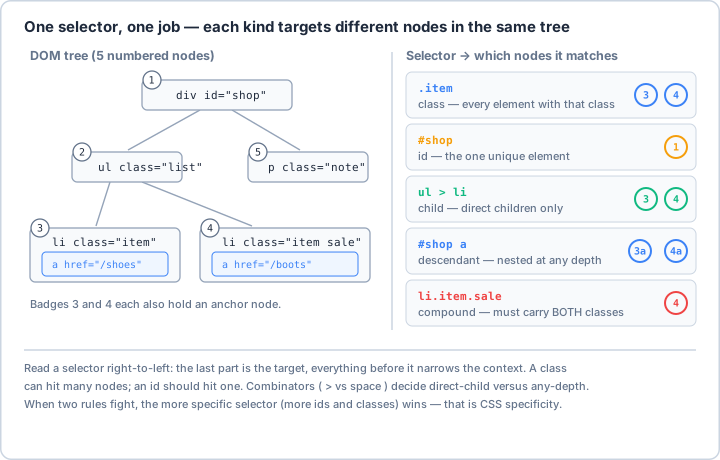
> for direct child versus a space for any depth — changes the answer entirely. When two rules target the same node, the more specific selector wins; that is CSS specificity, and it is why picky selectors survive messy real-world HTML.Real-World Scenario: The E-Commerce Data Extractor 🛒
You're building a price monitoring system that tracks products across multiple e-commerce sites. Each site has different HTML structures, dynamic content, nested elements, and tricky layouts. You need to extract product names, prices, ratings, reviews, and availability from chaotic HTML. Let's master every selector technique to handle any website!
from bs4 import BeautifulSoup
import requests
from lxml import html, etree
import re
from typing import List, Dict, Optional, Any, Union, Tuple
from dataclasses import dataclass
from enum import Enum
import json
from urllib.parse import urljoin, urlparse
import cssselect
from selenium import webdriver
from selenium.webdriver.common.by import By
import time
import logging
@dataclass
class Element:
"""Represents an HTML element with its properties."""
tag: str
text: str
attributes: Dict[str, str]
children: List['Element'] = None
parent: 'Element' = None
def __post_init__(self):
if self.children is None:
self.children = []
class SelectorType(Enum):
"""Types of selectors."""
CSS = "css"
XPATH = "xpath"
TAG = "tag"
CLASS = "class"
ID = "id"
ATTRIBUTE = "attribute"
class SelectorMaster:
"""
Comprehensive HTML/CSS selector toolkit for precise web element targeting.
"""
def __init__(self):
self.setup_logging()
self.selector_cache = {}
def setup_logging(self):
"""Setup logging configuration."""
logging.basicConfig(
level=logging.INFO,
format='%(asctime)s - %(name)s - %(levelname)s - %(message)s'
)
self.logger = logging.getLogger(__name__)
# ==================== Basic Selectors ====================
def select_by_tag(self, html_content: str, tag: str) -> List[BeautifulSoup]:
"""
Select elements by tag name.
Examples: 'div', 'p', 'a', 'span'
"""
soup = BeautifulSoup(html_content, 'html.parser')
elements = soup.find_all(tag)
self.logger.info(f"Found {len(elements)} <{tag}> elements")
return elements
def select_by_id(self, html_content: str, element_id: str) -> Optional[BeautifulSoup]:
"""
Select element by ID (should be unique).
Example: '#header', '#main-content'
"""
soup = BeautifulSoup(html_content, 'html.parser')
# Method 1: Using find with id parameter
element = soup.find(id=element_id)
# Method 2: Using CSS selector
# element = soup.select_one(f'#{element_id}')
if element:
self.logger.info(f"Found element with id='{element_id}'")
else:
self.logger.warning(f"No element found with id='{element_id}'")
return element
def select_by_class(self, html_content: str, class_name: str) -> List[BeautifulSoup]:
"""
Select elements by class name.
Example: '.product', '.price', '.highlight'
"""
soup = BeautifulSoup(html_content, 'html.parser')
# Method 1: Using find_all with class_ parameter
elements = soup.find_all(class_=class_name)
# Method 2: Using CSS selector
# elements = soup.select(f'.{class_name}')
self.logger.info(f"Found {len(elements)} elements with class='{class_name}'")
return elements
def select_by_multiple_classes(self, html_content: str, classes: List[str]) -> List[BeautifulSoup]:
"""
Select elements that have all specified classes.
Example: ['product', 'featured', 'sale']
"""
soup = BeautifulSoup(html_content, 'html.parser')
# Build CSS selector for multiple classes
selector = '.' + '.'.join(classes)
elements = soup.select(selector)
self.logger.info(f"Found {len(elements)} elements with classes {classes}")
return elements
# ==================== Attribute Selectors ====================
def select_by_attribute(self, html_content: str, attr_name: str,
attr_value: Optional[str] = None,
match_type: str = 'exact') -> List[BeautifulSoup]:
"""
Select elements by attribute.
match_type options:
- 'exact': Exact match [attr="value"]
- 'contains': Contains substring [attr*="value"]
- 'starts': Starts with [attr^="value"]
- 'ends': Ends with [attr$="value"]
- 'word': Contains word [attr~="value"]
- 'prefix': Prefix match [attr|="value"]
"""
soup = BeautifulSoup(html_content, 'html.parser')
if attr_value is None:
# Select elements that have the attribute (any value)
selector = f'[{attr_name}]'
else:
# Build selector based on match type
if match_type == 'exact':
selector = f'[{attr_name}="{attr_value}"]'
elif match_type == 'contains':
selector = f'[{attr_name}*="{attr_value}"]'
elif match_type == 'starts':
selector = f'[{attr_name}^="{attr_value}"]'
elif match_type == 'ends':
selector = f'[{attr_name}$="{attr_value}"]'
elif match_type == 'word':
selector = f'[{attr_name}~="{attr_value}"]'
elif match_type == 'prefix':
selector = f'[{attr_name}|="{attr_value}"]'
else:
selector = f'[{attr_name}="{attr_value}"]'
elements = soup.select(selector)
self.logger.info(f"Found {len(elements)} elements with selector '{selector}'")
return elements
def select_by_data_attribute(self, html_content: str, data_attr: str,
value: Optional[str] = None) -> List[BeautifulSoup]:
"""
Select elements by data attribute.
Example: data-product-id="123", data-category="electronics"
"""
attr_name = f'data-{data_attr}'
return self.select_by_attribute(html_content, attr_name, value)
# ==================== Combinators ====================
def select_descendants(self, html_content: str, ancestor: str,
descendant: str) -> List[BeautifulSoup]:
"""
Select descendant elements (any level deep).
Example: 'div p' selects all <p> inside <div>
"""
soup = BeautifulSoup(html_content, 'html.parser')
selector = f'{ancestor} {descendant}'
elements = soup.select(selector)
self.logger.info(f"Found {len(elements)} descendants with selector '{selector}'")
return elements
def select_direct_children(self, html_content: str, parent: str,
child: str) -> List[BeautifulSoup]:
"""
Select direct child elements (immediate children only).
Example: 'div > p' selects <p> that are direct children of <div>
"""
soup = BeautifulSoup(html_content, 'html.parser')
selector = f'{parent} > {child}'
elements = soup.select(selector)
self.logger.info(f"Found {len(elements)} direct children with selector '{selector}'")
return elements
def select_adjacent_sibling(self, html_content: str, first: str,
second: str) -> List[BeautifulSoup]:
"""
Select adjacent sibling element.
Example: 'h1 + p' selects <p> immediately after <h1>
"""
soup = BeautifulSoup(html_content, 'html.parser')
selector = f'{first} + {second}'
elements = soup.select(selector)
self.logger.info(f"Found {len(elements)} adjacent siblings with selector '{selector}'")
return elements
def select_general_siblings(self, html_content: str, first: str,
sibling: str) -> List[BeautifulSoup]:
"""
Select all sibling elements.
Example: 'h1 ~ p' selects all <p> that are siblings of <h1>
"""
soup = BeautifulSoup(html_content, 'html.parser')
selector = f'{first} ~ {sibling}'
elements = soup.select(selector)
self.logger.info(f"Found {len(elements)} siblings with selector '{selector}'")
return elements
# ==================== Pseudo Selectors ====================
def select_with_pseudo(self, html_content: str, base_selector: str,
pseudo: str) -> List[BeautifulSoup]:
"""
Select elements using pseudo-selectors.
Common pseudo-selectors:
- :first-child, :last-child
- :nth-child(n), :nth-of-type(n)
- :not(selector)
- :empty
- :contains(text) (BeautifulSoup specific)
"""
soup = BeautifulSoup(html_content, 'html.parser')
# Handle special BeautifulSoup pseudo-selectors
if ':contains' in pseudo:
# Extract text from :contains(text)
import re
match = re.search(r':contains\((.*?)\)', pseudo)
if match:
text = match.group(1).strip('"\'')
elements = [elem for elem in soup.select(base_selector)
if text in elem.get_text()]
else:
elements = []
else:
selector = f'{base_selector}{pseudo}'
elements = soup.select(selector)
self.logger.info(f"Found {len(elements)} elements with pseudo-selector '{pseudo}'")
return elements
def select_nth_elements(self, html_content: str, selector: str,
positions: Union[int, List[int], str]) -> List[BeautifulSoup]:
"""
Select elements at specific positions.
positions can be:
- int: Single position (1-based)
- List[int]: Multiple positions
- str: Formula like 'odd', 'even', '2n+1'
"""
soup = BeautifulSoup(html_content, 'html.parser')
if isinstance(positions, int):
# Single position
full_selector = f'{selector}:nth-of-type({positions})'
elements = soup.select(full_selector)
elif isinstance(positions, list):
# Multiple positions
elements = []
for pos in positions:
full_selector = f'{selector}:nth-of-type({pos})'
elements.extend(soup.select(full_selector))
else:
# Formula (odd, even, 2n+1, etc.)
full_selector = f'{selector}:nth-of-type({positions})'
elements = soup.select(full_selector)
return elements
# ==================== XPath Selectors ====================
def select_by_xpath(self, html_content: str, xpath: str) -> List[html.HtmlElement]:
"""
Select elements using XPath.
XPath examples:
- //div[@class='product']
- //a[contains(@href, 'product')]
- //div[@id='content']//p[1]
- //text()[contains(., 'price')]
"""
tree = html.fromstring(html_content)
elements = tree.xpath(xpath)
self.logger.info(f"Found {len(elements)} elements with XPath '{xpath}'")
return elements
def xpath_with_text(self, html_content: str, tag: str,
text: str, exact: bool = False) -> List[html.HtmlElement]:
"""
Select elements by text content using XPath.
"""
tree = html.fromstring(html_content)
if exact:
xpath = f'//{tag}[text()="{text}"]'
else:
xpath = f'//{tag}[contains(text(), "{text}")]'
elements = tree.xpath(xpath)
self.logger.info(f"Found {len(elements)} elements with text '{text}'")
return elements
def xpath_with_position(self, html_content: str, base_xpath: str,
position: int) -> Optional[html.HtmlElement]:
"""
Select element at specific position using XPath.
Note: XPath positions are 1-based.
"""
tree = html.fromstring(html_content)
xpath = f'({base_xpath})[{position}]'
elements = tree.xpath(xpath)
return elements[0] if elements else None
# ==================== Complex Selectors ====================
def build_complex_selector(self, tag: Optional[str] = None,
id_: Optional[str] = None,
classes: Optional[List[str]] = None,
attributes: Optional[Dict[str, str]] = None,
pseudo: Optional[str] = None,
parent: Optional[str] = None,
position: Optional[int] = None) -> str:
"""
Build a complex CSS selector from components.
"""
selector_parts = []
# Add tag
if tag:
selector_parts.append(tag)
# Add ID
if id_:
selector_parts.append(f'#{id_}')
# Add classes
if classes:
selector_parts.append('.' + '.'.join(classes))
# Add attributes
if attributes:
for attr, value in attributes.items():
if value:
selector_parts.append(f'[{attr}="{value}"]')
else:
selector_parts.append(f'[{attr}]')
# Combine parts
selector = ''.join(selector_parts) if selector_parts else '*'
# Add pseudo-selector
if pseudo:
selector += pseudo
# Add position
if position:
selector += f':nth-of-type({position})'
# Add parent context
if parent:
selector = f'{parent} {selector}'
self.logger.info(f"Built complex selector: {selector}")
return selector
def select_with_complex_selector(self, html_content: str, **kwargs) -> List[BeautifulSoup]:
"""
Select elements using a complex selector built from components.
"""
selector = self.build_complex_selector(**kwargs)
soup = BeautifulSoup(html_content, 'html.parser')
elements = soup.select(selector)
self.logger.info(f"Found {len(elements)} elements with complex selector")
return elements
# ==================== Practical Selector Patterns ====================
def select_product_cards(self, html_content: str) -> List[Dict[str, Any]]:
"""
Extract product information using various selector strategies.
"""
soup = BeautifulSoup(html_content, 'html.parser')
products = []
# Common product card selectors
product_selectors = [
'div.product',
'article.product-card',
'li.product-item',
'[data-testid*="product"]',
'div[class*="product"]'
]
for selector in product_selectors:
cards = soup.select(selector)
if cards:
self.logger.info(f"Found {len(cards)} products with selector '{selector}'")
break
for card in cards:
product = {}
# Extract title (try multiple selectors)
title_selectors = ['h2', 'h3', '.title', '.product-name', '[class*="title"]']
for sel in title_selectors:
title = card.select_one(sel)
if title:
product['title'] = title.get_text(strip=True)
break
# Extract price
price_selectors = ['.price', 'span.price', '[class*="price"]', '[data-price]']
for sel in price_selectors:
price = card.select_one(sel)
if price:
product['price'] = self._extract_price(price.get_text(strip=True))
break
# Extract rating
rating_selectors = ['.rating', '[class*="rating"]', '[data-rating]']
for sel in rating_selectors:
rating = card.select_one(sel)
if rating:
product['rating'] = self._extract_rating(rating)
break
# Extract image
img = card.select_one('img')
if img:
product['image'] = img.get('src') or img.get('data-src')
# Extract link
link = card.select_one('a')
if link:
product['url'] = link.get('href')
if product:
products.append(product)
return products
def _extract_price(self, price_text: str) -> Optional[float]:
"""Extract numeric price from text."""
import re
match = re.search(r'[\d,]+\.?\d*', price_text.replace(',', ''))
return float(match.group()) if match else None
def _extract_rating(self, rating_element) -> Optional[float]:
"""Extract rating from various formats."""
# Check for aria-label
if rating_element.get('aria-label'):
import re
match = re.search(r'([\d.]+)', rating_element.get('aria-label'))
if match:
return float(match.group(1))
# Check for data attributes
for attr in ['data-rating', 'data-score', 'data-value']:
if rating_element.get(attr):
try:
return float(rating_element.get(attr))
except:
pass
# Check for star count
stars = rating_element.select('.star.filled, .star.active, [class*="star-filled"]')
if stars:
return len(stars)
return None
# ==================== Selector Validation & Testing ====================
def validate_selector(self, selector: str, selector_type: SelectorType = SelectorType.CSS) -> bool:
"""
Validate if a selector is syntactically correct.
"""
try:
if selector_type == SelectorType.CSS:
# Try to compile CSS selector
from cssselect import GenericTranslator
GenericTranslator().css_to_xpath(selector)
return True
elif selector_type == SelectorType.XPATH:
# Try to compile XPath
from lxml import etree
etree.XPath(selector)
return True
else:
return True
except Exception as e:
self.logger.error(f"Invalid selector '{selector}': {e}")
return False
def test_selector(self, html_content: str, selector: str,
expected_count: Optional[int] = None) -> bool:
"""
Test if a selector returns expected results.
"""
soup = BeautifulSoup(html_content, 'html.parser')
elements = soup.select(selector)
actual_count = len(elements)
if expected_count is not None:
success = actual_count == expected_count
if not success:
self.logger.warning(
f"Selector test failed: expected {expected_count} elements, "
f"got {actual_count}"
)
else:
success = actual_count > 0
return success
def generate_selector(self, element: BeautifulSoup) -> str:
"""
Generate a unique selector for an element.
"""
# Try ID first
if element.get('id'):
return f'#{element.get("id")}'
# Build selector with tag and classes
selector = element.name
if element.get('class'):
classes = [c for c in element.get('class') if c]
if classes:
selector += '.' + '.'.join(classes)
# Add unique attributes if needed
for attr in ['name', 'data-testid', 'data-id']:
if element.get(attr):
selector += f'[{attr}="{element.get(attr)}"]'
break
# Make it unique by adding parent context if needed
parent = element.parent
if parent and parent.name != 'body':
parent_selector = self.generate_selector(parent)
selector = f'{parent_selector} > {selector}'
return selector
class SelectorOptimizer:
"""
Optimize selectors for performance and reliability.
"""
def __init__(self):
self.logger = logging.getLogger(__name__)
def optimize_selector(self, selector: str) -> str:
"""
Optimize a CSS selector for better performance.
"""
optimizations = []
# Prefer ID selectors (fastest)
if '#' in selector and not selector.startswith('#'):
# Move ID to the beginning if possible
parts = selector.split()
id_parts = [p for p in parts if '#' in p]
if id_parts:
optimizations.append(f"Consider starting with ID: {id_parts[0]}")
# Avoid universal selector
if '*' in selector:
optimizations.append("Avoid universal selector (*)")
# Limit descendant selectors
if selector.count(' ') > 3:
optimizations.append("Too many descendant selectors, consider simplifying")
# Prefer class over attribute selectors
if '[' in selector and '.' not in selector:
optimizations.append("Consider using class selectors instead of attributes")
if optimizations:
self.logger.info(f"Optimization suggestions for '{selector}':")
for opt in optimizations:
self.logger.info(f" - {opt}")
return selector
def benchmark_selector(self, html_content: str, selector: str) -> float:
"""
Benchmark selector performance.
"""
import time
soup = BeautifulSoup(html_content, 'html.parser')
start_time = time.perf_counter()
for _ in range(100):
soup.select(selector)
end_time = time.perf_counter()
avg_time = (end_time - start_time) / 100
self.logger.info(f"Selector '{selector}' avg time: {avg_time*1000:.3f}ms")
return avg_time
class SelectorCheatSheet:
"""
Quick reference for common selector patterns.
"""
@staticmethod
def get_common_patterns() -> Dict[str, str]:
"""Get common selector patterns with descriptions."""
return {
# Basic Selectors
"tag": "div - Select by tag name",
"id": "#header - Select by ID",
"class": ".product - Select by class",
"multiple_classes": ".product.featured - Multiple classes",
# Attribute Selectors
"has_attribute": "[href] - Has attribute",
"exact_attribute": '[type="text"] - Exact match',
"contains_attribute": '[class*="btn"] - Contains substring',
"starts_with": '[href^="http"] - Starts with',
"ends_with": '[src$=".jpg"] - Ends with',
"word_match": '[class~="active"] - Contains word',
# Combinators
"descendant": "div p - Any descendant",
"child": "ul > li - Direct child",
"adjacent": "h1 + p - Adjacent sibling",
"general_sibling": "h1 ~ p - General sibling",
# Pseudo-selectors
"first_child": "li:first-child - First child",
"last_child": "li:last-child - Last child",
"nth_child": "li:nth-child(2) - Nth child",
"nth_of_type": "p:nth-of-type(odd) - Nth of type",
"not": "input:not([type='submit']) - Negation",
"empty": "div:empty - Empty elements",
# Complex Patterns
"form_inputs": "form input[required] - Required inputs",
"external_links": 'a[href^="http"]:not([href*="mydomain"]) - External links',
"visible_only": "div:not([hidden]) - Visible elements",
"data_attributes": "[data-product-id] - Data attributes",
# XPath Equivalents
"xpath_all": "//div - All divs (XPath)",
"xpath_with_class": "//div[@class='product'] - Class match (XPath)",
"xpath_contains_text": "//a[contains(text(), 'Click')] - Text contains (XPath)",
"xpath_position": "(//div)[1] - First div (XPath)",
"xpath_parent": "//a/parent::div - Parent element (XPath)",
"xpath_following": "//h1/following-sibling::p - Following sibling (XPath)"
}
@staticmethod
def get_performance_tips() -> List[str]:
"""Get selector performance tips."""
return [
"ID selectors (#id) are fastest",
"Class selectors (.class) are faster than attribute selectors",
"Avoid universal selector (*)",
"Right-to-left evaluation: rightmost selector should be specific",
"Limit selector depth (avoid deep nesting)",
"Use child selector (>) instead of descendant when possible",
"Avoid pseudo-selectors in high-frequency operations",
"Cache selector results when reusing",
"Prefer CSS selectors over XPath for simple selections",
"Use XPath for complex text-based or position-based queries"
]
# Example usage
if __name__ == "__main__":
# Sample HTML for testing
sample_html = """
<!DOCTYPE html>
<html>
<head><title>Sample E-commerce Page</title></head>
<body>
<header id="main-header">
<nav class="navigation primary">
<ul>
<li><a href="/">Home</a></li>
<li><a href="/products">Products</a></li>
<li><a href="/about">About</a></li>
</ul>
</nav>
</header>
<div class="container">
<div class="product-list">
<article class="product featured" data-product-id="1">
<img alt="Product 1" src="product1.jpg"/>
<h3 class="product-title">Premium Laptop</h3>
<div class="price-container">
<span class="price">$1,299.99</span>
<span class="original-price">$1,499.99</span>
</div>
<div class="rating" data-rating="4.5">★★★★☆</div>
<button class="add-to-cart" data-product="1">Add to Cart</button>
</article>
<article class="product" data-product-id="2">
<img alt="Product 2" src="product2.jpg"/>
<h3 class="product-title">Wireless Mouse</h3>
<div class="price-container">
<span class="price">$29.99</span>
</div>
<div class="rating" data-rating="4.0">★★★★☆</div>
<button class="add-to-cart" data-product="2">Add to Cart</button>
</article>
<article class="product sale" data-product-id="3">
<img alt="Product 3" src="product3.jpg"/>
<h3 class="product-title">USB-C Hub</h3>
<div class="price-container">
<span class="price sale-price">$39.99</span>
<span class="original-price">$59.99</span>
</div>
<div class="rating" data-rating="4.8">★★★★★</div>
<button class="add-to-cart" data-product="3">Add to Cart</button>
</article>
</div>
<aside class="sidebar">
<div class="filter-section">
<h4>Categories</h4>
<ul class="category-list">
<li data-category="electronics">Electronics</li>
<li data-category="computers">Computers</li>
<li data-category="accessories">Accessories</li>
</ul>
</div>
</aside>
</div>
<footer>
<div class="navigation-links">
<a class="nav-prev" href="filesystem_backup_automation.html">← Previous: Backup Automation</a>
<a class="nav-home" href="index.html">🏠 Course Home</a>
<a class="nav-next" href="webscraping_beautifulsoup_mastery.html">Next: BeautifulSoup Mastery →</a>
</div>
</footer>
</main>
</body>
</html>
"""
# Initialize selector master
selector_master = SelectorMaster()
print("🎯 HTML/CSS Selector Examples\n")
# Example 1: Basic selectors
print("1️⃣ Basic Selectors:")
# Select by tag
articles = selector_master.select_by_tag(sample_html, 'article')
print(f" Found {len(articles)} article elements")
# Select by ID
header = selector_master.select_by_id(sample_html, 'main-header')
print(f" Header found: {header is not None}")
# Select by class
products = selector_master.select_by_class(sample_html, 'product')
print(f" Found {len(products)} products")
# Select by multiple classes
featured = selector_master.select_by_multiple_classes(sample_html, ['product', 'featured'])
print(f" Found {len(featured)} featured products")
# Example 2: Attribute selectors
print("\n2️⃣ Attribute Selectors:")
# Select by data attribute
with_product_id = selector_master.select_by_data_attribute(sample_html, 'product-id')
print(f" Elements with data-product-id: {len(with_product_id)}")
# Select by attribute contains
sale_prices = selector_master.select_by_attribute(
sample_html, 'class', 'sale', match_type='contains'
)
print(f" Elements with 'sale' in class: {len(sale_prices)}")
# Example 3: Combinators
print("\n3️⃣ Combinators:")
# Descendant selector
nav_links = selector_master.select_descendants(sample_html, 'nav', 'a')
print(f" Links in navigation: {len(nav_links)}")
# Direct child selector
direct_li = selector_master.select_direct_children(sample_html, 'ul', 'li')
print(f" Direct li children of ul: {len(direct_li)}")
# Example 4: Complex selectors
print("\n4️⃣ Complex Selectors:")
# Build complex selector
complex_selector = selector_master.build_complex_selector(
tag='article',
classes=['product'],
attributes={'data-product-id': None},
parent='div.product-list'
)
print(f" Complex selector: {complex_selector}")
# Example 5: Extract product data
print("\n5️⃣ Product Data Extraction:")
products_data = selector_master.select_product_cards(sample_html)
for i, product in enumerate(products_data, 1):
print(f" Product {i}:")
print(f" Title: {product.get('title')}")
print(f" Price: ${product.get('price', 'N/A')}")
print(f" Rating: {product.get('rating', 'N/A')}")
# Example 6: XPath selectors
print("\n6️⃣ XPath Selectors:")
# Select by XPath with text
buttons_with_text = selector_master.xpath_with_text(
sample_html, 'button', 'Add to Cart'
)
print(f" Buttons with 'Add to Cart': {len(buttons_with_text)}")
# XPath with position
first_product = selector_master.xpath_with_position(
sample_html, '//article[@class="product"]', 1
)
print(f" First product found: {first_product is not None}")
# Example 7: Selector optimization
print("\n7️⃣ Selector Optimization:")
optimizer = SelectorOptimizer()
# Test selector performance
test_selectors = [
'#main-header', # ID selector (fastest)
'.product', # Class selector
'article', # Tag selector
'[data-product-id]', # Attribute selector
'div.container div.product-list article.product' # Complex selector
]
print(" Performance benchmark:")
for selector in test_selectors:
time_taken = optimizer.benchmark_selector(sample_html, selector)
print(f" {selector}: {time_taken*1000:.3f}ms")
# Example 8: Selector validation
print("\n8️⃣ Selector Validation:")
valid_selectors = [
'.product:first-child',
'#header > nav',
'[data-rating="4.5"]'
]
invalid_selectors = [
'.product::invalid', # Invalid pseudo-element
'#header >>>> nav', # Invalid syntax
]
for selector in valid_selectors:
is_valid = selector_master.validate_selector(selector)
print(f" '{selector}' is valid: {is_valid}")
# Example 9: Cheat sheet
print("\n9️⃣ Selector Cheat Sheet:")
cheat_sheet = SelectorCheatSheet()
patterns = cheat_sheet.get_common_patterns()
print(" Common patterns:")
for i, (key, description) in enumerate(list(patterns.items())[:5], 1):
print(f" {i}. {description}")
print("\n Performance tips:")
tips = cheat_sheet.get_performance_tips()
for i, tip in enumerate(tips[:3], 1):
print(f" {i}. {tip}")
print("\n✅ HTML/CSS selector demonstration complete!")
</h1></p></h1></p></div></p></div></p>Key Takeaways and Best Practices 🎯
- Start Simple: Use the simplest selector that uniquely identifies your target.
- Prioritize Performance: ID > Class > Tag > Attribute > Pseudo-selectors.
- Be Specific but Flexible: Too specific = brittle; too generic = slow and unreliable.
- Test Your Selectors: Always verify selectors work across different page states.
- Handle Dynamic Content: Account for AJAX-loaded content and DOM changes.
- Use Appropriate Tools: CSS for simple selections, XPath for complex text/position queries.
- Cache Results: Store selector results when reusing to improve performance.
Selector Mastery Best Practices 📋
Mastering HTML/CSS selectors transforms you from a web scraping novice to a precision data extractor. You can now target any element on any webpage, no matter how complex the structure. Whether you're scraping e-commerce sites, news portals, or social media, these selector skills are your foundation for web automation success! 🚀
📓 Learning Journal
Keep a learning journal — digital or physical. After this lesson, take a few minutes to write down:
- Key concepts you learned
- Techniques that clicked for you
- Questions or confusion points to revisit
- Ideas you want to try
- Your progress and feelings about learning this
✍️ This lesson's prompt: Pick an element on a page you would like to scrape and write three different selectors that reach it. Which one would still work if the site redesigned its CSS classes, and why?
📝 Lesson Summary
🎓 Key Takeaways
- Selectors are addresses: the best one is specific enough to be unique but flexible enough to survive small page changes.
- CSS selectors handle most cases cleanly; XPath shines for text matching and positional queries.
- Prefer stable hooks (ids, semantic attributes) over presentation classes that designers change often.
- Test selectors in browser devtools first, and always plan a fallback for when the primary one fails.
🎉 What You've Accomplished
You can now pinpoint any element on any page, no matter how deeply nested — the targeting precision that every reliable scraper depends on.
❓ Common Questions at This Stage
Should I use CSS selectors or XPath?
Reach for CSS selectors by default — they are shorter and readable. Switch to XPath when you need to match by visible text, walk to a parent, or select by position.
Why does the "Copy selector" from devtools often break?
Browsers generate long, brittle selectors tied to exact structure. Use them as a starting point, then simplify to a stable id, class, or attribute that expresses your intent.
My selector finds nothing — what went wrong?
Often the content is loaded by JavaScript after the initial HTML. Confirm the element exists in the raw response, and if not, you will need a browser-driven tool or the site's API.
🔭 Looking Ahead
Now that you can name exactly the element you want, the next lesson puts those selectors to work inside BeautifulSoup to parse and extract data at scale.
✅ Before the Next Lesson
- Open a page in devtools and practice writing CSS selectors that match a single element, then a group of elements.
- Rewrite one CSS selector as an equivalent XPath expression and verify both target the same node.
- Write your Learning Journal entry for this lesson
🌟 Encouragement for the Journey
Precise targeting is the quiet superpower of web scraping. Master it and every page becomes a map you can read at a glance. Keep aiming true.
Pro Tip: Think of selectors as addresses in a city. A good address is specific enough to find the right building but flexible enough to work even if the street name changes slightly. Start with developer tools in your browser - inspect elements and test selectors in the console before coding. Use the browser's copy selector feature as a starting point, but always optimize it. Remember that websites change, so build robust selectors that rely on semantic HTML rather than presentation classes. And always have a fallback strategy - if your primary selector fails, what's Plan B?