🌐 UI Testing with Selenium: Automate Browser Testing Like a Pro
📚 What You'll Learn
By the end of this lesson, you will be able to:
- Create and configure WebDriver instances (Chrome, Firefox, Edge) for headed, headless, and Grid runs
- Locate elements reliably, preferring stable strategies (ID and CSS) over brittle XPath
- Use explicit waits (
WebDriverWaitwith expected conditions) instead oftime.sleep()to fight flakiness - Structure maintainable suites with the Page Object Model, separating test logic from page structure
- Test responsive layouts, handle alerts/iframes/new windows, and capture screenshots on failure
- Add visual regression checks and diagnose the common causes of flaky UI tests
⏱️ Estimated Time: 45–60 minutes
🎯 Project: Build a Page Object for a login page and write a Selenium test that drives it with explicit waits and a failure screenshot.
UI testing with Selenium transforms manual browser testing into automated, repeatable validation of your web applications - it simulates real user interactions, verifies visual elements, and ensures your application works across different browsers and devices. Like having an army of tireless testers clicking through your application 24/7, Selenium enables you to catch UI bugs before users do. Whether you're testing complex single-page applications, e-commerce sites, or enterprise portals, mastering Selenium is essential for comprehensive web testing. Let's explore the powerful world of browser automation testing! 🎭
The Selenium Testing Architecture
Think of Selenium as a remote control for web browsers - it can click buttons, fill forms, navigate pages, and verify content just like a human user, but with perfect consistency and infinite patience. Using WebDriver, page object patterns, and modern testing frameworks, you can create maintainable test suites that validate functionality, accessibility, and user experience. Understanding element locators, wait strategies, and cross-browser testing is crucial for effective UI automation!
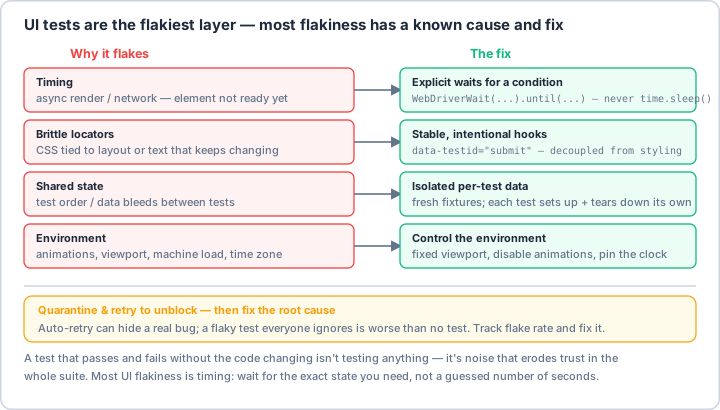
time.sleep(). The rest is brittle locators (use stable data-testid hooks), shared state (give each test its own data), and the environment (pin the viewport, disable animations). Quarantine-and-retry can unblock a build, but a flake everyone ignores erodes trust in the whole suite — fix the root cause.Real-World Scenario: The E-Commerce Testing Platform 🛒
You're building a comprehensive UI testing platform for a large e-commerce site that tests checkout flows across multiple browsers, validates responsive design on various screen sizes, ensures accessibility compliance (WCAG), tests complex JavaScript interactions, verifies payment integrations work correctly, validates search and filtering functionality, tests user authentication and sessions, and monitors page performance metrics. Your platform must support parallel execution, provide visual regression testing, handle dynamic content, and generate detailed reports. Let's build a professional Selenium testing framework!
# Comprehensive UI Testing Framework with Selenium
# pip install selenium pytest selenium-wire webdriver-manager
# pip install allure-pytest pytest-html pytest-xdist pytest-bdd
# pip install Pillow opencv-python scikit-image
import os
import time
import json
import logging
from typing import List, Dict, Any, Optional, Tuple, Union
from dataclasses import dataclass, field
from datetime import datetime
from pathlib import Path
from contextlib import contextmanager
from abc import ABC, abstractmethod
import re
# Selenium imports
from selenium import webdriver
from selenium.webdriver.common.by import By
from selenium.webdriver.common.keys import Keys
from selenium.webdriver.common.action_chains import ActionChains
from selenium.webdriver.support.ui import WebDriverWait, Select
from selenium.webdriver.support import expected_conditions as EC
from selenium.webdriver.remote.webelement import WebElement
from selenium.common.exceptions import (
TimeoutException,
NoSuchElementException,
StaleElementReferenceException,
WebDriverException
)
# WebDriver Manager for automatic driver management
from webdriver_manager.chrome import ChromeDriverManager
from webdriver_manager.firefox import GeckoDriverManager
from webdriver_manager.microsoft import EdgeChromiumDriverManager
# For advanced features
from selenium.webdriver.chrome.options import Options as ChromeOptions
from selenium.webdriver.firefox.options import Options as FirefoxOptions
from selenium.webdriver.common.desired_capabilities import DesiredCapabilities
# Selenium 4 passes the driver executable via a Service object, not a path arg.
from selenium.webdriver.chrome.service import Service as ChromeService
from selenium.webdriver.firefox.service import Service as FirefoxService
from selenium.webdriver.edge.service import Service as EdgeService
# For visual testing
from PIL import Image, ImageChops
import cv2
import numpy as np
# Testing frameworks
import pytest
import allure
# ==================== Configuration ====================
@dataclass
class SeleniumConfig:
"""Configuration for Selenium tests."""
browser: str = "chrome" # chrome, firefox, edge, safari
headless: bool = False
window_size: Tuple[int, int] = (1920, 1080)
implicit_wait: int = 10
explicit_wait: int = 20
page_load_timeout: int = 30
# Grid configuration
use_grid: bool = False
grid_url: str = "http://localhost:4444/wd/hub"
# Screenshots
screenshot_on_failure: bool = True
screenshot_dir: Path = Path("screenshots")
# Advanced options
enable_logging: bool = True
log_level: str = "INFO"
download_dir: Optional[str] = None
accept_insecure_certs: bool = False
# Performance
enable_performance_logging: bool = False
network_conditions: Optional[Dict] = None # For throttling
# ==================== WebDriver Factory ====================
class WebDriverFactory:
"""Factory for creating WebDriver instances."""
@staticmethod
def create_driver(config: SeleniumConfig) -> webdriver.Remote:
"""Create WebDriver based on configuration."""
if config.use_grid:
return WebDriverFactory._create_remote_driver(config)
browser = config.browser.lower()
if browser == "chrome":
return WebDriverFactory._create_chrome_driver(config)
elif browser == "firefox":
return WebDriverFactory._create_firefox_driver(config)
elif browser == "edge":
return WebDriverFactory._create_edge_driver(config)
elif browser == "safari":
return WebDriverFactory._create_safari_driver(config)
else:
raise ValueError(f"Unsupported browser: {browser}")
@staticmethod
def _create_chrome_driver(config: SeleniumConfig) -> webdriver.Chrome:
"""Create Chrome WebDriver."""
options = ChromeOptions()
if config.headless:
options.add_argument("--headless")
options.add_argument("--no-sandbox")
options.add_argument("--disable-dev-shm-usage")
options.add_argument(f"--window-size={config.window_size[0]},{config.window_size[1]}")
if config.accept_insecure_certs:
options.add_argument("--ignore-certificate-errors")
if config.download_dir:
prefs = {
"download.default_directory": config.download_dir,
"download.prompt_for_download": False,
}
options.add_experimental_option("prefs", prefs)
if config.enable_performance_logging:
options.add_experimental_option("perfLoggingPrefs", {
"enableNetwork": True,
"enablePage": True,
})
options.set_capability("goog:loggingPrefs", {"performance": "ALL"})
# Use WebDriver Manager to automatically download driver
driver = webdriver.Chrome(
service=ChromeService(ChromeDriverManager().install()),
options=options
)
driver.implicitly_wait(config.implicit_wait)
driver.set_page_load_timeout(config.page_load_timeout)
return driver
@staticmethod
def _create_firefox_driver(config: SeleniumConfig) -> webdriver.Firefox:
"""Create Firefox WebDriver."""
options = FirefoxOptions()
if config.headless:
options.add_argument("--headless")
options.add_argument(f"--width={config.window_size[0]}")
options.add_argument(f"--height={config.window_size[1]}")
if config.accept_insecure_certs:
options.accept_insecure_certs = True
driver = webdriver.Firefox(
service=FirefoxService(GeckoDriverManager().install()),
options=options
)
driver.implicitly_wait(config.implicit_wait)
driver.set_page_load_timeout(config.page_load_timeout)
return driver
@staticmethod
def _create_edge_driver(config: SeleniumConfig) -> webdriver.Edge:
"""Create Edge WebDriver."""
options = webdriver.EdgeOptions()
if config.headless:
options.add_argument("--headless")
driver = webdriver.Edge(
service=EdgeService(EdgeChromiumDriverManager().install()),
options=options
)
driver.implicitly_wait(config.implicit_wait)
driver.set_page_load_timeout(config.page_load_timeout)
return driver
@staticmethod
def _create_safari_driver(config: SeleniumConfig) -> webdriver.Safari:
"""Create Safari WebDriver."""
# Safari doesn't require driver download
driver = webdriver.Safari()
driver.implicitly_wait(config.implicit_wait)
driver.set_page_load_timeout(config.page_load_timeout)
return driver
@staticmethod
def _create_remote_driver(config: SeleniumConfig) -> webdriver.Remote:
"""Create Remote WebDriver for Selenium Grid."""
# Selenium 4 dropped the desired_capabilities kwarg; capabilities are
# now folded into an options object via set_capability().
options = ChromeOptions()
options.set_capability("browserName", config.browser)
options.set_capability("platformName", "ANY")
options.set_capability("acceptInsecureCerts", config.accept_insecure_certs)
driver = webdriver.Remote(
command_executor=config.grid_url,
options=options
)
driver.implicitly_wait(config.implicit_wait)
driver.set_page_load_timeout(config.page_load_timeout)
return driver
# ==================== Page Object Model ====================
class BasePage(ABC):
"""Base class for Page Objects."""
def __init__(self, driver: webdriver.Remote, config: SeleniumConfig):
self.driver = driver
self.config = config
self.wait = WebDriverWait(driver, config.explicit_wait)
self.logger = logging.getLogger(self.__class__.__name__)
@abstractmethod
def is_loaded(self) -> bool:
"""Check if page is loaded."""
pass
def wait_for_page_load(self, timeout: Optional[int] = None):
"""Wait for page to load completely."""
timeout = timeout or self.config.page_load_timeout
# Wait for document ready state
WebDriverWait(self.driver, timeout).until(
lambda driver: driver.execute_script("return document.readyState") == "complete"
)
# Wait for page-specific element
if not self.is_loaded():
raise TimeoutException(f"Page {self.__class__.__name__} failed to load")
def find_element(self, locator: Tuple[str, str]) -> WebElement:
"""Find element with wait."""
return self.wait.until(EC.presence_of_element_located(locator))
def find_elements(self, locator: Tuple[str, str]) -> List[WebElement]:
"""Find multiple elements with wait."""
return self.wait.until(EC.presence_of_all_elements_located(locator))
def click(self, locator: Tuple[str, str]):
"""Click element with wait."""
element = self.wait.until(EC.element_to_be_clickable(locator))
element.click()
def send_keys(self, locator: Tuple[str, str], text: str):
"""Send keys to element."""
element = self.find_element(locator)
element.clear()
element.send_keys(text)
def get_text(self, locator: Tuple[str, str]) -> str:
"""Get element text."""
element = self.find_element(locator)
return element.text
def is_element_visible(self, locator: Tuple[str, str]) -> bool:
"""Check if element is visible."""
try:
element = self.driver.find_element(*locator)
return element.is_displayed()
except NoSuchElementException:
return False
def wait_for_element(
self,
locator: Tuple[str, str],
condition: str = "presence",
timeout: Optional[int] = None
) -> WebElement:
"""Wait for element with specific condition."""
timeout = timeout or self.config.explicit_wait
wait = WebDriverWait(self.driver, timeout)
conditions = {
"presence": EC.presence_of_element_located,
"visible": EC.visibility_of_element_located,
"clickable": EC.element_to_be_clickable,
"invisible": EC.invisibility_of_element_located
}
condition_func = conditions.get(condition, EC.presence_of_element_located)
return wait.until(condition_func(locator))
def scroll_to_element(self, element: WebElement):
"""Scroll to element."""
self.driver.execute_script("arguments[0].scrollIntoView(true);", element)
time.sleep(0.5) # Wait for scroll to complete
def take_screenshot(self, name: str):
"""Take screenshot of current page."""
screenshot_path = self.config.screenshot_dir / f"{name}_{datetime.now().strftime('%Y%m%d_%H%M%S')}.png"
screenshot_path.parent.mkdir(exist_ok=True)
self.driver.save_screenshot(str(screenshot_path))
self.logger.info(f"Screenshot saved: {screenshot_path}")
return screenshot_path
# ==================== Example Page Objects ====================
class LoginPage(BasePage):
"""Login page object."""
# Locators
USERNAME_INPUT = (By.ID, "username")
PASSWORD_INPUT = (By.ID, "password")
LOGIN_BUTTON = (By.CSS_SELECTOR, "button[type='submit']")
ERROR_MESSAGE = (By.CLASS_NAME, "error-message")
REMEMBER_ME = (By.ID, "remember-me")
FORGOT_PASSWORD = (By.LINK_TEXT, "Forgot Password?")
def is_loaded(self) -> bool:
"""Check if login page is loaded."""
return self.is_element_visible(self.LOGIN_BUTTON)
def login(self, username: str, password: str, remember_me: bool = False) -> None:
"""Perform login."""
self.send_keys(self.USERNAME_INPUT, username)
self.send_keys(self.PASSWORD_INPUT, password)
if remember_me:
remember_checkbox = self.find_element(self.REMEMBER_ME)
if not remember_checkbox.is_selected():
remember_checkbox.click()
self.click(self.LOGIN_BUTTON)
def get_error_message(self) -> str:
"""Get login error message."""
if self.is_element_visible(self.ERROR_MESSAGE):
return self.get_text(self.ERROR_MESSAGE)
return ""
def click_forgot_password(self):
"""Click forgot password link."""
self.click(self.FORGOT_PASSWORD)
class ProductPage(BasePage):
"""Product page object."""
# Locators
PRODUCT_TITLE = (By.CSS_SELECTOR, "h1.product-title")
PRICE = (By.CLASS_NAME, "price")
ADD_TO_CART = (By.ID, "add-to-cart")
QUANTITY = (By.NAME, "quantity")
SIZE_SELECTOR = (By.ID, "size")
COLOR_OPTIONS = (By.CSS_SELECTOR, ".color-option")
PRODUCT_IMAGE = (By.CSS_SELECTOR, ".product-image img")
REVIEWS = (By.CLASS_NAME, "review")
def is_loaded(self) -> bool:
"""Check if product page is loaded."""
return self.is_element_visible(self.PRODUCT_TITLE)
def get_product_info(self) -> Dict[str, Any]:
"""Get product information."""
return {
"title": self.get_text(self.PRODUCT_TITLE),
"price": self.get_text(self.PRICE),
"image_src": self.find_element(self.PRODUCT_IMAGE).get_attribute("src")
}
def select_size(self, size: str):
"""Select product size."""
size_dropdown = Select(self.find_element(self.SIZE_SELECTOR))
size_dropdown.select_by_visible_text(size)
def select_color(self, color: str):
"""Select product color."""
color_elements = self.find_elements(self.COLOR_OPTIONS)
for element in color_elements:
if element.get_attribute("data-color") == color:
element.click()
break
def set_quantity(self, quantity: int):
"""Set product quantity."""
quantity_input = self.find_element(self.QUANTITY)
quantity_input.clear()
quantity_input.send_keys(str(quantity))
def add_to_cart(self):
"""Add product to cart."""
self.click(self.ADD_TO_CART)
def get_review_count(self) -> int:
"""Get number of reviews."""
reviews = self.find_elements(self.REVIEWS)
return len(reviews)
class ShoppingCartPage(BasePage):
"""Shopping cart page object."""
# Locators
CART_ITEMS = (By.CSS_SELECTOR, ".cart-item")
CHECKOUT_BUTTON = (By.ID, "checkout")
CART_TOTAL = (By.CLASS_NAME, "cart-total")
REMOVE_ITEM = (By.CSS_SELECTOR, ".remove-item")
UPDATE_QUANTITY = (By.CSS_SELECTOR, ".quantity-input")
def is_loaded(self) -> bool:
"""Check if cart page is loaded."""
return self.is_element_visible(self.CHECKOUT_BUTTON)
def get_cart_items(self) -> List[Dict[str, Any]]:
"""Get all items in cart."""
items = []
cart_elements = self.find_elements(self.CART_ITEMS)
for element in cart_elements:
item = {
"name": element.find_element(By.CLASS_NAME, "item-name").text,
"price": element.find_element(By.CLASS_NAME, "item-price").text,
"quantity": element.find_element(By.CLASS_NAME, "item-quantity").get_attribute("value")
}
items.append(item)
return items
def remove_item(self, index: int):
"""Remove item from cart by index."""
remove_buttons = self.find_elements(self.REMOVE_ITEM)
if index < len(remove_buttons):
remove_buttons[index].click()
def update_quantity(self, index: int, quantity: int):
"""Update item quantity."""
quantity_inputs = self.find_elements(self.UPDATE_QUANTITY)
if index < len(quantity_inputs):
quantity_inputs[index].clear()
quantity_inputs[index].send_keys(str(quantity))
def get_total(self) -> str:
"""Get cart total."""
return self.get_text(self.CART_TOTAL)
def proceed_to_checkout(self):
"""Click checkout button."""
self.click(self.CHECKOUT_BUTTON)
# ==================== Test Utilities ====================
class TestUtilities:
"""Utility functions for testing."""
@staticmethod
def wait_for_ajax(driver: webdriver.Remote, timeout: int = 30):
"""Wait for AJAX requests to complete."""
WebDriverWait(driver, timeout).until(
lambda driver: driver.execute_script("return jQuery.active == 0")
)
@staticmethod
def switch_to_iframe(driver: webdriver.Remote, iframe_locator: Tuple[str, str]):
"""Switch to iframe."""
iframe = WebDriverWait(driver, 10).until(
EC.frame_to_be_available_and_switch_to_it(iframe_locator)
)
@staticmethod
def switch_to_new_window(driver: webdriver.Remote):
"""Switch to newly opened window."""
windows = driver.window_handles
driver.switch_to.window(windows[-1])
@staticmethod
def accept_cookies(driver: webdriver.Remote):
"""Accept cookies banner if present."""
try:
accept_button = driver.find_element(By.ID, "accept-cookies")
accept_button.click()
except NoSuchElementException:
pass # No cookie banner
@staticmethod
def handle_alert(driver: webdriver.Remote, accept: bool = True) -> str:
"""Handle JavaScript alert."""
alert = WebDriverWait(driver, 5).until(EC.alert_is_present())
text = alert.text
if accept:
alert.accept()
else:
alert.dismiss()
return text
@staticmethod
@contextmanager
def wait_for_new_window(driver: webdriver.Remote):
"""Context manager for handling new windows."""
original_windows = driver.window_handles
yield
WebDriverWait(driver, 10).until(
lambda d: len(d.window_handles) > len(original_windows)
)
new_windows = set(driver.window_handles) - set(original_windows)
if new_windows:
driver.switch_to.window(new_windows.pop())
# ==================== Visual Testing ====================
class VisualTester:
"""Visual regression testing utilities."""
def __init__(self, baseline_dir: Path = Path("baseline_images")):
self.baseline_dir = baseline_dir
self.baseline_dir.mkdir(exist_ok=True)
def capture_screenshot(self, driver: webdriver.Remote, name: str) -> np.ndarray:
"""Capture screenshot as numpy array."""
screenshot = driver.get_screenshot_as_png()
image = Image.open(io.BytesIO(screenshot))
return np.array(image)
def compare_images(
self,
image1: np.ndarray,
image2: np.ndarray,
threshold: float = 0.95
) -> Tuple[bool, float]:
"""Compare two images and return similarity score."""
# Convert to grayscale
gray1 = cv2.cvtColor(image1, cv2.COLOR_BGR2GRAY)
gray2 = cv2.cvtColor(image2, cv2.COLOR_BGR2GRAY)
# Calculate structural similarity
from skimage.metrics import structural_similarity as ssim
similarity = ssim(gray1, gray2)
return similarity >= threshold, similarity
def highlight_differences(
self,
image1: np.ndarray,
image2: np.ndarray
) -> np.ndarray:
"""Highlight differences between images."""
diff = cv2.absdiff(image1, image2)
# Convert to grayscale and threshold
gray = cv2.cvtColor(diff, cv2.COLOR_BGR2GRAY)
_, thresh = cv2.threshold(gray, 30, 255, cv2.THRESH_BINARY)
# Find contours
contours, _ = cv2.findContours(thresh, cv2.RETR_EXTERNAL, cv2.CHAIN_APPROX_SIMPLE)
# Draw rectangles around differences
result = image2.copy()
for contour in contours:
x, y, w, h = cv2.boundingRect(contour)
cv2.rectangle(result, (x, y), (x + w, y + h), (0, 0, 255), 2)
return result
def verify_visual_regression(
self,
driver: webdriver.Remote,
test_name: str,
threshold: float = 0.95
) -> bool:
"""Verify visual regression for current page."""
baseline_path = self.baseline_dir / f"{test_name}.png"
current_screenshot = self.capture_screenshot(driver, test_name)
if not baseline_path.exists():
# Save as new baseline
cv2.imwrite(str(baseline_path), current_screenshot)
return True
# Load baseline and compare
baseline = cv2.imread(str(baseline_path))
match, similarity = self.compare_images(baseline, current_screenshot, threshold)
if not match:
# Save diff image
diff = self.highlight_differences(baseline, current_screenshot)
diff_path = self.baseline_dir / f"{test_name}_diff.png"
cv2.imwrite(str(diff_path), diff)
print(f"Visual regression failed. Similarity: {similarity:.2%}")
return match
# ==================== Performance Testing ====================
class PerformanceTester:
"""Browser performance testing."""
def __init__(self, driver: webdriver.Remote):
self.driver = driver
def get_page_load_time(self) -> float:
"""Get page load time in milliseconds."""
navigation_start = self.driver.execute_script(
"return window.performance.timing.navigationStart"
)
load_complete = self.driver.execute_script(
"return window.performance.timing.loadEventEnd"
)
return load_complete - navigation_start
def get_performance_metrics(self) -> Dict[str, Any]:
"""Get comprehensive performance metrics."""
return self.driver.execute_script("""
var perfData = window.performance.timing;
var pageLoadTime = perfData.loadEventEnd - perfData.navigationStart;
var connectTime = perfData.responseEnd - perfData.requestStart;
var renderTime = perfData.domComplete - perfData.domLoading;
return {
'pageLoadTime': pageLoadTime,
'connectTime': connectTime,
'renderTime': renderTime,
'domInteractive': perfData.domInteractive - perfData.navigationStart,
'domContentLoaded': perfData.domContentLoadedEventEnd - perfData.navigationStart
};
""")
def get_resource_timings(self) -> List[Dict[str, Any]]:
"""Get resource loading timings."""
return self.driver.execute_script("""
return window.performance.getEntriesByType('resource').map(function(resource) {
return {
'name': resource.name,
'duration': resource.duration,
'size': resource.transferSize,
'type': resource.initiatorType
};
});
""")
def check_console_errors(self) -> List[str]:
"""Check for JavaScript console errors."""
logs = self.driver.get_log('browser')
errors = [
log['message'] for log in logs
if log['level'] == 'SEVERE'
]
return errors
# ==================== Test Base Class ====================
class SeleniumTestBase:
"""Base class for Selenium tests."""
@pytest.fixture(autouse=True)
def setup_method(self, request):
"""Setup test method."""
self.config = SeleniumConfig()
self.driver = WebDriverFactory.create_driver(self.config)
# Add test info
self.test_name = request.node.name
yield
# Cleanup
if request.node.rep_call.failed and self.config.screenshot_on_failure:
self.take_failure_screenshot()
self.driver.quit()
def take_failure_screenshot(self):
"""Take screenshot on test failure."""
timestamp = datetime.now().strftime('%Y%m%d_%H%M%S')
filename = f"failure_{self.test_name}_{timestamp}.png"
filepath = self.config.screenshot_dir / filename
filepath.parent.mkdir(exist_ok=True)
self.driver.save_screenshot(str(filepath))
print(f"Failure screenshot saved: {filepath}")
def navigate_to(self, url: str):
"""Navigate to URL."""
self.driver.get(url)
def assert_url_contains(self, expected: str):
"""Assert current URL contains text."""
assert expected in self.driver.current_url, \
f"Expected URL to contain '{expected}', got '{self.driver.current_url}'"
def assert_title_contains(self, expected: str):
"""Assert page title contains text."""
assert expected in self.driver.title, \
f"Expected title to contain '{expected}', got '{self.driver.title}'"
# ==================== Example Test Cases ====================
class TestECommerce(SeleniumTestBase):
"""E-commerce site test cases."""
def test_user_login(self):
"""Test user login flow."""
self.navigate_to("https://example-shop.com/login")
login_page = LoginPage(self.driver, self.config)
login_page.wait_for_page_load()
# Test invalid login
login_page.login("invalid@email.com", "wrongpassword")
error = login_page.get_error_message()
assert "Invalid credentials" in error
# Test valid login
login_page.login("user@example.com", "correctpassword")
# Verify redirect to dashboard
self.assert_url_contains("/dashboard")
def test_product_search_and_purchase(self):
"""Test complete purchase flow."""
self.navigate_to("https://example-shop.com")
# Search for product
search_box = self.driver.find_element(By.NAME, "search")
search_box.send_keys("laptop")
search_box.send_keys(Keys.RETURN)
# Click first product
first_product = WebDriverWait(self.driver, 10).until(
EC.element_to_be_clickable((By.CSS_SELECTOR, ".product-card:first-child"))
)
first_product.click()
# Add to cart
product_page = ProductPage(self.driver, self.config)
product_page.wait_for_page_load()
product_info = product_page.get_product_info()
product_page.set_quantity(2)
product_page.add_to_cart()
# Go to cart
cart_link = self.driver.find_element(By.ID, "cart-link")
cart_link.click()
cart_page = ShoppingCartPage(self.driver, self.config)
cart_page.wait_for_page_load()
# Verify cart
cart_items = cart_page.get_cart_items()
assert len(cart_items) > 0
assert cart_items[0]["quantity"] == "2"
# Proceed to checkout
cart_page.proceed_to_checkout()
# Verify checkout page
self.assert_url_contains("/checkout")
def test_responsive_design(self):
"""Test responsive design on different screen sizes."""
test_sizes = [
(1920, 1080), # Desktop
(768, 1024), # Tablet
(375, 667), # Mobile
]
for width, height in test_sizes:
self.driver.set_window_size(width, height)
self.navigate_to("https://example-shop.com")
# Check if mobile menu is visible on small screens
if width < 768:
mobile_menu = self.driver.find_element(By.CLASS_NAME, "mobile-menu")
assert mobile_menu.is_displayed()
else:
desktop_menu = self.driver.find_element(By.CLASS_NAME, "desktop-menu")
assert desktop_menu.is_displayed()
# ==================== BDD Test Example ====================
from pytest_bdd import scenarios, given, when, then
scenarios('features/shopping.feature')
@given('I am on the shopping site')
def navigate_to_site(driver):
driver.get("https://example-shop.com")
@when('I search for ""')
def search_product(driver, product):
search = driver.find_element(By.NAME, "search")
search.send_keys(product)
search.send_keys(Keys.RETURN)
@then('I should see search results')
def verify_results(driver):
results = driver.find_elements(By.CLASS_NAME, "product-card")
assert len(results) > 0
# ==================== Parallel Test Execution ====================
class ParallelTestRunner:
"""Run Selenium tests in parallel."""
def __init__(self, test_suite: str, browsers: List[str], parallel_count: int = 4):
self.test_suite = test_suite
self.browsers = browsers
self.parallel_count = parallel_count
def run(self):
"""Run tests in parallel across browsers."""
import subprocess
from concurrent.futures import ThreadPoolExecutor, as_completed
commands = []
for browser in self.browsers:
cmd = [
"pytest",
self.test_suite,
f"--browser={browser}",
"-n", str(self.parallel_count),
"--html=report_{browser}.html"
]
commands.append(cmd)
with ThreadPoolExecutor(max_workers=len(self.browsers)) as executor:
futures = {
executor.submit(subprocess.run, cmd, capture_output=True): browser
for cmd, browser in zip(commands, self.browsers)
}
for future in as_completed(futures):
browser = futures[future]
result = future.result()
print(f"Tests completed for {browser}")
if result.returncode != 0:
print(f"Failures in {browser}:")
print(result.stdout.decode())
import io
# Example usage
if __name__ == "__main__":
print("🌐 Selenium UI Testing Examples\n")
# Example 1: Locator strategies
print("1️⃣ Selenium Locator Strategies:")
locators = [
("By.ID", "Fastest, most reliable if unique"),
("By.NAME", "Good for form elements"),
("By.CLASS_NAME", "For styled elements"),
("By.CSS_SELECTOR", "Powerful and flexible"),
("By.XPATH", "Most powerful but slower"),
("By.TAG_NAME", "For generic elements"),
("By.LINK_TEXT", "For exact link text"),
("By.PARTIAL_LINK_TEXT", "For partial link text")
]
for locator, description in locators:
print(f" {locator}: {description}")
# Example 2: Wait strategies
print("\n2️⃣ Wait Strategies:")
waits = [
"Implicit Wait - Global timeout for all elements",
"Explicit Wait - Wait for specific condition",
"Fluent Wait - Poll with custom frequency",
"Expected Conditions - Pre-built wait conditions"
]
for wait in waits:
print(f" • {wait}")
# Example 3: Page Object Pattern
print("\n3️⃣ Page Object Pattern Benefits:")
benefits = [
"Maintainability - Changes in one place",
"Readability - Self-documenting tests",
"Reusability - Share page logic",
"Separation - Test logic from page structure"
]
for benefit in benefits:
print(f" • {benefit}")
# Example 4: Browser capabilities
print("\n4️⃣ Browser Capabilities:")
capabilities = [
"Headless mode for CI/CD",
"Window size configuration",
"Download directory setting",
"Proxy configuration",
"Accept insecure certificates",
"Performance logging",
"Network throttling"
]
for capability in capabilities:
print(f" • {capability}")
# Example 5: Best practices
print("\n5️⃣ Selenium Testing Best Practices:")
practices = [
"🎯 Use Page Object Model",
"⏱️ Prefer explicit over implicit waits",
"🔍 Use stable locators (ID > CSS > XPath)",
"📸 Take screenshots on failures",
"🔄 Handle dynamic content properly",
"🧹 Clean up test data",
"⚡ Run tests in parallel",
"🎭 Test on multiple browsers",
"📱 Test responsive design",
"📊 Monitor test performance"
]
for practice in practices:
print(f" {practice}")
# Example 6: Common challenges
print("\n6️⃣ Common Selenium Challenges:")
challenges = [
("Flaky tests", "Use proper waits and retries"),
("Dynamic elements", "Use stable locators and waits"),
("Popups/Alerts", "Handle with switchTo methods"),
("IFrames", "Switch context before interaction"),
("File uploads", "Use send_keys with file path"),
("AJAX calls", "Wait for requests to complete")
]
for challenge, solution in challenges:
print(f" {challenge}: {solution}")
# Example 7: Visual testing
print("\n7️⃣ Visual Testing Approaches:")
approaches = [
"Pixel comparison",
"Structural similarity (SSIM)",
"Perceptual hashing",
"AI-based comparison",
"Layout testing"
]
for approach in approaches:
print(f" • {approach}")
# Example 8: Test organization
print("\n8️⃣ Selenium Test Organization:")
structure = """
tests/
├── ui/
│ ├── conftest.py # Fixtures and setup
│ ├── pages/ # Page objects
│ │ ├── base_page.py
│ │ ├── login_page.py
│ │ └── product_page.py
│ ├── tests/ # Test cases
│ │ ├── test_auth.py
│ │ └── test_shopping.py
│ └── utils/ # Utilities
│ └── helpers.py
└── features/ # BDD features
└── shopping.feature
"""
print(structure)
# Example 9: Running tests
print("\n9️⃣ Running Selenium Tests:")
print(" # Single browser")
print(" pytest tests/ui --browser=chrome")
print("")
print(" # Multiple browsers in parallel")
print(" pytest tests/ui -n 4 --browser=chrome,firefox")
print("")
print(" # With reporting")
print(" pytest tests/ui --html=report.html --self-contained-html")
print("\n✅ Selenium UI testing examples complete!")
Key Takeaways and Best Practices 🎯
- Page Object Model: Separate test logic from page structure for maintainability.
- Explicit Waits: Use WebDriverWait instead of sleep for reliable tests.
- Stable Locators: Prefer ID and CSS selectors over XPath when possible.
- Cross-Browser Testing: Test on multiple browsers to ensure compatibility.
- Visual Testing: Implement visual regression testing for UI consistency.
- Performance Monitoring: Track page load times and resource usage.
- Error Handling: Implement robust error handling and recovery.
- Parallel Execution: Run tests in parallel for faster feedback.
Selenium Testing Best Practices 📋
Mastering Selenium UI testing enables you to ensure your web applications work flawlessly across browsers and devices. You can now create robust page objects, handle dynamic content reliably, implement visual regression testing, test responsive designs, and run comprehensive cross-browser test suites. Whether you're testing e-commerce sites, SaaS applications, or content platforms, these Selenium skills are essential for delivering quality web experiences! 🚀
Pro Tip: Think of Selenium tests as automated QA engineers - they should interact with your application exactly as a human would, but with perfect consistency. Always use the Page Object Model (POM) - it makes tests readable, maintainable, and reusable. Each page should have its own class with locators and methods that represent user actions. Use explicit waits (WebDriverWait) instead of implicit waits or sleep - they're more reliable and faster. Choose locators wisely: IDs are fastest and most reliable, followed by CSS selectors, with XPath as a last resort. Make your tests independent - each test should set up its own data and not depend on other tests. Implement proper cleanup in teardown methods. Take screenshots on failures for debugging - a picture is worth a thousand logs. Handle dynamic content properly with appropriate wait conditions. Test on real browsers, not just Chrome - Edge, Firefox, and Safari may behave differently. Implement visual regression testing to catch CSS issues that functional tests miss. Use Selenium Grid or cloud services for parallel execution and cross-browser testing. Keep tests focused - one test should verify one behavior. Monitor test execution time - UI tests are slow but shouldn't take minutes. Most importantly: if tests are flaky, fix them immediately - flaky tests erode confidence in the test suite!