🔄 Continuous Integration Setup: Automate Your Testing Pipeline
📚 What You'll Learn
By the end of this lesson, you will be able to:
- Explain how CI acts as a gate that automatically builds and tests every change and blocks broken code from merging
- Write a GitHub Actions workflow with jobs for code quality, unit tests, and integration tests
- Run a test matrix across multiple Python versions and operating systems to catch "works on my machine" bugs
- Speed up pipelines with dependency caching and parallel jobs, keeping them fast enough that people trust them
- Add security scanning (Bandit, Safety, Trivy) and coverage reporting to the pipeline
- Enforce quality with branch protection and pre-commit hooks, and recognize equivalent config in Jenkins, GitLab CI, and CircleCI
⏱️ Estimated Time: 45–60 minutes
🎯 Project: Write a GitHub Actions workflow that lints, runs unit tests across a Python version matrix, and reports coverage on every push and pull request.
Continuous Integration (CI) transforms manual testing into an automated safety net - it runs your tests automatically on every code change, catches bugs before they reach production, and ensures your team maintains high code quality standards. Like having a tireless quality inspector checking every piece of code 24/7, CI enables rapid development with confidence. Whether you're using GitHub Actions, Jenkins, or GitLab CI, mastering CI setup is essential for modern software development. Let's explore the comprehensive world of automated testing pipelines! 🚦
The CI/CD Pipeline Architecture
Think of CI/CD as your code's journey from development to production - it automates building, testing, and deployment, ensuring only quality code reaches users. Using pipeline configurations, test matrices, and deployment strategies, you can create sophisticated workflows that handle everything from unit tests to production deployments. Understanding pipeline stages, parallel execution, and artifact management is crucial for effective CI/CD!
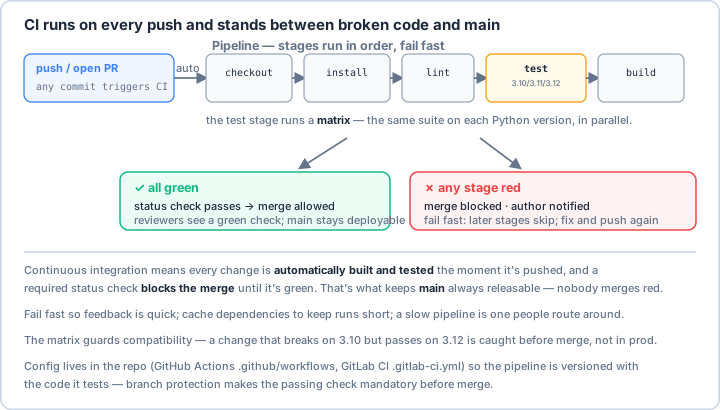
main always releasable — nobody merges broken code. Keep the pipeline fast (fail early, cache dependencies) so people don't route around it, run a version matrix to catch "works on my Python" bugs before merge, and store the config in the repo so the pipeline is versioned with the code it tests.Real-World Scenario: The Enterprise CI/CD Platform 🏢
You're building a comprehensive CI/CD platform for a large organization that runs tests across multiple Python versions and operating systems, performs security scanning and dependency checking, generates code coverage and quality reports, manages deployment to multiple environments, implements blue-green and canary deployments, monitors application performance post-deployment, provides rollback capabilities for failed deployments, and integrates with issue tracking and notification systems. Your platform must handle hundreds of builds daily, provide fast feedback to developers, maintain audit logs for compliance, and scale with the organization. Let's build a professional CI/CD pipeline!
# Comprehensive CI/CD Pipeline Configuration
# This file demonstrates configurations for multiple CI/CD platforms
import os
import json
import yaml
import subprocess
from typing import Dict, List, Any, Optional
from dataclasses import dataclass, field
from pathlib import Path
import logging
from datetime import datetime
# ==================== GitHub Actions Configuration ====================
def create_github_actions_workflow():
"""Create GitHub Actions workflow configuration."""
workflow = """
name: CI/CD Pipeline
on:
push:
branches: [ main, develop ]
pull_request:
branches: [ main ]
schedule:
- cron: '0 0 * * 0' # Weekly on Sunday
workflow_dispatch: # Manual trigger
env:
PYTHON_VERSION: '3.9'
NODE_VERSION: '16'
POETRY_VERSION: '1.2.0'
jobs:
# ==================== Code Quality ====================
code-quality:
name: Code Quality Checks
runs-on: ubuntu-latest
steps:
- uses: actions/checkout@v3
with:
fetch-depth: 0 # Full history for better analysis
- name: Set up Python
uses: actions/setup-python@v4
with:
python-version: ${{ env.PYTHON_VERSION }}
- name: Cache dependencies
uses: actions/cache@v3
with:
path: |
~/.cache/pip
~/.cache/pre-commit
key: ${{ runner.os }}-pip-${{ hashFiles('**/requirements*.txt') }}
restore-keys: |
${{ runner.os }}-pip-
- name: Install dependencies
run: |
python -m pip install --upgrade pip
pip install flake8 black mypy pylint bandit safety
pip install -r requirements-dev.txt
- name: Run Black formatter
run: black --check --diff .
- name: Run Flake8 linter
run: flake8 . --count --statistics
- name: Run MyPy type checker
run: mypy --strict src/
- name: Run Pylint
run: pylint src/ --fail-under=8.0
- name: Security scan with Bandit
run: bandit -r src/ -f json -o bandit-report.json
- name: Check dependencies with Safety
run: safety check --json > safety-report.json
- name: Upload security reports
uses: actions/upload-artifact@v3
if: always()
with:
name: security-reports
path: |
bandit-report.json
safety-report.json
# ==================== Unit Tests ====================
unit-tests:
name: Unit Tests - Python ${{ matrix.python-version }} on ${{ matrix.os }}
runs-on: ${{ matrix.os }}
needs: code-quality
strategy:
fail-fast: false
matrix:
os: [ubuntu-latest, windows-latest, macos-latest]
python-version: ['3.8', '3.9', '3.10', '3.11']
exclude:
- os: windows-latest
python-version: '3.8'
steps:
- uses: actions/checkout@v3
- name: Set up Python ${{ matrix.python-version }}
uses: actions/setup-python@v4
with:
python-version: ${{ matrix.python-version }}
- name: Install dependencies
run: |
python -m pip install --upgrade pip
pip install pytest pytest-cov pytest-xdist pytest-timeout
pip install -r requirements.txt
pip install -r requirements-test.txt
- name: Run unit tests with coverage
run: |
pytest tests/unit \
--cov=src \
--cov-report=xml \
--cov-report=html \
--cov-report=term-missing \
--junit-xml=junit.xml \
-n auto \
--timeout=300
- name: Upload coverage to Codecov
uses: codecov/codecov-action@v3
with:
file: ./coverage.xml
flags: unittests
name: codecov-${{ matrix.os }}-py${{ matrix.python-version }}
- name: Upload test results
uses: actions/upload-artifact@v3
if: always()
with:
name: test-results-${{ matrix.os }}-py${{ matrix.python-version }}
path: |
junit.xml
htmlcov/
# ==================== Integration Tests ====================
integration-tests:
name: Integration Tests
runs-on: ubuntu-latest
needs: unit-tests
services:
postgres:
image: postgres:14
env:
POSTGRES_USER: testuser
POSTGRES_PASSWORD: testpass
POSTGRES_DB: testdb
ports:
- 5432:5432
options: >-
--health-cmd pg_isready
--health-interval 10s
--health-timeout 5s
--health-retries 5
redis:
image: redis:7
ports:
- 6379:6379
options: >-
--health-cmd "redis-cli ping"
--health-interval 10s
--health-timeout 5s
--health-retries 5
rabbitmq:
image: rabbitmq:3-management
ports:
- 5672:5672
- 15672:15672
env:
RABBITMQ_DEFAULT_USER: guest
RABBITMQ_DEFAULT_PASS: guest
steps:
- uses: actions/checkout@v3
- name: Set up Python
uses: actions/setup-python@v4
with:
python-version: ${{ env.PYTHON_VERSION }}
- name: Install dependencies
run: |
python -m pip install --upgrade pip
pip install -r requirements.txt
pip install -r requirements-test.txt
- name: Wait for services
run: |
python scripts/wait_for_services.py
- name: Run database migrations
env:
DATABASE_URL: postgresql://testuser:testpass@localhost:5432/testdb
run: |
alembic upgrade head
- name: Run integration tests
env:
DATABASE_URL: postgresql://testuser:testpass@localhost:5432/testdb
REDIS_URL: redis://localhost:6379
RABBITMQ_URL: amqp://guest:guest@localhost:5672
run: |
pytest tests/integration \
--cov=src \
--cov-report=xml \
--junit-xml=integration-junit.xml
- name: Upload integration test results
uses: actions/upload-artifact@v3
if: always()
with:
name: integration-test-results
path: integration-junit.xml
# ==================== E2E Tests ====================
e2e-tests:
name: End-to-End Tests
runs-on: ubuntu-latest
needs: integration-tests
steps:
- uses: actions/checkout@v3
- name: Set up Python
uses: actions/setup-python@v4
with:
python-version: ${{ env.PYTHON_VERSION }}
- name: Set up Node.js
uses: actions/setup-node@v3
with:
node-version: ${{ env.NODE_VERSION }}
- name: Install dependencies
run: |
python -m pip install --upgrade pip
pip install -r requirements.txt
npm install -g wait-on
- name: Build application
run: |
python setup.py build
- name: Start application
run: |
python -m src.main &
wait-on http://localhost:8000/health -t 60000
- name: Run E2E tests with Playwright
run: |
npx playwright install
npx playwright test
- name: Upload E2E test results
uses: actions/upload-artifact@v3
if: always()
with:
name: e2e-test-results
path: |
playwright-report/
test-results/
# ==================== Build & Package ====================
build:
name: Build and Package
runs-on: ubuntu-latest
needs: [unit-tests, integration-tests]
steps:
- uses: actions/checkout@v3
- name: Set up Python
uses: actions/setup-python@v4
with:
python-version: ${{ env.PYTHON_VERSION }}
- name: Install Poetry
uses: snok/install-poetry@v1
with:
version: ${{ env.POETRY_VERSION }}
- name: Build package
run: |
poetry build
- name: Build Docker image
run: |
docker build -t myapp:${{ github.sha }} .
docker tag myapp:${{ github.sha }} myapp:latest
- name: Run Trivy security scan
uses: aquasecurity/trivy-action@master
with:
image-ref: myapp:${{ github.sha }}
format: 'sarif'
output: 'trivy-results.sarif'
- name: Upload Trivy results
uses: github/codeql-action/upload-sarif@v2
with:
sarif_file: 'trivy-results.sarif'
- name: Save Docker image
run: |
docker save myapp:${{ github.sha }} | gzip > myapp.tar.gz
- name: Upload artifacts
uses: actions/upload-artifact@v3
with:
name: build-artifacts
path: |
dist/
myapp.tar.gz
# ==================== Deploy to Staging ====================
deploy-staging:
name: Deploy to Staging
runs-on: ubuntu-latest
needs: [build, e2e-tests]
environment: staging
if: github.ref == 'refs/heads/develop'
steps:
- uses: actions/checkout@v3
- name: Download artifacts
uses: actions/download-artifact@v3
with:
name: build-artifacts
- name: Load Docker image
run: |
docker load < myapp.tar.gz
- name: Configure AWS credentials
uses: aws-actions/configure-aws-credentials@v2
with:
aws-access-key-id: ${{ secrets.AWS_ACCESS_KEY_ID }}
aws-secret-access-key: ${{ secrets.AWS_SECRET_ACCESS_KEY }}
aws-region: us-east-1
- name: Push to ECR
run: |
aws ecr get-login-password | docker login --username AWS --password-stdin ${{ secrets.ECR_REGISTRY }}
docker tag myapp:${{ github.sha }} ${{ secrets.ECR_REGISTRY }}/myapp:staging-${{ github.sha }}
docker push ${{ secrets.ECR_REGISTRY }}/myapp:staging-${{ github.sha }}
- name: Deploy to ECS
run: |
aws ecs update-service \
--cluster staging-cluster \
--service myapp-staging \
--force-new-deployment
- name: Wait for deployment
run: |
aws ecs wait services-stable \
--cluster staging-cluster \
--services myapp-staging
- name: Run smoke tests
run: |
python scripts/smoke_tests.py --env staging
# ==================== Deploy to Production ====================
deploy-production:
name: Deploy to Production
runs-on: ubuntu-latest
needs: deploy-staging
environment: production
if: github.ref == 'refs/heads/main'
steps:
- uses: actions/checkout@v3
- name: Download artifacts
uses: actions/download-artifact@v3
with:
name: build-artifacts
- name: Configure AWS credentials
uses: aws-actions/configure-aws-credentials@v2
with:
aws-access-key-id: ${{ secrets.AWS_ACCESS_KEY_ID }}
aws-secret-access-key: ${{ secrets.AWS_SECRET_ACCESS_KEY }}
aws-region: us-east-1
- name: Blue-Green Deployment
run: |
python scripts/blue_green_deploy.py \
--image ${{ secrets.ECR_REGISTRY }}/myapp:${{ github.sha }} \
--cluster production-cluster \
--service myapp-production
- name: Run production smoke tests
run: |
python scripts/smoke_tests.py --env production
- name: Monitor deployment
run: |
python scripts/monitor_deployment.py \
--duration 300 \
--threshold 0.01
# ==================== Notification ====================
notify:
name: Send Notifications
runs-on: ubuntu-latest
needs: [deploy-staging, deploy-production]
if: always()
steps:
- name: Send Slack notification
uses: 8398a7/action-slack@v3
with:
status: ${{ job.status }}
text: |
Pipeline: ${{ github.workflow }}
Status: ${{ job.status }}
Branch: ${{ github.ref }}
Commit: ${{ github.sha }}
Author: ${{ github.actor }}
webhook_url: ${{ secrets.SLACK_WEBHOOK }}
- name: Create GitHub deployment
uses: chrnorm/deployment-action@v2
with:
token: ${{ github.token }}
environment: ${{ github.ref == 'refs/heads/main' && 'production' || 'staging' }}
target_url: https://myapp.example.com
"""
# Save workflow file
workflow_path = Path(".github/workflows/ci-cd.yml")
workflow_path.parent.mkdir(parents=True, exist_ok=True)
workflow_path.write_text(workflow)
return workflow_path
# ==================== Jenkins Pipeline ====================
def create_jenkins_pipeline():
"""Create Jenkins pipeline configuration."""
jenkinsfile = """
pipeline {
agent any
environment {
PYTHON_VERSION = '3.9'
DOCKER_REGISTRY = 'docker.io'
DOCKER_IMAGE = 'myapp'
SONARQUBE_SERVER = 'SonarQube'
}
options {
timestamps()
timeout(time: 1, unit: 'HOURS')
buildDiscarder(logRotator(numToKeepStr: '10'))
parallelsAlwaysFailFast()
}
stages {
stage('Checkout') {
steps {
checkout scm
script {
env.GIT_COMMIT = sh(
script: 'git rev-parse HEAD',
returnStdout: true
).trim()
env.GIT_BRANCH = sh(
script: 'git rev-parse --abbrev-ref HEAD',
returnStdout: true
).trim()
}
}
}
stage('Setup Python') {
steps {
sh '''
python${PYTHON_VERSION} -m venv venv
. venv/bin/activate
pip install --upgrade pip
pip install -r requirements.txt
pip install -r requirements-dev.txt
'''
}
}
stage('Code Quality') {
parallel {
stage('Linting') {
steps {
sh '''
. venv/bin/activate
flake8 . --format=checkstyle --output-file=flake8.xml
pylint src/ --output-format=parseable > pylint.log || true
'''
recordIssues(
enabledForFailure: true,
tools: [
flake8(pattern: 'flake8.xml'),
pyLint(pattern: 'pylint.log')
]
)
}
}
stage('Security Scan') {
steps {
sh '''
. venv/bin/activate
bandit -r src/ -f json -o bandit-report.json
safety check --json > safety-report.json || true
'''
publishHTML(target: [
allowMissing: false,
alwaysLinkToLastBuild: true,
keepAll: true,
reportDir: '.',
reportFiles: 'bandit-report.json,safety-report.json',
reportName: 'Security Reports'
])
}
}
stage('Type Checking') {
steps {
sh '''
. venv/bin/activate
mypy --strict src/ --html-report mypy-report
'''
publishHTML(target: [
reportDir: 'mypy-report',
reportFiles: 'index.html',
reportName: 'MyPy Report'
])
}
}
}
}
stage('Unit Tests') {
steps {
sh '''
. venv/bin/activate
pytest tests/unit \
--cov=src \
--cov-report=xml \
--cov-report=html \
--junit-xml=test-results/junit.xml \
--html=test-results/report.html \
--self-contained-html
'''
junit 'test-results/junit.xml'
publishHTML(target: [
reportDir: 'htmlcov',
reportFiles: 'index.html',
reportName: 'Coverage Report'
])
publishCoverage adapters: [coberturaAdapter('coverage.xml')]
}
}
stage('Integration Tests') {
steps {
script {
docker.image('postgres:14').withRun(
'-e POSTGRES_PASSWORD=testpass -e POSTGRES_DB=testdb'
) { db ->
docker.image('redis:7').withRun() { redis ->
sh '''
. venv/bin/activate
export DATABASE_URL="postgresql://postgres:testpass@${db.host}:5432/testdb"
export REDIS_URL="redis://${redis.host}:6379"
pytest tests/integration --junit-xml=integration-results.xml
'''
}
}
}
junit 'integration-results.xml'
}
}
stage('SonarQube Analysis') {
steps {
withSonarQubeEnv(SONARQUBE_SERVER) {
sh '''
. venv/bin/activate
sonar-scanner \
-Dsonar.projectKey=myapp \
-Dsonar.sources=src \
-Dsonar.tests=tests \
-Dsonar.python.coverage.reportPaths=coverage.xml \
-Dsonar.python.xunit.reportPath=test-results/junit.xml
'''
}
}
}
stage('Quality Gate') {
steps {
timeout(time: 1, unit: 'HOURS') {
waitForQualityGate abortPipeline: true
}
}
}
stage('Build Docker Image') {
steps {
script {
dockerImage = docker.build("${DOCKER_IMAGE}:${env.BUILD_NUMBER}")
dockerImage.tag("${DOCKER_IMAGE}:latest")
dockerImage.tag("${DOCKER_IMAGE}:${env.GIT_COMMIT}")
}
}
}
stage('Push to Registry') {
when {
branch 'main'
}
steps {
script {
docker.withRegistry("https://${DOCKER_REGISTRY}", 'docker-credentials') {
dockerImage.push("${env.BUILD_NUMBER}")
dockerImage.push("latest")
dockerImage.push("${env.GIT_COMMIT}")
}
}
}
}
stage('Deploy') {
when {
branch 'main'
}
stages {
stage('Deploy to Staging') {
steps {
script {
withCredentials([
string(credentialsId: 'staging-server', variable: 'SERVER'),
sshUserPrivateKey(
credentialsId: 'staging-ssh',
keyFileVariable: 'SSH_KEY'
)
]) {
sh '''
ssh -i ${SSH_KEY} deploy@${SERVER} "cd /app/myapp && docker pull ${DOCKER_REGISTRY}/myapp:${BUILD_NUMBER} && docker stop myapp || true && docker rm myapp || true && docker run -d --name myapp -p 8000:8000 ${DOCKER_REGISTRY}/myapp:${BUILD_NUMBER}"
'''
}
}
}
}
stage('Smoke Tests') {
steps {
sh 'python smoke_tests.py --env staging'
}
}
stage('Deploy to Production') {
input {
message "Deploy to production?"
ok "Deploy"
parameters {
choice(
name: 'DEPLOYMENT_TYPE',
choices: ['blue-green', 'canary', 'rolling'],
description: 'Select deployment strategy'
)
}
}
steps {
script {
if (params.DEPLOYMENT_TYPE == 'blue-green') {
sh 'python scripts/blue_green_deploy.py'
} else if (params.DEPLOYMENT_TYPE == 'canary') {
sh 'python scripts/canary_deploy.py'
} else {
sh 'python scripts/rolling_deploy.py'
}
}
}
}
}
}
}
post {
always {
cleanWs()
}
success {
slackSend(
color: 'good',
message: "Build ${env.BUILD_NUMBER} for ${env.JOB_NAME} succeeded."
)
}
failure {
emailext(
subject: "Build ${env.BUILD_NUMBER} for ${env.JOB_NAME} failed",
body: "Check the console output.",
to: 'team@example.com'
)
}
}
}
"""
jenkinsfile_path = Path("Jenkinsfile")
jenkinsfile_path.write_text(jenkinsfile)
return jenkinsfile_path
# ==================== GitLab CI Configuration ====================
def create_gitlab_ci_config():
"""Create GitLab CI/CD configuration."""
gitlab_ci = """
stages:
- build
- test
- security
- deploy
variables:
DOCKER_DRIVER: overlay2
DOCKER_TLS_CERTDIR: "/certs"
PIP_CACHE_DIR: "$CI_PROJECT_DIR/.cache/pip"
PYTHON_VERSION: "3.9"
cache:
paths:
- .cache/pip
- venv/
before_script:
- python -m venv venv
- source venv/bin/activate
- pip install --upgrade pip
# ==================== Test Stage ====================
unit-tests:
stage: test
image: python:${PYTHON_VERSION}
script:
- pip install -r requirements-dev.txt
- pytest tests/unit --cov=src --cov-report=term --junitxml=test-results.xml
artifacts:
reports:
junit: test-results.xml
integration-tests:
stage: test
image: python:${PYTHON_VERSION}
services:
- postgres:14
- redis:7
variables:
POSTGRES_DB: testdb
POSTGRES_USER: testuser
POSTGRES_PASSWORD: testpass
DATABASE_URL: "postgresql://testuser:testpass@postgres:5432/testdb"
REDIS_URL: "redis://redis:6379"
script:
- pip install -r requirements-dev.txt
- pytest tests/integration --junitxml=test-results.xml
# ==================== Security Stage ====================
security-scan:
stage: security
image: python:${PYTHON_VERSION}
script:
- pip install bandit safety
- bandit -r src -f json -o bandit-report.json
- safety check --json > safety-report.json
artifacts:
reports:
sast: bandit-report.json
paths:
- safety-report.json
dependency-scanning:
stage: security
image: python:${PYTHON_VERSION}
script:
- pip install pip-audit
- pip-audit --desc
container-scanning:
stage: security
image: docker:stable
services:
- docker:dind
script:
- docker build -t $CI_PROJECT_NAME:$CI_COMMIT_SHA .
- apk add --no-cache curl
- curl -sfL https://raw.githubusercontent.com/aquasecurity/trivy/main/contrib/install.sh | sh -s -- -b /usr/local/bin
- trivy image --exit-code 1 --severity HIGH,CRITICAL $CI_PROJECT_NAME:$CI_COMMIT_SHA
# ==================== Deploy Stage ====================
deploy-staging:
stage: deploy
image: alpine:latest
needs: ["unit-tests", "integration-tests", "security-scan"]
environment:
name: staging
url: https://staging.example.com
only:
- develop
before_script:
- apk add --no-cache openssh-client
- eval $(ssh-agent -s)
- echo "$SSH_PRIVATE_KEY" | ssh-add -
script:
- ssh deploy@staging.example.com "cd /app && ./deploy.sh staging $CI_COMMIT_SHA"
deploy-production:
stage: deploy
image: alpine:latest
needs: ["deploy-staging"]
environment:
name: production
url: https://example.com
only:
- main
when: manual
before_script:
- apk add --no-cache openssh-client
- eval $(ssh-agent -s)
- echo "$SSH_PRIVATE_KEY" | ssh-add -
script:
- ssh deploy@production.example.com "cd /app && ./deploy.sh production $CI_COMMIT_SHA"
after_script:
- curl -X POST $SLACK_WEBHOOK -d "{'text':'Deployment to production completed'}"
"""
gitlab_ci_path = Path(".gitlab-ci.yml")
gitlab_ci_path.write_text(gitlab_ci)
return gitlab_ci_path
# ==================== CircleCI Configuration ====================
def create_circleci_config():
"""Create CircleCI configuration."""
circleci_config = """
version: 2.1
orbs:
python: circleci/python@2.1.1
docker: circleci/docker@2.2.0
aws-ecr: circleci/aws-ecr@8.1.2
executors:
python-executor:
docker:
- image: cimg/python:3.9
python-with-services:
docker:
- image: cimg/python:3.9
- image: cimg/postgres:14.0
environment:
POSTGRES_USER: testuser
POSTGRES_PASSWORD: testpass
POSTGRES_DB: testdb
- image: cimg/redis:7.0
jobs:
test-and-lint:
executor: python-executor
steps:
- checkout
- python/install-packages:
pkg-manager: pip
pip-dependency-file: requirements-dev.txt
- run:
name: Run linting
command: |
flake8 .
black --check .
mypy --strict src/
- run:
name: Run unit tests
command: |
pytest tests/unit \
--cov=src \
--cov-report=xml \
--junit-xml=test-results/junit.xml
- store_test_results:
path: test-results
- store_artifacts:
path: htmlcov
- persist_to_workspace:
root: .
paths:
- coverage.xml
integration-tests:
executor: python-with-services
steps:
- checkout
- python/install-packages:
pkg-manager: pip
- run:
name: Wait for services
command: |
dockerize -wait tcp://localhost:5432 -timeout 1m
dockerize -wait tcp://localhost:6379 -timeout 1m
- run:
name: Run integration tests
command: |
export DATABASE_URL="postgresql://testuser:testpass@localhost:5432/testdb"
export REDIS_URL="redis://localhost:6379"
pytest tests/integration
security-scan:
executor: python-executor
steps:
- checkout
- run:
name: Install security tools
command: |
pip install bandit safety pip-audit
- run:
name: Run Bandit
command: bandit -r src/ -f json -o bandit-report.json
- run:
name: Check dependencies
command: |
safety check
pip-audit
- store_artifacts:
path: bandit-report.json
build-and-push:
executor: docker/docker
steps:
- setup_remote_docker:
docker_layer_caching: true
- checkout
- docker/build:
image: myapp
tag: ${CIRCLE_SHA1}
- docker/push:
image: myapp
tag: ${CIRCLE_SHA1}
deploy-staging:
executor: python-executor
steps:
- checkout
- run:
name: Deploy to staging
command: |
python scripts/deploy.py \
--env staging \
--image myapp:${CIRCLE_SHA1}
deploy-production:
executor: python-executor
steps:
- checkout
- run:
name: Deploy to production
command: |
python scripts/deploy.py \
--env production \
--image myapp:${CIRCLE_SHA1} \
--strategy blue-green
workflows:
main:
jobs:
- test-and-lint
- integration-tests:
requires:
- test-and-lint
- security-scan:
requires:
- test-and-lint
- build-and-push:
requires:
- integration-tests
- security-scan
filters:
branches:
only:
- main
- develop
- deploy-staging:
requires:
- build-and-push
filters:
branches:
only: develop
- hold-production:
type: approval
requires:
- build-and-push
filters:
branches:
only: main
- deploy-production:
requires:
- hold-production
filters:
branches:
only: main
nightly:
triggers:
- schedule:
cron: "0 0 * * *"
filters:
branches:
only:
- main
jobs:
- test-and-lint
- integration-tests
- security-scan
"""
config_path = Path(".circleci/config.yml")
config_path.parent.mkdir(parents=True, exist_ok=True)
config_path.write_text(circleci_config)
return config_path
# ==================== CI/CD Utilities ====================
@dataclass
class CIPipelineConfig:
"""Configuration for CI/CD pipeline."""
platform: str # github, jenkins, gitlab, circleci
python_versions: List[str] = field(default_factory=lambda: ["3.8", "3.9", "3.10"])
test_matrix_os: List[str] = field(default_factory=lambda: ["ubuntu-latest"])
# Test configuration
run_unit_tests: bool = True
run_integration_tests: bool = True
run_e2e_tests: bool = False
run_security_scan: bool = True
run_performance_tests: bool = False
# Coverage requirements
coverage_threshold: float = 80.0
# Deployment
deploy_staging: bool = True
deploy_production: bool = False
deployment_strategy: str = "blue-green" # blue-green, canary, rolling
# Notifications
slack_webhook: Optional[str] = None
email_notifications: List[str] = field(default_factory=list)
class PipelineGenerator:
"""Generate CI/CD pipeline configurations."""
def __init__(self, config: CIPipelineConfig):
self.config = config
def generate(self) -> Path:
"""Generate pipeline configuration based on platform."""
generators = {
"github": create_github_actions_workflow,
"jenkins": create_jenkins_pipeline,
"gitlab": create_gitlab_ci_config,
"circleci": create_circleci_config
}
generator = generators.get(self.config.platform)
if not generator:
raise ValueError(f"Unsupported platform: {self.config.platform}")
return generator()
# ==================== Deployment Scripts ====================
class DeploymentManager:
"""Manage deployment strategies."""
@staticmethod
def blue_green_deploy(image: str, cluster: str, service: str):
"""Perform blue-green deployment."""
script = f"""
#!/usr/bin/env python
import boto3
import time
ecs = boto3.client('ecs')
# Create new task definition with new image
response = ecs.register_task_definition(
family='{service}',
containerDefinitions=[{{
'name': 'app',
'image': '{image}',
'memory': 512,
'cpu': 256,
'essential': True
}}]
)
new_task_def = response['taskDefinition']['taskDefinitionArn']
# Update service with new task definition
ecs.update_service(
cluster='{cluster}',
service='{service}-green',
taskDefinition=new_task_def
)
# Wait for green deployment to be stable
waiter = ecs.get_waiter('services_stable')
waiter.wait(cluster='{cluster}', services=['{service}-green'])
# Switch traffic to green
# (Implementation depends on load balancer configuration)
# Stop blue deployment
ecs.update_service(
cluster='{cluster}',
service='{service}-blue',
desiredCount=0
)
print("Blue-green deployment completed successfully")
"""
script_path = Path("scripts/blue_green_deploy.py")
script_path.parent.mkdir(exist_ok=True)
script_path.write_text(script)
script_path.chmod(0o755)
return script_path
@staticmethod
def canary_deploy(image: str, cluster: str, service: str, canary_percentage: int = 10):
"""Perform canary deployment."""
script = f"""
#!/usr/bin/env python
import boto3
import time
ecs = boto3.client('ecs')
elbv2 = boto3.client('elbv2')
# Deploy canary version
canary_task_def = ecs.register_task_definition(
family='{service}-canary',
containerDefinitions=[{{
'name': 'app',
'image': '{image}',
'memory': 512,
'cpu': 256
}}]
)
# Start canary tasks (10% of traffic)
total_tasks = 10
canary_tasks = {canary_percentage} // 10
ecs.update_service(
cluster='{cluster}',
service='{service}-canary',
taskDefinition=canary_task_def['taskDefinition']['taskDefinitionArn'],
desiredCount=canary_tasks
)
# Monitor canary metrics
print(f"Monitoring canary deployment ({canary_percentage}% traffic)...")
time.sleep(300) # Monitor for 5 minutes
# Check metrics (simplified)
# In reality, would check CloudWatch metrics, error rates, etc.
metrics_ok = True
if metrics_ok:
# Promote canary to production
print("Canary metrics look good, promoting to production...")
ecs.update_service(
cluster='{cluster}',
service='{service}',
taskDefinition=canary_task_def['taskDefinition']['taskDefinitionArn']
)
else:
# Rollback canary
print("Canary metrics indicate issues, rolling back...")
ecs.update_service(
cluster='{cluster}',
service='{service}-canary',
desiredCount=0
)
print("Canary deployment completed")
"""
script_path = Path("scripts/canary_deploy.py")
script_path.parent.mkdir(exist_ok=True)
script_path.write_text(script)
script_path.chmod(0o755)
return script_path
# ==================== Pre-commit Hooks ====================
def create_precommit_config():
"""Create pre-commit configuration."""
precommit_config = """
repos:
- repo: https://github.com/pre-commit/pre-commit-hooks
rev: v4.4.0
hooks:
- id: trailing-whitespace
- id: end-of-file-fixer
- id: check-yaml
- id: check-added-large-files
- id: check-json
- id: check-toml
- id: check-merge-conflict
- id: check-case-conflict
- id: detect-private-key
- repo: https://github.com/psf/black
rev: 23.3.0
hooks:
- id: black
language_version: python3.9
- repo: https://github.com/PyCQA/flake8
rev: 6.0.0
hooks:
- id: flake8
args: ['--max-line-length=100', '--extend-ignore=E203']
- repo: https://github.com/PyCQA/isort
rev: 5.12.0
hooks:
- id: isort
args: ["--profile", "black"]
- repo: https://github.com/pre-commit/mirrors-mypy
rev: v1.3.0
hooks:
- id: mypy
additional_dependencies: [types-requests]
- repo: https://github.com/PyCQA/bandit
rev: 1.7.5
hooks:
- id: bandit
args: ['-r', 'src/']
- repo: https://github.com/commitizen-tools/commitizen
rev: 3.2.1
hooks:
- id: commitizen
"""
config_path = Path(".pre-commit-config.yaml")
config_path.write_text(precommit_config)
# Install pre-commit hooks
subprocess.run(["pre-commit", "install"], check=False)
return config_path
# Example usage
if __name__ == "__main__":
print("🔄 Continuous Integration Setup Examples\n")
# Example 1: CI/CD platforms
print("1️⃣ Popular CI/CD Platforms:")
platforms = [
("GitHub Actions", "Native GitHub integration"),
("Jenkins", "Open-source, highly customizable"),
("GitLab CI", "Integrated with GitLab"),
("CircleCI", "Cloud-native CI/CD"),
("Travis CI", "Simple configuration"),
("Azure DevOps", "Microsoft ecosystem"),
("Bitbucket Pipelines", "Atlassian integration")
]
for platform, description in platforms:
print(f" {platform}: {description}")
# Example 2: Pipeline stages
print("\n2️⃣ Common Pipeline Stages:")
stages = [
"Checkout - Get source code",
"Build - Compile/package application",
"Test - Run automated tests",
"Security - Scan for vulnerabilities",
"Quality - Code analysis and metrics",
"Package - Create deployable artifacts",
"Deploy - Release to environments",
"Monitor - Track deployment health"
]
for stage in stages:
print(f" • {stage}")
# Example 3: Test matrix
print("\n3️⃣ Test Matrix Example:")
print(" Python: [3.8, 3.9, 3.10, 3.11]")
print(" OS: [ubuntu, windows, macos]")
print(" Database: [postgres, mysql, sqlite]")
print(" Total combinations: 36")
# Example 4: Deployment strategies
print("\n4️⃣ Deployment Strategies:")
strategies = [
("Blue-Green", "Switch between two identical environments"),
("Canary", "Gradual rollout to subset of users"),
("Rolling", "Update instances incrementally"),
("Recreate", "Stop old version, start new version"),
("A/B Testing", "Route different users to different versions")
]
for strategy, description in strategies:
print(f" {strategy}: {description}")
# Example 5: Security scanning
print("\n5️⃣ Security Scanning Tools:")
tools = [
"Bandit - Python security linter",
"Safety - Dependency vulnerability scanner",
"Trivy - Container security scanner",
"SonarQube - Code quality and security",
"Snyk - Dependency and container scanning",
"OWASP Dependency Check"
]
for tool in tools:
print(f" • {tool}")
# Example 6: Best practices
print("\n6️⃣ CI/CD Best Practices:")
practices = [
"🎯 Run tests on every commit",
"⚡ Keep pipelines fast (< 10 minutes)",
"🔄 Use caching for dependencies",
"📊 Track metrics and coverage",
"🔐 Scan for security vulnerabilities",
"🎭 Test in production-like environments",
"📝 Version everything (code, configs, scripts)",
"🚦 Use branch protection rules",
"🔔 Set up notifications for failures",
"📈 Monitor deployment success rate"
]
for practice in practices:
print(f" {practice}")
# Example 7: Generate configurations
print("\n7️⃣ Generating CI/CD Configurations:")
config = CIPipelineConfig(
platform="github",
python_versions=["3.9", "3.10"],
run_security_scan=True,
deploy_staging=True
)
generator = PipelineGenerator(config)
print(f" Platform: {config.platform}")
print(f" Python versions: {config.python_versions}")
print(f" Coverage threshold: {config.coverage_threshold}%")
# Example 8: Pipeline metrics
print("\n8️⃣ Key Pipeline Metrics:")
metrics = [
"Build success rate",
"Test pass rate",
"Code coverage percentage",
"Build duration",
"Time to deploy",
"Deployment frequency",
"Mean time to recovery (MTTR)",
"Change failure rate"
]
for metric in metrics:
print(f" • {metric}")
# Example 9: Configuration files
print("\n9️⃣ CI/CD Configuration Files:")
files = [
".github/workflows/*.yml - GitHub Actions",
"Jenkinsfile - Jenkins Pipeline",
".gitlab-ci.yml - GitLab CI",
".circleci/config.yml - CircleCI",
".travis.yml - Travis CI",
"azure-pipelines.yml - Azure DevOps",
"bitbucket-pipelines.yml - Bitbucket"
]
for file in files:
print(f" {file}")
# Example 10: Sample commands
print("\n🔟 Useful CI/CD Commands:")
commands = [
"# Install pre-commit hooks",
"pre-commit install",
"",
"# Run tests with coverage",
"pytest --cov=src --cov-report=html",
"",
"# Build Docker image",
"docker build -t myapp:latest .",
"",
"# Run security scan",
"bandit -r src/",
"",
"# Check code quality",
"flake8 . && black --check . && mypy src/"
]
for command in commands:
print(f" {command}")
print("\n✅ CI/CD setup examples complete!")
Key Takeaways and Best Practices 🎯
- Automate Everything: Every manual process should be automated in the pipeline.
- Fast Feedback: Keep pipelines under 10 minutes for rapid iteration.
- Test Matrix: Test across multiple versions and platforms.
- Security First: Include security scanning in every pipeline.
- Branch Protection: Enforce code review and test passing before merge.
- Deployment Strategies: Use appropriate strategies for risk mitigation.
- Monitoring: Track pipeline metrics and deployment success.
- Rollback Plan: Always have a way to revert bad deployments.
CI/CD Best Practices 📋
Mastering CI/CD setup enables you to deliver high-quality software rapidly and reliably. You can now create comprehensive pipelines that automatically test code, scan for vulnerabilities, manage deployments, and maintain quality standards. Whether you're using GitHub Actions, Jenkins, or any other platform, these CI/CD skills are essential for modern software development! 🚀
Pro Tip: Think of CI/CD as your development team's assembly line - it should catch problems early, provide fast feedback, and deliver quality code reliably. Start with the basics: run tests on every commit, enforce code style, and check for security issues. Use a test matrix to validate across different Python versions and operating systems - what works on your machine might not work everywhere. Implement caching aggressively - cache pip dependencies, Docker layers, and build artifacts to speed up pipelines. Set up parallel execution where possible - run linting, type checking, and security scanning simultaneously. Use branch protection rules to enforce quality gates - require passing tests, code review, and up-to-date branches before merging. Implement proper secret management - never commit credentials, use environment variables or secret management services. Design your pipeline stages thoughtfully: build once, test everywhere, deploy with confidence. Use deployment strategies appropriate to your risk tolerance - blue-green for zero downtime, canary for gradual rollout. Monitor your pipelines - track success rates, duration trends, and flaky tests. Set up notifications wisely - alert on failures but avoid spam. Document your pipeline - explain what each stage does and how to troubleshoot failures. Most importantly: treat your CI/CD configuration as code - version it, review it, and continuously improve it!