🤖 RPA Concepts: Understanding Robotic Process Automation
📚 What You'll Learn
By the end of this lesson, you will be able to:
- Define Robotic Process Automation and explain how a software robot drives existing application UIs without changing the underlying systems
- Distinguish attended, unattended, and hybrid bots and choose the right mode for a given task
- Describe the role of the three core components — Studio/IDE, Orchestrator, and Robots — in an enterprise RPA setup
- Explain why the Orchestrator's central credentials, queues, and logging make RPA enterprise-grade rather than just desktop scripting
- Judge when RPA is the right glue and when a real API or database integration is the better choice
⏱️ Estimated Time: 45–60 minutes
🎯 Project: Map a repetitive, rule-based task in your world and outline it as an RPA workflow, deciding whether it should run as an attended or unattended bot.
Robotic Process Automation (RPA) represents a paradigm shift in how organizations handle repetitive tasks - it creates software robots that mimic human actions to automate business processes across applications without changing existing infrastructure. Like having digital workers who never tire, make fewer errors, and work 24/7, RPA transforms manual workflows into automated processes that free humans for higher-value work. Whether you're automating data entry, report generation, or complex business workflows, understanding RPA concepts is essential for modern enterprise automation. Let's explore the comprehensive world of robotic process automation! 🏭
The RPA Architecture
Think of RPA as creating a digital workforce that operates alongside human employees - these software robots interact with applications just as humans do, clicking buttons, entering data, reading screens, and making decisions based on rules. Using computer vision, OCR, APIs, and workflow orchestration, RPA bridges the gap between legacy systems and modern automation needs. Understanding bot types, automation patterns, and governance frameworks is crucial for successful RPA implementation!
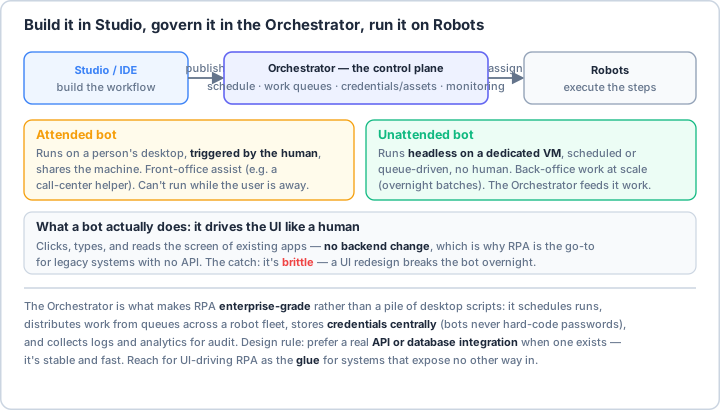
Real-World Scenario: The Digital Transformation Initiative 🏢
You're leading an RPA initiative for a large enterprise that processes thousands of invoices daily, manages employee onboarding across multiple systems, generates complex regulatory reports from various data sources, handles customer service requests through email and web forms, reconciles financial data between legacy and modern systems, monitors compliance across business processes, and scales automation based on demand. Your RPA solution must integrate with existing systems without modification, provide audit trails for compliance, handle exceptions gracefully, and deliver measurable ROI. Let's build a comprehensive RPA framework!
# Comprehensive RPA Framework with Python
# pip install pyautogui pillow opencv-python pytesseract
# pip install pandas openpyxl python-docx PyPDF2
# pip install selenium pywinauto keyboard mouse
# pip install schedule watchdog pygetwindow
import os
import time
import json
import logging
from typing import Dict, List, Any, Optional, Callable, Union
from dataclasses import dataclass, field, asdict
from datetime import datetime, timedelta
from pathlib import Path
from enum import Enum, auto
from abc import ABC, abstractmethod
import threading
import queue
# UI Automation libraries
import pyautogui
import pygetwindow as gw
import keyboard
import mouse
from PIL import Image, ImageGrab
import cv2
import numpy as np
import pytesseract
# Windows automation
try:
from pywinauto import Application, Desktop
from pywinauto import findwindows
WINDOWS_AVAILABLE = True
except ImportError:
WINDOWS_AVAILABLE = False
# Web automation
from selenium import webdriver
from selenium.webdriver.common.by import By
from selenium.webdriver.support.ui import WebDriverWait
from selenium.webdriver.support import expected_conditions as EC
# Data processing
import pandas as pd
from openpyxl import load_workbook, Workbook
import PyPDF2
from docx import Document
# Scheduling and monitoring
import schedule
from watchdog.observers import Observer
from watchdog.events import FileSystemEventHandler
# ==================== Core RPA Concepts ====================
class BotType(Enum):
"""Types of RPA bots."""
ATTENDED = auto() # Works with human supervision
UNATTENDED = auto() # Runs independently
HYBRID = auto() # Can work both ways
COGNITIVE = auto() # Uses AI/ML for decisions
class ProcessComplexity(Enum):
"""Process complexity levels."""
SIMPLE = auto() # Rule-based, structured data
MEDIUM = auto() # Some variation, multiple systems
COMPLEX = auto() # Exceptions, unstructured data
COGNITIVE = auto() # Requires judgment, learning
@dataclass
class ProcessMetadata:
"""Metadata for an RPA process."""
name: str
description: str
bot_type: BotType
complexity: ProcessComplexity
applications: List[str]
frequency: str # daily, weekly, monthly, on-demand
estimated_duration: timedelta
business_value: str
compliance_required: bool = False
error_handling: str = "manual"
def to_dict(self) -> Dict[str, Any]:
"""Convert to dictionary."""
data = asdict(self)
data['bot_type'] = self.bot_type.name
data['complexity'] = self.complexity.name
data['estimated_duration'] = str(self.estimated_duration)
return data
# ==================== RPA Bot Base Class ====================
class RPABot(ABC):
"""Base class for RPA bots."""
def __init__(self, name: str, config: Optional[Dict] = None):
self.name = name
self.config = config or {}
self.logger = self._setup_logger()
self.metrics = BotMetrics()
self.status = BotStatus.IDLE
self.current_task = None
def _setup_logger(self) -> logging.Logger:
"""Setup bot logger."""
logger = logging.getLogger(f"RPABot.{self.name}")
logger.setLevel(logging.INFO)
# Console handler
ch = logging.StreamHandler()
ch.setLevel(logging.INFO)
# File handler
fh = logging.FileHandler(f"logs/bot_{self.name}.log")
fh.setLevel(logging.DEBUG)
# Formatter
formatter = logging.Formatter(
'%(asctime)s - %(name)s - %(levelname)s - %(message)s'
)
ch.setFormatter(formatter)
fh.setFormatter(formatter)
logger.addHandler(ch)
logger.addHandler(fh)
return logger
@abstractmethod
def execute(self, task: 'Task') -> 'TaskResult':
"""Execute a task."""
pass
def initialize(self):
"""Initialize bot resources."""
self.logger.info(f"Initializing bot: {self.name}")
self.status = BotStatus.READY
def shutdown(self):
"""Cleanup bot resources."""
self.logger.info(f"Shutting down bot: {self.name}")
self.status = BotStatus.STOPPED
def handle_error(self, error: Exception, task: 'Task') -> 'TaskResult':
"""Handle errors during execution."""
self.logger.error(f"Error in task {task.id}: {str(error)}")
# Screenshot for debugging
screenshot = self.take_screenshot(f"error_{task.id}")
# Create error result
return TaskResult(
task_id=task.id,
status=TaskStatus.FAILED,
error=str(error),
screenshot=screenshot
)
def take_screenshot(self, name: str) -> Path:
"""Take screenshot for debugging."""
timestamp = datetime.now().strftime("%Y%m%d_%H%M%S")
filename = f"screenshots/{name}_{timestamp}.png"
screenshot = pyautogui.screenshot()
screenshot.save(filename)
return Path(filename)
# ==================== Bot Status and Metrics ====================
class BotStatus(Enum):
"""Bot status states."""
IDLE = auto()
READY = auto()
RUNNING = auto()
PAUSED = auto()
ERROR = auto()
STOPPED = auto()
class TaskStatus(Enum):
"""Task execution status."""
PENDING = auto()
RUNNING = auto()
COMPLETED = auto()
FAILED = auto()
CANCELLED = auto()
@dataclass
class BotMetrics:
"""Metrics for bot performance."""
tasks_completed: int = 0
tasks_failed: int = 0
total_runtime: timedelta = timedelta()
average_task_time: timedelta = timedelta()
success_rate: float = 100.0
last_error: Optional[str] = None
last_execution: Optional[datetime] = None
def update(self, result: 'TaskResult'):
"""Update metrics based on task result."""
if result.status == TaskStatus.COMPLETED:
self.tasks_completed += 1
else:
self.tasks_failed += 1
self.last_error = result.error
self.last_execution = datetime.now()
# Calculate success rate
total = self.tasks_completed + self.tasks_failed
if total > 0:
self.success_rate = (self.tasks_completed / total) * 100
# ==================== Task Management ====================
@dataclass
class Task:
"""Represents an RPA task."""
id: str
name: str
bot_name: str
priority: int = 5 # 1-10, higher is more important
data: Dict[str, Any] = field(default_factory=dict)
scheduled_time: Optional[datetime] = None
timeout: Optional[timedelta] = None
retry_count: int = 3
def __lt__(self, other):
"""Compare tasks by priority."""
return self.priority > other.priority
@dataclass
class TaskResult:
"""Result of task execution."""
task_id: str
status: TaskStatus
start_time: datetime = field(default_factory=datetime.now)
end_time: Optional[datetime] = None
data: Dict[str, Any] = field(default_factory=dict)
error: Optional[str] = None
screenshot: Optional[Path] = None
def duration(self) -> timedelta:
"""Calculate task duration."""
if self.end_time:
return self.end_time - self.start_time
return timedelta()
# ==================== UI Automation Utilities ====================
class UIAutomation:
"""Utilities for UI automation."""
@staticmethod
def find_element_by_image(template_path: str, confidence: float = 0.8) -> Optional[tuple]:
"""Find element on screen by image matching."""
template = cv2.imread(template_path)
screenshot = pyautogui.screenshot()
screenshot = cv2.cvtColor(np.array(screenshot), cv2.COLOR_RGB2BGR)
result = cv2.matchTemplate(screenshot, template, cv2.TM_CCOEFF_NORMED)
min_val, max_val, min_loc, max_loc = cv2.minMaxLoc(result)
if max_val >= confidence:
return max_loc
return None
@staticmethod
def wait_for_element(
locator: Union[str, tuple],
timeout: int = 30,
locator_type: str = "image"
) -> bool:
"""Wait for element to appear."""
start_time = time.time()
while time.time() - start_time < timeout:
if locator_type == "image":
if UIAutomation.find_element_by_image(locator):
return True
elif locator_type == "text":
if UIAutomation.find_text_on_screen(locator):
return True
time.sleep(0.5)
return False
@staticmethod
def find_text_on_screen(text: str) -> Optional[tuple]:
"""Find text on screen using OCR."""
screenshot = pyautogui.screenshot()
# Convert to grayscale
gray = cv2.cvtColor(np.array(screenshot), cv2.COLOR_RGB2GRAY)
# OCR
ocr_result = pytesseract.image_to_data(
gray,
output_type=pytesseract.Output.DICT
)
# Find text
for i, word in enumerate(ocr_result['text']):
if text.lower() in word.lower():
x = ocr_result['left'][i]
y = ocr_result['top'][i]
return (x, y)
return None
@staticmethod
def click_element(position: tuple, clicks: int = 1, button: str = 'left'):
"""Click at specified position."""
pyautogui.click(position[0], position[1], clicks=clicks, button=button)
@staticmethod
def type_text(text: str, interval: float = 0.1):
"""Type text with specified interval."""
pyautogui.typewrite(text, interval=interval)
@staticmethod
def drag_drop(start: tuple, end: tuple, duration: float = 1.0):
"""Drag from start to end position."""
pyautogui.moveTo(start[0], start[1])
pyautogui.dragTo(end[0], end[1], duration=duration)
# ==================== Application Automation ====================
class ApplicationAutomation:
"""Automate desktop applications."""
def __init__(self):
self.apps = {}
def start_application(self, path: str, name: str) -> bool:
"""Start an application."""
try:
if WINDOWS_AVAILABLE:
app = Application().start(path)
self.apps[name] = app
else:
# Use OS-specific command
import subprocess
subprocess.Popen([path])
return True
except Exception as e:
logging.error(f"Failed to start application: {e}")
return False
def connect_to_application(self, title: str) -> Optional[Any]:
"""Connect to running application by window title."""
if WINDOWS_AVAILABLE:
try:
app = Application().connect(title=title)
return app
except:
pass
# Fallback to pygetwindow
windows = gw.getWindowsWithTitle(title)
if windows:
return windows[0]
return None
def get_window(self, title: str):
"""Get application window."""
windows = gw.getWindowsWithTitle(title)
if windows:
return windows[0]
return None
def activate_window(self, window):
"""Bring window to foreground."""
if hasattr(window, 'activate'):
window.activate()
else:
window.restore()
window.activate()
# ==================== Process Automation Examples ====================
class InvoiceProcessingBot(RPABot):
"""Bot for processing invoices."""
def execute(self, task: Task) -> TaskResult:
"""Process invoice."""
try:
self.status = BotStatus.RUNNING
result = TaskResult(task_id=task.id, status=TaskStatus.RUNNING)
# Extract invoice data
invoice_path = task.data.get('invoice_path')
invoice_data = self.extract_invoice_data(invoice_path)
# Validate data
if not self.validate_invoice(invoice_data):
raise ValueError("Invoice validation failed")
# Enter data into ERP system
self.enter_data_to_erp(invoice_data)
# Update result
result.status = TaskStatus.COMPLETED
result.data = invoice_data
result.end_time = datetime.now()
return result
except Exception as e:
return self.handle_error(e, task)
finally:
self.status = BotStatus.READY
def extract_invoice_data(self, path: str) -> Dict[str, Any]:
"""Extract data from invoice PDF."""
data = {}
with open(path, 'rb') as file:
pdf_reader = PyPDF2.PdfReader(file)
text = ""
for page in pdf_reader.pages:
text += page.extract_text()
# Extract key fields (simplified)
import re
# Invoice number
invoice_match = re.search(r'Invoice\s*#?\s*:?\s*(\w+)', text)
if invoice_match:
data['invoice_number'] = invoice_match.group(1)
# Amount
amount_match = re.search(r'Total\s*:?\s*\$?([\d,]+\.?\d*)', text)
if amount_match:
data['amount'] = float(amount_match.group(1).replace(',', ''))
# Date
date_match = re.search(r'Date\s*:?\s*([\d/\-]+)', text)
if date_match:
data['date'] = date_match.group(1)
return data
def validate_invoice(self, data: Dict[str, Any]) -> bool:
"""Validate invoice data."""
required_fields = ['invoice_number', 'amount', 'date']
for field in required_fields:
if field not in data:
self.logger.error(f"Missing required field: {field}")
return False
# Validate amount
if data['amount'] <= 0:
self.logger.error("Invalid amount")
return False
return True
def enter_data_to_erp(self, data: Dict[str, Any]):
"""Enter invoice data into ERP system."""
# Open ERP application
erp_window = ApplicationAutomation().get_window("ERP System")
if erp_window:
ApplicationAutomation().activate_window(erp_window)
# Navigate to invoice entry
pyautogui.hotkey('ctrl', 'n') # New invoice
time.sleep(1)
# Enter invoice number
UIAutomation.type_text(data['invoice_number'])
pyautogui.press('tab')
# Enter amount
UIAutomation.type_text(str(data['amount']))
pyautogui.press('tab')
# Enter date
UIAutomation.type_text(data['date'])
# Save
pyautogui.hotkey('ctrl', 's')
self.logger.info(f"Invoice {data['invoice_number']} processed successfully")
# ==================== Orchestration ====================
class RPAOrchestrator:
"""Orchestrate RPA bots and tasks."""
def __init__(self):
self.bots: Dict[str, RPABot] = {}
self.task_queue = queue.PriorityQueue()
self.running = False
self.executor_thread = None
def register_bot(self, bot: RPABot):
"""Register a bot with orchestrator."""
self.bots[bot.name] = bot
bot.initialize()
logging.info(f"Registered bot: {bot.name}")
def submit_task(self, task: Task):
"""Submit task for execution."""
# PriorityQueue serves the LOWEST number first, but Task.priority is
# "higher = more important", so negate it to dequeue critical tasks first.
self.task_queue.put((-task.priority, task))
logging.info(f"Task {task.id} submitted")
def start(self):
"""Start orchestrator."""
self.running = True
self.executor_thread = threading.Thread(target=self._execute_tasks)
self.executor_thread.start()
logging.info("Orchestrator started")
def stop(self):
"""Stop orchestrator."""
self.running = False
if self.executor_thread:
self.executor_thread.join()
# Shutdown bots
for bot in self.bots.values():
bot.shutdown()
logging.info("Orchestrator stopped")
def _execute_tasks(self):
"""Execute tasks from queue."""
while self.running:
try:
# Get task from queue
if not self.task_queue.empty():
_, task = self.task_queue.get(timeout=1)
# Find appropriate bot
bot = self.bots.get(task.bot_name)
if bot and bot.status == BotStatus.READY:
# Execute task
result = bot.execute(task)
# Update metrics
bot.metrics.update(result)
# Log result
self._log_result(result)
else:
# Re-queue task (negate priority to match submit_task)
self.task_queue.put((-task.priority, task))
time.sleep(1)
else:
time.sleep(1)
except queue.Empty:
continue
except Exception as e:
logging.error(f"Orchestrator error: {e}")
def _log_result(self, result: TaskResult):
"""Log task result."""
logging.info(
f"Task {result.task_id} completed with status: {result.status.name}"
)
# ==================== Process Mining ====================
class ProcessMiner:
"""Discover automation opportunities through process mining."""
def __init__(self):
self.event_log = []
def record_event(self, event: Dict[str, Any]):
"""Record process event."""
event['timestamp'] = datetime.now()
self.event_log.append(event)
def analyze_process(self) -> Dict[str, Any]:
"""Analyze recorded process."""
if not self.event_log:
return {}
df = pd.DataFrame(self.event_log)
analysis = {
'total_events': len(df),
'unique_activities': df['activity'].nunique() if 'activity' in df else 0,
'average_duration': self._calculate_average_duration(df),
'bottlenecks': self._identify_bottlenecks(df),
'automation_candidates': self._find_automation_candidates(df)
}
return analysis
def _calculate_average_duration(self, df: pd.DataFrame) -> timedelta:
"""Calculate average process duration."""
if 'timestamp' in df.columns:
duration = df['timestamp'].max() - df['timestamp'].min()
return duration
return timedelta()
def _identify_bottlenecks(self, df: pd.DataFrame) -> List[str]:
"""Identify process bottlenecks."""
bottlenecks = []
if 'activity' in df.columns and 'duration' in df.columns:
# Find activities with longest duration
activity_duration = df.groupby('activity')['duration'].mean()
bottlenecks = activity_duration.nlargest(3).index.tolist()
return bottlenecks
def _find_automation_candidates(self, df: pd.DataFrame) -> List[Dict]:
"""Find processes suitable for automation."""
candidates = []
if 'activity' in df.columns:
# Count repetitive activities
activity_counts = df['activity'].value_counts()
for activity, count in activity_counts.items():
if count > 10: # Repetitive threshold
candidates.append({
'activity': activity,
'frequency': count,
'automation_potential': 'high' if count > 50 else 'medium'
})
return candidates
# ==================== RPA Governance ====================
class RPAGovernance:
"""Governance framework for RPA."""
def __init__(self):
self.policies = {}
self.audit_log = []
def add_policy(self, name: str, policy: Dict[str, Any]):
"""Add governance policy."""
self.policies[name] = policy
def validate_bot(self, bot: RPABot) -> bool:
"""Validate bot against policies."""
# Check required attributes
if 'security' in self.policies:
security_policy = self.policies['security']
# Check authentication
if security_policy.get('require_auth', False):
if not bot.config.get('authentication'):
return False
# Check encryption
if security_policy.get('require_encryption', False):
if not bot.config.get('encryption_enabled'):
return False
return True
def audit_task(self, task: Task, result: TaskResult):
"""Audit task execution."""
audit_entry = {
'timestamp': datetime.now(),
'task_id': task.id,
'task_name': task.name,
'bot_name': task.bot_name,
'status': result.status.name,
'duration': str(result.duration()),
'user': os.getenv('USERNAME', 'system')
}
self.audit_log.append(audit_entry)
# Save to file
self._save_audit_log()
def _save_audit_log(self):
"""Save audit log to file."""
log_file = Path("audit/rpa_audit.json")
log_file.parent.mkdir(exist_ok=True)
with open(log_file, 'w') as f:
json.dump(self.audit_log, f, indent=2, default=str)
def generate_compliance_report(self) -> Dict[str, Any]:
"""Generate compliance report."""
df = pd.DataFrame(self.audit_log)
if df.empty:
return {}
report = {
'total_tasks': len(df),
'success_rate': (df['status'] == 'COMPLETED').mean() * 100,
'average_duration': df['duration'].mean() if 'duration' in df else None,
'tasks_by_bot': df.groupby('bot_name')['task_id'].count().to_dict(),
'compliance_status': 'COMPLIANT' # Simplified
}
return report
# ==================== RPA Best Practices ====================
class RPABestPractices:
"""Best practices for RPA implementation."""
@staticmethod
def get_process_selection_criteria() -> List[str]:
"""Criteria for selecting processes for RPA."""
return [
"High volume and frequency",
"Rule-based and predictable",
"Structured data input",
"Stable process (low change rate)",
"Multiple system interaction",
"Time-sensitive or SLA-driven",
"Error-prone when manual",
"Clear ROI potential"
]
@staticmethod
def get_implementation_phases() -> List[Dict[str, str]]:
"""RPA implementation phases."""
return [
{
"phase": "Discovery",
"activities": "Process assessment, feasibility study, ROI calculation",
"duration": "2-4 weeks"
},
{
"phase": "Design",
"activities": "Solution design, architecture, exception handling",
"duration": "2-3 weeks"
},
{
"phase": "Development",
"activities": "Bot development, unit testing, integration",
"duration": "4-8 weeks"
},
{
"phase": "Testing",
"activities": "UAT, performance testing, security testing",
"duration": "2-3 weeks"
},
{
"phase": "Deployment",
"activities": "Production deployment, monitoring setup",
"duration": "1-2 weeks"
},
{
"phase": "Support",
"activities": "Maintenance, optimization, scaling",
"duration": "Ongoing"
}
]
@staticmethod
def calculate_roi(
manual_time: float, # Hours per execution
frequency: int, # Executions per month
labor_cost: float, # $ per hour
bot_development_cost: float,
bot_maintenance_cost: float # Monthly
) -> Dict[str, float]:
"""Calculate ROI for RPA implementation."""
# Annual savings
annual_manual_cost = manual_time * frequency * 12 * labor_cost
annual_bot_cost = bot_development_cost + (bot_maintenance_cost * 12)
annual_savings = annual_manual_cost - annual_bot_cost
roi = (annual_savings / bot_development_cost) * 100
payback_period = bot_development_cost / (annual_savings / 12)
return {
'annual_manual_cost': annual_manual_cost,
'annual_bot_cost': annual_bot_cost,
'annual_savings': annual_savings,
'roi_percentage': roi,
'payback_months': payback_period
}
# Example usage
if __name__ == "__main__":
print("🤖 RPA Concepts Examples\n")
# Example 1: Bot types
print("1️⃣ Types of RPA Bots:")
for bot_type in BotType:
descriptions = {
BotType.ATTENDED: "Works alongside humans, requires supervision",
BotType.UNATTENDED: "Runs independently on servers/VMs",
BotType.HYBRID: "Can work both attended and unattended",
BotType.COGNITIVE: "Uses AI/ML for complex decisions"
}
print(f" {bot_type.name}: {descriptions[bot_type]}")
# Example 2: Process complexity
print("\n2️⃣ Process Complexity Levels:")
for complexity in ProcessComplexity:
examples = {
ProcessComplexity.SIMPLE: "Data entry, copy-paste, report generation",
ProcessComplexity.MEDIUM: "Invoice processing, order management",
ProcessComplexity.COMPLEX: "Customer service, claims processing",
ProcessComplexity.COGNITIVE: "Document understanding, sentiment analysis"
}
print(f" {complexity.name}: {examples[complexity]}")
# Example 3: RPA use cases
print("\n3️⃣ Common RPA Use Cases:")
use_cases = [
"Invoice processing and accounts payable",
"Employee onboarding and offboarding",
"Data migration between systems",
"Report generation and distribution",
"Customer service ticket routing",
"Inventory management and updates",
"Compliance reporting and monitoring",
"Email processing and response"
]
for use_case in use_cases:
print(f" • {use_case}")
# Example 4: Process selection criteria
print("\n4️⃣ Process Selection Criteria:")
criteria = RPABestPractices.get_process_selection_criteria()
for criterion in criteria:
print(f" • {criterion}")
# Example 5: Implementation phases
print("\n5️⃣ RPA Implementation Phases:")
phases = RPABestPractices.get_implementation_phases()
for phase in phases:
print(f" {phase['phase']}: {phase['activities']} ({phase['duration']})")
# Example 6: ROI calculation
print("\n6️⃣ ROI Calculation Example:")
roi = RPABestPractices.calculate_roi(
manual_time=2.0, # 2 hours per execution
frequency=100, # 100 times per month
labor_cost=50, # $50 per hour
bot_development_cost=20000, # $20k development
bot_maintenance_cost=1000 # $1k per month
)
print(f" Annual Manual Cost: ${roi['annual_manual_cost']:,.2f}")
print(f" Annual Bot Cost: ${roi['annual_bot_cost']:,.2f}")
print(f" Annual Savings: ${roi['annual_savings']:,.2f}")
print(f" ROI: {roi['roi_percentage']:.1f}%")
print(f" Payback Period: {roi['payback_months']:.1f} months")
# Example 7: Create sample process
print("\n7️⃣ Sample Process Definition:")
process = ProcessMetadata(
name="Invoice Processing",
description="Extract and enter invoice data into ERP",
bot_type=BotType.UNATTENDED,
complexity=ProcessComplexity.MEDIUM,
applications=["Email", "PDF Reader", "ERP System"],
frequency="daily",
estimated_duration=timedelta(minutes=5),
business_value="Reduces processing time by 80%",
compliance_required=True
)
print(f" Process: {process.name}")
print(f" Type: {process.bot_type.name}")
print(f" Applications: {', '.join(process.applications)}")
print(f" Frequency: {process.frequency}")
# Example 8: Bot orchestration
print("\n8️⃣ Bot Orchestration Example:")
# Create orchestrator
orchestrator = RPAOrchestrator()
# Register bot
invoice_bot = InvoiceProcessingBot("InvoiceBot")
orchestrator.register_bot(invoice_bot)
# Create task
task = Task(
id="TASK001",
name="Process Invoice",
bot_name="InvoiceBot",
priority=8,
data={'invoice_path': 'invoices/sample.pdf'}
)
print(f" Registered bot: {invoice_bot.name}")
print(f" Task submitted: {task.id}")
print(f" Priority: {task.priority}")
# Example 9: Governance
print("\n9️⃣ RPA Governance:")
governance = RPAGovernance()
# Add security policy
governance.add_policy('security', {
'require_auth': True,
'require_encryption': True,
'audit_all_tasks': True
})
print(" Security Policy:")
print(" • Authentication required")
print(" • Encryption required")
print(" • All tasks audited")
# Example 10: Best practices
print("\n🔟 RPA Best Practices:")
practices = [
"🎯 Start with simple, high-volume processes",
"📝 Document processes thoroughly before automation",
"🧪 Test extensively in non-production environments",
"🔒 Implement proper security and access controls",
"📊 Monitor bot performance and ROI continuously",
"🚨 Design comprehensive exception handling",
"📈 Plan for scalability from the beginning",
"👥 Involve business users in development",
"🔄 Implement version control for bot code",
"📚 Maintain detailed documentation"
]
for practice in practices:
print(f" {practice}")
print("\n✅ RPA concepts demonstration complete!")
Key Takeaways and Best Practices 🎯
- Process Selection: Choose high-volume, rule-based, stable processes for RPA.
- Bot Types: Use attended bots for human collaboration, unattended for automation.
- Exception Handling: Design comprehensive error handling and recovery mechanisms.
- Governance: Implement proper security, compliance, and audit frameworks.
- ROI Focus: Calculate and track return on investment continuously.
- Scalability: Design bots to handle increasing volumes and complexity.
- Change Management: Prepare organization for digital workforce integration.
- Continuous Improvement: Monitor, optimize, and enhance bot performance.
RPA Implementation Best Practices 📋
Understanding RPA concepts provides the foundation for successful automation initiatives. You now know how to identify automation opportunities, design robust bots, implement governance frameworks, calculate ROI, and manage digital workers effectively. Whether you're automating simple data entry or complex business processes, these RPA fundamentals are essential for enterprise automation success! 🚀
Pro Tip: Think of RPA as creating a digital workforce that complements your human employees - it's not about replacing people but freeing them from repetitive tasks to focus on higher-value work. Start with process discovery and mining to identify the best automation candidates - look for high-volume, rule-based processes with structured data and stable workflows. Calculate ROI carefully, considering not just cost savings but also improved accuracy, compliance, and employee satisfaction. Choose the right bot type: attended for processes requiring human judgment, unattended for fully automated workflows, and hybrid for flexibility. Design bots with resilience in mind - implement retry logic, exception handling, and graceful degradation. Use orchestration to manage multiple bots, distribute work, and handle dependencies. Implement strong governance from day one - security policies, access controls, audit logging, and compliance monitoring. Plan for change management - communicate benefits, train users, and address concerns about job displacement. Monitor bot performance continuously - track success rates, processing times, and error patterns. Design for maintainability with modular components, clear documentation, and version control. Consider cognitive automation for complex processes requiring pattern recognition or decision-making. Most importantly: RPA is a journey, not a destination - start small, prove value, and scale gradually!