🎨 HTML Emails: Create Beautiful Email Templates
📚 What You'll Learn
By the end of this lesson, you will be able to:
- Explain why an HTML email ships both a plain-text and an HTML part inside
multipart/alternative, ordered least-to-most preferred - Build email-safe HTML: table-based layouts and inlined CSS, because clients strip
<head>and<style> - Compose reusable components — headers, hero images, buttons, columns, and footers — with a builder pattern
- Make emails responsive and dark-mode aware, keeping designs to ~600px with proper viewport and media queries
- Inline CSS automatically (e.g. with premailer) and templatize content with Jinja2 for newsletters and transactional mail
- Validate emails and check spam score, add alt text, and test how major clients (Gmail, Outlook, Apple Mail, mobile) will render them
⏱️ Estimated Time: 45–60 minutes
🎯 Project: Build a responsive HTML email — header, heading, body text, a call-to-action button, and a footer with an unsubscribe link — then run it through validation and a spam-score check.
HTML emails are the canvas of digital communication - they transform plain text into visually stunning, interactive messages that engage readers and drive action. Like crafting a mini website that travels through inboxes, mastering HTML emails allows you to create newsletters, marketing campaigns, transactional emails, and branded communications that look professional across all email clients. Let's master the art and science of HTML email design! 🖼️
The HTML Email Design Architecture
Think of HTML emails as building a time machine to 1999 - you need to use table-based layouts, inline CSS, and careful testing because email clients are notoriously inconsistent. Unlike modern web development, email HTML requires special techniques to ensure your beautiful designs don't break in Outlook, Gmail, or mobile clients. Understanding these constraints and workarounds is crucial for creating emails that look great everywhere!
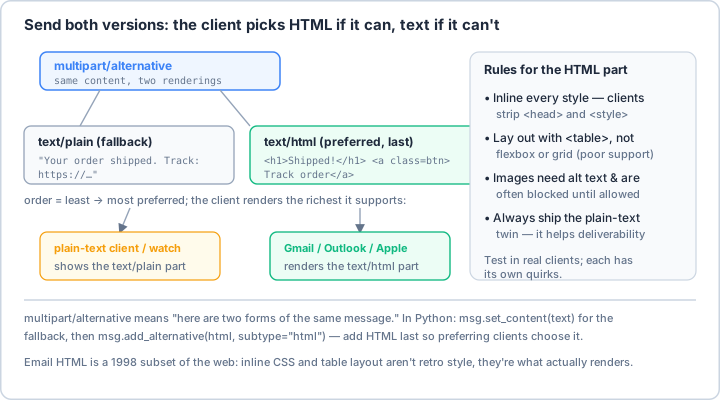
multipart/alternative, ordered least-to-most preferred, and each client renders the richest form it can (add the HTML last so capable clients choose it). The other half of the lesson is that email HTML is a 1998 subset of the web: clients strip <head> and <style>, so you inline every style and lay out with <table> — not retro taste, just what actually renders across Gmail, Outlook, and Apple Mail.Real-World Scenario: The Email Campaign Platform 📧
You're building an email campaign platform that creates responsive newsletters, promotional emails, transactional notifications, and automated drip campaigns. Your system must generate beautiful HTML emails that work across all clients, support dark mode, include tracking pixels, personalize content, optimize for mobile, pass spam filters, and scale to millions of recipients. Let's build a comprehensive HTML email framework!
# First, install required packages:
# pip install premailer beautifulsoup4 css-inline jinja2 pillow python-dateutil
import os
import re
import json
import base64
from typing import Dict, List, Optional, Any, Union, Tuple
from dataclasses import dataclass, field
from pathlib import Path
from datetime import datetime
import hashlib
from urllib.parse import urlencode
import logging
from jinja2 import Environment, FileSystemLoader, Template
from premailer import transform
from bs4 import BeautifulSoup
import css_inline
from PIL import Image
from io import BytesIO
# ==================== HTML Email Builder ====================
class HTMLEmailBuilder:
"""
Builder for creating HTML emails with best practices.
"""
def __init__(self):
self.reset()
self.logger = logging.getLogger(__name__)
def reset(self):
"""Reset builder to initial state."""
self.title = ""
self.preheader = ""
self.styles = []
self.body_content = []
self.head_content = []
self.background_color = "#f4f4f4"
self.container_width = 600
self.font_family = "Arial, sans-serif"
self.primary_color = "#007bff"
self.text_color = "#333333"
self.link_color = "#007bff"
return self
def set_title(self, title: str) -> 'HTMLEmailBuilder':
"""Set email title."""
self.title = title
return self
def set_preheader(self, text: str) -> 'HTMLEmailBuilder':
"""Set preheader text (preview text)."""
self.preheader = text
return self
def set_colors(self, primary: str = None, text: str = None,
background: str = None, link: str = None) -> 'HTMLEmailBuilder':
"""Set color scheme."""
if primary:
self.primary_color = primary
if text:
self.text_color = text
if background:
self.background_color = background
if link:
self.link_color = link
return self
def add_style(self, css: str) -> 'HTMLEmailBuilder':
"""Add custom CSS styles."""
self.styles.append(css)
return self
def add_header(self, logo_url: str = None, company_name: str = None) -> 'HTMLEmailBuilder':
"""Add email header."""
header_html = f"""
<tr>
<td align="center" style="padding: 40px 0 30px 0;">
<table border="0" cellpadding="0" cellspacing="0">
<tr>
<td align="center">
"""
if logo_url:
header_html += f"""
<img alt="{company_name or 'Logo'}" border="0" src="{logo_url}" style="display: block; max-width: 200px; height: auto;"/>
"""
elif company_name:
header_html += f"""
<h1 style="margin: 0; font-size: 32px; font-weight: bold;
color: {self.primary_color};">
{company_name}
</h1>
"""
header_html += """
</td>
</tr>
</table>
</td>
</tr>
"""
self.body_content.append(header_html)
return self
def add_hero(self, image_url: str, alt_text: str = "",
link_url: str = None) -> 'HTMLEmailBuilder':
"""Add hero image."""
hero_html = f"""
<tr>
<td align="center" style="padding: 0;">
"""
if link_url:
hero_html += f'<a href="{link_url}" target="_blank">'
hero_html += f"""
<img alt="{alt_text}" border="0" src="{image_url}" style="display: block; width: 100%; max-width: {self.container_width}px;
height: auto;" width="{self.container_width}"/>
"""
if link_url:
hero_html += '</a>'
hero_html += """
</td>
</tr>
"""
self.body_content.append(hero_html)
return self
def add_text(self, text: str, align: str = "left",
size: int = 16, bold: bool = False) -> 'HTMLEmailBuilder':
"""Add text paragraph."""
weight = "bold" if bold else "normal"
text_html = f"""
<tr>
<td style="padding: 20px 30px;">
<p style="margin: 0; font-family: {self.font_family};
font-size: {size}px; line-height: 1.6;
color: {self.text_color}; text-align: {align};
font-weight: {weight};">
{text}
</p>
</td>
</tr>
"""
self.body_content.append(text_html)
return self
def add_heading(self, text: str, level: int = 2) -> 'HTMLEmailBuilder':
"""Add heading."""
size_map = {1: 32, 2: 28, 3: 24, 4: 20, 5: 18, 6: 16}
size = size_map.get(level, 20)
heading_html = f"""
<tr>
<td style="padding: 20px 30px 10px 30px;">
<h{level} style="margin: 0; font-family: {self.font_family};
font-size: {size}px; font-weight: bold;
color: {self.text_color};">
{text}
</h{level}>
</td>
</tr>
"""
self.body_content.append(heading_html)
return self
def add_button(self, text: str, url: str,
background_color: str = None,
text_color: str = "#ffffff",
full_width: bool = False) -> 'HTMLEmailBuilder':
"""Add call-to-action button."""
bg_color = background_color or self.primary_color
width_style = "width: 100%;" if full_width else ""
button_html = f"""
<tr>
<td align="center" style="padding: 30px;">
<table border="0" cellpadding="0" cellspacing="0" {width_style}>
<tr>
<td align="center" bgcolor="{bg_color}" style="border-radius: 4px;">
<a href="{url}" style="display: inline-block; padding: 14px 30px;
font-family: {self.font_family};
font-size: 16px; font-weight: bold;
color: {text_color}; text-decoration: none;
border-radius: 4px;" target="_blank">
{text}
</a>
</td>
</tr>
</table>
</td>
</tr>
"""
self.body_content.append(button_html)
return self
def add_divider(self, color: str = "#dddddd",
margin: int = 20) -> 'HTMLEmailBuilder':
"""Add horizontal divider."""
divider_html = f"""
<tr>
<td style="padding: {margin}px 30px;">
<table border="0" cellpadding="0" cellspacing="0" width="100%">
<tr>
<td style="border-bottom: 1px solid {color}; font-size: 0;
line-height: 0;">
</td>
</tr>
</table>
</td>
</tr>
"""
self.body_content.append(divider_html)
return self
def add_columns(self, columns: List[Dict[str, str]]) -> 'HTMLEmailBuilder':
"""Add multi-column layout."""
num_columns = len(columns)
column_width = int(self.container_width / num_columns) - 20
columns_html = """
<tr>
<td style="padding: 20px 10px;">
<table border="0" cellpadding="0" cellspacing="0" width="100%">
<tr>
"""
for col in columns:
columns_html += f"""
<td style="padding: 0 10px;" valign="top">
<table border="0" cellpadding="0" cellspacing="0" width="{column_width}">
"""
if col.get('image'):
columns_html += f"""
<tr>
<td align="center">
<img alt="" src="{col['image']}" style="display: block; max-width: 100%;
height: auto;" width="{column_width}"/>
</td>
</tr>
"""
if col.get('title'):
columns_html += f"""
<tr>
<td style="padding: 10px 0 5px 0;">
<h3 style="margin: 0; font-size: 18px;
color: {self.text_color};">
{col['title']}
</h3>
</td>
</tr>
"""
if col.get('text'):
columns_html += f"""
<tr>
<td style="padding: 5px 0;">
<p style="margin: 0; font-size: 14px;
line-height: 1.5;
color: {self.text_color};">
{col['text']}
</p>
</td>
</tr>
"""
if col.get('link_text') and col.get('link_url'):
columns_html += f"""
<tr>
<td style="padding: 10px 0;">
<a href="{col['link_url']}" style="color: {self.link_color};
text-decoration: underline;">
{col['link_text']}
</a>
</td>
</tr>
"""
columns_html += """
</table>
</td>
"""
columns_html += """
</tr>
</table>
</td>
</tr>
"""
self.body_content.append(columns_html)
return self
def add_social_links(self, links: Dict[str, str]) -> 'HTMLEmailBuilder':
"""Add social media links."""
social_html = """
<tr>
<td align="center" style="padding: 30px;">
<table border="0" cellpadding="0" cellspacing="0">
<tr>
"""
icon_urls = {
"facebook": "https://cdn-icons-png.flaticon.com/512/124/124010.png",
"twitter": "https://cdn-icons-png.flaticon.com/512/124/124021.png",
"instagram": "https://cdn-icons-png.flaticon.com/512/2111/2111463.png",
"linkedin": "https://cdn-icons-png.flaticon.com/512/124/124011.png",
"youtube": "https://cdn-icons-png.flaticon.com/512/124/124015.png"
}
for platform, url in links.items():
icon = icon_urls.get(platform.lower())
if icon:
social_html += f"""
<td style="padding: 0 10px;">
<a href="{url}" target="_blank">
<img alt="{platform}" border="0" height="32" src="{icon}" style="display: block;" width="32"/>
</a>
</td>
"""
social_html += """
</tr>
</table>
</td>
</tr>
"""
self.body_content.append(social_html)
return self
def add_footer(self, company_name: str,
address: str = None,
unsubscribe_url: str = None,
privacy_url: str = None) -> 'HTMLEmailBuilder':
"""Add email footer."""
footer_html = f"""
<tr>
<td style="padding: 30px; background-color: #f8f8f8;">
<table border="0" cellpadding="0" cellspacing="0" width="100%">
<tr>
<td align="center" style="font-family: {self.font_family};
font-size: 12px; color: #666666;">
"""
if company_name:
footer_html += f"""
<p style="margin: 0 0 10px 0;">
© {datetime.now().year} {company_name}. All rights reserved.
</p>
"""
if address:
footer_html += f"""
<p style="margin: 0 0 10px 0;">
{address}
</p>
"""
footer_links = []
if unsubscribe_url:
footer_links.append(f'<a href="{unsubscribe_url}" style="color: #666666;">Unsubscribe</a>')
if privacy_url:
footer_links.append(f'<a href="{privacy_url}" style="color: #666666;">Privacy Policy</a>')
if footer_links:
footer_html += f"""
<p style="margin: 0;">
{' | '.join(footer_links)}
</p>
"""
footer_html += """
</td>
</tr>
</table>
</td>
</tr>
"""
self.body_content.append(footer_html)
return self
def build(self) -> str:
"""Build complete HTML email."""
# Base template
html = f"""<!DOCTYPE html>
<html lang="en">
<head>
<meta charset="utf-8"/>
<meta content="width=device-width, initial-scale=1.0" name="viewport"/>
<meta content="IE=edge" http-equiv="X-UA-Compatible"/>
<title>{self.title}</title>
<!--[if mso]>
<noscript>
<xml>
<o:OfficeDocumentSettings>
<o:PixelsPerInch>96</o:PixelsPerInch>
</o:OfficeDocumentSettings>
</xml>
</noscript>
<![endif]-->
<style type="text/css">
/* Client-specific Styles */
#outlook a {{ padding: 0; }}
body {{ margin: 0; padding: 0; -webkit-text-size-adjust: 100%;
-ms-text-size-adjust: 100%; }}
table, td {{ border-collapse: collapse; mso-table-lspace: 0pt;
mso-table-rspace: 0pt; }}
img {{ border: 0; height: auto; line-height: 100%; outline: none;
text-decoration: none; -ms-interpolation-mode: bicubic; }}
/* Mobile Styles */
@media only screen and (max-width: 600px) {{
table[class="container"] {{ width: 100% !important; }}
td[class="mobile-padding"] {{ padding: 10px !important; }}
img[class="mobile-image"] {{ width: 100% !important;
max-width: 100% !important;
height: auto !important; }}
}}
/* Dark Mode Styles */
@media (prefers-color-scheme: dark) {{
.dark-mode-bg {{ background-color: #1a1a1a !important; }}
.dark-mode-text {{ color: #ffffff !important; }}
.dark-mode-link {{ color: #4a9eff !important; }}
}}
/* Custom Styles */
{' '.join(self.styles)}
</style>
</head>
<body style="margin: 0; padding: 0; background-color: {self.background_color};">
"""
# Add preheader
if self.preheader:
html += f"""
<div style="display: none; font-size: 1px; color: {self.background_color};
line-height: 1px; max-height: 0px; max-width: 0px;
opacity: 0; overflow: hidden;">
{self.preheader}
</div>
"""
# Main table
html += f"""
<table border="0" cellpadding="0" cellspacing="0" width="100%">
<tr>
<td align="center" style="padding: 40px 0;">
<table border="0" cellpadding="0" cellspacing="0" class="container" style="background-color: #ffffff; border-radius: 8px;
box-shadow: 0 2px 4px rgba(0,0,0,0.1);" width="{self.container_width}">
{''.join(self.body_content)}
</table>
</td>
</tr>
</table>
</body>
</html>"""
return html
# ==================== Email Template System ====================
class EmailTemplateSystem:
"""
Manage and render email templates.
"""
def __init__(self, template_dir: str = "./email_templates"):
self.template_dir = Path(template_dir)
self.env = Environment(loader=FileSystemLoader(str(self.template_dir)))
# Add custom filters
self.env.filters['format_currency'] = self._format_currency
self.env.filters['format_date'] = self._format_date
self.logger = logging.getLogger(__name__)
def _format_currency(self, value: float, currency: str = "$") -> str:
"""Format currency value."""
return f"{currency}{value:,.2f}"
def _format_date(self, value: datetime, format: str = "%B %d, %Y") -> str:
"""Format date value."""
if isinstance(value, str):
value = datetime.fromisoformat(value)
return value.strftime(format)
def render_template(self, template_name: str, **context) -> str:
"""Render template with context."""
try:
template = self.env.get_template(template_name)
return template.render(**context)
except Exception as e:
self.logger.error(f"Template rendering failed: {e}")
raise
def create_template(self, name: str, content: str):
"""Save template to file."""
template_path = self.template_dir / name
template_path.parent.mkdir(parents=True, exist_ok=True)
with open(template_path, 'w') as f:
f.write(content)
self.logger.info(f"Created template: {name}")
# ==================== CSS Inliner ====================
class CSSInliner:
"""
Inline CSS for email compatibility.
"""
def __init__(self):
self.logger = logging.getLogger(__name__)
def inline_css(self, html: str, preserve_media_queries: bool = True) -> str:
"""
Inline CSS styles for email compatibility.
Args:
html: HTML content with CSS
preserve_media_queries: Keep media queries for responsive design
Returns:
HTML with inlined CSS
"""
try:
# Use premailer for comprehensive inlining
inlined = transform(
html,
keep_style_tags=preserve_media_queries,
strip_important=False,
exclude_pseudoclasses=True,
align_floating_images=False
)
return inlined
except Exception as e:
self.logger.error(f"CSS inlining failed: {e}")
# Return original HTML if inlining fails
return html
def optimize_for_email(self, html: str) -> str:
"""Optimize HTML for email clients."""
soup = BeautifulSoup(html, 'html.parser')
# Remove scripts
for script in soup.find_all('script'):
script.decompose()
# Remove forms
for form in soup.find_all('form'):
form.decompose()
# Convert divs to tables where possible
# (simplified - real implementation would be more complex)
# Add email-specific attributes
for img in soup.find_all('img'):
img['border'] = '0'
if not img.get('alt'):
img['alt'] = ''
return str(soup)
# ==================== Responsive Email Templates ====================
class ResponsiveEmailTemplates:
"""
Pre-built responsive email templates.
"""
@staticmethod
def newsletter_template() -> str:
"""Newsletter template."""
return """
<!DOCTYPE html>
<html>
<head>
<meta charset="utf-8"/>
<meta content="width=device-width, initial-scale=1.0" name="viewport"/>
<title>{{ title }}</title>
<style>
@media only screen and (max-width: 600px) {
.container { width: 100% !important; }
.content { padding: 10px !important; }
.column { width: 100% !important; display: block !important; }
}
</style>
</head>
<body style="margin: 0; padding: 0; background-color: #f4f4f4;">
<table align="center" class="container" style="background: white;" width="600">
<!-- Header -->
<tr>
<td align="center" style="padding: 40px 0;">
<img alt="{{ company_name }}" src="{{ logo_url }}" style="max-width: 200px;"/>
</td>
</tr>
<!-- Hero -->
{% if hero_image %}
<tr>
<td>
<img alt="" src="{{ hero_image }}" style="width: 100%; max-width: 600px;" width="600"/>
</td>
</tr>
{% endif %}
<!-- Content -->
<tr>
<td class="content" style="padding: 30px;">
<h1 style="color: #333; margin: 0 0 20px 0;">{{ headline }}</h1>
{{ content | safe }}
</td>
</tr>
<!-- Articles -->
{% for article in articles %}
<tr>
<td style="padding: 20px 30px;">
<table width="100%">
<tr>
{% if article.image %}
<td valign="top" width="150">
<img alt="" src="{{ article.image }}" style="max-width: 100%;" width="150"/>
</td>
{% endif %}
<td style="padding-left: 20px;" valign="top">
<h2 style="margin: 0 0 10px 0; font-size: 20px;">{{ article.title }}</h2>
<p style="margin: 0 0 10px 0; color: #666;">{{ article.summary }}</p>
<a href="{{ article.link }}" style="color: #007bff;">Read more →</a>
</td>
</tr>
</table>
</td>
</tr>
{% endfor %}
<!-- Footer -->
<tr>
<td style="padding: 30px; background: #f8f8f8; text-align: center;">
<p style="margin: 0; color: #666; font-size: 14px;">
© {{ year }} {{ company_name }}<br/>
<a href="{{ unsubscribe_url }}" style="color: #666;">Unsubscribe</a> |
<a href="{{ privacy_url }}" style="color: #666;">Privacy</a>
</p>
</td>
</tr>
</table>
</body>
</html>
"""
@staticmethod
def transactional_template() -> str:
"""Transactional email template."""
return """
<!DOCTYPE html>
<html>
<head>
<meta charset="utf-8"/>
<title>{{ subject }}</title>
</head>
<body style="margin: 0; padding: 0; font-family: Arial, sans-serif; background: #f4f4f4;">
<table cellpadding="0" cellspacing="0" width="100%">
<tr>
<td align="center" style="padding: 40px 0;">
<table style="background: white; border-radius: 8px;" width="600">
<!-- Header -->
<tr>
<td style="padding: 30px; border-bottom: 2px solid #eee;">
<h1 style="margin: 0; color: #333;">{{ company_name }}</h1>
</td>
</tr>
<!-- Content -->
<tr>
<td style="padding: 30px;">
<h2 style="margin: 0 0 20px 0;">{{ title }}</h2>
{% if order %}
<!-- Order Details -->
<table style="border: 1px solid #ddd; margin: 20px 0;" width="100%">
<tr style="background: #f8f8f8;">
<td style="padding: 10px;"><strong>Order #{{ order.id }}</strong></td>
<td style="padding: 10px; text-align: right;">{{ order.date }}</td>
</tr>
{% for item in order.items %}
<tr>
<td style="padding: 10px; border-top: 1px solid #eee;">
{{ item.name }}<br/>
<small style="color: #666;">Qty: {{ item.quantity }}</small>
</td>
<td style="padding: 10px; border-top: 1px solid #eee; text-align: right;">
{{ item.price | format_currency }}
</td>
</tr>
{% endfor %}
<tr style="background: #f8f8f8;">
<td style="padding: 10px; border-top: 2px solid #ddd;">
<strong>Total</strong>
</td>
<td style="padding: 10px; border-top: 2px solid #ddd; text-align: right;">
<strong>{{ order.total | format_currency }}</strong>
</td>
</tr>
</table>
{% endif %}
{{ message | safe }}
{% if action_url %}
<table style="margin: 30px 0;" width="100%">
<tr>
<td align="center">
<a href="{{ action_url }}" style="display: inline-block; padding: 12px 30px;
background: #007bff; color: white;
text-decoration: none; border-radius: 4px;">
{{ action_text }}
</a>
</td>
</tr>
</table>
{% endif %}
</td>
</tr>
<!-- Footer -->
<tr>
<td style="padding: 20px; background: #f8f8f8; text-align: center;
font-size: 12px; color: #666;">
This is an automated message. Please do not reply.<br/>
© {{ year }} {{ company_name }}
</td>
</tr>
</table>
</td>
</tr>
</table>
</body>
</html>
"""
# ==================== Email Testing ====================
class EmailTester:
"""
Test HTML emails for compatibility.
"""
def __init__(self):
self.logger = logging.getLogger(__name__)
def validate_html(self, html: str) -> Dict[str, Any]:
"""Validate HTML for email compatibility."""
soup = BeautifulSoup(html, 'html.parser')
issues = []
warnings = []
# Check for JavaScript
if soup.find_all('script'):
issues.append("JavaScript is not supported in emails")
# Check for forms
if soup.find_all('form'):
issues.append("Forms are not reliably supported in emails")
# Check for external CSS
for link in soup.find_all('link', rel='stylesheet'):
if link.get('href', '').startswith('http'):
warnings.append("External CSS may not load in some clients")
# Check image alt text
for img in soup.find_all('img'):
if not img.get('alt'):
warnings.append(f"Missing alt text for image: {img.get('src', 'unknown')}")
# Check table structure
tables = soup.find_all('table')
if not tables:
warnings.append("Consider using tables for layout (better email client support)")
# Check for divs (less compatible)
divs = soup.find_all('div')
if len(divs) > 10:
warnings.append("Heavy use of divs - consider tables for better compatibility")
# Check viewport meta
viewport = soup.find('meta', attrs={'name': 'viewport'})
if not viewport:
warnings.append("Missing viewport meta tag for mobile optimization")
return {
"valid": len(issues) == 0,
"issues": issues,
"warnings": warnings,
"stats": {
"tables": len(tables),
"divs": len(divs),
"images": len(soup.find_all('img')),
"links": len(soup.find_all('a'))
}
}
def check_spam_score(self, html: str, subject: str = "") -> Dict[str, Any]:
"""Check for spam triggers."""
spam_triggers = []
score = 0
# Subject line checks
subject_lower = subject.lower()
spam_words = ['free', 'winner', 'congratulations', 'click here',
'limited time', 'act now', 'urgent', '100%', 'guarantee']
for word in spam_words:
if word in subject_lower:
spam_triggers.append(f"Spam word in subject: {word}")
score += 1
# HTML content checks
html_lower = html.lower()
# Check for all caps
if re.search(r'[A-Z]{10,}', html):
spam_triggers.append("Excessive use of capital letters")
score += 2
# Check for excessive exclamation marks
if html.count('!') > 5:
spam_triggers.append("Too many exclamation marks")
score += 1
# Check for hidden text
if 'display:none' in html_lower or 'visibility:hidden' in html_lower:
spam_triggers.append("Hidden text detected")
score += 2
# Check image to text ratio
soup = BeautifulSoup(html, 'html.parser')
text_length = len(soup.get_text())
image_count = len(soup.find_all('img'))
if text_length < 100 and image_count > 0:
spam_triggers.append("Low text to image ratio")
score += 1
return {
"score": score,
"risk_level": "high" if score > 5 else "medium" if score > 2 else "low",
"triggers": spam_triggers
}
def preview_in_clients(self, html: str) -> Dict[str, str]:
"""Generate preview for different email clients."""
previews = {}
# Gmail preview (strips some CSS)
gmail_html = self._simulate_gmail(html)
previews["gmail"] = gmail_html
# Outlook preview (limited CSS support)
outlook_html = self._simulate_outlook(html)
previews["outlook"] = outlook_html
# Mobile preview (simplified)
mobile_html = self._simulate_mobile(html)
previews["mobile"] = mobile_html
return previews
def _simulate_gmail(self, html: str) -> str:
"""Simulate Gmail rendering."""
soup = BeautifulSoup(html, 'html.parser')
# Gmail strips some styles
for style in soup.find_all('style'):
content = style.string or ''
# Remove unsupported properties
content = re.sub(r'position:\s*fixed;?', '', content)
content = re.sub(r'position:\s*absolute;?', '', content)
style.string = content
return str(soup)
def _simulate_outlook(self, html: str) -> str:
"""Simulate Outlook rendering."""
soup = BeautifulSoup(html, 'html.parser')
# Outlook has limited CSS support
# Remove unsupported elements
for element in soup.find_all(['video', 'audio', 'canvas']):
element.decompose()
return str(soup)
def _simulate_mobile(self, html: str) -> str:
"""Simulate mobile rendering."""
soup = BeautifulSoup(html, 'html.parser')
# Apply mobile-specific changes
for table in soup.find_all('table'):
if table.get('width'):
table['width'] = '100%'
return str(soup)
# Example usage
if __name__ == "__main__":
print("🎨 HTML Email Examples\n")
# Example 1: Basic HTML email
print("1️⃣ Building HTML Email:")
builder = HTMLEmailBuilder()
email_html = (builder
.set_title("Welcome Email")
.set_preheader("Thanks for joining us!")
.add_header(company_name="MyCompany")
.add_heading("Welcome Aboard!")
.add_text("We're excited to have you as part of our community.")
.add_button("Get Started", "https://example.com/start")
.add_footer("MyCompany", unsubscribe_url="https://example.com/unsub")
.build())
print(" ✓ Email structure built")
print(" ✓ Responsive design included")
print(" ✓ Dark mode support added")
# Example 2: Email client compatibility
print("\n2️⃣ Email Client Compatibility:")
clients = [
("Gmail", "Good CSS support, strips some styles"),
("Outlook", "Limited CSS, use tables"),
("Apple Mail", "Excellent support"),
("Yahoo Mail", "Good support, some quirks"),
("Mobile", "Varied, test thoroughly")
]
for client, note in clients:
print(f" {client}: {note}")
# Example 3: CSS best practices
print("\n3️⃣ CSS Best Practices:")
practices = [
"Use inline CSS for maximum compatibility",
"Keep CSS simple - avoid complex selectors",
"Use tables for layout, not divs",
"Test media queries for responsive design",
"Avoid JavaScript completely",
"Use web-safe fonts",
"Include fallback colors",
"Test dark mode rendering"
]
for practice in practices:
print(f" • {practice}")
# Example 4: Template validation
print("\n4️⃣ Email Validation:")
tester = EmailTester()
validation = tester.validate_html(email_html)
print(f" Valid: {validation['valid']}")
print(f" Tables: {validation['stats']['tables']}")
print(f" Images: {validation['stats']['images']}")
print(f" Links: {validation['stats']['links']}")
# Example 5: Spam check
print("\n5️⃣ Spam Score Check:")
spam_check = tester.check_spam_score(email_html, "Special Offer!")
print(f" Score: {spam_check['score']}/10")
print(f" Risk Level: {spam_check['risk_level']}")
if spam_check['triggers']:
print(" Triggers:")
for trigger in spam_check['triggers'][:3]:
print(f" - {trigger}")
# Example 6: Responsive design
print("\n6️⃣ Responsive Design Tips:")
tips = [
"Use max-width instead of fixed width",
"Include viewport meta tag",
"Test on actual devices",
"Use media queries for mobile",
"Stack columns on small screens",
"Increase font size for mobile",
"Make buttons touch-friendly"
]
for tip in tips:
print(f" • {tip}")
# Example 7: Image optimization
print("\n7️⃣ Image Best Practices:")
image_tips = [
"Always include alt text",
"Use absolute URLs for images",
"Optimize file size (< 100KB)",
"Use standard formats (JPG, PNG, GIF)",
"Consider retina displays (2x images)",
"Host images on reliable CDN",
"Include width and height attributes"
]
for tip in image_tips:
print(f" • {tip}")
# Example 8: Testing checklist
print("\n8️⃣ Email Testing Checklist:")
checklist = [
"✓ Test in major email clients",
"✓ Check mobile rendering",
"✓ Verify links work",
"✓ Test with images disabled",
"✓ Check spam score",
"✓ Validate HTML",
"✓ Test dark mode",
"✓ Verify unsubscribe link"
]
for item in checklist:
print(f" {item}")
# Example 9: Common mistakes
print("\n9️⃣ Common HTML Email Mistakes:")
mistakes = [
("Using JavaScript", "Not supported in emails"),
("External CSS only", "May not load"),
("Complex CSS", "Poor client support"),
("Missing alt text", "Images may be blocked"),
("Too wide layout", "Poor mobile experience"),
("No plain text version", "Accessibility issues")
]
for mistake, issue in mistakes:
print(f" {mistake}: {issue}")
# Example 10: Performance tips
print("\n🔟 Performance Optimization:")
perf_tips = [
"Inline critical CSS",
"Compress images",
"Minimize HTML size",
"Use CSS instead of images where possible",
"Limit external resources",
"Preheader text for preview",
"Test load time"
]
for tip in perf_tips:
print(f" • {tip}")
print("\n✅ HTML email demonstration complete!")
Key Takeaways and Best Practices 🎯
- Use Tables for Layout: Email clients have limited CSS support.
- Inline Your CSS: Many clients strip style tags.
- Test Extensively: Email clients render HTML differently.
- Optimize Images: Use alt text and proper sizing.
- Keep It Simple: Complex layouts often break.
- Mobile-First Design: Most emails are read on mobile.
- Avoid JavaScript: Not supported in email clients.
- Include Plain Text: Always provide a text alternative.
HTML Email Best Practices 📋
Mastering HTML email design enables you to create beautiful, engaging emails that work across all clients and devices. You can now build responsive newsletters, transactional emails, and marketing campaigns that look professional and drive results. Whether you're sending to thousands or millions, these HTML email skills ensure your messages look great everywhere! 🎨
📓 Learning Journal
Keep a learning journal — digital or physical. After this lesson, take a few minutes to write down:
- Key concepts you learned
- Techniques that clicked for you
- Questions or confusion points to revisit
- Ideas you want to try
- Your progress and feelings about learning this
✍️ This lesson's prompt: Email HTML is a deliberately old-fashioned subset of the web — tables and inline styles instead of flexbox and stylesheets. How did it feel to design under those constraints, and what did that teach you about writing for platforms you don't control?
📝 Lesson Summary
🎓 Key Takeaways
- An HTML email carries both versions in
multipart/alternative(plain text and HTML, HTML last), so every client renders the richest form it supports. - Clients strip
<head>and<style>, so you inline every style and lay out with<table>— not nostalgia, just what actually renders across Gmail, Outlook, and Apple Mail. - Design for constraints: cap width around 600px, add a viewport tag and media queries for mobile, support dark mode, and always give images alt text.
- Automate the tedious parts — inline CSS with a tool like premailer, drive content with Jinja2 templates, and validate/spam-check before you send.
🎉 What You've Accomplished
You can now build professional, responsive HTML emails that hold up across the messy landscape of email clients — with inlined styles, table layouts, dark-mode support, and a plain-text fallback — and check them for validity and deliverability before sending.
❓ Common Questions at This Stage
Why can't I just use a normal stylesheet and flexbox like a web page?
Many email clients strip <style> blocks and don't support modern layout (flexbox, grid) or external CSS. Inlining styles and using nested tables is the only approach that renders consistently, especially in Outlook.
Do I really need a plain-text version too?
Yes. It's the fallback for text-only clients and smartwatches, it improves accessibility, and it helps deliverability — some spam filters penalize HTML-only mail. Ship both in a multipart/alternative part with HTML last.
Why are my images not showing for some recipients?
Many clients block images by default until the recipient opts in. Always include meaningful alt text, use absolute image URLs on a reliable host, and never put essential information only inside an image.
🔭 Looking Ahead
You can now send rich mail and read incoming mail. Next you'll make the inbox itself intelligent — filtering, categorizing, and acting on messages automatically with rules.
✅ Before the Next Lesson
- Build a responsive HTML email with a header, a call-to-action button, and a footer, then inline its CSS and confirm the styles survive.
- Run your email through a validation and spam-score check, add alt text to every image, and preview how it degrades with images disabled.
- Write your Learning Journal entry for this lesson
🌟 Encouragement for the Journey
Designing email that looks great everywhere is genuinely hard — and you just did it. That patience with quirky, real-world platforms is exactly what separates polished automation from code that only works on your machine. Nicely done.
Pro Tip: Think of HTML emails as building for the web of 1999 - tables for layout, inline CSS, and lots of testing! Always start with a solid table-based structure that works without CSS, then enhance with inline styles. Test in actual email clients, not just browsers - Gmail, Outlook, and Apple Mail all render differently. Keep your design width to 600px maximum for best compatibility. Use web-safe fonts with fallbacks. Always include alt text for images as many clients block images by default. Make your CTAs buttons large and touch-friendly for mobile users. Test dark mode rendering - many clients now auto-convert emails. Check your spam score to ensure deliverability. Include both HTML and plain text versions. Most importantly: keep it simple - fancy effects that work on the web often fail in email!