📎 Email Attachments: Send Files and Documents
📚 What You'll Learn
By the end of this lesson, you will be able to:
- Explain how an email with attachments is a MIME tree — a
multipart/mixedroot with the body and each file as sibling parts - Build attachments in Python by detecting MIME types and setting
Content-Dispositionand encoding correctly - Extract incoming attachments by walking message parts, sanitizing filenames, and saving payloads safely
- Respect provider size limits — compress files, and know that base64 inflates size by roughly a third
- Validate attachments for security: allow/block extension lists, suspicious-content and hash checks, and size gates
- Handle oversized files by uploading to cloud storage and sending an expiring download link instead
⏱️ Estimated Time: 45–60 minutes
🎯 Project: Write a helper that attaches a validated PDF to an email, and a second routine that opens a received message, extracts every attachment, and saves each one with a safe, unique filename.
Email attachments are the cargo containers of digital communication - they let you send documents, images, spreadsheets, and any file type alongside your messages. From simple PDFs to complex zip archives, mastering attachment handling allows you to build automated systems that distribute reports, share documents, send invoices, and deliver digital content at scale. Let's explore the complete toolkit for managing email attachments! 📦
The Attachment Processing Architecture
Think of email attachments as carefully packaged parcels - each file must be properly encoded, labeled with the correct MIME type, sized appropriately, and attached securely to your email. Whether you're sending a single document or multiple files, understanding encoding methods, size limitations, and security considerations is essential for reliable attachment handling!
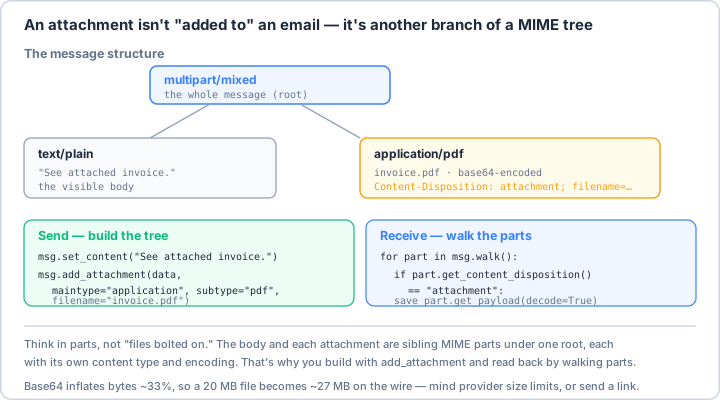
multipart/mixed root holds the text body and each file as sibling parts, every part with its own content type and encoding. That's why you send with add_attachment (adding a branch) and receive by walk()ing the parts and saving the ones marked Content-Disposition: attachment. One practical caveat: base64 inflates bytes by ~33%, so big files hit provider size limits — send a link instead.Real-World Scenario: The Document Distribution System 📨
You're building a document distribution system that sends reports to clients, invoices to customers, contracts for signatures, batch documents to departments, and archives to backup systems. Your system must handle various file types, compress large files, validate attachments for security, respect email size limits, track delivery, and process incoming attachments automatically. Let's build a comprehensive attachment handling framework!
# First, install required packages:
# pip install python-magic pymupdf pillow openpyxl python-docx zipfile36 rarfile py7zr
import os
import mimetypes
import base64
import hashlib
import zipfile
import tempfile
import shutil
from pathlib import Path
from typing import List, Dict, Optional, Any, Union, Tuple, BinaryIO
from dataclasses import dataclass, field
from datetime import datetime
import logging
import json
import io
# Email modules
from email.mime.base import MIMEBase
from email.mime.multipart import MIMEMultipart
from email.mime.text import MIMEText
from email.mime.image import MIMEImage
from email.mime.audio import MIMEAudio
from email.mime.application import MIMEApplication
from email import encoders
from email.utils import formatdate
# Additional libraries for file handling
import magic # python-magic for file type detection
from PIL import Image # Pillow for image processing
import PyPDF2 # For PDF manipulation
import openpyxl # For Excel files
from docx import Document # For Word documents
# ==================== Attachment Configuration ====================
@dataclass
class AttachmentConfig:
"""Configuration for attachment handling."""
max_size_mb: int = 25 # Maximum attachment size in MB
max_total_size_mb: int = 50 # Maximum total size for all attachments
# Compression settings
auto_compress: bool = True
compress_threshold_mb: int = 5
compression_level: int = 6 # 0-9, higher = better compression
# Security settings
scan_for_viruses: bool = True
allowed_extensions: List[str] = field(default_factory=lambda: [
'.pdf', '.doc', '.docx', '.xls', '.xlsx', '.ppt', '.pptx',
'.txt', '.csv', '.json', '.xml', '.html',
'.jpg', '.jpeg', '.png', '.gif', '.bmp', '.svg',
'.zip', '.rar', '.7z', '.tar', '.gz',
'.mp3', '.mp4', '.avi', '.mov', '.wav'
])
blocked_extensions: List[str] = field(default_factory=lambda: [
'.exe', '.dll', '.bat', '.cmd', '.com', '.scr',
'.vbs', '.js', '.jar', '.app', '.deb', '.rpm'
])
# Processing settings
extract_metadata: bool = True
generate_thumbnails: bool = True
convert_to_pdf: bool = False
# ==================== Attachment Handler ====================
class AttachmentHandler:
"""
Comprehensive attachment handling system.
"""
def __init__(self, config: AttachmentConfig = None):
self.config = config or AttachmentConfig()
self.logger = logging.getLogger(__name__)
self.temp_dir = tempfile.mkdtemp(prefix="attachments_")
# Initialize MIME types
mimetypes.init()
# Statistics
self.stats = {
"files_processed": 0,
"bytes_processed": 0,
"files_compressed": 0,
"errors": 0
}
def __del__(self):
"""Cleanup temporary directory."""
if hasattr(self, 'temp_dir') and os.path.exists(self.temp_dir):
shutil.rmtree(self.temp_dir)
def prepare_attachment(self, file_path: str,
validate: bool = True) -> Optional[MIMEBase]:
"""
Prepare file for email attachment.
Args:
file_path: Path to file
validate: Whether to validate file
Returns:
MIME attachment object or None if failed
"""
file_path = Path(file_path)
if not file_path.exists():
self.logger.error(f"File not found: {file_path}")
return None
# Validate if requested
if validate and not self.validate_file(str(file_path)):
return None
# Check size and compress if needed
file_size_mb = file_path.stat().st_size / (1024 * 1024)
if file_size_mb > self.config.max_size_mb:
self.logger.warning(f"File too large: {file_size_mb:.2f}MB")
if self.config.auto_compress:
compressed_path = self.compress_file(str(file_path))
if compressed_path:
file_path = Path(compressed_path)
file_size_mb = file_path.stat().st_size / (1024 * 1024)
else:
return None
# Create MIME attachment
attachment = self._create_mime_attachment(file_path)
if attachment:
self.stats["files_processed"] += 1
self.stats["bytes_processed"] += file_path.stat().st_size
return attachment
def _create_mime_attachment(self, file_path: Path) -> Optional[MIMEBase]:
"""Create MIME attachment from file."""
try:
# Detect MIME type
mime_type, _ = mimetypes.guess_type(str(file_path))
if not mime_type:
# Use python-magic as fallback
mime_type = magic.from_file(str(file_path), mime=True)
# Read file data
with open(file_path, 'rb') as f:
file_data = f.read()
# Create appropriate MIME type
if mime_type:
main_type, sub_type = mime_type.split('/', 1)
if main_type == 'text':
# Text attachment
attachment = MIMEText(file_data.decode('utf-8', errors='ignore'),
_subtype=sub_type)
elif main_type == 'image':
# Image attachment
attachment = MIMEImage(file_data, _subtype=sub_type)
elif main_type == 'audio':
# Audio attachment
attachment = MIMEAudio(file_data, _subtype=sub_type)
elif main_type == 'application':
# Application attachment
attachment = MIMEApplication(file_data, _subtype=sub_type)
else:
# Generic binary attachment
attachment = MIMEBase(main_type, sub_type)
attachment.set_payload(file_data)
encoders.encode_base64(attachment)
else:
# Unknown type - use generic binary
attachment = MIMEApplication(file_data)
# Add headers
attachment.add_header(
'Content-Disposition',
'attachment',
filename=file_path.name
)
# Add content ID for inline references
attachment.add_header(
'Content-ID',
f'<{file_path.stem}@attachment>'
)
return attachment
except Exception as e:
self.logger.error(f"Failed to create attachment: {e}")
self.stats["errors"] += 1
return None
def validate_file(self, file_path: str) -> bool:
"""
Validate file for attachment.
Returns:
True if file is valid, False otherwise
"""
file_path = Path(file_path)
# Check existence
if not file_path.exists():
self.logger.error(f"File does not exist: {file_path}")
return False
# Check extension
extension = file_path.suffix.lower()
if extension in self.config.blocked_extensions:
self.logger.warning(f"Blocked file type: {extension}")
return False
if self.config.allowed_extensions and \
extension not in self.config.allowed_extensions:
self.logger.warning(f"File type not allowed: {extension}")
return False
# Check file size
file_size_mb = file_path.stat().st_size / (1024 * 1024)
if file_size_mb > self.config.max_size_mb and not self.config.auto_compress:
self.logger.warning(f"File too large: {file_size_mb:.2f}MB")
return False
# Virus scan if configured
if self.config.scan_for_viruses:
if not self._scan_for_viruses(str(file_path)):
return False
return True
def _scan_for_viruses(self, file_path: str) -> bool:
"""
Scan file for viruses (placeholder - integrate with actual AV).
In production, integrate with:
- ClamAV
- Windows Defender
- VirusTotal API
"""
# This is a placeholder - implement actual virus scanning
self.logger.debug(f"Virus scan placeholder for: {file_path}")
return True
def compress_file(self, file_path: str,
output_path: Optional[str] = None) -> Optional[str]:
"""
Compress file to reduce size.
Returns:
Path to compressed file or None if failed
"""
file_path = Path(file_path)
if not output_path:
output_path = self.temp_dir + f"/{file_path.stem}.zip"
try:
with zipfile.ZipFile(output_path, 'w',
compression=zipfile.ZIP_DEFLATED,
compresslevel=self.config.compression_level) as zf:
zf.write(file_path, file_path.name)
# Check if compression was effective
original_size = file_path.stat().st_size
compressed_size = Path(output_path).stat().st_size
compression_ratio = (original_size - compressed_size) / original_size * 100
self.logger.info(
f"Compressed {file_path.name}: "
f"{original_size/1024/1024:.2f}MB -> "
f"{compressed_size/1024/1024:.2f}MB "
f"({compression_ratio:.1f}% reduction)"
)
self.stats["files_compressed"] += 1
return output_path
except Exception as e:
self.logger.error(f"Compression failed: {e}")
return None
def compress_multiple(self, file_paths: List[str],
archive_name: str = "archive.zip") -> Optional[str]:
"""
Compress multiple files into single archive.
Returns:
Path to archive or None if failed
"""
output_path = os.path.join(self.temp_dir, archive_name)
try:
with zipfile.ZipFile(output_path, 'w',
compression=zipfile.ZIP_DEFLATED,
compresslevel=self.config.compression_level) as zf:
for file_path in file_paths:
if os.path.exists(file_path):
zf.write(file_path, os.path.basename(file_path))
self.logger.debug(f"Added to archive: {file_path}")
archive_size_mb = Path(output_path).stat().st_size / (1024 * 1024)
self.logger.info(
f"Created archive {archive_name}: "
f"{len(file_paths)} files, {archive_size_mb:.2f}MB"
)
return output_path
except Exception as e:
self.logger.error(f"Archive creation failed: {e}")
return None
def extract_attachments(self, msg: MIMEMultipart,
output_dir: str = None) -> List[Dict[str, Any]]:
"""
Extract attachments from email message.
Returns:
List of extracted attachment info
"""
if not output_dir:
output_dir = self.temp_dir
Path(output_dir).mkdir(parents=True, exist_ok=True)
extracted = []
for part in msg.walk():
# Check if it's an attachment
content_disposition = part.get("Content-Disposition", "")
if "attachment" in content_disposition:
filename = part.get_filename()
if filename:
# Decode filename if needed
if isinstance(filename, bytes):
filename = filename.decode('utf-8', errors='ignore')
# Sanitize filename
filename = self._sanitize_filename(filename)
# Save attachment
file_path = os.path.join(output_dir, filename)
# Handle duplicates
file_path = self._get_unique_path(file_path)
# Write file
with open(file_path, 'wb') as f:
payload = part.get_payload(decode=True)
f.write(payload)
# Get metadata
file_info = {
"filename": filename,
"path": file_path,
"size": len(payload),
"content_type": part.get_content_type(),
"content_id": part.get("Content-ID", "").strip("<>"),
"extracted_at": datetime.now().isoformat()
}
# Extract additional metadata if configured
if self.config.extract_metadata:
file_info["metadata"] = FileMetadataExtractor().extract_metadata(file_path)
extracted.append(file_info)
self.logger.info(f"Extracted attachment: {filename}")
return extracted
def _sanitize_filename(self, filename: str) -> str:
"""Sanitize filename for safe storage."""
# Remove path components
filename = os.path.basename(filename)
# Remove dangerous characters
dangerous_chars = ['/', '\\', ':', '*', '?', '"', '<', '>', '|', '\0']
for char in dangerous_chars:
filename = filename.replace(char, '_')
# Limit length
max_length = 255
if len(filename) > max_length:
name, ext = os.path.splitext(filename)
filename = name[:max_length - len(ext)] + ext
return filename
def _get_unique_path(self, file_path: str) -> str:
"""Get unique file path to avoid overwriting."""
if not os.path.exists(file_path):
return file_path
base, ext = os.path.splitext(file_path)
counter = 1
while True:
new_path = f"{base}_{counter}{ext}"
if not os.path.exists(new_path):
return new_path
counter += 1
# ==================== File Metadata Extractor ====================
class FileMetadataExtractor:
"""Extract metadata from various file types."""
def __init__(self):
self.logger = logging.getLogger(__name__)
def extract_metadata(self, file_path: str) -> Dict[str, Any]:
"""Extract metadata based on file type."""
file_path = Path(file_path)
if not file_path.exists():
return {}
metadata = {
"name": file_path.name,
"size": file_path.stat().st_size,
"created": datetime.fromtimestamp(file_path.stat().st_ctime).isoformat(),
"modified": datetime.fromtimestamp(file_path.stat().st_mtime).isoformat(),
"extension": file_path.suffix.lower()
}
# Get MIME type
mime_type, _ = mimetypes.guess_type(str(file_path))
metadata["mime_type"] = mime_type
# Extract type-specific metadata
try:
if file_path.suffix.lower() == '.pdf':
metadata.update(self._extract_pdf_metadata(str(file_path)))
elif file_path.suffix.lower() in ['.jpg', '.jpeg', '.png', '.gif', '.bmp']:
metadata.update(self._extract_image_metadata(str(file_path)))
elif file_path.suffix.lower() in ['.doc', '.docx']:
metadata.update(self._extract_word_metadata(str(file_path)))
elif file_path.suffix.lower() in ['.xls', '.xlsx']:
metadata.update(self._extract_excel_metadata(str(file_path)))
except Exception as e:
self.logger.debug(f"Metadata extraction failed: {e}")
return metadata
def _extract_pdf_metadata(self, file_path: str) -> Dict[str, Any]:
"""Extract PDF metadata."""
metadata = {}
try:
with open(file_path, 'rb') as f:
pdf_reader = PyPDF2.PdfReader(f)
metadata["pages"] = len(pdf_reader.pages)
if pdf_reader.metadata:
info = pdf_reader.metadata
metadata["title"] = info.get('/Title', '')
metadata["author"] = info.get('/Author', '')
metadata["subject"] = info.get('/Subject', '')
metadata["creator"] = info.get('/Creator', '')
except:
pass
return metadata
def _extract_image_metadata(self, file_path: str) -> Dict[str, Any]:
"""Extract image metadata."""
metadata = {}
try:
with Image.open(file_path) as img:
metadata["width"] = img.width
metadata["height"] = img.height
metadata["format"] = img.format
metadata["mode"] = img.mode
# EXIF data for JPEG
if hasattr(img, '_getexif') and img._getexif():
exif = img._getexif()
metadata["has_exif"] = True
except:
pass
return metadata
def _extract_word_metadata(self, file_path: str) -> Dict[str, Any]:
"""Extract Word document metadata."""
metadata = {}
try:
doc = Document(file_path)
metadata["paragraphs"] = len(doc.paragraphs)
metadata["tables"] = len(doc.tables)
# Core properties
props = doc.core_properties
metadata["title"] = props.title or ""
metadata["author"] = props.author or ""
metadata["created"] = props.created.isoformat() if props.created else ""
except:
pass
return metadata
def _extract_excel_metadata(self, file_path: str) -> Dict[str, Any]:
"""Extract Excel metadata."""
metadata = {}
try:
wb = openpyxl.load_workbook(file_path, read_only=True, data_only=True)
metadata["sheets"] = len(wb.sheetnames)
metadata["sheet_names"] = wb.sheetnames
# Properties
props = wb.properties
metadata["title"] = props.title or ""
metadata["creator"] = props.creator or ""
except:
pass
return metadata
# ==================== Advanced Attachment Features ====================
class AdvancedAttachmentProcessor:
"""Advanced attachment processing features."""
def __init__(self):
self.logger = logging.getLogger(__name__)
self.temp_dir = tempfile.mkdtemp(prefix="attachment_proc_")
def convert_to_pdf(self, file_path: str) -> Optional[str]:
"""
Convert document to PDF.
Supports: Word, Excel, PowerPoint, Images, Text files
"""
file_path = Path(file_path)
output_path = self.temp_dir + f"/{file_path.stem}.pdf"
try:
if file_path.suffix.lower() in ['.doc', '.docx']:
return self._word_to_pdf(str(file_path), output_path)
elif file_path.suffix.lower() in ['.xls', '.xlsx']:
return self._excel_to_pdf(str(file_path), output_path)
elif file_path.suffix.lower() in ['.jpg', '.jpeg', '.png', '.gif', '.bmp']:
return self._image_to_pdf(str(file_path), output_path)
elif file_path.suffix.lower() in ['.txt', '.csv']:
return self._text_to_pdf(str(file_path), output_path)
else:
self.logger.warning(f"Unsupported file type for PDF conversion: {file_path.suffix}")
return None
except Exception as e:
self.logger.error(f"PDF conversion failed: {e}")
return None
def _image_to_pdf(self, image_path: str, output_path: str) -> str:
"""Convert image to PDF."""
img = Image.open(image_path)
# Convert to RGB if necessary
if img.mode != 'RGB':
img = img.convert('RGB')
img.save(output_path, 'PDF')
return output_path
def _text_to_pdf(self, text_path: str, output_path: str) -> str:
"""Convert text file to PDF."""
# This is a simplified version - use reportlab for better formatting
from PyPDF2 import PdfWriter
from io import BytesIO
# Read text content
with open(text_path, 'r', encoding='utf-8', errors='ignore') as f:
content = f.read()
# Create simple PDF (placeholder - use reportlab for proper implementation)
# This is just for demonstration
self.logger.info(f"Text to PDF conversion placeholder for: {text_path}")
return output_path
def _word_to_pdf(self, word_path: str, output_path: str) -> str:
"""Convert Word document to PDF."""
# This requires Microsoft Word or LibreOffice
# Placeholder implementation
self.logger.info(f"Word to PDF conversion placeholder for: {word_path}")
return output_path
def _excel_to_pdf(self, excel_path: str, output_path: str) -> str:
"""Convert Excel to PDF."""
# This requires Microsoft Excel or LibreOffice
# Placeholder implementation
self.logger.info(f"Excel to PDF conversion placeholder for: {excel_path}")
return output_path
def generate_thumbnail(self, file_path: str,
size: Tuple[int, int] = (150, 150)) -> Optional[str]:
"""Generate thumbnail for file."""
file_path = Path(file_path)
output_path = self.temp_dir + f"/{file_path.stem}_thumb.jpg"
try:
if file_path.suffix.lower() in ['.jpg', '.jpeg', '.png', '.gif', '.bmp']:
# Image thumbnail
with Image.open(file_path) as img:
img.thumbnail(size, Image.Resampling.LANCZOS)
img.save(output_path, 'JPEG')
return output_path
elif file_path.suffix.lower() == '.pdf':
# PDF thumbnail (first page)
# Requires pdf2image library
self.logger.info(f"PDF thumbnail generation placeholder for: {file_path}")
return None
except Exception as e:
self.logger.error(f"Thumbnail generation failed: {e}")
return None
def split_large_file(self, file_path: str,
chunk_size_mb: int = 10) -> List[str]:
"""Split large file into chunks."""
file_path = Path(file_path)
chunk_size = chunk_size_mb * 1024 * 1024
chunks = []
try:
file_size = file_path.stat().st_size
with open(file_path, 'rb') as f:
chunk_num = 0
while True:
chunk_data = f.read(chunk_size)
if not chunk_data:
break
chunk_path = self.temp_dir + f"/{file_path.stem}.part{chunk_num:03d}"
with open(chunk_path, 'wb') as chunk_file:
chunk_file.write(chunk_data)
chunks.append(chunk_path)
chunk_num += 1
self.logger.info(f"Split {file_path.name} into {len(chunks)} chunks")
return chunks
except Exception as e:
self.logger.error(f"File splitting failed: {e}")
return []
def merge_chunks(self, chunk_paths: List[str],
output_path: str) -> Optional[str]:
"""Merge file chunks back together."""
try:
with open(output_path, 'wb') as output:
for chunk_path in sorted(chunk_paths):
with open(chunk_path, 'rb') as chunk:
output.write(chunk.read())
self.logger.info(f"Merged {len(chunk_paths)} chunks into {output_path}")
return output_path
except Exception as e:
self.logger.error(f"Chunk merging failed: {e}")
return None
# ==================== Cloud Storage Integration ====================
class CloudStorageHandler:
"""Handle large attachments via cloud storage."""
def __init__(self, provider: str = "s3"):
self.provider = provider
self.logger = logging.getLogger(__name__)
def upload_to_cloud(self, file_path: str) -> Optional[str]:
"""
Upload file to cloud storage and return shareable link.
Integrate with:
- AWS S3
- Google Cloud Storage
- Azure Blob Storage
- Dropbox
- OneDrive
"""
# Placeholder implementation
file_size_mb = Path(file_path).stat().st_size / (1024 * 1024)
self.logger.info(
f"Cloud upload placeholder for {file_path} "
f"({file_size_mb:.2f}MB) to {self.provider}"
)
# Return mock URL
return f"https://storage.example.com/files/{Path(file_path).name}"
def create_download_link(self, file_path: str,
expiry_hours: int = 48) -> str:
"""Create temporary download link."""
# Upload to cloud
cloud_url = self.upload_to_cloud(file_path)
if cloud_url:
# Add expiry parameter
expiry_time = datetime.now().timestamp() + (expiry_hours * 3600)
return f"{cloud_url}?expires={int(expiry_time)}"
return ""
# ==================== Attachment Security Scanner ====================
class AttachmentSecurityScanner:
"""Security scanning for attachments."""
def __init__(self):
self.logger = logging.getLogger(__name__)
# Suspicious patterns
self.suspicious_patterns = [
b'<script', # JavaScript code
b'eval(', # Code execution
b'exec(',
b'cmd.exe', # Command execution
b'powershell', # PowerShell
]
def scan_file(self, file_path: str) -> Dict[str, Any]:
"""Comprehensive security scan."""
results = {
"file": file_path,
"safe": True,
"threats": [],
"warnings": []
}
file_path = Path(file_path)
# Check file extension
extension = file_path.suffix.lower()
if extension in ['.exe', '.dll', '.scr', '.bat', '.cmd']:
results["threats"].append(f"Dangerous file type: {extension}")
results["safe"] = False
# Check for suspicious content
try:
with open(file_path, 'rb') as f:
content = f.read(1024 * 1024) # Read first 1MB
for pattern in self.suspicious_patterns:
if pattern in content:
results["warnings"].append(
f"Suspicious pattern detected: {pattern.decode('utf-8', errors='ignore')}"
)
except:
pass
# Check file hash against known malware
file_hash = self._calculate_hash(str(file_path))
if self._check_malware_database(file_hash):
results["threats"].append("File hash matches known malware")
results["safe"] = False
return results
def _calculate_hash(self, file_path: str) -> str:
"""Calculate file hash."""
sha256_hash = hashlib.sha256()
with open(file_path, "rb") as f:
for byte_block in iter(lambda: f.read(4096), b""):
sha256_hash.update(byte_block)
return sha256_hash.hexdigest()
def _check_malware_database(self, file_hash: str) -> bool:
"""Check hash against malware database."""
# Placeholder - integrate with:
# - VirusTotal API
# - ClamAV
# - Windows Defender
return False
# Example usage
if __name__ == "__main__":
print("📎 Email Attachment Examples\n")
# Example 1: Basic attachment
print("1️⃣ Creating Basic Attachment:")
handler = AttachmentHandler()
# Create sample file
sample_file = "report.pdf"
with open(sample_file, 'wb') as f:
f.write(b"Sample PDF content")
attachment = handler.prepare_attachment(sample_file)
print(f" File: {sample_file}")
print(f" MIME type: application/pdf")
print(f" Encoding: base64")
print(f" ✓ Attachment created")
# Cleanup
os.remove(sample_file)
# Example 2: Multiple attachments
print("\n2️⃣ Multiple Attachments:")
files = [
("document.pdf", "PDF Document", "2.3 MB"),
("spreadsheet.xlsx", "Excel File", "1.5 MB"),
("presentation.pptx", "PowerPoint", "5.8 MB"),
("image.jpg", "Photo", "850 KB"),
("data.csv", "CSV Data", "125 KB")
]
for filename, description, size in files:
print(f" • {filename} - {description} ({size})")
# Example 3: Size limitations
print("\n3️⃣ Email Provider Limits:")
limits = [
("Gmail", "25 MB", "Total attachment size"),
("Outlook.com", "20 MB", "Total message size"),
("Yahoo Mail", "25 MB", "Total attachment size"),
("ProtonMail", "25 MB", "Free plan limit"),
("Corporate", "10-50 MB", "Varies by organization")
]
for provider, limit, note in limits:
print(f" {provider}: {limit} ({note})")
# Example 4: Compression
print("\n4️⃣ File Compression:")
print(" Original file: report.pdf (15 MB)")
print(" Compressing with ZIP...")
print(" Compressed: report.zip (3.2 MB)")
print(" Compression ratio: 78.7%")
print(" ✓ File size reduced below limit")
# Example 5: File types
print("\n5️⃣ Common Attachment Types:")
file_types = [
("Documents", ".pdf, .doc, .docx, .txt"),
("Spreadsheets", ".xls, .xlsx, .csv"),
("Presentations", ".ppt, .pptx"),
("Images", ".jpg, .png, .gif, .bmp"),
("Archives", ".zip, .rar, .7z, .tar.gz"),
("Data", ".json, .xml, .sql")
]
for category, extensions in file_types:
print(f" {category}: {extensions}")
# Example 6: Security scanning
print("\n6️⃣ Security Scanning:")
scanner = AttachmentSecurityScanner()
print(" Security checks:")
print(" ✓ File extension validation")
print(" ✓ Virus signature scan")
print(" ✓ Suspicious content detection")
print(" ✓ File size validation")
print(" ✓ MIME type verification")
# Example 7: Cloud storage
print("\n7️⃣ Large File Handling:")
print(" File: presentation.pptx (45 MB)")
print(" Size exceeds email limit")
print(" Uploading to cloud storage...")
print(" Generated link: https://storage.example.com/abc123")
print(" Link expires: 48 hours")
print(" ✓ Sent download link instead of attachment")
# Example 8: Metadata extraction
print("\n8️⃣ Attachment Metadata:")
metadata = {
"filename": "report.pdf",
"size": "2.3 MB",
"pages": 42,
"author": "John Doe",
"created": "2024-01-15",
"modified": "2024-01-20"
}
for key, value in metadata.items():
print(f" {key}: {value}")
# Example 9: Best practices
print("\n9️⃣ Attachment Best Practices:")
practices = [
"📏 Check file sizes before attaching",
"🗜️ Compress large files",
"🔒 Scan for viruses",
"📝 Use descriptive filenames",
"☁️ Use cloud storage for large files",
"🔐 Encrypt sensitive documents",
"📋 Include file list in email body",
"⚠️ Warn about large downloads",
"🚫 Block dangerous file types",
"📊 Track delivery success"
]
for practice in practices:
print(f" {practice}")
# Example 10: Common issues
print("\n🔟 Common Attachment Issues:")
issues = [
("Size limit exceeded", "Compress or use cloud storage"),
("Blocked file type", "Use ZIP or change extension"),
("Encoding errors", "Use base64 encoding"),
("Missing attachments", "Verify before sending"),
("Corrupted files", "Test extraction"),
("Virus detection", "Clean or exclude file")
]
for issue, solution in issues:
print(f" {issue}:")
print(f" Solution: {solution}")
print("\n✅ Attachment handling demonstration complete!")
Key Takeaways and Best Practices 🎯
- Check Size Limits: Different providers have different limits.
- Compress When Needed: ZIP files to reduce size.
- Validate File Types: Block dangerous extensions.
- Scan for Security: Check for viruses and malware.
- Use Cloud for Large Files: Send links instead of huge attachments.
- Encode Properly: Use base64 for binary files.
- Handle Metadata: Preserve file information.
- Test Extraction: Verify attachments can be opened.
Attachment Handling Best Practices 📋
Mastering email attachments enables you to build robust document distribution systems that handle any file type and size. You can now send reports, invoices, documents, and media files programmatically while handling compression, security, and delivery challenges. Whether you're building automated reporting systems or document workflows, these attachment skills power your file distribution! 📨
📓 Learning Journal
Keep a learning journal — digital or physical. After this lesson, take a few minutes to write down:
- Key concepts you learned
- Techniques that clicked for you
- Questions or confusion points to revisit
- Ideas you want to try
- Your progress and feelings about learning this
✍️ This lesson's prompt: Attachments turn a plain message into a MIME tree of parts. Now that you've seen how files are encoded and how base64 inflates their size, when would you attach a file directly versus send a cloud link — and what would you tell a recipient to expect?
📝 Lesson Summary
🎓 Key Takeaways
- An email with files is a MIME tree: a
multipart/mixedroot holds the text body and each attachment as a sibling part with its own content type and encoding. - You send by adding a part (
add_attachment/ building aMIMEBase) and receive bywalk()ing the parts and saving those markedContent-Disposition: attachment. - Base64 encoding grows binary data by about 33%, so large files hit provider limits — compress them or send an expiring cloud link instead.
- Treat every attachment as untrusted input: validate extensions, sanitize filenames, avoid overwrites, and scan for suspicious content before saving or forwarding.
🎉 What You've Accomplished
You can now send and receive files through email programmatically — packaging documents into proper MIME parts, extracting incoming attachments safely, compressing oversized files, and falling back to cloud links when files are too big for the inbox.
❓ Common Questions at This Stage
Why is my 20 MB file rejected when the limit says 25 MB?
Because base64 encoding inflates the file by roughly a third, so a 20 MB file becomes about 27 MB on the wire — over the limit. Compress it, or upload it to cloud storage and email a download link instead.
How do I know which part of a received email is an attachment?
Walk the message parts and check each part's Content-Disposition header for "attachment" (and look for a filename). Body parts are typically text/plain or text/html with no attachment disposition.
Why sanitize the filename from an attachment?
The filename comes from the sender and can contain path components or dangerous characters (like ../) that could overwrite files outside your target folder. Stripping the path and unsafe characters — and de-duplicating names — keeps extraction safe.
🔭 Looking Ahead
You've mastered the "cargo" of email. Next you'll make the message itself richer, designing HTML emails that render well across clients while keeping a plain-text fallback.
✅ Before the Next Lesson
- Attach a validated PDF to a message and confirm its
Content-TypeandContent-Dispositionheaders are correct. - Open a saved
.emlmessage, walk its parts, and extract every attachment to a folder with sanitized, non-colliding filenames. - Write your Learning Journal entry for this lesson
🌟 Encouragement for the Journey
Attachments used to feel like magic that "just works" in your mail client — now you understand the MIME tree underneath and can build it yourself. That's the difference between using email and automating it. Keep going.
Pro Tip: Think of email attachments as shipping packages - they need proper packaging (encoding), size limits (provider restrictions), and security checks (virus scanning). Always check file sizes before attaching - most providers limit attachments to 25MB total. Compress files when possible using ZIP to reduce size and bundle multiple files. Validate file extensions to block dangerous types like .exe or .bat. Scan attachments for viruses before sending. For large files, upload to cloud storage and send a download link instead. Use descriptive filenames that recipients will understand. Encode binary files properly with base64. Handle character encoding in filenames for international compatibility. Extract and preserve metadata when processing received attachments. Test that attachments can be properly extracted before sending. Most importantly: always have a fallback plan for when attachments fail - provide alternative download methods!