💼 Slack Integration: Build Workplace Automation Bots
📚 What You'll Learn
By the end of this lesson, you will be able to:
- Create a Slack app, run the OAuth install flow, and obtain a scoped bot token (
xoxb-) - Request the minimum scopes your bot needs and explain why least privilege limits the blast radius of a leaked token
- Respond to events, slash commands, and interactive components using the Bolt for Python framework
- Honor the Events API 3-second rule by calling
ack()first and doing slow work asynchronously - Write idempotent handlers so a Slack retry doesn't process the same event twice
- Build rich messages with Block Kit and choose between Socket Mode and a public Events API endpoint
⏱️ Estimated Time: 45–60 minutes
🎯 Project: Build a Slack bot that answers a slash command with a Block Kit message, acknowledging within three seconds and running any real work in the background.
Slack bots are the productivity powerhouses of modern workplaces - they automate workflows, integrate tools, facilitate communication, and transform how teams collaborate. Like having a digital assistant that never takes a break, mastering Slack bot development allows you to streamline operations, connect disparate systems, and create custom tools that boost team efficiency. Let's explore the comprehensive world of Slack bot development! 🚀
The Slack Bot Architecture
Think of Slack bots as intelligent coworkers in your digital workspace - they can respond to messages, post updates, create interactive workflows, manage channels, and integrate with countless third-party services. Using Slack's powerful APIs and SDKs, you can build bots that handle everything from simple notifications to complex multi-step workflows. Understanding Slack's event model, Block Kit UI framework, and workspace permissions is essential for building effective workplace bots!
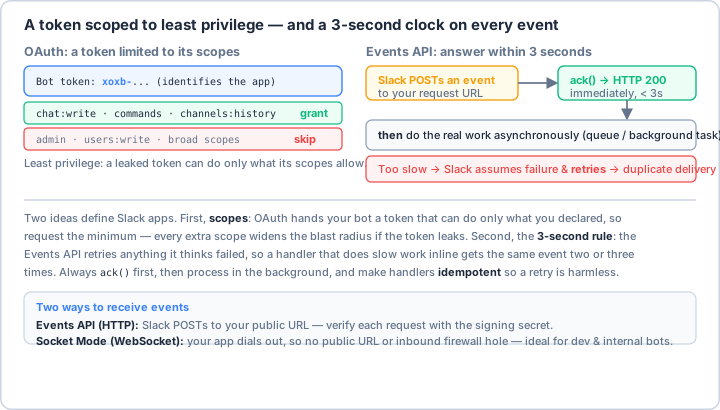
xoxb- token that can do only what you declared, so request the minimum — every extra scope widens the blast radius if it leaks. The 3-second rule: the Events API retries anything it thinks failed, so a handler doing slow work inline gets the same event two or three times. Always ack() first, then process in the background, and make handlers idempotent so a retry is harmless. (Socket Mode is the no-public-URL alternative.)Real-World Scenario: The Enterprise Productivity Suite 🏢
You're building a comprehensive Slack bot for a tech company that handles standup meetings, manages project tasks, integrates with JIRA and GitHub, sends team notifications, handles expense approvals, manages meeting schedules, provides analytics dashboards, and automates HR workflows. Your bot must handle hundreds of users, maintain security compliance, integrate with enterprise systems, and provide a seamless user experience. Let's build a production-ready Slack bot framework!
# First, install required packages:
# pip install slack-sdk slack-bolt python-dotenv aiohttp asyncpg redis pandas
import os
import json
import asyncio
import logging
from typing import Optional, List, Dict, Any, Union
from datetime import datetime, timedelta, timezone
from dataclasses import dataclass, field
from enum import Enum
import re
import hashlib
# Slack SDK imports
from slack_bolt import App
from slack_bolt.adapter.socket_mode import SocketModeHandler
from slack_sdk import WebClient
from slack_sdk.errors import SlackApiError
from slack_bolt.context import BoltContext
from slack_bolt.context.say import Say
from slack_bolt.context.ack import Ack
from slack_sdk.web import SlackResponse
# For async operations
from slack_bolt.async_app import AsyncApp
from slack_sdk.web.async_client import AsyncWebClient
# Load environment variables
from dotenv import load_dotenv
load_dotenv()
# ==================== Bot Configuration ====================
@dataclass
class SlackBotConfig:
"""Slack bot configuration."""
# Tokens and secrets
bot_token: str
app_token: str # For Socket Mode
signing_secret: str
# OAuth (for distributed apps)
client_id: Optional[str] = None
client_secret: Optional[str] = None
# Features
use_socket_mode: bool = True
enable_home_tab: bool = True
enable_message_tab: bool = True
# Settings
default_channel: str = "#general"
admin_user_ids: List[str] = field(default_factory=list)
# Database
database_url: str = "sqlite:///slack_bot.db"
redis_url: Optional[str] = None
# API Keys for integrations
github_token: Optional[str] = None
jira_api_key: Optional[str] = None
@classmethod
def from_env(cls):
"""Load configuration from environment variables."""
return cls(
bot_token=os.environ["SLACK_BOT_TOKEN"],
app_token=os.environ.get("SLACK_APP_TOKEN", ""),
signing_secret=os.environ["SLACK_SIGNING_SECRET"],
client_id=os.environ.get("SLACK_CLIENT_ID"),
client_secret=os.environ.get("SLACK_CLIENT_SECRET"),
admin_user_ids=os.environ.get("ADMIN_USER_IDS", "").split(",")
)
# ==================== Slack Bot Class ====================
class SlackBot:
"""
Enhanced Slack bot with advanced features.
"""
def __init__(self, config: SlackBotConfig):
self.config = config
# Initialize Slack app
self.app = App(
token=config.bot_token,
signing_secret=config.signing_secret
)
# Web client for API calls
self.client = WebClient(token=config.bot_token)
# Setup logging
self.logger = self._setup_logging()
# Storage
self.cache = {}
self.user_states = {} # Track user conversation states
# Register handlers
self._register_handlers()
def _setup_logging(self) -> logging.Logger:
"""Configure logging."""
logger = logging.getLogger('slack_bot')
logger.setLevel(logging.INFO)
handler = logging.StreamHandler()
handler.setFormatter(logging.Formatter(
'%(asctime)s - %(name)s - %(levelname)s - %(message)s'
))
logger.addHandler(handler)
return logger
def _register_handlers(self):
"""Register all event handlers and commands."""
# Message handlers
self.app.message("hello")(self.handle_hello)
self.app.message(re.compile(r"help", re.IGNORECASE))(self.handle_help)
# Slash commands
self.app.command("/standup")(self.handle_standup_command)
self.app.command("/task")(self.handle_task_command)
self.app.command("/remind")(self.handle_remind_command)
self.app.command("/poll")(self.handle_poll_command)
# Events
self.app.event("app_mention")(self.handle_app_mention)
self.app.event("team_join")(self.handle_team_join)
self.app.event("channel_created")(self.handle_channel_created)
# Shortcuts
self.app.shortcut("create_task")(self.handle_create_task_shortcut)
# View submissions (modals)
self.app.view("task_modal")(self.handle_task_modal_submission)
# Actions (buttons, select menus)
self.app.action("approve_button")(self.handle_approve_button)
self.app.action("reject_button")(self.handle_reject_button)
# Home tab
self.app.event("app_home_opened")(self.update_home_tab)
def start(self):
"""Start the bot."""
if self.config.use_socket_mode:
# Socket Mode (for development/internal apps)
handler = SocketModeHandler(self.app, self.config.app_token)
self.logger.info("Starting bot in Socket Mode...")
handler.start()
else:
# HTTP mode (for production)
self.logger.info("Starting bot in HTTP mode...")
self.app.start(port=3000)
# ==================== Message Handlers ====================
def handle_hello(self, message: dict, say: Say):
"""Respond to hello messages."""
user = message.get("user")
say(f"Hello <@{user}>! 👋 How can I help you today?")
def handle_help(self, message: dict, say: Say):
"""Show help information."""
help_text = """
*Available Commands:*
• `/standup` - Start daily standup
• `/task create` - Create a new task
• `/remind @user [message]` - Set a reminder
• `/poll "[question]" "[option1]" "[option2]"` - Create a poll
*Features:*
• Mention me for assistance
• React with 👍 to save messages
• Use shortcuts for quick actions
"""
say(blocks=[
{
"type": "section",
"text": {
"type": "mrkdwn",
"text": help_text
}
}
])
def handle_app_mention(self, event: dict, say: Say):
"""Handle when the bot is mentioned."""
text = event.get("text", "")
user = event.get("user")
# Remove bot mention to get actual message
message = re.sub(r'<@[A-Z0-9]+>', '', text).strip()
# Process the message with AI or pattern matching
response = self._process_natural_language(message)
say(f"<@{user}> {response}", thread_ts=event.get("ts"))
def _process_natural_language(self, message: str) -> str:
"""Process natural language requests."""
message_lower = message.lower()
if "meeting" in message_lower:
return "I can help you schedule a meeting! Use `/meeting` command."
elif "task" in message_lower:
return "Need to manage tasks? Try `/task create` or `/task list`."
elif "reminder" in message_lower:
return "I'll help you set reminders. Use `/remind @user [message]`."
else:
return "I'm here to help! Try asking about meetings, tasks, or reminders."
# ==================== Slash Commands ====================
def handle_standup_command(self, ack: Ack, command: dict, client: WebClient):
"""Handle /standup command."""
ack()
user_id = command["user_id"]
channel_id = command["channel_id"]
# Open modal for standup
client.views_open(
trigger_id=command["trigger_id"],
view={
"type": "modal",
"callback_id": "standup_modal",
"title": {"type": "plain_text", "text": "Daily Standup"},
"blocks": [
{
"type": "input",
"block_id": "yesterday",
"label": {"type": "plain_text", "text": "What did you do yesterday?"},
"element": {
"type": "plain_text_input",
"action_id": "yesterday_input",
"multiline": True
}
},
{
"type": "input",
"block_id": "today",
"label": {"type": "plain_text", "text": "What will you do today?"},
"element": {
"type": "plain_text_input",
"action_id": "today_input",
"multiline": True
}
},
{
"type": "input",
"block_id": "blockers",
"label": {"type": "plain_text", "text": "Any blockers?"},
"element": {
"type": "plain_text_input",
"action_id": "blockers_input",
"multiline": True
},
"optional": True
}
],
"submit": {"type": "plain_text", "text": "Submit"},
"private_metadata": json.dumps({"channel_id": channel_id})
}
)
def handle_task_command(self, ack: Ack, command: dict, client: WebClient):
"""Handle /task command."""
ack()
text = command.get("text", "").strip()
user_id = command["user_id"]
if text.startswith("create"):
# Open task creation modal
self._open_task_modal(command["trigger_id"], client)
elif text.startswith("list"):
# List user's tasks
tasks = self._get_user_tasks(user_id)
self._display_tasks(command["response_url"], tasks)
else:
# Show task help
client.chat_postEphemeral(
channel=command["channel_id"],
user=user_id,
text="*Task Commands:*\n• `/task create` - Create new task\n• `/task list` - List your tasks"
)
def handle_poll_command(self, ack: Ack, command: dict, say: Say):
"""Handle /poll command."""
ack()
# Parse poll from command text
import shlex
try:
parts = shlex.split(command["text"])
if len(parts) < 3:
say("Usage: `/poll \"Question\" \"Option 1\" \"Option 2\" [\"Option 3\"]`")
return
question = parts[0]
options = parts[1:][:4] # Max 4 options
# Create poll message with buttons
blocks = [
{
"type": "section",
"text": {
"type": "mrkdwn",
"text": f"*Poll:* {question}"
}
},
{"type": "divider"}
]
# Add option buttons
for i, option in enumerate(options):
blocks.append({
"type": "section",
"text": {
"type": "mrkdwn",
"text": f"{option}\nVotes: 0"
},
"accessory": {
"type": "button",
"text": {"type": "plain_text", "text": "Vote"},
"action_id": f"poll_vote_{i}",
"value": json.dumps({
"option": i,
"text": option
})
}
})
say(blocks=blocks)
except Exception as e:
say(f"Error creating poll: {str(e)}")
def handle_remind_command(self, ack: Ack, command: dict, client: WebClient):
"""Handle /remind command."""
ack()
text = command["text"]
# Parse reminder: @user in 5m message
match = re.match(r'<@([A-Z0-9]+)>\s+in\s+(\d+[mhd])\s+(.+)', text)
if not match:
client.chat_postEphemeral(
channel=command["channel_id"],
user=command["user_id"],
text="Usage: `/remind @user in 5m Remember to check the report`"
)
return
target_user = match.group(1)
time_str = match.group(2)
message = match.group(3)
# Schedule reminder
delay = self._parse_time(time_str)
self._schedule_reminder(target_user, message, delay, client)
client.chat_postEphemeral(
channel=command["channel_id"],
user=command["user_id"],
text=f"✅ Reminder set for <@{target_user}> in {time_str}"
)
# ==================== Interactive Components ====================
def handle_approve_button(self, ack: Ack, body: dict, client: WebClient):
"""Handle approval button click."""
ack()
user = body["user"]["id"]
message_ts = body["message"]["ts"]
channel = body["channel"]["id"]
# Update message to show approval
original_blocks = body["message"]["blocks"]
original_blocks.append({
"type": "context",
"elements": [
{
"type": "mrkdwn",
"text": f"✅ Approved by <@{user}> at {datetime.now().strftime('%H:%M')}"
}
]
})
client.chat_update(
channel=channel,
ts=message_ts,
blocks=original_blocks
)
# Notify relevant parties
self._notify_approval(user, body)
def handle_create_task_shortcut(self, ack: Ack, shortcut: dict, client: WebClient):
"""Handle create task shortcut."""
ack()
# Open task modal
self._open_task_modal(shortcut["trigger_id"], client)
def _open_task_modal(self, trigger_id: str, client: WebClient):
"""Open task creation modal."""
client.views_open(
trigger_id=trigger_id,
view={
"type": "modal",
"callback_id": "task_modal",
"title": {"type": "plain_text", "text": "Create Task"},
"blocks": [
{
"type": "input",
"block_id": "title",
"label": {"type": "plain_text", "text": "Task Title"},
"element": {
"type": "plain_text_input",
"action_id": "title_input"
}
},
{
"type": "input",
"block_id": "description",
"label": {"type": "plain_text", "text": "Description"},
"element": {
"type": "plain_text_input",
"action_id": "description_input",
"multiline": True
},
"optional": True
},
{
"type": "input",
"block_id": "assignee",
"label": {"type": "plain_text", "text": "Assignee"},
"element": {
"type": "users_select",
"action_id": "assignee_select"
}
},
{
"type": "input",
"block_id": "due_date",
"label": {"type": "plain_text", "text": "Due Date"},
"element": {
"type": "datepicker",
"action_id": "due_date_picker"
},
"optional": True
}
],
"submit": {"type": "plain_text", "text": "Create Task"}
}
)
def handle_task_modal_submission(self, ack: Ack, body: dict, client: WebClient):
"""Handle task modal submission."""
ack()
values = body["view"]["state"]["values"]
user = body["user"]["id"]
# Extract form data
title = values["title"]["title_input"]["value"]
description = values.get("description", {}).get("description_input", {}).get("value", "")
assignee = values["assignee"]["assignee_select"]["selected_user"]
due_date = values.get("due_date", {}).get("due_date_picker", {}).get("selected_date")
# Create task (store in database)
task_id = self._create_task(title, description, assignee, due_date, user)
# Notify assignee
client.chat_postMessage(
channel=assignee,
blocks=[
{
"type": "section",
"text": {
"type": "mrkdwn",
"text": f"📋 *New Task Assigned*\n\n*Title:* {title}\n*Description:* {description}\n*Due:* {due_date or 'No deadline'}\n*Created by:* <@{user}>"
}
},
{
"type": "actions",
"elements": [
{
"type": "button",
"text": {"type": "plain_text", "text": "Mark Complete"},
"style": "primary",
"action_id": f"complete_task_{task_id}"
}
]
}
]
)
# ==================== Home Tab ====================
def update_home_tab(self, event: dict, client: WebClient):
"""Update app home tab."""
user_id = event["user"]
# Get user's tasks and stats
tasks = self._get_user_tasks(user_id)
stats = self._get_user_stats(user_id)
# Build home tab view
blocks = [
{
"type": "header",
"text": {"type": "plain_text", "text": "🏠 Your Workspace"}
},
{"type": "divider"},
{
"type": "section",
"text": {
"type": "mrkdwn",
"text": f"*Welcome back!*\nHere's your dashboard for {datetime.now().strftime('%B %d, %Y')}"
}
},
{"type": "divider"},
{
"type": "section",
"fields": [
{"type": "mrkdwn", "text": f"*Tasks:*\n{stats.get('task_count', 0)}"},
{"type": "mrkdwn", "text": f"*Completed Today:*\n{stats.get('completed_today', 0)}"},
{"type": "mrkdwn", "text": f"*Pending Reviews:*\n{stats.get('pending_reviews', 0)}"},
{"type": "mrkdwn", "text": f"*Messages:*\n{stats.get('message_count', 0)}"}
]
},
{"type": "divider"},
{
"type": "section",
"text": {"type": "mrkdwn", "text": "*Your Tasks:*"}
}
]
# Add tasks
for task in tasks[:5]: # Show latest 5 tasks
blocks.append({
"type": "section",
"text": {
"type": "mrkdwn",
"text": f"• {task['title']} - Due: {task.get('due_date', 'No deadline')}"
},
"accessory": {
"type": "button",
"text": {"type": "plain_text", "text": "View"},
"action_id": f"view_task_{task['id']}"
}
})
# Add quick actions
blocks.append({"type": "divider"})
blocks.append({
"type": "actions",
"elements": [
{
"type": "button",
"text": {"type": "plain_text", "text": "Create Task"},
"style": "primary",
"action_id": "create_task_home"
},
{
"type": "button",
"text": {"type": "plain_text", "text": "Start Standup"},
"action_id": "start_standup_home"
},
{
"type": "button",
"text": {"type": "plain_text", "text": "View Calendar"},
"action_id": "view_calendar_home"
}
]
})
# Publish view
client.views_publish(
user_id=user_id,
view={
"type": "home",
"blocks": blocks
}
)
# ==================== Event Handlers ====================
def handle_team_join(self, event: dict, client: WebClient):
"""Welcome new team members."""
user_id = event["user"]["id"]
# Send welcome DM
welcome_message = f"""
Welcome to the team! 🎉
I'm your workspace assistant. Here are some things I can help you with:
• Daily standups
• Task management
• Reminders and notifications
• Team collaboration
Type `/help` to see available commands or just mention me if you need assistance!
"""
client.chat_postMessage(
channel=user_id,
text=welcome_message
)
# Add to onboarding channel if configured
if hasattr(self.config, 'onboarding_channel'):
client.conversations_invite(
channel=self.config.onboarding_channel,
users=[user_id]
)
def handle_channel_created(self, event: dict, client: WebClient):
"""Handle new channel creation."""
channel = event["channel"]
# Post in admin channel
if hasattr(self.config, 'admin_channel'):
client.chat_postMessage(
channel=self.config.admin_channel,
text=f"New channel created: #{channel['name']} by <@{channel['creator']}>"
)
# ==================== Helper Methods ====================
def _parse_time(self, time_str: str) -> int:
"""Parse time string to seconds."""
match = re.match(r'(\d+)([mhd])', time_str)
if not match:
return 60 # Default 1 minute
amount = int(match.group(1))
unit = match.group(2)
multipliers = {'m': 60, 'h': 3600, 'd': 86400}
return amount * multipliers.get(unit, 60)
def _schedule_reminder(self, user: str, message: str, delay: int, client: WebClient):
"""Schedule a reminder."""
# In production, use a proper task queue like Celery
import threading
timer = threading.Timer(delay, lambda: client.chat_postMessage(
channel=user,
text=f"⏰ *Reminder:* {message}"
))
timer.start()
def _create_task(self, title: str, description: str,
assignee: str, due_date: str, creator: str) -> str:
"""Create a task in the database."""
# In production, use proper database
import uuid
task_id = str(uuid.uuid4())[:8]
# Store task (simplified)
task = {
"id": task_id,
"title": title,
"description": description,
"assignee": assignee,
"due_date": due_date,
"creator": creator,
"created_at": datetime.now().isoformat(),
"status": "pending"
}
# Store in cache (in production, use database)
if "tasks" not in self.cache:
self.cache["tasks"] = []
self.cache["tasks"].append(task)
return task_id
def _get_user_tasks(self, user_id: str) -> List[Dict]:
"""Get tasks for a user."""
# In production, query from database
tasks = self.cache.get("tasks", [])
return [t for t in tasks if t["assignee"] == user_id]
def _get_user_stats(self, user_id: str) -> Dict[str, int]:
"""Get user statistics."""
# In production, calculate from database
return {
"task_count": len(self._get_user_tasks(user_id)),
"completed_today": 0,
"pending_reviews": 0,
"message_count": 0
}
def _display_tasks(self, response_url: str, tasks: List[Dict]):
"""Display tasks using response URL."""
import requests
if not tasks:
message = {"text": "You have no tasks assigned."}
else:
blocks = [
{
"type": "section",
"text": {"type": "mrkdwn", "text": "*Your Tasks:*"}
}
]
for task in tasks:
blocks.append({
"type": "section",
"text": {
"type": "mrkdwn",
"text": f"• *{task['title']}*\n Due: {task.get('due_date', 'No deadline')}\n Status: {task['status']}"
}
})
message = {"blocks": blocks}
requests.post(response_url, json=message)
def _notify_approval(self, approver: str, body: dict):
"""Notify relevant parties of approval."""
# Extract context from the original message
# In production, this would trigger workflows
self.logger.info(f"Approval by {approver} recorded")
# ==================== Block Kit Builder ====================
class BlockKitBuilder:
"""Helper class for building Slack Block Kit UI."""
@staticmethod
def create_task_card(task: Dict) -> List[Dict]:
"""Create a task card using Block Kit."""
return [
{
"type": "header",
"text": {"type": "plain_text", "text": task["title"]}
},
{
"type": "section",
"fields": [
{"type": "mrkdwn", "text": f"*Assignee:*\n<@{task['assignee']}>"},
{"type": "mrkdwn", "text": f"*Due Date:*\n{task.get('due_date', 'None')}"},
{"type": "mrkdwn", "text": f"*Status:*\n{task['status']}"},
{"type": "mrkdwn", "text": f"*Priority:*\n{task.get('priority', 'Normal')}"}
]
},
{
"type": "section",
"text": {
"type": "mrkdwn",
"text": f"*Description:*\n{task.get('description', 'No description')}"
}
},
{
"type": "actions",
"elements": [
{
"type": "button",
"text": {"type": "plain_text", "text": "Complete"},
"style": "primary",
"action_id": f"complete_{task['id']}"
},
{
"type": "button",
"text": {"type": "plain_text", "text": "Edit"},
"action_id": f"edit_{task['id']}"
},
{
"type": "button",
"text": {"type": "plain_text", "text": "Delete"},
"style": "danger",
"confirm": {
"title": {"type": "plain_text", "text": "Delete Task?"},
"text": {"type": "plain_text", "text": "This cannot be undone."},
"confirm": {"type": "plain_text", "text": "Delete"},
"deny": {"type": "plain_text", "text": "Cancel"}
},
"action_id": f"delete_{task['id']}"
}
]
}
]
# ==================== Main Application ====================
def main():
"""Main entry point."""
# Load configuration
config = SlackBotConfig.from_env()
# Create and start bot
bot = SlackBot(config)
bot.start()
# Example usage
if __name__ == "__main__":
print("💼 Slack Bot Examples\n")
# Example 1: Setup steps
print("1️⃣ Slack App Setup:")
steps = [
"Create app at api.slack.com",
"Configure OAuth scopes",
"Install app to workspace",
"Get Bot User OAuth Token",
"Enable Socket Mode (optional)",
"Set up Event Subscriptions",
"Add Slash Commands"
]
for i, step in enumerate(steps, 1):
print(f" {i}. {step}")
# Example 2: OAuth scopes
print("\n2️⃣ Common OAuth Scopes:")
scopes = [
("channels:read", "View channel info"),
("chat:write", "Send messages"),
("commands", "Slash commands"),
("im:write", "Send DMs"),
("users:read", "View user info"),
("files:write", "Upload files"),
("reactions:write", "Add reactions")
]
for scope, description in scopes:
print(f" {scope}: {description}")
# Example 3: Event types
print("\n3️⃣ Slack Events:")
events = [
("message", "New message posted"),
("app_mention", "Bot mentioned"),
("team_join", "New member joins"),
("channel_created", "New channel"),
("reaction_added", "Emoji reaction"),
("file_shared", "File uploaded"),
("app_home_opened", "Home tab viewed")
]
for event, description in events:
print(f" {event}: {description}")
# Example 4: Block Kit components
print("\n4️⃣ Block Kit UI Components:")
components = [
"Section - Text and fields",
"Header - Large title",
"Divider - Visual separator",
"Image - Pictures and graphics",
"Actions - Buttons and menus",
"Input - Form fields",
"Context - Small text"
]
for component in components:
print(f" • {component}")
# Example 5: Interactive elements
print("\n5️⃣ Interactive Elements:")
elements = [
("Button", "Clickable actions"),
("Select Menu", "Dropdown options"),
("Date Picker", "Calendar selection"),
("Time Picker", "Time selection"),
("Radio Buttons", "Single choice"),
("Checkboxes", "Multiple choices"),
("Plain Text Input", "Text entry")
]
for element, description in elements:
print(f" {element}: {description}")
# Example 6: Message formatting
print("\n6️⃣ Slack Markdown:")
formatting = [
("*bold*", "Bold text"),
("_italic_", "Italic text"),
("~strike~", "Strikethrough"),
("`code`", "Inline code"),
("```block```", "Code block"),
(">quote", "Blockquote"),
("<@U123>", "User mention"),
("<#C123>", "Channel link")
]
for syntax, description in formatting:
print(f" {syntax} → {description}")
# Example 7: Workflow example
print("\n7️⃣ Approval Workflow:")
workflow_steps = [
"User submits request via slash command",
"Bot opens modal for details",
"Creates approval message with buttons",
"Posts to approval channel",
"Manager clicks approve/reject",
"Bot updates message and notifies user",
"Records decision in database"
]
for i, step in enumerate(workflow_steps, 1):
print(f" {i}. {step}")
# Example 8: Best practices
print("\n8️⃣ Slack Bot Best Practices:")
practices = [
"🔒 Store tokens securely",
"⚡ Respond within 3 seconds",
"📝 Use ephemeral messages wisely",
"🧵 Use threads for conversations",
"✨ Leverage Block Kit for rich UI",
"🔄 Handle rate limits gracefully",
"📊 Log events for debugging",
"🎯 Validate user permissions",
"💾 Persist data externally",
"🧪 Test in development workspace"
]
for practice in practices:
print(f" {practice}")
print("\n✅ Slack bot demonstration complete!")
print("\n📝 Note: To run the bot, you need:")
print(" 1. Slack App with Bot Token")
print(" 2. Install slack-sdk: pip install slack-sdk slack-bolt")
print(" 3. Set environment variables")
print(" 4. Run with: python slack_bot.py")
Key Takeaways and Best Practices 🎯
- Secure Tokens: Store all tokens and secrets in environment variables.
- Use Block Kit: Create rich, interactive UI with Slack's Block Kit.
- Handle Events Properly: Acknowledge within 3 seconds to avoid timeouts.
- Implement Slash Commands: Modern way for users to interact with bots.
- Use Modals: Collect structured data with modal forms.
- Leverage Ephemeral Messages: Send private responses when appropriate.
- Thread Conversations: Keep channels organized with threaded replies.
- Monitor Rate Limits: Respect Slack's API rate limits.
Slack Bot Development Best Practices 📋
Mastering Slack bot development enables you to build powerful workplace automation tools that streamline operations and boost team productivity. You can now create bots that manage projects, integrate systems, automate workflows, and enhance team collaboration. Whether you're building for a startup or enterprise, these Slack bot skills empower you to transform how teams work! 💪
Pro Tip: Think of Slack bots as digital team members - they should enhance productivity without being intrusive. Start with proper app configuration on api.slack.com, carefully selecting only the OAuth scopes you need. Use Socket Mode for development and internal apps - it's easier than setting up public endpoints. Implement both slash commands and message handlers to give users flexibility. Always acknowledge interactions within 3 seconds to prevent timeouts. Use Block Kit to create beautiful, interactive messages instead of plain text. Implement modals for complex data collection - they provide a better UX than back-and-forth messaging. Use ephemeral messages for sensitive or user-specific information. Thread responses to keep channels clean. Store state and data externally - Slack messages shouldn't be your database. Handle errors gracefully and provide helpful feedback. Test thoroughly in a development workspace before deploying to production. Most importantly: design your bot to augment human work, not replace human interaction!