🌐 Dynamic Content with Selenium: Scrape JavaScript-Heavy Sites
📚 What You'll Learn
By the end of this lesson, you will be able to:
- Decide when a page truly needs a browser by asking whether its content is in the initial HTML or built by JavaScript — and prefer the hidden JSON API when one exists
- Create and configure a Selenium WebDriver (headless, window size, proxy, user agent, download dir) across Chrome, Firefox, and Edge
- Interact with elements robustly — safe clicks, typing, hovering, dropdowns, drag-and-drop, and file uploads with retries
- Replace
time.sleep()with explicit waits and framework-aware conditions (AJAX, page load, element count, text present) - Handle dynamic patterns like infinite scroll, cookies/sessions, and network interception, and structure code with the Page Object Model
⏱️ Estimated Time: 45–60 minutes
🎯 Project: Drive a headless browser to load a JavaScript-rendered page, wait explicitly for its content, and scrape items from an infinite-scroll list.
Modern websites are interactive playgrounds powered by JavaScript. Traditional scrapers see only the initial HTML, missing the dynamically loaded content. Selenium changes the game by controlling a real browser, executing JavaScript, clicking buttons, filling forms, and waiting for AJAX requests. It's like having a robot that uses websites exactly like a human would. Let's master the art of browser automation! 🤖
The Selenium Architecture
Think of Selenium as your personal web browsing assistant. It doesn't just read web pages - it interacts with them. It can click buttons, scroll pages, wait for elements to load, handle pop-ups, and even take screenshots. If a human can do it in a browser, Selenium can automate it!
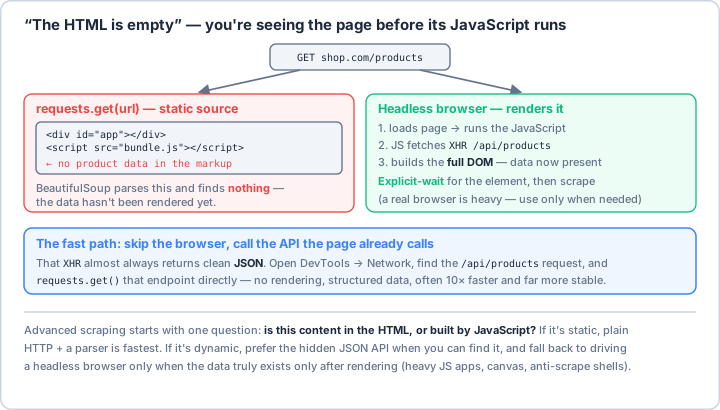
requests only sees the initial source — for a JS app that's an empty shell, which is why “the HTML looks empty.” A headless browser renders it, but the faster, sturdier path is usually to call the hidden JSON API the page's own JavaScript hits (find it in DevTools → Network). Drive a real browser only when the data truly exists only after rendering.Real-World Scenario: The Social Media Analytics Platform 📊
You're building an analytics platform that monitors social media sites, streaming platforms, and modern web apps. These sites load content dynamically, require login, use infinite scrolling, show content based on user interactions, and protect against bots. Selenium will be your key to unlocking all this dynamic content!
# First, install Selenium and drivers:
# pip install selenium webdriver-manager undetected-chromedriver selenium-wire
from selenium import webdriver
from selenium.webdriver.common.by import By
from selenium.webdriver.common.keys import Keys
from selenium.webdriver.common.action_chains import ActionChains
from selenium.webdriver.support.ui import WebDriverWait
from selenium.webdriver.support import expected_conditions as EC
from selenium.webdriver.support.select import Select
from selenium.webdriver.chrome.options import Options as ChromeOptions
from selenium.webdriver.chrome.service import Service
from selenium.common.exceptions import (
TimeoutException,
NoSuchElementException,
StaleElementReferenceException,
ElementClickInterceptedException,
ElementNotInteractableException,
WebDriverException
)
from webdriver_manager.chrome import ChromeDriverManager
import undetected_chromedriver as uc
from seleniumwire import webdriver as wire_webdriver
import time
import json
import logging
from typing import List, Dict, Optional, Any, Callable, Union, Tuple
from dataclasses import dataclass
from datetime import datetime, timedelta
from pathlib import Path
import pickle
import base64
from PIL import Image
from io import BytesIO
import re
from urllib.parse import urlparse
from functools import wraps
import random
# ==================== Configuration ====================
@dataclass
class SeleniumConfig:
"""Selenium configuration settings."""
headless: bool = False
window_size: Tuple[int, int] = (1920, 1080)
user_agent: Optional[str] = None
proxy: Optional[str] = None
download_dir: Optional[str] = None
implicit_wait: int = 10
page_load_timeout: int = 30
disable_images: bool = False
disable_javascript: bool = False
incognito: bool = False
disable_notifications: bool = True
log_level: str = "INFO"
binary_location: Optional[str] = None
class BrowserManager:
"""
Comprehensive browser management for Selenium automation.
"""
def __init__(self, config: SeleniumConfig = None):
self.config = config or SeleniumConfig()
self.driver = None
self.wait = None
self.setup_logging()
def setup_logging(self):
"""Setup logging configuration."""
logging.basicConfig(
level=getattr(logging, self.config.log_level),
format='%(asctime)s - %(name)s - %(levelname)s - %(message)s'
)
self.logger = logging.getLogger(__name__)
def create_driver(self, browser: str = "chrome",
undetected: bool = False) -> webdriver.Chrome:
"""
Create and configure WebDriver instance.
Args:
browser: Browser type (chrome, firefox, edge)
undetected: Use undetected-chromedriver to bypass detection
"""
if browser.lower() == "chrome":
if undetected:
return self._create_undetected_chrome()
else:
return self._create_chrome_driver()
elif browser.lower() == "firefox":
return self._create_firefox_driver()
elif browser.lower() == "edge":
return self._create_edge_driver()
else:
raise ValueError(f"Unsupported browser: {browser}")
def _create_chrome_driver(self) -> webdriver.Chrome:
"""Create standard Chrome driver."""
options = self._get_chrome_options()
# Use ChromeDriverManager to automatically download driver
service = Service(ChromeDriverManager().install())
driver = webdriver.Chrome(service=service, options=options)
# Set timeouts
driver.implicitly_wait(self.config.implicit_wait)
driver.set_page_load_timeout(self.config.page_load_timeout)
self.driver = driver
self.wait = WebDriverWait(driver, self.config.implicit_wait)
self.logger.info("Chrome driver created successfully")
return driver
def _create_undetected_chrome(self) -> uc.Chrome:
"""Create undetected Chrome driver to bypass bot detection."""
options = self._get_chrome_options()
# Additional options for stealth
options.add_argument('--disable-blink-features=AutomationControlled')
options.add_experimental_option("excludeSwitches", ["enable-automation"])
options.add_experimental_option('useAutomationExtension', False)
driver = uc.Chrome(options=options)
# Execute stealth JavaScript
driver.execute_cdp_cmd('Page.addScriptToEvaluateOnNewDocument', {
'source': '''
Object.defineProperty(navigator, 'webdriver', {
get: () => undefined
})
'''
})
driver.implicitly_wait(self.config.implicit_wait)
driver.set_page_load_timeout(self.config.page_load_timeout)
self.driver = driver
self.wait = WebDriverWait(driver, self.config.implicit_wait)
self.logger.info("Undetected Chrome driver created successfully")
return driver
def _get_chrome_options(self) -> ChromeOptions:
"""Get Chrome options based on configuration."""
options = ChromeOptions()
# Window size
if self.config.headless:
options.add_argument('--headless')
options.add_argument('--no-sandbox')
options.add_argument('--disable-dev-shm-usage')
options.add_argument(f'--window-size={self.config.window_size[0]},{self.config.window_size[1]}')
# User agent
if self.config.user_agent:
options.add_argument(f'user-agent={self.config.user_agent}')
# Proxy
if self.config.proxy:
options.add_argument(f'--proxy-server={self.config.proxy}')
# Build one merged prefs dict and set it once. Chrome only keeps the
# LAST add_experimental_option("prefs", ...) call, so calling it per
# option would silently discard every earlier pref.
prefs = {}
# Download directory
if self.config.download_dir:
prefs.update({
"download.default_directory": self.config.download_dir,
"download.prompt_for_download": False,
"download.directory_upgrade": True
})
# Performance options
if self.config.disable_images:
prefs["profile.managed_default_content_settings.images"] = 2
if self.config.disable_javascript:
prefs["profile.managed_default_content_settings.javascript"] = 2
# Privacy options
if self.config.incognito:
options.add_argument('--incognito')
if self.config.disable_notifications:
prefs["profile.default_content_setting_values.notifications"] = 2
if prefs:
options.add_experimental_option("prefs", prefs)
# Binary location
if self.config.binary_location:
options.binary_location = self.config.binary_location
# Additional stealth options
options.add_argument('--disable-gpu')
options.add_argument('--disable-extensions')
options.add_argument('--disable-infobars')
options.add_argument('--disable-blink-features=AutomationControlled')
return options
def _create_firefox_driver(self) -> webdriver.Firefox:
"""Create Firefox driver."""
from selenium.webdriver.firefox.options import Options as FirefoxOptions
from selenium.webdriver.firefox.service import Service as FirefoxService
from webdriver_manager.firefox import GeckoDriverManager
options = FirefoxOptions()
if self.config.headless:
options.add_argument('--headless')
if self.config.user_agent:
options.set_preference("general.useragent.override", self.config.user_agent)
service = FirefoxService(GeckoDriverManager().install())
driver = webdriver.Firefox(service=service, options=options)
driver.implicitly_wait(self.config.implicit_wait)
driver.set_page_load_timeout(self.config.page_load_timeout)
self.driver = driver
self.wait = WebDriverWait(driver, self.config.implicit_wait)
self.logger.info("Firefox driver created successfully")
return driver
def _create_edge_driver(self) -> webdriver.Edge:
"""Create Edge driver."""
from selenium.webdriver.edge.options import Options as EdgeOptions
from selenium.webdriver.edge.service import Service as EdgeService
from webdriver_manager.microsoft import EdgeChromiumDriverManager
options = EdgeOptions()
if self.config.headless:
options.add_argument('--headless')
service = EdgeService(EdgeChromiumDriverManager().install())
driver = webdriver.Edge(service=service, options=options)
driver.implicitly_wait(self.config.implicit_wait)
driver.set_page_load_timeout(self.config.page_load_timeout)
self.driver = driver
self.wait = WebDriverWait(driver, self.config.implicit_wait)
self.logger.info("Edge driver created successfully")
return driver
def quit(self):
"""Quit the driver."""
if self.driver:
self.driver.quit()
self.logger.info("Driver quit successfully")
# ==================== Element Interaction ====================
class ElementInteractor:
"""
Advanced element interaction methods.
"""
def __init__(self, driver: webdriver.Chrome, wait_timeout: int = 10):
self.driver = driver
self.wait = WebDriverWait(driver, wait_timeout)
self.actions = ActionChains(driver)
self.logger = logging.getLogger(__name__)
def safe_click(self, locator: Tuple[By, str], retries: int = 3) -> bool:
"""
Safely click an element with retries and error handling.
"""
for attempt in range(retries):
try:
element = self.wait.until(EC.element_to_be_clickable(locator))
# Try different click methods
try:
element.click()
except ElementClickInterceptedException:
# Try JavaScript click
self.driver.execute_script("arguments[0].click();", element)
self.logger.info(f"Clicked element: {locator}")
return True
except (TimeoutException, StaleElementReferenceException) as e:
self.logger.warning(f"Click attempt {attempt + 1} failed: {e}")
if attempt == retries - 1:
return False
time.sleep(1)
return False
def safe_send_keys(self, locator: Tuple[By, str], text: str,
clear_first: bool = True) -> bool:
"""
Safely send keys to an element.
"""
try:
element = self.wait.until(EC.presence_of_element_located(locator))
if clear_first:
element.clear()
element.send_keys(text)
self.logger.info(f"Sent keys to element: {locator}")
return True
except (TimeoutException, ElementNotInteractableException) as e:
self.logger.error(f"Failed to send keys: {e}")
return False
def wait_and_get_text(self, locator: Tuple[By, str]) -> Optional[str]:
"""
Wait for element and get its text.
"""
try:
element = self.wait.until(EC.presence_of_element_located(locator))
return element.text
except TimeoutException:
self.logger.warning(f"Element not found: {locator}")
return None
def wait_and_get_attribute(self, locator: Tuple[By, str],
attribute: str) -> Optional[str]:
"""
Wait for element and get attribute value.
"""
try:
element = self.wait.until(EC.presence_of_element_located(locator))
return element.get_attribute(attribute)
except TimeoutException:
self.logger.warning(f"Element not found: {locator}")
return None
def scroll_to_element(self, element: Any) -> None:
"""
Scroll element into view.
"""
self.driver.execute_script("arguments[0].scrollIntoView(true);", element)
time.sleep(0.5) # Brief pause for scroll to complete
def hover_over_element(self, locator: Tuple[By, str]) -> bool:
"""
Hover over an element.
"""
try:
element = self.wait.until(EC.presence_of_element_located(locator))
self.actions.move_to_element(element).perform()
self.logger.info(f"Hovered over element: {locator}")
return True
except TimeoutException:
self.logger.warning(f"Element not found for hover: {locator}")
return False
def drag_and_drop(self, source_locator: Tuple[By, str],
target_locator: Tuple[By, str]) -> bool:
"""
Drag and drop between elements.
"""
try:
source = self.wait.until(EC.presence_of_element_located(source_locator))
target = self.wait.until(EC.presence_of_element_located(target_locator))
self.actions.drag_and_drop(source, target).perform()
self.logger.info("Drag and drop performed successfully")
return True
except TimeoutException:
self.logger.error("Failed to perform drag and drop")
return False
def select_dropdown(self, locator: Tuple[By, str], value: str,
by: str = "value") -> bool:
"""
Select dropdown option.
Args:
locator: Dropdown element locator
value: Value to select
by: Selection method (value, text, index)
"""
try:
element = self.wait.until(EC.presence_of_element_located(locator))
select = Select(element)
if by == "value":
select.select_by_value(value)
elif by == "text":
select.select_by_visible_text(value)
elif by == "index":
select.select_by_index(int(value))
self.logger.info(f"Selected dropdown option: {value}")
return True
except Exception as e:
self.logger.error(f"Failed to select dropdown: {e}")
return False
def upload_file(self, locator: Tuple[By, str], file_path: str) -> bool:
"""
Upload file to file input.
"""
try:
element = self.wait.until(EC.presence_of_element_located(locator))
element.send_keys(file_path)
self.logger.info(f"Uploaded file: {file_path}")
return True
except Exception as e:
self.logger.error(f"Failed to upload file: {e}")
return False
# ==================== Wait Strategies ====================
class SmartWaiter:
"""
Advanced waiting strategies for dynamic content.
"""
def __init__(self, driver: webdriver.Chrome, timeout: int = 10):
self.driver = driver
self.wait = WebDriverWait(driver, timeout)
self.logger = logging.getLogger(__name__)
def wait_for_ajax(self, timeout: int = 30) -> bool:
"""
Wait for AJAX requests to complete.
"""
def ajax_complete(driver):
try:
return driver.execute_script("return jQuery.active == 0")
except:
# If jQuery is not defined, assume no AJAX
return True
try:
WebDriverWait(self.driver, timeout).until(ajax_complete)
return True
except TimeoutException:
self.logger.warning("AJAX wait timeout")
return False
def wait_for_angular(self, timeout: int = 30) -> bool:
"""
Wait for Angular to finish rendering.
"""
def angular_ready(driver):
try:
return driver.execute_script("""
return window.getAllAngularTestabilities().every(function(testability) {
return testability.isStable();
});
""")
except:
return True
try:
WebDriverWait(self.driver, timeout).until(angular_ready)
return True
except TimeoutException:
self.logger.warning("Angular wait timeout")
return False
def wait_for_react(self, timeout: int = 30) -> bool:
"""
Wait for React to finish rendering.
"""
def react_ready(driver):
try:
return driver.execute_script("""
// React does not expose a reliable "is rendering" signal,
// so fall back to document readiness plus DOM stability.
return document.readyState === 'complete';
""")
except:
return True
try:
WebDriverWait(self.driver, timeout).until(react_ready)
return True
except TimeoutException:
self.logger.warning("React wait timeout")
return False
def wait_for_page_load(self, timeout: int = 30) -> bool:
"""
Wait for page to fully load.
"""
def page_loaded(driver):
return driver.execute_script("return document.readyState") == "complete"
try:
WebDriverWait(self.driver, timeout).until(page_loaded)
return True
except TimeoutException:
self.logger.warning("Page load timeout")
return False
def wait_for_element_count(self, locator: Tuple[By, str],
count: int, timeout: int = 30) -> bool:
"""
Wait for specific number of elements.
"""
def element_count_matches(driver):
elements = driver.find_elements(*locator)
return len(elements) >= count
try:
WebDriverWait(self.driver, timeout).until(element_count_matches)
return True
except TimeoutException:
self.logger.warning(f"Element count not reached: {count}")
return False
def wait_for_text_in_element(self, locator: Tuple[By, str],
text: str, timeout: int = 30) -> bool:
"""
Wait for specific text in element.
"""
try:
WebDriverWait(self.driver, timeout).until(
EC.text_to_be_present_in_element(locator, text)
)
return True
except TimeoutException:
self.logger.warning(f"Text not found in element: {text}")
return False
def wait_for_element_to_disappear(self, locator: Tuple[By, str],
timeout: int = 30) -> bool:
"""
Wait for element to disappear.
"""
try:
WebDriverWait(self.driver, timeout).until(
EC.invisibility_of_element_located(locator)
)
return True
except TimeoutException:
self.logger.warning("Element did not disappear")
return False
# ==================== JavaScript Execution ====================
class JavaScriptExecutor:
"""
Execute JavaScript in the browser.
"""
def __init__(self, driver: webdriver.Chrome):
self.driver = driver
self.logger = logging.getLogger(__name__)
def scroll_to_bottom(self, pause: float = 0.5) -> None:
"""
Scroll to bottom of page.
"""
self.driver.execute_script("window.scrollTo(0, document.body.scrollHeight);")
time.sleep(pause)
def infinite_scroll(self, max_scrolls: int = 10, pause: float = 1) -> int:
"""
Handle infinite scroll pages.
Returns:
Number of scrolls performed
"""
last_height = self.driver.execute_script("return document.body.scrollHeight")
scrolls = 0
while scrolls < max_scrolls:
# Scroll down
self.scroll_to_bottom(pause)
# Calculate new height
new_height = self.driver.execute_script("return document.body.scrollHeight")
# Check if we've reached the bottom
if new_height == last_height:
break
last_height = new_height
scrolls += 1
self.logger.info(f"Performed scroll {scrolls}/{max_scrolls}")
return scrolls
def remove_element(self, locator: Tuple[By, str]) -> bool:
"""
Remove element from DOM.
"""
try:
element = self.driver.find_element(*locator)
self.driver.execute_script("arguments[0].remove();", element)
return True
except NoSuchElementException:
return False
def get_local_storage(self) -> Dict:
"""
Get all local storage items.
"""
return self.driver.execute_script("""
var items = {};
for (var i = 0; i < localStorage.length; i++) {
var key = localStorage.key(i);
items[key] = localStorage.getItem(key);
}
return items;
""")
def set_local_storage(self, key: str, value: str) -> None:
"""
Set local storage item.
"""
self.driver.execute_script(
"localStorage.setItem(arguments[0], arguments[1]);",
key, value
)
def get_session_storage(self) -> Dict:
"""
Get all session storage items.
"""
return self.driver.execute_script("""
var items = {};
for (var i = 0; i < sessionStorage.length; i++) {
var key = sessionStorage.key(i);
items[key] = sessionStorage.getItem(key);
}
return items;
""")
def get_network_data(self) -> List[Dict]:
"""
Get network request data using the standard Performance API.
"""
return self.driver.execute_script("""
return window.performance.getEntries().map(entry => ({
name: entry.name,
type: entry.entryType,
duration: entry.duration,
size: entry.transferSize
}));
""")
def trigger_event(self, locator: Tuple[By, str], event: str) -> bool:
"""
Trigger JavaScript event on element.
"""
try:
element = self.driver.find_element(*locator)
self.driver.execute_script(
f"arguments[0].dispatchEvent(new Event('{event}'));",
element
)
return True
except NoSuchElementException:
return False
def get_computed_style(self, locator: Tuple[By, str]) -> Dict:
"""
Get computed CSS styles of element.
"""
try:
element = self.driver.find_element(*locator)
return self.driver.execute_script("""
var styles = window.getComputedStyle(arguments[0]);
var result = {};
for (var i = 0; i < styles.length; i++) {
var prop = styles[i];
result[prop] = styles.getPropertyValue(prop);
}
return result;
""", element)
except NoSuchElementException:
return {}
# ==================== Social Media Scraper ====================
class SocialMediaScraper:
"""
Scraper for social media platforms with dynamic content.
"""
def __init__(self, headless: bool = False):
config = SeleniumConfig(headless=headless)
self.browser_manager = BrowserManager(config)
self.driver = None
self.interactor = None
self.waiter = None
self.js_executor = None
self.logger = logging.getLogger(__name__)
def initialize(self, undetected: bool = True):
"""
Initialize browser and helper classes.
"""
self.driver = self.browser_manager.create_driver(undetected=undetected)
self.interactor = ElementInteractor(self.driver)
self.waiter = SmartWaiter(self.driver)
self.js_executor = JavaScriptExecutor(self.driver)
def login(self, url: str, username: str, password: str,
username_locator: Tuple[By, str],
password_locator: Tuple[By, str],
submit_locator: Tuple[By, str]) -> bool:
"""
Generic login method for social media platforms.
"""
try:
self.driver.get(url)
self.waiter.wait_for_page_load()
# Enter credentials
self.interactor.safe_send_keys(username_locator, username)
self.interactor.safe_send_keys(password_locator, password)
# Submit form
self.interactor.safe_click(submit_locator)
# Wait for login to complete
time.sleep(3)
# Check if login successful (customize per platform)
if "login" not in self.driver.current_url.lower():
self.logger.info("Login successful")
return True
else:
self.logger.warning("Login may have failed")
return False
except Exception as e:
self.logger.error(f"Login failed: {e}")
return False
def scrape_infinite_scroll_content(self,
content_locator: Tuple[By, str],
max_items: int = 100) -> List[Dict]:
"""
Scrape content from infinite scroll page.
"""
scraped_items = []
seen_ids = set()
while len(scraped_items) < max_items:
# Get current items
elements = self.driver.find_elements(*content_locator)
for element in elements:
# Generate unique ID for element
element_id = element.get_attribute("id") or element.get_attribute("data-id")
if not element_id:
# Use element text hash as ID
element_id = hash(element.text)
if element_id not in seen_ids:
seen_ids.add(element_id)
# Extract data from element
item_data = self.extract_element_data(element)
scraped_items.append(item_data)
if len(scraped_items) >= max_items:
break
# Scroll for more content
old_count = len(scraped_items)
self.js_executor.scroll_to_bottom(pause=2)
# Wait for new content to load
time.sleep(2)
# Check if new content loaded
new_elements = self.driver.find_elements(*content_locator)
if len(new_elements) == len(elements):
# No new content loaded
self.logger.info("No more content to load")
break
self.logger.info(f"Scraped {len(scraped_items)} items so far")
return scraped_items
def extract_element_data(self, element: Any) -> Dict:
"""
Extract data from a web element.
"""
data = {}
try:
# Get text content
data['text'] = element.text
# Get common attributes
for attr in ['id', 'class', 'href', 'src', 'alt', 'title']:
value = element.get_attribute(attr)
if value:
data[attr] = value
# Get data attributes
for attr in element.get_property('attributes'):
if attr['name'].startswith('data-'):
data[attr['name']] = attr['value']
except Exception as e:
self.logger.warning(f"Error extracting element data: {e}")
return data
def handle_popup(self, close_button_locator: Tuple[By, str]) -> bool:
"""
Handle popup windows.
"""
try:
# Wait briefly for popup to appear
time.sleep(1)
# Try to close popup
return self.interactor.safe_click(close_button_locator, retries=1)
except:
return False
def take_screenshot(self, filename: str = None) -> str:
"""
Take screenshot of current page.
"""
if not filename:
filename = f"screenshot_{datetime.now().strftime('%Y%m%d_%H%M%S')}.png"
self.driver.save_screenshot(filename)
self.logger.info(f"Screenshot saved: {filename}")
return filename
def extract_images(self, image_locator: Tuple[By, str] = (By.TAG_NAME, "img")) -> List[str]:
"""
Extract all image URLs from page.
"""
images = []
elements = self.driver.find_elements(*image_locator)
for element in elements:
src = element.get_attribute("src")
if src:
images.append(src)
return images
def save_cookies(self, filename: str = "cookies.pkl"):
"""
Save cookies to file.
"""
cookies = self.driver.get_cookies()
with open(filename, 'wb') as f:
pickle.dump(cookies, f)
self.logger.info(f"Cookies saved to {filename}")
def load_cookies(self, filename: str = "cookies.pkl") -> bool:
"""
Load cookies from file.
"""
try:
with open(filename, 'rb') as f:
cookies = pickle.load(f)
for cookie in cookies:
self.driver.add_cookie(cookie)
self.logger.info(f"Cookies loaded from {filename}")
return True
except Exception as e:
self.logger.error(f"Failed to load cookies: {e}")
return False
def quit(self):
"""
Clean up and quit browser.
"""
self.browser_manager.quit()
# ==================== Network Interceptor ====================
class NetworkInterceptor:
"""
Intercept and modify network requests using selenium-wire.
"""
def __init__(self):
self.driver = None
self.logger = logging.getLogger(__name__)
def create_interceptor_driver(self, options: Dict = None) -> wire_webdriver.Chrome:
"""
Create driver with network interception capabilities.
"""
seleniumwire_options = options or {}
# Configure Chrome options
chrome_options = ChromeOptions()
chrome_options.add_argument('--no-sandbox')
chrome_options.add_argument('--disable-dev-shm-usage')
# Create selenium-wire driver
self.driver = wire_webdriver.Chrome(
options=chrome_options,
seleniumwire_options=seleniumwire_options
)
return self.driver
def intercept_requests(self, pattern: str = None) -> List[Dict]:
"""
Get intercepted requests.
"""
requests = []
for request in self.driver.requests:
if pattern and pattern not in request.url:
continue
requests.append({
'url': request.url,
'method': request.method,
'headers': dict(request.headers),
'body': request.body,
'response_status': request.response.status_code if request.response else None
})
return requests
def modify_headers(self, headers: Dict):
"""
Modify request headers.
"""
def interceptor(request):
for key, value in headers.items():
request.headers[key] = value
self.driver.request_interceptor = interceptor
def block_resources(self, resource_types: List[str]):
"""
Block specific resource types (images, stylesheets, etc.).
"""
def interceptor(request):
if any(resource in request.url for resource in resource_types):
request.abort()
self.driver.request_interceptor = interceptor
def get_api_responses(self, api_pattern: str) -> List[Dict]:
"""
Extract API responses from network traffic.
"""
api_responses = []
for request in self.driver.requests:
if api_pattern in request.url and request.response:
try:
api_responses.append({
'url': request.url,
'status': request.response.status_code,
'data': json.loads(request.response.body.decode('utf-8'))
})
except:
pass
return api_responses
# ==================== Page Object Model ====================
class BasePage:
"""
Base page class for Page Object Model pattern.
"""
def __init__(self, driver: webdriver.Chrome):
self.driver = driver
self.wait = WebDriverWait(driver, 10)
self.interactor = ElementInteractor(driver)
self.waiter = SmartWaiter(driver)
def get(self, url: str):
"""Navigate to page."""
self.driver.get(url)
self.waiter.wait_for_page_load()
def get_title(self) -> str:
"""Get page title."""
return self.driver.title
def get_url(self) -> str:
"""Get current URL."""
return self.driver.current_url
class LoginPage(BasePage):
"""
Example login page object.
"""
# Locators
USERNAME_INPUT = (By.ID, "username")
PASSWORD_INPUT = (By.ID, "password")
LOGIN_BUTTON = (By.ID, "login-button")
ERROR_MESSAGE = (By.CLASS_NAME, "error-message")
def login(self, username: str, password: str) -> bool:
"""
Perform login.
"""
self.interactor.safe_send_keys(self.USERNAME_INPUT, username)
self.interactor.safe_send_keys(self.PASSWORD_INPUT, password)
self.interactor.safe_click(self.LOGIN_BUTTON)
# Check for error message
time.sleep(2)
error = self.interactor.wait_and_get_text(self.ERROR_MESSAGE)
return error is None
# Example usage
if __name__ == "__main__":
print("🌐 Selenium Dynamic Content Examples\n")
# Example 1: Browser setup
print("1️⃣ Browser Setup:")
config = SeleniumConfig(
headless=False,
window_size=(1920, 1080),
implicit_wait=10
)
browser_manager = BrowserManager(config)
print(" Configuration:")
print(f" Headless: {config.headless}")
print(f" Window size: {config.window_size}")
print(f" Implicit wait: {config.implicit_wait}s")
# Example 2: Create driver
print("\n2️⃣ Creating WebDriver:")
try:
driver = browser_manager.create_driver(browser="chrome", undetected=False)
print(" ✅ Chrome driver created successfully")
# Navigate to test page
driver.get("https://www.google.com")
print(f" Navigated to: {driver.title}")
# Clean up
driver.quit()
print(" Driver closed")
except Exception as e:
print(f" ❌ Error: {e}")
# Example 3: Element interaction patterns
print("\n3️⃣ Element Interaction Patterns:")
interaction_examples = [
("Click", "safe_click((By.ID, 'submit'))"),
("Send Keys", "safe_send_keys((By.NAME, 'email'), 'user@example.com')"),
("Hover", "hover_over_element((By.CLASS_NAME, 'menu'))"),
("Select Dropdown", "select_dropdown((By.ID, 'country'), 'USA', by='text')"),
("Drag & Drop", "drag_and_drop(source, target)"),
("Upload File", "upload_file((By.NAME, 'file'), '/path/to/file.pdf')")
]
for action, code in interaction_examples:
print(f" {action}: {code}")
# Example 4: Wait strategies
print("\n4️⃣ Wait Strategies:")
wait_strategies = [
("Page Load", "wait_for_page_load()"),
("AJAX Complete", "wait_for_ajax()"),
("Element Count", "wait_for_element_count((By.CLASS_NAME, 'item'), 10)"),
("Text in Element", "wait_for_text_in_element((By.ID, 'status'), 'Complete')"),
("Element Disappear", "wait_for_element_to_disappear((By.CLASS_NAME, 'loading'))"),
("Angular Ready", "wait_for_angular()"),
("React Ready", "wait_for_react()")
]
for strategy, code in wait_strategies:
print(f" {strategy}: {code}")
# Example 5: JavaScript execution
print("\n5️⃣ JavaScript Execution:")
js_examples = [
("Scroll to Bottom", "window.scrollTo(0, document.body.scrollHeight)"),
("Get Local Storage", "localStorage.getItem('key')"),
("Remove Element", "document.querySelector('.ad').remove()"),
("Trigger Event", "element.dispatchEvent(new Event('click'))"),
("Get Computed Style", "window.getComputedStyle(element)"),
("Get Network Data", "window.performance.getEntries()")
]
for action, script in js_examples:
print(f" {action}: {script[:50]}...")
# Example 6: Handling dynamic content
print("\n6️⃣ Handling Dynamic Content:")
dynamic_scenarios = [
"Infinite Scroll: Load content by scrolling",
"Lazy Loading: Wait for images to load on scroll",
"AJAX Content: Wait for dynamic content to appear",
"Single Page Apps: Handle client-side routing",
"Pop-ups: Detect and handle modal dialogs",
"iFrames: Switch context to embedded content"
]
for scenario in dynamic_scenarios:
print(f" • {scenario}")
# Example 7: Anti-detection techniques
print("\n7️⃣ Anti-Detection Techniques:")
stealth_techniques = [
"Use undetected-chromedriver",
"Randomize user agents",
"Add random delays between actions",
"Move mouse naturally with ActionChains",
"Disable automation indicators",
"Use residential proxies",
"Rotate browser fingerprints"
]
for technique in stealth_techniques:
print(f" • {technique}")
# Example 8: Network interception
print("\n8️⃣ Network Interception:")
print(" Capabilities with selenium-wire:")
print(" • Intercept HTTP/HTTPS requests")
print(" • Modify request headers")
print(" • Block specific resources")
print(" • Extract API responses")
print(" • Monitor network traffic")
# Example 9: Page Object Model
print("\n9️⃣ Page Object Model:")
print(" Structure:")
print(" BasePage")
print(" ├── LoginPage")
print(" ├── HomePage")
print(" ├── ProductPage")
print(" └── CheckoutPage")
print("\n Benefits:")
print(" • Maintainable test code")
print(" • Reusable page components")
print(" • Clear separation of concerns")
# Example 10: Best practices summary
print("\n🔟 Selenium Best Practices:")
best_practices = [
"🎯 Use explicit waits instead of sleep()",
"🔄 Implement retry logic for flaky elements",
"📍 Use unique and stable locators",
"🖱️ Simulate human behavior with delays",
"🛡️ Handle exceptions gracefully",
"💾 Save screenshots on failures",
"📊 Log all actions for debugging",
"🔒 Never hardcode credentials",
"🧪 Use Page Object Model for maintainability",
"⚡ Run headless for production"
]
for practice in best_practices:
print(f" {practice}")
print("\n✅ Selenium dynamic content demonstration complete!")
Key Takeaways and Best Practices 🎯
- Use Explicit Waits: Never use time.sleep() when you can wait for conditions.
- Handle Stale Elements: Elements can become stale; always re-find if needed.
- Simulate Human Behavior: Add random delays and natural mouse movements.
- Use Page Object Model: Keep your code maintainable and reusable.
- Handle JavaScript: Wait for AJAX, Angular, React to complete loading.
- Implement Retry Logic: Web elements can be flaky; always have fallbacks.
- Save Evidence: Take screenshots and save HTML on failures.
- Run Headless in Production: Save resources and run faster.
Selenium Best Practices 📋
Mastering Selenium opens up a whole new world of web automation possibilities. You can now scrape any website, no matter how much JavaScript it uses, interact with complex web applications, automate testing, and even build bots that behave like humans. Whether you're scraping SPAs, automating form submissions, or building testing frameworks, Selenium gives you complete control over the browser! 🚀
📓 Learning Journal
Keep a learning journal — digital or physical. After this lesson, take a few minutes to write down:
- Key concepts you learned
- Techniques that clicked for you
- Questions or confusion points to revisit
- Ideas you want to try
- Your progress and feelings about learning this
✍️ This lesson's prompt: Before reaching for a full browser, this lesson asks whether the data lives in a hidden JSON API instead. Think of a "heavy" solution you once used where a lighter one existed. How will checking DevTools → Network first change your approach to scraping dynamic sites?
📝 Lesson Summary
🎓 Key Takeaways
- Plain
requestssees only the initial HTML; for a JavaScript app that's often an empty shell, which is why "the HTML looks empty." - A headless browser renders the page, but the faster, sturdier path is usually to call the hidden JSON API the page's own JavaScript hits — find it in DevTools → Network.
- Drive a real browser only when the data truly exists only after rendering; then use explicit waits instead of
time.sleep()for reliable timing. - Robust automation is defensive: retry flaky clicks, re-find stale elements, and organize interactions with the Page Object Model.
🎉 What You've Accomplished
You can now scrape sites that defeat simple HTTP requests — rendering JavaScript, waiting intelligently for dynamic content, handling infinite scroll and sessions — while knowing when a lightweight API call is the smarter choice. That judgment is what separates a resilient scraper from a brittle one.
❓ Common Questions at This Stage
Why is Selenium so much slower than requests?
Selenium drives a real browser, so it downloads and runs all the CSS, JavaScript, and assets a human would. That's the cost of rendering. Use it only when you need that rendering; otherwise requests (or the underlying JSON API) is dramatically faster.
How do I know if a page needs a browser at all?
Fetch it with requests and look at the source. If the data is missing but appears in the live page, it's built by JavaScript. Open DevTools → Network, watch for XHR/fetch calls, and you'll often find a clean JSON endpoint you can call directly.
Why should I avoid time.sleep()?
A fixed sleep either wastes time (too long) or fails intermittently (too short). Explicit waits poll for an actual condition — element present, text visible, AJAX done — so your script proceeds the moment the page is ready and no sooner.
🔭 Looking Ahead
Next you'll graduate to the Scrapy framework, which brings concurrency, pipelines, and crawling structure to scraping at scale — building on the rendering judgment you developed here.
✅ Before the Next Lesson
- Pick a dynamic page, open DevTools → Network, and see whether you can find and call its JSON API directly instead of rendering.
- Rewrite a script that uses
time.sleep()to use an explicitWebDriverWaitcondition instead. - Write your Learning Journal entry for this lesson.
🌟 Encouragement for the Journey
The best scrapers aren't the ones who render everything — they're the ones who know when they don't have to. You've added both a powerful tool and the judgment to use it sparingly. That combination will make your automation fast and durable. Keep going.
Pro Tip: Selenium is powerful but can be fragile. The key to robust automation is defensive programming - always assume elements might not be there, clicks might fail, and pages might load slowly. Use explicit waits with expected conditions rather than implicit waits or sleep(). When dealing with modern SPAs, wait for framework-specific ready states (Angular, React, Vue). For anti-detection, use undetected-chromedriver and randomize everything - timing, mouse movements, scroll patterns. Remember that Selenium controls a real browser, which means it's resource-intensive - use it when you need JavaScript execution, otherwise use requests/BeautifulSoup. Implement the Page Object Model pattern for maintainable code. Most importantly: what works today might break tomorrow as websites change, so build your automation to be resilient and easy to update!