📄 PDF Manipulation with PyPDF2: Master the Portable Document Format
📚 What You'll Learn
By the end of this lesson, you will be able to:
- Read text and metadata from PDF files with PyPDF2
- Merge, split, and rotate pages to reshape documents programmatically
- Detect and handle encrypted PDFs, and add password protection to your own
- Validate PDFs before processing so a bad file does not crash your pipeline
- Batch-process folders of PDFs with robust error handling
- Choose the right library for the job (PyPDF2, PyMuPDF, or pikepdf) and manage memory on large files
⏱️ Estimated Time: 45–60 minutes
🎯 Project: Build a PDF batch tool that merges several PDFs into one, extracts their text, and saves a password-protected output document.
PDFs are everywhere - invoices, contracts, reports, ebooks, forms. They're designed to be read-only, but what if you need to merge hundreds of contracts, extract text from thousands of invoices, or add watermarks to confidential documents? PyPDF2 turns Python into your PDF Swiss Army knife! 🔧
Beyond Simple PDF Reading
Think of PDFs as locked treasure chests. PyPDF2 gives you the keys to not just open them, but to reorganize their contents, combine them, split them, and even add your own elements. It's like having X-ray vision for documents!
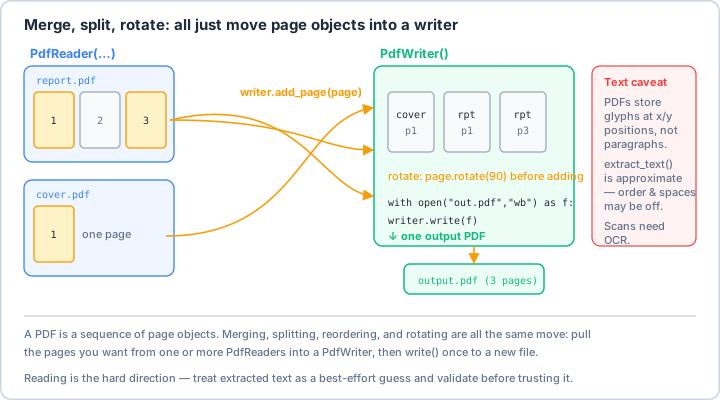
PdfReaders into a PdfWriter, then calling write() once. Going the other way — pulling clean text back out — is the hard direction, because PDFs store glyphs at x/y positions, not paragraphs, so treat extract_text() as a best-effort guess (and reach for OCR on scans).Real-World Scenario: The Document Processing Pipeline 📋
Imagine you're managing documents for a law firm. Every day, you receive hundreds of PDFs - contracts that need combining, confidential documents requiring watermarks, client files needing password protection, and reports that must be split by chapter. Let's automate this entire workflow!
import PyPDF2
from PyPDF2 import PdfReader, PdfWriter, PdfMerger
from PyPDF2.generic import AnnotationBuilder
import io
import os
from pathlib import Path
from typing import List, Dict, Optional, Tuple
from datetime import datetime
import re
from reportlab.lib.pagesizes import letter, A4
from reportlab.pdfgen import canvas
from reportlab.lib.colors import Color, red, blue, black
from reportlab.lib.units import inch
import fitz # PyMuPDF for advanced operations
import pikepdf # For handling encrypted PDFs
from PIL import Image
import json
class PDFMasterAutomation:
"""
Comprehensive PDF manipulation system for all document processing needs.
"""
def __init__(self, working_dir: str = None):
self.working_dir = Path(working_dir) if working_dir else Path.cwd()
self.working_dir.mkdir(parents=True, exist_ok=True)
# Configuration for different operations
self.config = {
'compression': True,
'preserve_metadata': True,
'default_watermark': 'CONFIDENTIAL',
'encryption_algorithm': 'AES-256',
'temp_dir': self.working_dir / 'temp'
}
self.config['temp_dir'].mkdir(exist_ok=True)
def merge_pdfs(self, pdf_files: List[str], output_file: str,
bookmark_names: List[str] = None) -> bool:
"""
Merge multiple PDF files into one with bookmarks.
"""
try:
merger = PdfMerger()
for idx, pdf_file in enumerate(pdf_files):
with open(pdf_file, 'rb') as file:
# Add bookmark for each merged file
bookmark = bookmark_names[idx] if bookmark_names else Path(pdf_file).stem
# Get page count for bookmark positioning
reader = PdfReader(file)
page_count = len(reader.pages)
# Merge with bookmark
merger.append(
fileobj=file,
outline_item=bookmark,
pages=(0, page_count)
)
print(f" ✅ Added: {Path(pdf_file).name} ({page_count} pages)")
# Add metadata
merger.add_metadata({
'/Title': 'Merged Document',
'/Author': 'PDF Automation System',
'/Subject': f'Merged from {len(pdf_files)} files',
'/Creator': 'PyPDF2',
'/CreationDate': datetime.now().isoformat()
})
# Write merged PDF
with open(output_file, 'wb') as output:
merger.write(output)
merger.close()
print(f"✅ Merged {len(pdf_files)} PDFs into {output_file}")
return True
except Exception as e:
print(f"❌ Error merging PDFs: {e}")
return False
def split_pdf(self, input_file: str, output_dir: str,
split_strategy: str = 'single', **kwargs) -> List[str]:
"""
Split PDF based on different strategies.
Strategies:
- 'single': One page per file
- 'chunks': Fixed number of pages per file
- 'bookmarks': Split at bookmark positions
- 'text_marker': Split where specific text is found
"""
output_path = Path(output_dir)
output_path.mkdir(parents=True, exist_ok=True)
output_files = []
try:
with open(input_file, 'rb') as file:
reader = PdfReader(file)
total_pages = len(reader.pages)
if split_strategy == 'single':
# One page per file
for page_num in range(total_pages):
writer = PdfWriter()
writer.add_page(reader.pages[page_num])
output_name = output_path / f"page_{page_num + 1:04d}.pdf"
with open(output_name, 'wb') as output_file:
writer.write(output_file)
output_files.append(str(output_name))
print(f"✅ Split into {total_pages} single-page PDFs")
elif split_strategy == 'chunks':
# Fixed chunks
chunk_size = kwargs.get('chunk_size', 10)
chunk_num = 0
for start_page in range(0, total_pages, chunk_size):
writer = PdfWriter()
end_page = min(start_page + chunk_size, total_pages)
for page_num in range(start_page, end_page):
writer.add_page(reader.pages[page_num])
chunk_num += 1
output_name = output_path / f"chunk_{chunk_num:03d}.pdf"
with open(output_name, 'wb') as output_file:
writer.write(output_file)
output_files.append(str(output_name))
print(f"✅ Split into {chunk_num} chunks of {chunk_size} pages")
elif split_strategy == 'bookmarks':
# Split at bookmarks
bookmarks = self._get_bookmarks_with_pages(reader)
for idx, (bookmark, start_page, end_page) in enumerate(bookmarks):
writer = PdfWriter()
for page_num in range(start_page, end_page):
writer.add_page(reader.pages[page_num])
# Clean bookmark name for filename
safe_name = re.sub(r'[^\w\s-]', '', bookmark)[:50]
output_name = output_path / f"{idx:02d}_{safe_name}.pdf"
with open(output_name, 'wb') as output_file:
writer.write(output_file)
output_files.append(str(output_name))
print(f"✅ Split into {len(bookmarks)} sections based on bookmarks")
elif split_strategy == 'text_marker':
# Split where text marker is found
marker = kwargs.get('marker', 'Chapter')
split_pages = self._find_text_markers(reader, marker)
for idx, (start_page, end_page) in enumerate(split_pages):
writer = PdfWriter()
for page_num in range(start_page, end_page):
writer.add_page(reader.pages[page_num])
output_name = output_path / f"section_{idx + 1:03d}.pdf"
with open(output_name, 'wb') as output_file:
writer.write(output_file)
output_files.append(str(output_name))
print(f"✅ Split into {len(split_pages)} sections at '{marker}' markers")
return output_files
except Exception as e:
print(f"❌ Error splitting PDF: {e}")
return []
def _get_bookmarks_with_pages(self, reader: PdfReader) -> List[Tuple[str, int, int]]:
"""Extract bookmarks with their page ranges."""
bookmarks = []
outlines = reader.outline
def extract_bookmark_pages(outline, level=0):
for item in outline:
if isinstance(item, list):
extract_bookmark_pages(item, level + 1)
else:
page_num = reader.get_destination_page_number(item)
bookmarks.append((item.title, page_num))
if outlines:
extract_bookmark_pages(outlines)
# Convert to page ranges
bookmark_ranges = []
for i in range(len(bookmarks)):
title = bookmarks[i][0]
start_page = bookmarks[i][1]
end_page = bookmarks[i + 1][1] if i + 1 < len(bookmarks) else len(reader.pages)
bookmark_ranges.append((title, start_page, end_page))
return bookmark_ranges
def _find_text_markers(self, reader: PdfReader, marker: str) -> List[Tuple[int, int]]:
"""Find pages containing specific text markers."""
marker_pages = []
for page_num, page in enumerate(reader.pages):
text = page.extract_text()
if marker in text:
marker_pages.append(page_num)
# Create page ranges
ranges = []
for i in range(len(marker_pages)):
start = marker_pages[i]
end = marker_pages[i + 1] if i + 1 < len(marker_pages) else len(reader.pages)
ranges.append((start, end))
return ranges
def add_watermark(self, input_file: str, output_file: str,
watermark_text: str = None,
watermark_image: str = None,
opacity: float = 0.3) -> bool:
"""
Add text or image watermark to all pages of a PDF.
"""
try:
# Create watermark PDF
if watermark_text:
watermark_pdf = self._create_text_watermark(watermark_text, opacity)
elif watermark_image:
watermark_pdf = self._create_image_watermark(watermark_image, opacity)
else:
watermark_pdf = self._create_text_watermark(self.config['default_watermark'], opacity)
# Apply watermark
with open(input_file, 'rb') as input_pdf:
reader = PdfReader(input_pdf)
writer = PdfWriter()
watermark_page = watermark_pdf.pages[0]
for page_num, page in enumerate(reader.pages):
# Merge watermark with page
page.merge_page(watermark_page)
writer.add_page(page)
# Preserve metadata
if self.config['preserve_metadata'] and reader.metadata:
writer.add_metadata(reader.metadata)
# Write watermarked PDF
with open(output_file, 'wb') as output:
writer.write(output)
print(f"✅ Watermark added to {output_file}")
return True
except Exception as e:
print(f"❌ Error adding watermark: {e}")
return False
def _create_text_watermark(self, text: str, opacity: float) -> PdfReader:
"""Create a PDF with text watermark."""
# Create watermark using reportlab
packet = io.BytesIO()
can = canvas.Canvas(packet, pagesize=letter)
can.setFillColor(Color(0.5, 0.5, 0.5, alpha=opacity))
can.setFont("Helvetica", 50)
# Rotate and position text
can.saveState()
can.translate(letter[0]/2, letter[1]/2)
can.rotate(45)
# Center text
text_width = can.stringWidth(text, "Helvetica", 50)
can.drawString(-text_width/2, 0, text)
can.restoreState()
can.save()
packet.seek(0)
return PdfReader(packet)
def _create_image_watermark(self, image_path: str, opacity: float) -> PdfReader:
"""Create a PDF with image watermark."""
packet = io.BytesIO()
can = canvas.Canvas(packet, pagesize=letter)
# Load and resize image
img = Image.open(image_path)
# Convert to RGBA and adjust opacity
if img.mode != 'RGBA':
img = img.convert('RGBA')
# Adjust opacity
img.putalpha(int(255 * opacity))
# Save temporary image
temp_img = self.config['temp_dir'] / 'temp_watermark.png'
img.save(temp_img)
# Add to canvas
can.drawImage(str(temp_img),
letter[0]/4, letter[1]/4,
width=letter[0]/2, height=letter[1]/2,
preserveAspectRatio=True,
mask='auto')
can.save()
packet.seek(0)
# Clean up temp file
temp_img.unlink()
return PdfReader(packet)
def extract_text(self, input_file: str, output_format: str = 'text',
page_range: Tuple[int, int] = None) -> str:
"""
Extract text from PDF with various output formats.
"""
extracted_text = []
try:
with open(input_file, 'rb') as file:
reader = PdfReader(file)
# Determine page range
start_page = page_range[0] if page_range else 0
end_page = page_range[1] if page_range else len(reader.pages)
for page_num in range(start_page, end_page):
page = reader.pages[page_num]
text = page.extract_text()
if output_format == 'text':
extracted_text.append(text)
elif output_format == 'json':
extracted_text.append({
'page': page_num + 1,
'text': text,
'word_count': len(text.split())
})
elif output_format == 'structured':
# Extract with structure preservation
lines = text.split('\n')
extracted_text.append({
'page': page_num + 1,
'lines': lines,
'paragraphs': self._extract_paragraphs(text)
})
if output_format == 'text':
return '\n'.join(extracted_text)
elif output_format in ['json', 'structured']:
return json.dumps(extracted_text, indent=2)
except Exception as e:
print(f"❌ Error extracting text: {e}")
return ""
def _extract_paragraphs(self, text: str) -> List[str]:
"""Extract paragraphs from text."""
# Split by multiple newlines
paragraphs = re.split(r'\n{2,}', text)
# Clean and filter
return [p.strip() for p in paragraphs if p.strip()]
def extract_images(self, input_file: str, output_dir: str) -> List[str]:
"""
Extract all images from a PDF.
"""
output_path = Path(output_dir)
output_path.mkdir(parents=True, exist_ok=True)
extracted_images = []
try:
# Use PyMuPDF for better image extraction
pdf_document = fitz.open(input_file)
for page_num, page in enumerate(pdf_document):
image_list = page.get_images()
for img_index, img in enumerate(image_list):
# Get image data
xref = img[0]
pix = fitz.Pixmap(pdf_document, xref)
# Save image
if pix.n - pix.alpha < 4: # GRAY or RGB
img_name = output_path / f"page{page_num + 1}_img{img_index + 1}.png"
pix.save(str(img_name))
extracted_images.append(str(img_name))
else: # CMYK
# Convert to RGB
pix = fitz.Pixmap(fitz.csRGB, pix)
img_name = output_path / f"page{page_num + 1}_img{img_index + 1}.png"
pix.save(str(img_name))
extracted_images.append(str(img_name))
pix = None
pdf_document.close()
print(f"✅ Extracted {len(extracted_images)} images")
return extracted_images
except Exception as e:
print(f"❌ Error extracting images: {e}")
return []
def rotate_pages(self, input_file: str, output_file: str,
rotation: int = 90, page_range: Tuple[int, int] = None) -> bool:
"""
Rotate PDF pages by specified degrees (90, 180, 270).
"""
try:
with open(input_file, 'rb') as file:
reader = PdfReader(file)
writer = PdfWriter()
for page_num, page in enumerate(reader.pages):
# Check if page is in range
if page_range:
if page_num < page_range[0] or page_num >= page_range[1]:
writer.add_page(page)
continue
# Rotate page
page.rotate(rotation)
writer.add_page(page)
# Write rotated PDF
with open(output_file, 'wb') as output:
writer.write(output)
print(f"✅ Pages rotated by {rotation}° in {output_file}")
return True
except Exception as e:
print(f"❌ Error rotating pages: {e}")
return False
def encrypt_pdf(self, input_file: str, output_file: str,
user_password: str, owner_password: str = None,
encryption_algorithm: str = None) -> bool:
"""
Encrypt PDF with password protection.
"""
try:
with open(input_file, 'rb') as file:
reader = PdfReader(file)
writer = PdfWriter()
# Copy all pages
for page in reader.pages:
writer.add_page(page)
# Copy metadata
if reader.metadata:
writer.add_metadata(reader.metadata)
# Set encryption
algorithm = encryption_algorithm or self.config['encryption_algorithm']
writer.encrypt(
user_password=user_password,
owner_password=owner_password or user_password,
algorithm=algorithm, # e.g. "AES-256", "AES-128", "RC4-128"
permissions_flag=-1 # All permissions
)
# Write encrypted PDF
with open(output_file, 'wb') as output:
writer.write(output)
print(f"✅ PDF encrypted with {algorithm}: {output_file}")
return True
except Exception as e:
print(f"❌ Error encrypting PDF: {e}")
return False
def decrypt_pdf(self, input_file: str, output_file: str, password: str) -> bool:
"""
Decrypt a password-protected PDF.
"""
try:
with open(input_file, 'rb') as file:
reader = PdfReader(file)
# Try to decrypt
if reader.is_encrypted:
if not reader.decrypt(password):
print("❌ Invalid password")
return False
writer = PdfWriter()
# Copy all pages
for page in reader.pages:
writer.add_page(page)
# Write decrypted PDF
with open(output_file, 'wb') as output:
writer.write(output)
print(f"✅ PDF decrypted: {output_file}")
return True
except Exception as e:
print(f"❌ Error decrypting PDF: {e}")
return False
def add_annotations(self, input_file: str, output_file: str,
annotations: List[Dict]) -> bool:
"""
Add annotations (comments, highlights, notes) to PDF.
annotations = [
{
'page': 1,
'type': 'text',
'x': 100, 'y': 100,
'text': 'Important note'
}
]
"""
try:
with open(input_file, 'rb') as file:
reader = PdfReader(file)
writer = PdfWriter()
for page_num, page in enumerate(reader.pages):
# Add annotations for this page
page_annotations = [a for a in annotations if a['page'] == page_num + 1]
for ann in page_annotations:
if ann['type'] == 'text':
# Create text annotation
annotation = AnnotationBuilder.text(
text=ann['text'],
rect=(ann['x'], ann['y'], ann['x'] + 100, ann['y'] + 20),
open=True
)
writer.add_annotation(page_number=page_num, annotation=annotation)
elif ann['type'] == 'highlight':
# Create highlight annotation
annotation = AnnotationBuilder.rectangle(
rect=(ann['x'], ann['y'], ann['x'] + ann['width'], ann['y'] + ann['height']),
highlight=True
)
writer.add_annotation(page_number=page_num, annotation=annotation)
writer.add_page(page)
# Write annotated PDF
with open(output_file, 'wb') as output:
writer.write(output)
print(f"✅ Annotations added: {output_file}")
return True
except Exception as e:
print(f"❌ Error adding annotations: {e}")
return False
def compress_pdf(self, input_file: str, output_file: str,
compression_level: str = 'medium') -> bool:
"""
Compress PDF to reduce file size.
"""
try:
# Compression settings
settings = {
'low': {'compress_level': 1, 'remove_images': False, 'reduce_images': False},
'medium': {'compress_level': 5, 'remove_images': False, 'reduce_images': True},
'high': {'compress_level': 9, 'remove_images': False, 'reduce_images': True},
'maximum': {'compress_level': 9, 'remove_images': True, 'reduce_images': True}
}
config = settings.get(compression_level, settings['medium'])
with pikepdf.open(input_file) as pdf:
# Compress streams
for page in pdf.pages:
for name, obj in page.images.items():
if config['reduce_images']:
# Reduce image quality
obj.write(zlib_level=config['compress_level'])
# Save with compression
pdf.save(output_file,
compress_streams=True,
stream_decode_level=pikepdf.StreamDecodeLevel.specialized)
# Check compression ratio
original_size = os.path.getsize(input_file)
compressed_size = os.path.getsize(output_file)
ratio = (1 - compressed_size / original_size) * 100
print(f"✅ PDF compressed by {ratio:.1f}%: {output_file}")
return True
except Exception as e:
print(f"❌ Error compressing PDF: {e}")
return False
class PDFFormProcessor:
"""
Process and fill PDF forms automatically.
"""
def __init__(self):
self.form_data_cache = {}
def extract_form_fields(self, pdf_file: str) -> Dict:
"""
Extract all form fields from a PDF.
"""
fields = {}
try:
with open(pdf_file, 'rb') as file:
reader = PdfReader(file)
if '/AcroForm' in reader.trailer['/Root']:
form_fields = reader.get_fields()
for field_name, field_data in form_fields.items():
field_type = field_data.get('/FT', '')
field_value = field_data.get('/V', '')
field_options = field_data.get('/Opt', [])
fields[field_name] = {
'type': str(field_type),
'value': str(field_value) if field_value else '',
'options': [str(opt) for opt in field_options] if field_options else []
}
print(f"✅ Extracted {len(fields)} form fields")
else:
print("⚠️ No form fields found in PDF")
return fields
except Exception as e:
print(f"❌ Error extracting form fields: {e}")
return {}
def fill_form(self, template_file: str, output_file: str,
form_data: Dict, flatten: bool = False) -> bool:
"""
Fill PDF form with provided data.
"""
try:
with open(template_file, 'rb') as file:
reader = PdfReader(file)
writer = PdfWriter()
# Copy pages and update form fields
for page in reader.pages:
writer.add_page(page)
# Update form field values on every page (a single page only
# fills fields on that page; multi-page forms need all pages)
for page in writer.pages:
writer.update_page_form_field_values(
page,
form_data
)
# NOTE: compress_content_streams() only compresses the streams;
# it does NOT flatten the form or make fields non-editable.
# True flattening requires removing /AcroForm and rendering the
# field appearances into the page content.
if flatten:
for page in writer.pages:
page.compress_content_streams()
# Write filled form
with open(output_file, 'wb') as output:
writer.write(output)
print(f"✅ Form filled and saved: {output_file}")
return True
except Exception as e:
print(f"❌ Error filling form: {e}")
return False
def batch_fill_forms(self, template_file: str, data_source: str,
output_dir: str) -> List[str]:
"""
Fill multiple forms from CSV or JSON data source.
"""
output_path = Path(output_dir)
output_path.mkdir(parents=True, exist_ok=True)
generated_files = []
try:
# Load data
if data_source.endswith('.csv'):
import pandas as pd
df = pd.read_csv(data_source)
records = df.to_dict('records')
elif data_source.endswith('.json'):
with open(data_source, 'r') as f:
records = json.load(f)
else:
print("❌ Unsupported data format")
return []
# Process each record
for idx, record in enumerate(records):
output_file = output_path / f"filled_form_{idx + 1:04d}.pdf"
if self.fill_form(template_file, str(output_file), record):
generated_files.append(str(output_file))
print(f"✅ Generated {len(generated_files)} filled forms")
return generated_files
except Exception as e:
print(f"❌ Error in batch form filling: {e}")
return []
class PDFReportGenerator:
"""
Generate PDF reports from data.
"""
def __init__(self):
self.styles = {
'title': {'fontSize': 24, 'textColor': (0.2, 0.2, 0.5)},
'heading': {'fontSize': 16, 'textColor': (0.3, 0.3, 0.3)},
'normal': {'fontSize': 11, 'textColor': (0, 0, 0)}
}
def create_report(self, data: Dict, output_file: str,
template: str = 'standard'):
"""
Create a PDF report from structured data.
"""
from reportlab.lib import colors
from reportlab.lib.pagesizes import letter, A4
from reportlab.platypus import SimpleDocTemplate, Table, TableStyle, Paragraph, Spacer
from reportlab.lib.styles import getSampleStyleSheet, ParagraphStyle
from reportlab.lib.units import inch
# Create document
doc = SimpleDocTemplate(output_file, pagesize=letter)
story = []
styles = getSampleStyleSheet()
# Add title
title_style = ParagraphStyle(
'CustomTitle',
parent=styles['Heading1'],
fontSize=24,
textColor=colors.HexColor('#1F4788'),
spaceAfter=30
)
title = Paragraph(data.get('title', 'Report'), title_style)
story.append(title)
story.append(Spacer(1, 12))
# Add metadata
if 'metadata' in data:
for key, value in data['metadata'].items():
para = Paragraph(f"{key}: {value}", styles['Normal'])
story.append(para)
story.append(Spacer(1, 12))
# Add sections
if 'sections' in data:
for section in data['sections']:
# Section heading
heading = Paragraph(section['heading'], styles['Heading2'])
story.append(heading)
story.append(Spacer(1, 6))
# Section content
if 'text' in section:
para = Paragraph(section['text'], styles['Normal'])
story.append(para)
story.append(Spacer(1, 12))
# Section table
if 'table' in section:
table_data = section['table']
t = Table(table_data)
# Apply table style
t.setStyle(TableStyle([
('BACKGROUND', (0, 0), (-1, 0), colors.HexColor('#1F4788')),
('TEXTCOLOR', (0, 0), (-1, 0), colors.whitesmoke),
('ALIGN', (0, 0), (-1, -1), 'CENTER'),
('FONTNAME', (0, 0), (-1, 0), 'Helvetica-Bold'),
('FONTSIZE', (0, 0), (-1, 0), 12),
('BOTTOMPADDING', (0, 0), (-1, 0), 12),
('BACKGROUND', (0, 1), (-1, -1), colors.beige),
('GRID', (0, 0), (-1, -1), 1, colors.black)
]))
story.append(t)
story.append(Spacer(1, 12))
# Build PDF
doc.build(story)
print(f"✅ Report generated: {output_file}")
class PDFBatchProcessor:
"""
Batch process multiple PDFs with various operations.
"""
def __init__(self, master: PDFMasterAutomation):
self.master = master
self.statistics = {
'processed': 0,
'failed': 0,
'total_pages': 0,
'total_size_mb': 0
}
def process_directory(self, input_dir: str, output_dir: str,
operations: List[Dict]) -> Dict:
"""
Process all PDFs in a directory with specified operations.
operations = [
{'type': 'watermark', 'text': 'CONFIDENTIAL'},
{'type': 'compress', 'level': 'medium'},
{'type': 'encrypt', 'password': 'secret'}
]
"""
input_path = Path(input_dir)
output_path = Path(output_dir)
output_path.mkdir(parents=True, exist_ok=True)
results = []
for pdf_file in input_path.glob('*.pdf'):
print(f"\nProcessing: {pdf_file.name}")
try:
# Apply operations in sequence
current_file = str(pdf_file)
for op in operations:
temp_output = output_path / f"temp_{pdf_file.name}"
if op['type'] == 'watermark':
success = self.master.add_watermark(
current_file, str(temp_output),
watermark_text=op.get('text')
)
elif op['type'] == 'compress':
success = self.master.compress_pdf(
current_file, str(temp_output),
compression_level=op.get('level', 'medium')
)
elif op['type'] == 'encrypt':
success = self.master.encrypt_pdf(
current_file, str(temp_output),
user_password=op.get('password')
)
elif op['type'] == 'rotate':
success = self.master.rotate_pages(
current_file, str(temp_output),
rotation=op.get('degrees', 90)
)
if success:
current_file = str(temp_output)
else:
raise Exception(f"Operation {op['type']} failed")
# Move final result
final_output = output_path / pdf_file.name
Path(current_file).rename(final_output)
# Update statistics
self.statistics['processed'] += 1
self.statistics['total_size_mb'] += os.path.getsize(final_output) / (1024 * 1024)
results.append({
'file': pdf_file.name,
'status': 'success',
'output': str(final_output)
})
except Exception as e:
self.statistics['failed'] += 1
results.append({
'file': pdf_file.name,
'status': 'failed',
'error': str(e)
})
print(f" ❌ Failed: {e}")
# Summary
print("\n" + "="*50)
print("📊 Batch Processing Summary:")
print(f" Processed: {self.statistics['processed']}")
print(f" Failed: {self.statistics['failed']}")
print(f" Total Size: {self.statistics['total_size_mb']:.2f} MB")
print("="*50)
return {
'statistics': self.statistics,
'results': results
}
# Example usage
if __name__ == "__main__":
# Initialize PDF master
pdf_master = PDFMasterAutomation(working_dir="./pdf_workspace")
# Example 1: Merge multiple contracts
pdf_master.merge_pdfs(
pdf_files=['contract1.pdf', 'contract2.pdf', 'appendix.pdf'],
output_file='merged_contract.pdf',
bookmark_names=['Main Contract', 'Amendment', 'Appendix']
)
# Example 2: Split a large document
pdf_master.split_pdf(
input_file='annual_report.pdf',
output_dir='./split_reports',
split_strategy='bookmarks'
)
# Example 3: Add watermark to confidential documents
pdf_master.add_watermark(
input_file='confidential.pdf',
output_file='confidential_watermarked.pdf',
watermark_text='CONFIDENTIAL - DO NOT DISTRIBUTE'
)
# Example 4: Extract text for analysis
extracted_text = pdf_master.extract_text(
input_file='invoice.pdf',
output_format='structured'
)
# Example 5: Process forms
form_processor = PDFFormProcessor()
# Extract form fields
fields = form_processor.extract_form_fields('application_form.pdf')
print(json.dumps(fields, indent=2))
# Fill form
form_data = {
'name': 'John Doe',
'email': 'john@example.com',
'date': '2024-01-15'
}
form_processor.fill_form(
template_file='application_form.pdf',
output_file='filled_application.pdf',
form_data=form_data,
flatten=True
)
# Example 6: Batch processing
batch_processor = PDFBatchProcessor(pdf_master)
operations = [
{'type': 'watermark', 'text': 'DRAFT'},
{'type': 'compress', 'level': 'high'},
{'type': 'encrypt', 'password': 'secure123'}
]
results = batch_processor.process_directory(
input_dir='./input_pdfs',
output_dir='./processed_pdfs',
operations=operations
)
print("\n✅ PDF automation complete!")
Advanced PDF Techniques 🔬
Let's explore more sophisticated PDF operations that handle complex real-world scenarios!
Compress, Split, Merge
class PDFIntelligentProcessor:
    """
    Intelligent PDF processing with OCR and content analysis.
    """

    def __init__(self):
        self.ocr_enabled = self._check_ocr_availability()

    def _check_ocr_availability(self) -> bool:
        """Check if OCR tools are available."""
        try:
            import pytesseract
            import pdf2image
            return True
        except ImportError:
            print("⚠️ OCR libraries not installed")
            return False

    def ocr_pdf(self, input_file: str, output_file: str, language: str = 'eng') -> bool:
        """
        Perform OCR on scanned PDFs to make them searchable.
        """
        if not self.ocr_enabled:
            print("❌ OCR not available")
            return False

        try:
            import pytesseract
            from pdf2image import convert_from_path
            from PIL import Image

            # Convert PDF to images
            images = convert_from_path(input_file)

            # Create new PDF with OCR text
            from reportlab.pdfgen import canvas
            from reportlab.lib.pagesizes import letter

            c = canvas.Canvas(output_file, pagesize=letter)

            for page_num, image in enumerate(images):
                # Perform OCR
                text = pytesseract.image_to_string(image, lang=language)

                # Add invisible text layer
                c.drawString(100, 750, text)
                c.showPage()

            c.save()
            print(f"✅ OCR completed: {output_file}")
            return True

        except Exception as e:
            print(f"❌ OCR failed: {e}")
            return False

    def smart_merge(self, pdf_files: List[str], output_file: str,
                   remove_duplicates: bool = True,
                   sort_by: str = 'name') -> bool:
        """
        Intelligently merge PDFs with duplicate detection and sorting.
        """
        try:
            # Sort files
            if sort_by == 'name':
                pdf_files.sort()
            elif sort_by == 'date':
                pdf_files.sort(key=lambda x: os.path.getmtime(x))
            elif sort_by == 'size':
                pdf_files.sort(key=lambda x: os.path.getsize(x))

            merger = PdfMerger()
            added_hashes = set()

            for pdf_file in pdf_files:
                # Calculate file hash for duplicate detection
                if remove_duplicates:
                    file_hash = self._calculate_file_hash(pdf_file)
                    if file_hash in added_hashes:
                        print(f"  ⏭️ Skipping duplicate: {Path(pdf_file).name}")
                        continue
                    added_hashes.add(file_hash)

                merger.append(pdf_file)
                print(f"  ✅ Added: {Path(pdf_file).name}")

            merger.write(output_file)
            merger.close()

            print(f"✅ Smart merge complete: {output_file}")
            return True

        except Exception as e:
            print(f"❌ Smart merge failed: {e}")
            return False

    def _calculate_file_hash(self, file_path: str) -> str:
        """Calculate SHA256 hash of a file."""
        import hashlib
        sha256_hash = hashlib.sha256()
        with open(file_path, "rb") as f:
            for byte_block in iter(lambda: f.read(4096), b""):
                sha256_hash.update(byte_block)
        return sha256_hash.hexdigest()

    def redact_sensitive_info(self, input_file: str, output_file: str,
                             patterns: List[str]) -> bool:
        """
        Redact sensitive information from PDFs.

        patterns = ['SSN: \d{3}-\d{2}-\d{4}', 'Credit Card: \d{16}']
        """
        try:
            # Use PyMuPDF for redaction
            import fitz

            doc = fitz.open(input_file)

            for page in doc:
                for pattern in patterns:
                    # Find text matching pattern
                    areas = page.search_for(pattern)

                    for area in areas:
                        # Add redaction annotation
                        page.add_redact_annot(area, fill=(0, 0, 0))

                # Apply redactions
                page.apply_redactions()

            doc.save(output_file)
            doc.close()

            print(f"✅ Sensitive information redacted: {output_file}")
            return True

        except Exception as e:
            print(f"❌ Redaction failed: {e}")
            return False
Key Takeaways and Best Practices 🎯
- Always Validate PDFs: Check if a PDF is valid before processing to avoid crashes.
- Preserve Metadata: Keep original metadata when modifying PDFs for audit trails.
- Handle Encryption Properly: Always check if a PDF is encrypted before attempting operations.
- Use Appropriate Libraries: PyPDF2 for basic operations, PyMuPDF for advanced features, pikepdf for robust handling.
- Batch Processing: Process multiple PDFs efficiently using loops and error handling.
- Memory Management: For large PDFs, use streaming and chunking to avoid memory issues.
- Test with Various PDFs: PDFs can vary greatly in structure - test with different sources.
PDF Automation Best Practices 📋
PDF automation with PyPDF2 and related libraries transforms you from a document reader to a document master. You can process thousands of PDFs, extract valuable data, apply security, and create professional documents - all programmatically. Whether you're in legal, finance, or any document-heavy industry, these skills will revolutionize your workflow! 🚀
Pro Tip: PDFs are complex beasts - they can contain forms, multimedia, JavaScript, and more. Always have a fallback plan when automation fails. Keep original files, log all operations, and verify outputs. Remember that PDF/A is the best format for long-term archival, and always consider accessibility when creating PDFs!