👻 Headless Browsing: Automation Without the GUI
📚 What You'll Learn
By the end of this lesson, you will be able to:
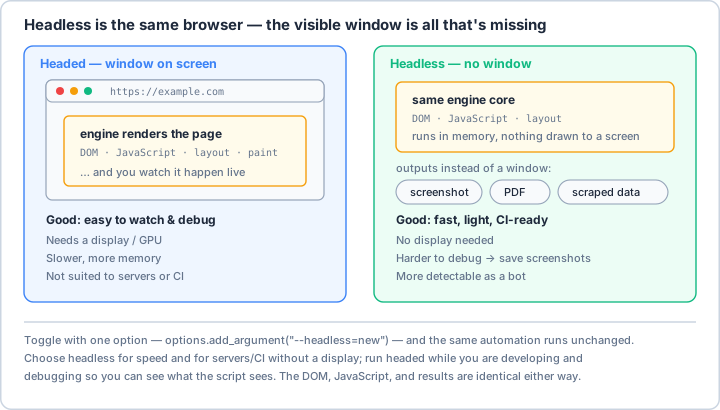
- Explain what headless mode is — the same browser engine running with no window drawn — and why it is faster and lighter
- Launch Chrome and Firefox in headless mode and set essential flags (window size,
--no-sandbox,--disable-gpu) - Debug an invisible browser by capturing screenshots, console logs, and page source when steps fail
- Recognize why some sites detect headless traffic and apply basic evasion (realistic user agent, window size, disabling automation flags)
- Choose headless for the right jobs — CI/CD tests, servers, screenshot and PDF generation, large-scale scraping
- Manage resources so many browser instances can run in parallel without exhausting memory
⏱️ Estimated Time: 45–60 minutes
🎯 Project: Write a headless script that visits a page on a displayless machine, saves a full-page screenshot as a debugging artifact, and confirms the DOM matches what a headed browser would see.
Headless browsing is like having an invisible browser that runs in the background - all the power of a full browser without the overhead of rendering graphics. It's the stealth mode of web automation, perfect for servers, CI/CD pipelines, and high-performance scraping. Like a submarine navigating underwater, headless browsers do their work unseen but with full capability. Let's master the art of GUI-less browser automation! 🚀
The Headless Browser Ecosystem
Headless browsers are the workhorses of modern automation - they consume less memory, run faster, and can scale to hundreds of instances. But with great power comes unique challenges: debugging without seeing, handling downloads without a UI, and dealing with sites that detect headless mode. Master these challenges to unlock unprecedented automation scale!
Real-World Scenario: The Cloud-Based Testing Farm 🌩️
You're building a cloud-based testing infrastructure that runs thousands of browser tests in parallel on serverless functions and containers. The system must handle screenshots, videos, network interception, console logging, and performance metrics - all without any GUI. It needs to evade headless detection, manage resources efficiently, and provide detailed debugging capabilities when tests fail. Let's build a comprehensive headless browsing system!
# First, install required packages:
# pip install selenium playwright pyppeteer pillow opencv-python pyvirtualdisplay
import os
import sys
import json
import base64
import logging
import tempfile
import shutil
from typing import Dict, List, Optional, Any, Tuple, Union
from dataclasses import dataclass, field
from enum import Enum
from pathlib import Path
import time
from datetime import datetime
import subprocess
import platform
from selenium import webdriver
from selenium.webdriver.common.by import By
from selenium.webdriver.chrome.options import Options as ChromeOptions
from selenium.webdriver.chrome.service import Service as ChromeService
from selenium.webdriver.firefox.options import Options as FirefoxOptions
from selenium.common.exceptions import WebDriverException
import cv2
import numpy as np
from PIL import Image
import io
# ==================== Headless Configuration ====================
@dataclass
class HeadlessConfig:
"""Configuration for headless browser."""
browser: str = "chrome"
window_size: Tuple[int, int] = (1920, 1080)
user_agent: Optional[str] = None
disable_gpu: bool = True
no_sandbox: bool = True
disable_dev_shm: bool = True
disable_blink_features: bool = True
stealth_mode: bool = True
# Performance options
disable_images: bool = False
disable_javascript: bool = False
disable_css: bool = False
page_load_strategy: str = "normal"
# Debugging options
enable_logging: bool = True
log_level: str = "INFO"
screenshot_on_failure: bool = True
save_console_logs: bool = True
save_network_logs: bool = False
record_video: bool = False
# Resource limits
memory_limit: Optional[int] = None # MB
cpu_limit: Optional[float] = None # Percentage
timeout: int = 30
# Download handling
download_dir: Optional[str] = None
# Proxy
proxy: Optional[str] = None
# ==================== Headless Browser Manager ====================
class HeadlessBrowserManager:
"""
Comprehensive headless browser management.
"""
def __init__(self, config: HeadlessConfig = None):
self.config = config or HeadlessConfig()
self.driver = None
self.logger = self._setup_logging()
self._setup_directories()
# Performance metrics
self.metrics = {
"start_time": None,
"memory_usage": [],
"cpu_usage": [],
"network_requests": [],
"console_logs": [],
"errors": []
}
def _setup_logging(self) -> logging.Logger:
"""Setup logging for headless browser."""
logger = logging.getLogger("HeadlessBrowser")
logger.setLevel(getattr(logging, self.config.log_level))
if not logger.handlers:
handler = logging.StreamHandler()
formatter = logging.Formatter(
'%(asctime)s - %(name)s - %(levelname)s - %(message)s'
)
handler.setFormatter(formatter)
logger.addHandler(handler)
return logger
def _setup_directories(self):
"""Create necessary directories."""
if self.config.download_dir:
Path(self.config.download_dir).mkdir(parents=True, exist_ok=True)
def create_chrome_headless(self) -> webdriver.Chrome:
"""Create headless Chrome browser."""
options = ChromeOptions()
# Basic headless configuration
options.add_argument("--headless=new") # New headless mode
options.add_argument(f"--window-size={self.config.window_size[0]},{self.config.window_size[1]}")
# System options
if self.config.disable_gpu:
options.add_argument("--disable-gpu")
if self.config.no_sandbox:
options.add_argument("--no-sandbox")
if self.config.disable_dev_shm:
options.add_argument("--disable-dev-shm-usage")
# Stealth mode configurations
if self.config.stealth_mode:
options = self._apply_stealth_options(options)
# Build ONE merged preferences dict. Each add_experimental_option("prefs", ...)
# call replaces the entire "prefs" value, so all prefs must go into a single
# dict added exactly once (otherwise earlier prefs are silently dropped).
prefs = {}
# Performance optimizations
if self.config.disable_images:
prefs["profile.managed_default_content_settings.images"] = 2
if self.config.disable_javascript:
prefs["profile.managed_default_content_settings.javascript"] = 2
# User agent
if self.config.user_agent:
options.add_argument(f"user-agent={self.config.user_agent}")
# Download configuration
if self.config.download_dir:
prefs.update({
"download.default_directory": os.path.abspath(self.config.download_dir),
"download.prompt_for_download": False,
"download.directory_upgrade": True,
"safebrowsing.enabled": False
})
# Apply the merged preferences once
if prefs:
options.add_experimental_option("prefs", prefs)
# Logging configuration
if self.config.enable_logging:
options.add_argument("--enable-logging")
options.add_argument("--log-level=0")
options.add_argument("--dump-dom")
# Enable performance logging
options.set_capability("goog:loggingPrefs", {
"browser": "ALL",
"driver": "ALL",
"performance": "ALL"
})
# Proxy configuration
if self.config.proxy:
options.add_argument(f"--proxy-server={self.config.proxy}")
# Additional arguments for stability
options.add_argument("--disable-software-rasterizer")
options.add_argument("--disable-extensions")
options.add_argument("--disable-plugins")
options.add_argument("--disable-default-apps")
options.add_argument("--disable-features=VizDisplayCompositor")
# Memory optimization
options.add_argument("--memory-pressure-off")
# Create driver
try:
driver = webdriver.Chrome(options=options)
driver.set_page_load_timeout(self.config.timeout)
self.driver = driver
self.metrics["start_time"] = datetime.now()
self.logger.info("Created headless Chrome browser")
return driver
except WebDriverException as e:
self.logger.error(f"Failed to create headless Chrome: {e}")
raise
def _apply_stealth_options(self, options: ChromeOptions) -> ChromeOptions:
"""Apply stealth mode options to avoid detection."""
# Remove automation indicators
options.add_experimental_option("excludeSwitches", ["enable-automation"])
options.add_experimental_option("useAutomationExtension", False)
# Additional stealth arguments
options.add_argument("--disable-blink-features=AutomationControlled")
# Modify navigator.webdriver flag via CDP
options.add_argument("--disable-web-security")
options.add_argument("--disable-features=IsolateOrigins,site-per-process")
# Set a realistic user agent if not already set
if not self.config.user_agent:
self.config.user_agent = (
"Mozilla/5.0 (Windows NT 10.0; Win64; x64) "
"AppleWebKit/537.36 (KHTML, like Gecko) "
"Chrome/120.0.0.0 Safari/537.36"
)
options.add_argument(f"user-agent={self.config.user_agent}")
return options
def create_firefox_headless(self) -> webdriver.Firefox:
"""Create headless Firefox browser."""
options = FirefoxOptions()
# Headless mode
options.add_argument("--headless")
# Window size
options.add_argument(f"--width={self.config.window_size[0]}")
options.add_argument(f"--height={self.config.window_size[1]}")
# Performance options
if self.config.disable_images:
options.set_preference("permissions.default.image", 2)
if self.config.disable_javascript:
options.set_preference("javascript.enabled", False)
# User agent
if self.config.user_agent:
options.set_preference("general.useragent.override", self.config.user_agent)
# Download configuration
if self.config.download_dir:
options.set_preference("browser.download.folderList", 2)
options.set_preference("browser.download.dir", self.config.download_dir)
options.set_preference("browser.download.useDownloadDir", True)
options.set_preference("browser.helperApps.neverAsk.saveToDisk",
"application/octet-stream,application/pdf")
# Proxy
if self.config.proxy:
proxy_parts = self.config.proxy.split(":")
options.set_preference("network.proxy.type", 1)
options.set_preference("network.proxy.http", proxy_parts[0])
options.set_preference("network.proxy.http_port", int(proxy_parts[1]))
# Create driver
try:
driver = webdriver.Firefox(options=options)
driver.set_page_load_timeout(self.config.timeout)
self.driver = driver
self.metrics["start_time"] = datetime.now()
self.logger.info("Created headless Firefox browser")
return driver
except WebDriverException as e:
self.logger.error(f"Failed to create headless Firefox: {e}")
raise
def apply_stealth_scripts(self):
"""Apply JavaScript to make browser less detectable."""
if not self.driver:
return
stealth_js = """
// Override navigator.webdriver
Object.defineProperty(navigator, 'webdriver', {
get: () => undefined
});
// Override navigator.plugins
Object.defineProperty(navigator, 'plugins', {
get: () => [1, 2, 3, 4, 5]
});
// Override navigator.languages
Object.defineProperty(navigator, 'languages', {
get: () => ['en-US', 'en']
});
// Override chrome
window.chrome = {
runtime: {}
};
// Override permissions
const originalQuery = window.navigator.permissions.query;
window.navigator.permissions.query = (parameters) => (
parameters.name === 'notifications' ?
Promise.resolve({ state: Notification.permission }) :
originalQuery(parameters)
);
"""
try:
self.driver.execute_cdp_cmd("Page.addScriptToEvaluateOnNewDocument", {
"source": stealth_js
})
self.logger.info("Applied stealth scripts")
except:
# Fallback for non-CDP browsers
self.driver.execute_script(stealth_js)
# ==================== Screenshot & Video Capture ====================
class HeadlessCapture:
"""
Screenshot and video capture for headless browsers.
"""
def __init__(self, driver: webdriver.Remote):
self.driver = driver
self.logger = logging.getLogger(__name__)
self.video_writer = None
self.video_frames = []
def take_screenshot(self, filename: Optional[str] = None) -> bytes:
"""Take a screenshot and return as bytes."""
screenshot = self.driver.get_screenshot_as_png()
if filename:
with open(filename, "wb") as f:
f.write(screenshot)
self.logger.info(f"Screenshot saved to {filename}")
return screenshot
def take_full_page_screenshot(self, filename: Optional[str] = None) -> bytes:
"""Take a full page screenshot by scrolling."""
# Get dimensions
total_height = self.driver.execute_script("return document.body.scrollHeight")
viewport_height = self.driver.execute_script("return window.innerHeight")
viewport_width = self.driver.execute_script("return window.innerWidth")
# Scroll and capture
screenshots = []
scroll_position = 0
while scroll_position < total_height:
# Scroll to position
self.driver.execute_script(f"window.scrollTo(0, {scroll_position})")
time.sleep(0.5) # Wait for render
# Take screenshot
screenshot = self.driver.get_screenshot_as_png()
screenshots.append(Image.open(io.BytesIO(screenshot)))
scroll_position += viewport_height
# Stitch screenshots together
stitched = Image.new('RGB', (viewport_width, total_height))
y_offset = 0
for img in screenshots:
stitched.paste(img, (0, y_offset))
y_offset += img.height
# Save or return
output = io.BytesIO()
stitched.save(output, format='PNG')
screenshot_bytes = output.getvalue()
if filename:
with open(filename, "wb") as f:
f.write(screenshot_bytes)
self.logger.info(f"Full page screenshot saved to {filename}")
return screenshot_bytes
def take_element_screenshot(self, element, filename: Optional[str] = None) -> bytes:
"""Take screenshot of specific element."""
# Get element location and size
location = element.location
size = element.size
# Take full page screenshot
screenshot = self.driver.get_screenshot_as_png()
image = Image.open(io.BytesIO(screenshot))
# Crop to element
left = location['x']
top = location['y']
right = left + size['width']
bottom = top + size['height']
cropped = image.crop((left, top, right, bottom))
# Save or return
output = io.BytesIO()
cropped.save(output, format='PNG')
screenshot_bytes = output.getvalue()
if filename:
with open(filename, "wb") as f:
f.write(screenshot_bytes)
self.logger.info(f"Element screenshot saved to {filename}")
return screenshot_bytes
def start_video_recording(self, fps: int = 10):
"""Start recording video of browser session."""
self.video_frames = []
self.recording_start = time.time()
self.fps = fps
self.logger.info("Started video recording")
def capture_video_frame(self):
"""Capture a frame for video."""
if self.video_frames is not None:
screenshot = self.driver.get_screenshot_as_png()
frame = cv2.imdecode(
np.frombuffer(screenshot, np.uint8),
cv2.IMREAD_COLOR
)
self.video_frames.append(frame)
def stop_video_recording(self, filename: str):
"""Stop recording and save video."""
if not self.video_frames:
self.logger.warning("No video frames to save")
return
# Get frame dimensions
height, width, _ = self.video_frames[0].shape
# Create video writer
fourcc = cv2.VideoWriter_fourcc(*'mp4v')
out = cv2.VideoWriter(filename, fourcc, self.fps, (width, height))
# Write frames
for frame in self.video_frames:
out.write(frame)
out.release()
self.video_frames = []
self.logger.info(f"Video saved to {filename}")
# ==================== Network Interception ====================
class NetworkInterceptor:
"""
Network request interception for headless browsers.
"""
def __init__(self, driver: webdriver.Remote):
self.driver = driver
self.logger = logging.getLogger(__name__)
self.intercepted_requests = []
self.blocked_urls = []
def enable_network_logging(self):
"""Enable network request logging."""
# Enable Chrome DevTools Protocol
self.driver.execute_cdp_cmd("Network.enable", {})
# Set up request interception
self.driver.execute_cdp_cmd("Network.setRequestInterception", {
"patterns": [{"urlPattern": "*"}]
})
self.logger.info("Network logging enabled")
def get_network_logs(self) -> List[Dict]:
"""Get network request logs."""
logs = self.driver.get_log("performance")
network_logs = []
for log in logs:
message = json.loads(log["message"])
method = message.get("message", {}).get("method", "")
if "Network" in method:
network_logs.append(message)
return network_logs
def block_requests(self, patterns: List[str]):
"""Block requests matching patterns."""
self.blocked_urls = patterns
# Use CDP to block requests
for pattern in patterns:
self.driver.execute_cdp_cmd("Network.setBlockedURLs", {
"urls": [pattern]
})
self.logger.info(f"Blocking requests matching: {patterns}")
def intercept_request(self, callback):
"""Intercept and modify requests."""
# This requires more complex CDP setup
# Simplified version for demonstration
script = """
const originalFetch = window.fetch;
window.fetch = function(...args) {
console.log('Fetch intercepted:', args[0]);
return originalFetch.apply(this, args);
};
const originalXHR = XMLHttpRequest.prototype.open;
XMLHttpRequest.prototype.open = function(...args) {
console.log('XHR intercepted:', args[1]);
return originalXHR.apply(this, args);
};
"""
self.driver.execute_script(script)
# ==================== Console & Error Logging ====================
class HeadlessDebugger:
"""
Debugging tools for headless browsers.
"""
def __init__(self, driver: webdriver.Remote):
self.driver = driver
self.logger = logging.getLogger(__name__)
self.console_logs = []
self.js_errors = []
def enable_console_logging(self):
"""Enable console log capture."""
# Inject script to capture console logs
script = """
// Store original console methods
const originalLog = console.log;
const originalError = console.error;
const originalWarn = console.warn;
// Override console methods
window.__consoleLogs = [];
console.log = function(...args) {
window.__consoleLogs.push({
type: 'log',
message: args.join(' '),
timestamp: new Date().toISOString()
});
originalLog.apply(console, args);
};
console.error = function(...args) {
window.__consoleLogs.push({
type: 'error',
message: args.join(' '),
timestamp: new Date().toISOString()
});
originalError.apply(console, args);
};
console.warn = function(...args) {
window.__consoleLogs.push({
type: 'warn',
message: args.join(' '),
timestamp: new Date().toISOString()
});
originalWarn.apply(console, args);
};
// Capture uncaught errors
window.addEventListener('error', function(e) {
window.__consoleLogs.push({
type: 'error',
message: e.message + ' at ' + e.filename + ':' + e.lineno,
timestamp: new Date().toISOString()
});
});
"""
self.driver.execute_script(script)
self.logger.info("Console logging enabled")
def get_console_logs(self) -> List[Dict]:
"""Get captured console logs."""
try:
# Get logs from injected script
logs = self.driver.execute_script("return window.__consoleLogs || []")
self.console_logs.extend(logs)
# Also get browser logs if available
browser_logs = self.driver.get_log("browser")
for log in browser_logs:
self.console_logs.append({
"type": log["level"],
"message": log["message"],
"timestamp": log["timestamp"]
})
return self.console_logs
except Exception as e:
self.logger.error(f"Failed to get console logs: {e}")
return []
def save_logs_to_file(self, filename: str):
"""Save all logs to file."""
logs = self.get_console_logs()
with open(filename, "w") as f:
json.dump(logs, f, indent=2, default=str)
self.logger.info(f"Logs saved to {filename}")
def check_for_js_errors(self) -> List[str]:
"""Check for JavaScript errors on the page."""
errors = []
# Check console logs for errors
logs = self.get_console_logs()
for log in logs:
if log.get("type") == "error":
errors.append(log["message"])
return errors
# ==================== Performance Monitoring ====================
class PerformanceMonitor:
"""
Monitor performance metrics in headless browser.
"""
def __init__(self, driver: webdriver.Remote):
self.driver = driver
self.logger = logging.getLogger(__name__)
def get_performance_metrics(self) -> Dict[str, Any]:
"""Get browser performance metrics."""
# Navigation timing
navigation_timing = self.driver.execute_script("""
const timing = performance.timing;
return {
domContentLoaded: timing.domContentLoadedEventEnd - timing.navigationStart,
loadComplete: timing.loadEventEnd - timing.navigationStart,
responseTime: timing.responseEnd - timing.requestStart,
domInteractive: timing.domInteractive - timing.navigationStart,
dns: timing.domainLookupEnd - timing.domainLookupStart,
tcp: timing.connectEnd - timing.connectStart
};
""")
# Resource timing
resources = self.driver.execute_script("""
return performance.getEntriesByType('resource').map(r => ({
name: r.name,
duration: r.duration,
size: r.transferSize,
type: r.initiatorType
}));
""")
# Memory usage (Chrome only)
memory = None
try:
memory = self.driver.execute_script("""
return performance.memory ? {
usedJSHeapSize: performance.memory.usedJSHeapSize,
totalJSHeapSize: performance.memory.totalJSHeapSize,
jsHeapSizeLimit: performance.memory.jsHeapSizeLimit
} : null;
""")
except:
pass
return {
"navigation": navigation_timing,
"resources": resources,
"memory": memory
}
def get_coverage_report(self) -> Dict[str, Any]:
"""Get CSS and JS coverage report."""
# Enable coverage
self.driver.execute_cdp_cmd("Profiler.enable", {})
self.driver.execute_cdp_cmd("Profiler.startPreciseCoverage", {
"callCount": False,
"detailed": True
})
# Navigate and interact with page
# ... perform actions ...
# Get coverage
js_coverage = self.driver.execute_cdp_cmd("Profiler.takePreciseCoverage", {})
return {
"javascript": js_coverage
}
# ==================== Virtual Display (Linux) ====================
class VirtualDisplay:
"""
Virtual display for headless environments (Linux).
"""
def __init__(self, size: Tuple[int, int] = (1920, 1080)):
self.size = size
self.display = None
self.logger = logging.getLogger(__name__)
def start(self):
"""Start virtual display."""
if platform.system() != "Linux":
self.logger.info("Virtual display not needed on this platform")
return
try:
from pyvirtualdisplay import Display
self.display = Display(visible=False, size=self.size)
self.display.start()
self.logger.info(f"Started virtual display: {self.size}")
except ImportError:
self.logger.warning("pyvirtualdisplay not installed")
except Exception as e:
self.logger.error(f"Failed to start virtual display: {e}")
def stop(self):
"""Stop virtual display."""
if self.display:
self.display.stop()
self.logger.info("Stopped virtual display")
# ==================== Headless Testing Framework ====================
class HeadlessTestRunner:
"""
Complete headless testing framework.
"""
def __init__(self, config: HeadlessConfig = None):
self.config = config or HeadlessConfig()
self.browser_manager = HeadlessBrowserManager(self.config)
self.driver = None
self.capture = None
self.debugger = None
self.performance = None
self.virtual_display = None
self.logger = logging.getLogger(self.__class__.__name__)
# Test results
self.results = {
"passed": 0,
"failed": 0,
"errors": [],
"screenshots": [],
"logs": [],
"performance": {}
}
def setup(self):
"""Setup test environment."""
# Start virtual display if on Linux
if platform.system() == "Linux":
self.virtual_display = VirtualDisplay()
self.virtual_display.start()
# Create browser
if self.config.browser == "chrome":
self.driver = self.browser_manager.create_chrome_headless()
elif self.config.browser == "firefox":
self.driver = self.browser_manager.create_firefox_headless()
# Apply stealth mode
if self.config.stealth_mode:
self.browser_manager.apply_stealth_scripts()
# Initialize tools
self.capture = HeadlessCapture(self.driver)
self.debugger = HeadlessDebugger(self.driver)
self.performance = PerformanceMonitor(self.driver)
# Enable debugging features
if self.config.save_console_logs:
self.debugger.enable_console_logging()
# Start video recording
if self.config.record_video:
self.capture.start_video_recording()
def teardown(self):
"""Cleanup test environment."""
# Save video if recording
if self.config.record_video:
timestamp = datetime.now().strftime("%Y%m%d_%H%M%S")
self.capture.stop_video_recording(f"test_video_{timestamp}.mp4")
# Save logs
if self.config.save_console_logs:
logs = self.debugger.get_console_logs()
self.results["logs"] = logs
# Get performance metrics
self.results["performance"] = self.performance.get_performance_metrics()
# Close browser
if self.driver:
self.driver.quit()
# Stop virtual display
if self.virtual_display:
self.virtual_display.stop()
def run_test(self, test_func, *args, **kwargs):
"""Run a test function with error handling."""
test_name = test_func.__name__
try:
# Run test
test_func(self.driver, *args, **kwargs)
self.results["passed"] += 1
self.logger.info(f"✅ Test passed: {test_name}")
except Exception as e:
self.results["failed"] += 1
self.results["errors"].append({
"test": test_name,
"error": str(e)
})
# Take screenshot on failure
if self.config.screenshot_on_failure:
screenshot_file = f"failure_{test_name}_{datetime.now():%Y%m%d_%H%M%S}.png"
self.capture.take_screenshot(screenshot_file)
self.results["screenshots"].append(screenshot_file)
self.logger.error(f"❌ Test failed: {test_name} - {e}")
raise
def generate_report(self, filename: str = "test_report.json"):
"""Generate test report."""
with open(filename, "w") as f:
json.dump(self.results, f, indent=2, default=str)
self.logger.info(f"Test report saved to {filename}")
# Example usage
if __name__ == "__main__":
print("👻 Headless Browsing Examples\n")
# Example 1: Headless configuration
print("1️⃣ Headless Browser Configuration:")
config = HeadlessConfig(
browser="chrome",
window_size=(1920, 1080),
stealth_mode=True,
screenshot_on_failure=True,
save_console_logs=True,
record_video=False
)
print(f" Browser: {config.browser}")
print(f" Window size: {config.window_size}")
print(f" Stealth mode: {config.stealth_mode}")
print(f" Debug features: screenshots, console logs")
# Example 2: Benefits of headless
print("\n2️⃣ Benefits of Headless Browsing:")
benefits = [
"⚡ Faster execution (no GUI rendering)",
"💾 Lower memory usage",
"🔧 Better for CI/CD pipelines",
"📈 Easy to scale horizontally",
"🖥️ Runs on servers without display",
"🤖 Perfect for automation",
"🔄 Supports parallel execution"
]
for benefit in benefits:
print(f" {benefit}")
# Example 3: Use cases
print("\n3️⃣ Headless Browser Use Cases:")
use_cases = [
("Web Scraping", "Extract data at scale"),
("Automated Testing", "Run tests in CI/CD"),
("Screenshot Generation", "Capture page screenshots"),
("PDF Generation", "Convert web pages to PDF"),
("Performance Testing", "Monitor page metrics"),
("SEO Analysis", "Check meta tags and content"),
("Monitoring", "Check site availability")
]
for use_case, description in use_cases:
print(f" {use_case}: {description}")
# Example 4: Detection evasion
print("\n4️⃣ Headless Detection Evasion:")
evasion_techniques = [
"Override navigator.webdriver property",
"Set realistic user agent",
"Add fake plugins array",
"Randomize window dimensions",
"Implement human-like delays",
"Use residential proxies",
"Rotate browser fingerprints",
"Handle Chrome DevTools Protocol"
]
for technique in evasion_techniques:
print(f" • {technique}")
# Example 5: Debugging techniques
print("\n5️⃣ Debugging Headless Browsers:")
debug_methods = [
"Screenshots - Capture page state",
"Console logs - JavaScript errors",
"Network logs - Request/response data",
"Video recording - Full session replay",
"Performance metrics - Load times",
"Coverage reports - Code usage",
"DOM dumps - Page structure",
"Temporary GUI mode - Visual debugging"
]
for method in debug_methods:
print(f" • {method}")
# Example 6: Performance optimization
print("\n6️⃣ Performance Optimization:")
optimizations = [
"Disable images: 2-3x speed improvement",
"Disable CSS: Faster for data extraction",
"Block ads/trackers: Reduce network overhead",
"Use page.goto() waitUntil options",
"Implement connection pooling",
"Cache static resources",
"Minimize browser restarts"
]
for optimization in optimizations:
print(f" • {optimization}")
# Example 7: Resource management
print("\n7️⃣ Resource Management:")
resources = [
"Memory limits - Prevent OOM errors",
"CPU throttling - Control usage",
"Process isolation - Separate contexts",
"Automatic cleanup - Close browsers",
"Connection limits - Manage pools",
"Disk usage - Clear cache/cookies"
]
for resource in resources:
print(f" • {resource}")
# Example 8: Common issues
print("\n8️⃣ Common Headless Issues & Solutions:")
issues = [
("Font rendering", "Install system fonts"),
("Timezone differences", "Set TZ environment variable"),
("Download handling", "Configure download directory"),
("SSL certificates", "Add --ignore-certificate-errors"),
("WebGL support", "Use --use-gl=swiftshader"),
("Audio/Video", "Use virtual audio/display")
]
for issue, solution in issues:
print(f" Issue: {issue}")
print(f" Solution: {solution}\n")
# Example 9: Platform considerations
print("9️⃣ Platform-Specific Considerations:")
platforms = {
"Linux": "Use Xvfb or pyvirtualdisplay",
"Docker": "Install dependencies, use --no-sandbox",
"AWS Lambda": "Use Lambda Layers for Chrome",
"Windows": "Works out of the box",
"macOS": "May need permissions for screen recording"
}
for platform, note in platforms.items():
print(f" {platform}: {note}")
# Example 10: Best practices
print("\n🔟 Headless Browsing Best Practices:")
best_practices = [
"🎯 Always implement proper error handling",
"📸 Take screenshots on failures",
"📝 Log console and network activity",
"⏱️ Set appropriate timeouts",
"🔄 Implement retry logic",
"🧹 Clean up resources properly",
"🔍 Monitor memory and CPU usage",
"🛡️ Use stealth mode for scraping",
"📊 Collect performance metrics",
"🎬 Record videos for complex flows"
]
for practice in best_practices:
print(f" {practice}")
print("\n✅ Headless browsing demonstration complete!")
Key Takeaways and Best Practices 🎯
- Use Proper Configuration: Set window size, user agent, and options appropriately.
- Implement Stealth Mode: Avoid detection with proper browser fingerprinting.
- Enable Debugging Tools: Screenshots, logs, and videos are crucial for troubleshooting.
- Monitor Performance: Track memory, CPU, and load times.
- Handle Downloads: Configure download directories properly.
- Use Virtual Display: Essential for Linux servers without GUI.
- Implement Error Recovery: Graceful failures with detailed logging.
- Optimize Resources: Disable unnecessary features for better performance.
Headless Browsing Best Practices 📋
Mastering headless browsing unlocks the full potential of browser automation at scale. You can now run hundreds of browser instances on servers, integrate with CI/CD pipelines, and build high-performance scraping systems. Whether you're testing, scraping, or generating content, headless browsing ensures your automation runs efficiently anywhere! 👻
Pro Tip: Headless browsing is like having a ninja browser - invisible but fully capable. The key to success is proper configuration and debugging capabilities. Always set a realistic window size (1920x1080 is standard) even in headless mode - some sites behave differently at different resolutions. Implement stealth mode to avoid detection: override navigator.webdriver, set realistic user agents, and add fake plugins. For debugging, screenshots are your eyes - take them liberally, especially on failures. Enable console logging to catch JavaScript errors that would be visible in a normal browser. Use video recording for complex flows - it's like having a replay button for debugging. On Linux servers, use Xvfb or pyvirtualdisplay for a virtual display. Optimize performance by disabling images, CSS, and unnecessary features when they're not needed. Monitor resource usage to prevent memory leaks. Most importantly: what works in GUI mode might fail in headless, so always test both!